
Vanilla Pings
一款 Minecraft 模组,让您能像大多数流行射击游戏那样轻松地对实体和位置进行标记。标记通过盔甲架显示,并带有发光效果。这使得该模组可以仅在服务器端运行。如果在客户端使用,将添加一个热键。

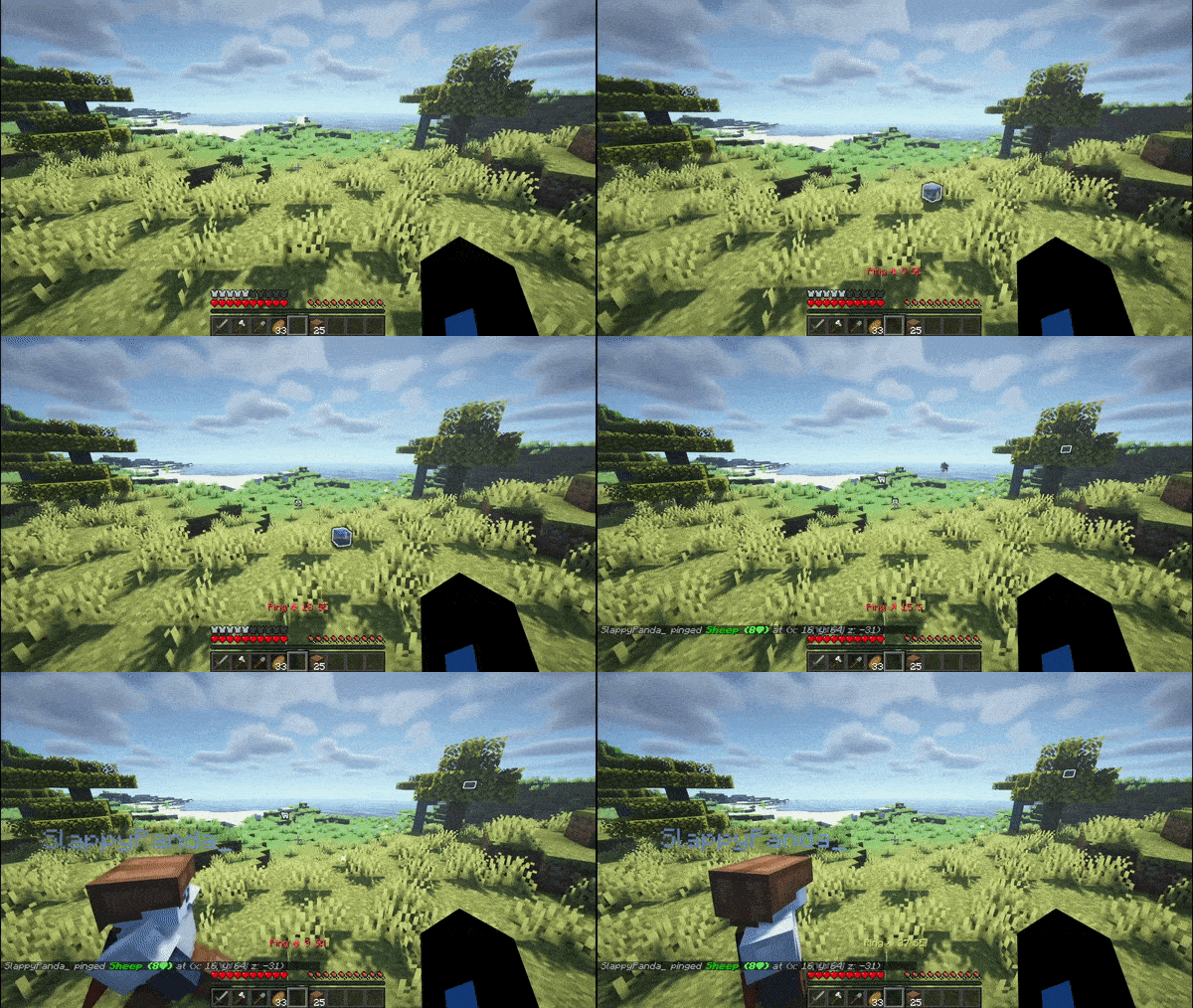
您可以自定义消息使用的语言(参见:自定义消息)。
该模组使用游戏规则 sendCommandFeedback 和 logAdminCommands 来处理命令反馈和日志记录(与原版命令一样),适用于所有 管理员命令。
较新的构建版本(从
1.11.0及更高版本) 经过重新构建以支持更广泛的 Minecraft 版本。如果您在这些版本中的任何一个遇到问题,请 提交 issue —— 同时,您可以安全地回退到1.10.3,这是此更改前的最后一个发布版本。
使用方法
该模组必须在服务器上安装。但客户端并非强制要求。不过,在客户端使用它会添加一个可自定义的标记热键。管理员命令的行为类似于原版的操作员命令,并且只能由操作员执行。
客户端热键(可选)
在客户端使用会添加一个可自定义的标记热键。
- 默认按键: 默认情况下,美式键盘上的标记热键是 Z。
- 配置: 随时在标准 Minecraft 控制菜单中更改(
选项...>控制...>按键绑定...)下的 "Vanilla Pings" 类别中。
命令
公共命令 (任何人都可以运行)
/ping对面前方方块或任何实体进行标记
管理员命令 (仅限操作员,可从控制台运行)
/vanillapings reload重新加载所有 设置。/vanillapings removeOld移除那些未能自行消失的标记(ping-remove-old (设置))。/vanillapings language <name>设置您想要的语言(lang (设置),更多信息见 此处)。/vanillapings sound (<true|false>)禁用/启用当出现标记时播放声音 (ping-sound (设置))。/vanillapings cooldown <ticks>设置玩家每次标记之间需要等待的冷却时间(以刻为单位)(ping-cooldown (设置))。/vanillapings item <item>设置用于标记的物品 (ping-item (设置))。/vanillapings item count <true|false>禁用/启用在标记中显示物品数量 (ping-item-count (设置))。/vanillapings item count range <value>设置计算物品数量的范围 (ping-item-count-range (设置))。/vanillapings glowing (<true|false>)禁用/启用标记具有的发光效果 (ping-glowing (设置))。/vanillapings glowing flash (<true|false>)禁用/启用标记在消失前具有的闪烁效果 (ping-glowing-flash (设置))。/vanillapings range <value>设置玩家可以从其位置进行标记的最大范围 (ping-max-range (设置))。/vanillapings range chat <value>设置玩家需要靠近标记多远才能看到聊天消息的最大范围 (ping-chat-message-range (设置))。/vanillapings range direction <value>设置玩家需要靠近标记多远才能在操作栏中看到方向消息的最大范围 (ping-direction-message-range (设置))。
配置
设置文件
对于常规设置,请使用位于服务器或 minecraft 文件夹的 config/vanillapings 文件夹中的 vanillapings.properties 文件。设置应在 服务器端 或您的 本地客户端(如果您玩单人游戏或通过局域网开放共享世界)上进行配置。
#vanillapings.properties
#Mon May 13 11:39:38 CEST 2024
lang=en_us                             # 用于标记聊天消息的语言
ping-chat-message-range=160.0          # 玩家需要靠近标记多远才能看到聊天消息的范围 (-1=无限制, 0=禁用)
ping-cooldown=5                        # 服务器端为玩家在游戏中发送标记设置的冷却时间(以刻为单位)。玩家使用热键标记的速度被限制为每个标记 5 刻,因此这也是默认值。(注意:如果冷却时间设置得更低,则可以使用 "/ping" 更快地标记)
ping-direction-message-range=160.0     # 玩家需要靠近标记多远才能在看操作栏中看到方向消息的范围 (-1=无限制, 0=禁用)
ping-glowing=true                      # 是否应使用发光高亮显示标记。
ping-glowing-flash=true                # 当标记即将消失时开始闪烁标记(仅当启用了 ping-glowing 时)。
ping-item=minecraft\:red_stained_glass # 用于标记的物品类型。(空=默认,不存在的物品=默认)
ping-item-count=true                   # 显示物品标记附近物品的数量
ping-item-count-range=1.0              # 计算物品标记附近物品数量的范围
ping-max-range=500.0                   # 玩家可以标记的最大范围。(注意:水平范围仍限制为 256,因为这也是最大渲染距离)(-1=最大范围, 0=禁用)
ping-remove-old=true                   # 是否应每 20 秒自动删除旧标记。当标记因世界卸载而未自行删除时会创建旧标记。
ping-sound=true                        # 当出现标记时应否播放声音
您可以删除该文件,以便在重启后重新生成默认配置。重新加载只会将当前值重构到文件中(此行为可能在未来的更新中发生变化)。
自定义消息
当玩家对实体进行 ping 操作时,服务器会在聊天栏中发送一条包含 ping 信息的消息。该消息(以及其他消息)的语言可以在 vanillapings.properties 文件中配置。 默认情况下,仅支持 en_us 和 de_de,因为我只懂这两种语言。
创建你自己的语言文件
- 将 GitHub 仓库资源文件夹中的 en_us.json 复制到本地的
config/vanillapings/lang文件夹中。如果该文件夹不存在,你可能需要手动创建它。 - 用你的语言填写 JSON 文件,并在配置文件的 lang 字段中选择该语言。例如,如果你的文件名是 fr_fr.json,则需要在 vanillapings.properties 配置文件中将 lang 指定为 fr_fr。
- 重启服务器或使用
/vanillapings reload命令重新加载配置。
你也可以使用新的 /vanillapings language 命令来选择你自定义的语言。
在旁观者模式下,你可以看到佩戴高亮方块的不隐形盔甲架(如果你好奇的话)。
Vanilla Pings
A Minecraft mod to easily ping entities and locations like in most popular shooter games. The pings show up using armor stands and have glowing on them. This makes it possible for the mod to be server-side only. Using it on the client will add a hotkey.
It's possible to customize the language used for messages (see: custom messages).
The mod uses the game rules sendCommandFeedback and logAdminCommands for command feedback and logging (just like vanilla commands) on all admin commands.
Newer builds (starting
1.11.0and higher) were rebuilt to support a wider range of Minecraft versions. If you run into any problem on one of these versions, please open an issue — and in the meantime you can safely fall back to1.10.3, the last release before this change.
Usage
The mod is required on the server. But not mandatory for clients. However, using it on the client adds a customizable hotkey for pinging. Admin commands behave like vanilla operator commands and can only be run by operators.
Client-side Hotkey (Optional)
Using it on the client adds a customizable hotkey for pinging.
- Default Key: By default, the hotkey to ping is Z on US Keyboards.
- Configure: Change at any time in the standard Minecraft controls menu (
Options...>Controls...>Key Binds...) under the "Vanilla Pings" category.
Commands
Public commands (can be run by everyone)
/pingto ping the block or any entity in front of you
Admin commands (only for operators, work from the console)
/vanillapings reloadto reload all settings./vanillapings removeOldto remove pings that didn't disappear on their own (ping-remove-old (settings))./vanillapings language <name>to set your desired language (lang (settings) more info here)./vanillapings sound (<true|false>)to disable/enable playing sounds when a ping appears (ping-sound (settings))./vanillapings cooldown <ticks>to set the cooldown which a player needs to wait for between each ping (ping-cooldown (settings))./vanillapings item <item>to set the item used for the ping (ping-item (settings))./vanillapings item count <true|false>to disable/enable displaying the amount of items in a ping (ping-item-count (settings))./vanillapings item count range <value>to set the range in which items will be counted (ping-item-count-range (settings))./vanillapings glowing (<true|false>)to disable/enable the glowing effect pings have (ping-glowing (settings))./vanillapings glowing flash (<true|false>)to disable/enable the flashing effect pings have before disappearing (ping-glowing-flash (settings))./vanillapings range <value>to set the maximum range a player can ping from their position (ping-max-range (settings))./vanillapings range chat <value>to set the maximum range a player needs to be near a ping to see chat messages (ping-chat-message-range (settings))./vanillapings range direction <value>to set the maximum range a player needs to be near a ping to see direction messages in the action bar (ping-direction-message-range (settings)).
Configuration
Settings file
For general settings use the vanillapings.properties file found in the config/vanillapings folder of your server or minecraft folder. Settings should be configured on the server side or on your local client if you play single player or share your world via open to lan.
#vanillapings.properties
#Mon May 13 11:39:38 CEST 2024
lang=en_us                             # Language used for ping chat messages
ping-chat-message-range=160.0          # Range a player needs to be near a ping to see chat messages (-1=no limit, 0=disabled)
ping-cooldown=5                        # Server side cooldown for pings sent by players in game ticks. Players ping speed using the hotkey is limited to 5 ticks per ping so that's also the default. (Note: "/ping" can be used to ping faster if the cooldown is set lower)
ping-direction-message-range=160.0     # Range a player needs to be near a ping to see direction messages in the action bar (-1=no limit, 0=disabled)
ping-glowing=true                      # If pings should be highlighted with glowing.
ping-glowing-flash=true                # Start flashing the ping (only if ping-glowing is enabled) when it's about to disappear.
ping-item=minecraft\:red_stained_glass # The type of item that's used for a ping. (empty=default, nonexistent item=default)
ping-item-count=true                   # Show the count of items near an item ping
ping-item-count-range=1.0              # Range for counting items near an item ping
ping-max-range=500.0                   # Max range a player can ping. (Note: horizontal range is still limited to 256 due to that also being the max render distance) (-1=max-range, 0=disabled)
ping-remove-old=true                   # If old pings should be removed automatically every 20s. Old pings are created when a ping hasn't deleted itself due to the world unloading.
ping-sound=true                        # If a sound should be played when a ping appears
You may delete the file to regenerate the default configuration upon a restart. A reload only reconstructs current values into the file (This behaviour will likely change in future updates).
Custom messages
When a player pings an entity the server sends a message with information about the ping in the chat. The language of that message (and other messages) can be configured in the vanillapings.properties file. By default, only en_us and de_de are available as I only know these languages.
Creating your own language file
- Copy the en_us.json out of the GitHub repo found in the resource folder into your local
config/vanillapings/langfolder. You might have to create it if it doesn't exist. - Fill out the json in your language and select the language in the config lang field. E.g. if your file is named fr_fr.json you have to specify fr_fr as the lang in the vanillapings.properties config file.
- Restart your server or use
/vanillapings reloadto reload the configuration.
You may also select your custom language using the new /vanillapings language command.
In spectator mode you can see the invisible armor stand wearing the highlighted block (in case you're curious).

下载 Vanilla Pings
下载 Vanilla Pings
下载 Vanilla Pings
下载 Vanilla Pings
下载 Vanilla Pings
下载 Vanilla Pings
需要联机服务器吗?
稳定流畅、一键部署,几分钟即可和朋友联机开服
最低仅需 8 元/月 即可畅快联机
下载 Vanilla Pings
下载 Vanilla Pings
下载 Vanilla Pings
下载 Vanilla Pings
关于这个资源的讨论、问题反馈与使用心得
还没有讨论,来发第一帖吧
你是这个资源的作者?登录后可认领此资源。
相似资源
 模组

显示你正在注视的方块的信息。(适用于 Minecraft 1.16+ 的 Hwyla/Waila 分支)
 模组
在游戏画面角落显示附近世界地形、玩家、生物和实体的地图。可创建路径点,帮助你找到标记过的位置。
 模组

查看物品与配方
 模组
使用 JavaScript 编辑配方、添加自定义物品、编写世界事件!
 模组
AE2:一款流行的自动化与存储模组
 模组
那是什么?一个 Waila/Hwyla 的分支。
评论 0
登录后参与评分
还没有评论,来抢沙发吧