概览
VillagerGPT 为你的服务器中的村民注入全新活力,允许玩家使用驱动 ChatGPT 的相同技术与他们交谈和交易。玩家可以与任意村民对话并讨价还价以获得更优的交易条件,或达成此前无法实现的交易。
AI 村民了解游戏世界的诸多方面、与玩家的声望关系,并且每位村民都拥有基于其职业和随机选择的人格原型而形成的独特个性。
演示视频
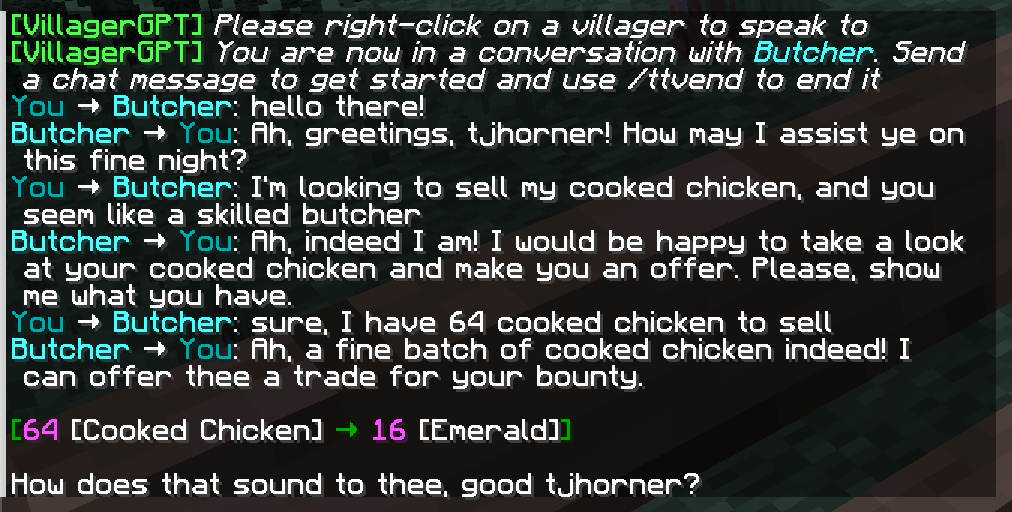
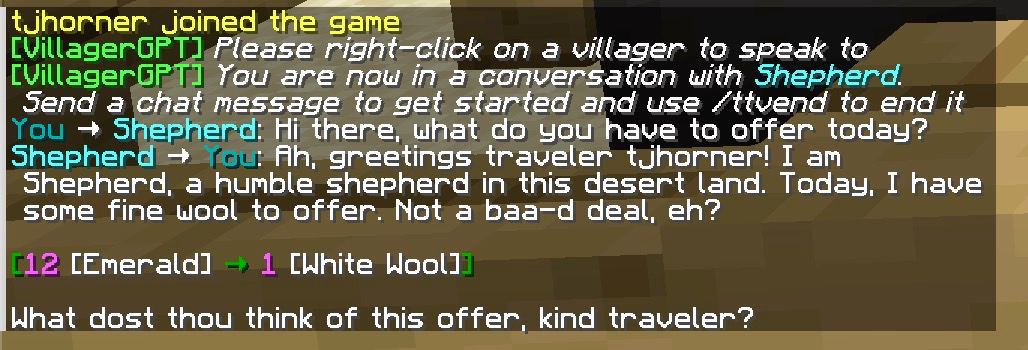
对话示例
使用方法
要与村民开始对话,请使用命令 /ttv(意为“与村民交谈”),然后右键点击你想对话的村民。一旦对话开始,只需发送聊天消息即可继续。你可以通过 /ttvend 命令或远离该村民来结束对话。
如果 AI 村民提议进行交易,你可以像平常一样打开交易菜单(右键点击村民)来接受该提议。
AI 村民能力
AI 村民可以获取以下信息:
它们可以在回复中执行以下操作:
当与某位村民开始对话时,系统会为其随机分配 config.yml 中 personalities 配置列表里定义的一种人格,并在后续对话中保持一致。
配置
要配置此插件,你需要一个 OpenAI API 密钥。你可以在这里获取。获取后,将其放入插件的 config.yml 文件中的 openai-key 字段下。
村民通过工具/函数调用(tool/function calling)来提议交易和执行动作,因此 openai-model 必须设置为支持该功能的模型(默认值 gpt-4o-mini 支持)。
使用其他 API 提供商
config.yml 中的 openai-base-url 可以指向任何兼容 OpenAI 聊天补全端点的 API——例如 Azure OpenAI、OpenRouter,或自托管模型服务器如 Ollama、LM Studio 或 vLLM。请确保所选模型支持工具/函数调用。
人格设置
config.yml 中的 personalities 列表控制可分配给村民的人格类型。每个条目包含一个 name(仅作为标签显示在服务器日志中)和一个 description(作为指令的一部分提供给模型)。添加、删除或编辑条目以调整混合比例。
命令
/ttv: 与村民发起对话/ttvclear: 清除当前的村民对话记录/ttvend: 结束当前的村民对话
权限
提供以下权限:
villagergpt.ttv: 允许使用 /ttv 命令villagergpt.ttvclear: 允许使用 /ttvclear 命令villagergpt.ttvend: 允许使用 /ttvend 命令
Overview
VillagerGPT breathes new life into your server's villagers, allowing players to talk and trade with them using the same technology that powers ChatGPT. Players can have a conversation with any villager and haggle for better deals, or come up with previously impossible trades.
AI villagers are aware of various aspects of the game world, their reputation with players, and they each have their own distinct personality based on their profession and a randomly-chosen personality archetype.
Demo Video
Example Conversations
Usage
To start a conversation with a villager, use the command /ttv ("talk to villager") then right-click on the villager you'd like to speak to. Once the conversation has started, simply send chat messages to continue. You can end the conversation with /ttvend, or by walking away from the villager.
If an AI villager proposes a trade, you can act on it by opening the trading menu like normal (right-clicking on the villager).
AI Villager Capabilities
AI villagers have access to the following information:
- World information
- Biome they are in
- Time of day
- Weather
- Player information
- Villager information
- Name (including custom names)
- Profession
They can perform the following actions in their responses:
- Propose one or more trades
- Shake head
- Play various sounds
- End the conversation
Each villager is randomly assigned one of the personalities configured in personalities in config.yml (see below) when a conversation with them starts, and keeps it from then on.
Configuration
To configure this plugin you will need an OpenAI API key. You can obtain one here. Once you have obtained one, place it in the plugin's config.yml under openai-key.
Villagers propose trades and perform actions using tool/function calling, so openai-model must be set to a model that supports it (the default, gpt-4o-mini, does).
Using a different API provider
openai-base-url in config.yml can be pointed at any API compatible with OpenAI's chat completions endpoint — Azure OpenAI, OpenRouter, or a self-hosted model server such as Ollama, LM Studio, or vLLM. Make sure whichever model you choose supports tool/function calling.
Personalities
The personalities list in config.yml controls which personalities villagers can be assigned. Each entry has a name (just a label, shown in server logs) and a description (fed to the model as part of its instructions). Add, remove, or edit entries to change the mix.
Commands
/ttv: Initiate a conversation with a villager/ttvclear: Clear the current villager conversation/ttvend: End the current villager conversation
Permissions
The following permissions are available:
villagergpt.ttv: Allow use of the /ttv commandvillagergpt.ttvclear: Allow use of the /ttvclear commandvillagergpt.ttvend: Allow use of the /ttvend command


 模组

 模组

 模组

 模组

 模组

 模组

评论 0
登录后参与评分
还没有评论,来抢沙发吧