Vinculum
Vinculum 是一个 Fabric 模组,旨在帮助玩家保持其 Minecraft 模组列表与他们加入的服务器保持一致。
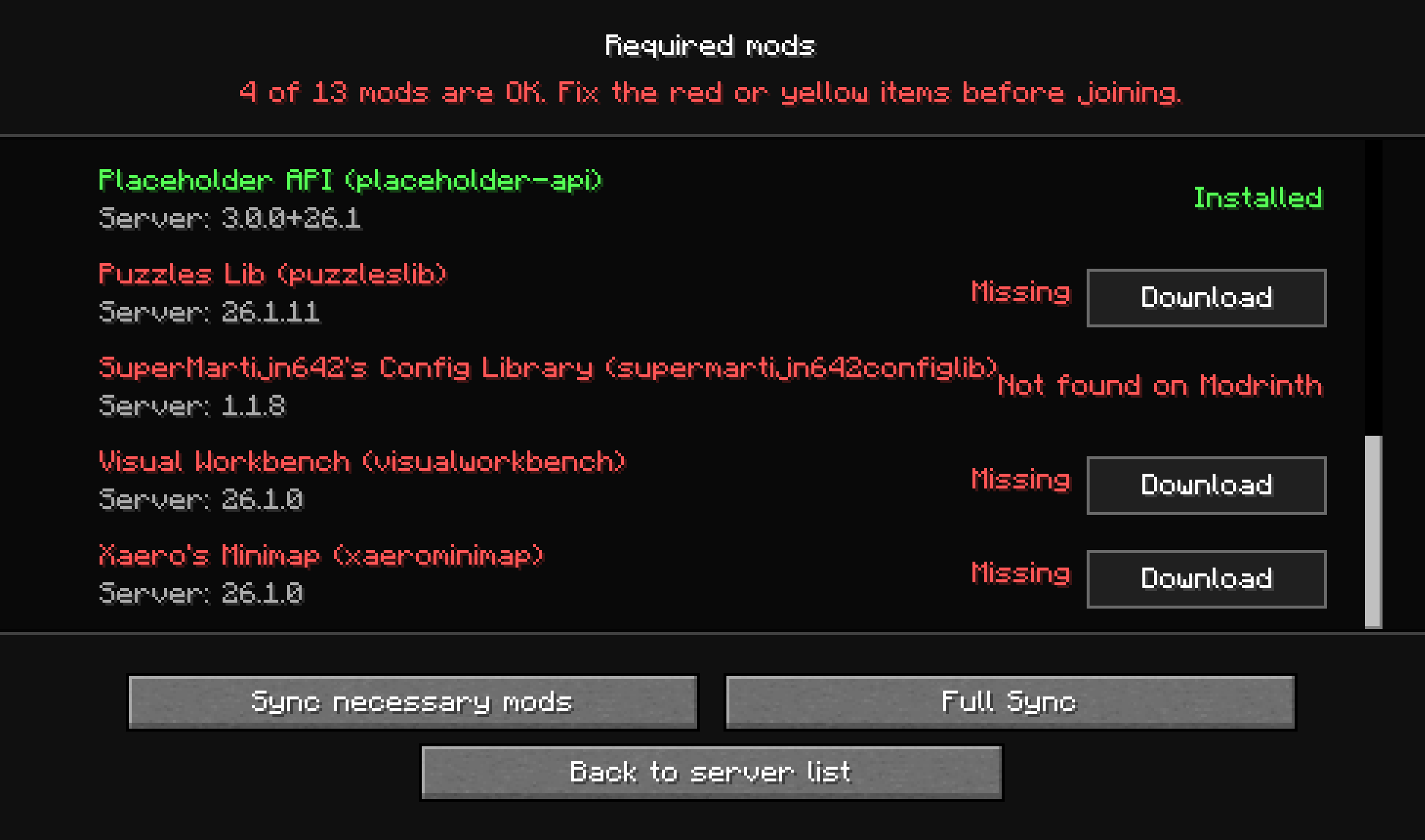
当运行着 Vinculum 的服务器或开启局域网的游戏正在运行时,它会通过服务器列表广播其 Minecraft 版本、加载器版本以及已安装的模组信息。客户端在加入之前会将这些信息与本地 mods 文件夹中的内容进行比对,然后显示一个清晰的状态屏幕,指出任何缺失或使用不同版本的模组。
功能特性
- 在加入前检测缺失的服务器必需模组。
- 高亮显示客户端与服务器之间的版本不匹配项。
- 单独标记仅客户端模组,让玩家清楚哪些条目不会阻碍加入。
- 当 Modrinth 上存在匹配文件时,自动下载缺失的 Fabric 模组。
- 当 Modrinth 无法解析所需模组且启用了服务器传输时,回退到使用服务器提供的传输方式。
- 在下载服务器直接提供的 JAR 文件前需要显式确认,并附带安全警告及广播的文件元数据。
- 提供“必要同步”(仅同步加入所需的模组)和“完整同步”(同步完整的服务器模组集)选项。
- 在替换不匹配或多余的本地模组之前进行备份。
- 直接在 Minecraft UI 中显示同步进度。
工作原理
服务端 Vinculum 收集当前活跃的自定义模组,并通过服务器状态发布一个紧凑的兼容性负载数据。客户端 Vinculum 读取该负载数据,将其与玩家已安装的模组进行比较,并在需要操作时打开“必需模组”屏幕。
玩家可以选择仅同步加入所需的模组,或者运行完整同步以对齐整个广播的服务器模组集。两种模式都优先使用 Modrinth。如果在 Modrinth 上找不到一个或多个匹配文件,Vinculum 会列出将直接从服务器获取的 JAR 文件——包括名称、ID、版本、作者、环境、文件名和大小——并要求玩家选择 信任并下载。未经批准的服务器回退方案将被阻止。
在替换不匹配的模组之前,Vinculum 会将旧的 JAR 文件移动为 .bak 备份文件。完整同步还会备份本地顶层模组中未被服务器广播的那些。下载完成后,重启游戏以便 Minecraft 加载更新后的模组集合。
配置
Vinculum 会在 Fabric 配置目录中创建一个 modsync.json 配置文件。
{
  "transferPort": 9123,
  "allowServerTransfers": true,
  "filterMode": "none",
  "filterRules": []
}
transferPort: 用于服务器托管模组传输的端口。allowServerTransfers: 启用或禁用直接从服务器下载。filterMode: 控制 Vinculum 管理哪些 JAR 文件。可使用 none、blacklist 或 whitelist。filterRules: JAR 名称或类似 gitignore 的模式。被列入黑名单的 JAR 以及不在白名单内的 JAR 不会被广播、传输、比较或移动到备份中。
不包含斜杠的规则将在任何目录中匹配 JAR 文件名。包含斜杠的规则相对于 mods 目录而言是相对的。匹配过程不区分大小写,* 匹配除 / 之外的任意字符,? 匹配除 / 之外的单个字符,** 可跨目录匹配,末尾的 / 匹配目录及其所有内容。空规则以及以 # 开头的规则会被忽略。
例如:
{
  "transferPort": 9123,
  "allowServerTransfers": true,
  "filterMode": "blacklist",
  "filterRules": [
    "client-only/",
    "mod-proprietario-*",
    "optional/**/*.jar"
  ]
}
这两个值也可以通过 modsync.transferPort 和 modsync.allowServerTransfers 系统属性,或者 MODSYNC_TRANSFER_PORT 和 MODSYNC_ALLOW_SERVER_TRANSFERS 环境变量来进行覆盖。
要求
- Minecraft 26.1.2
- Fabric Loader 0.19.3 或更高版本
- Fabric API
- Java 25 或更高版本
许可证
本项目采用 MIT 许可证授权。您可以重用、修改和分发它,前提是保留原始版权声明和许可证。
Vinculum
Vinculum is a Fabric mod that helps players keep their Minecraft mod list aligned with the servers they join.
When a server or game with LAN open is running Vinculum, it advertises its Minecraft version, loader version, and installed mods through the server list. The client compares that information with the local mods folder before joining, then shows a clear status screen for anything that is missing or using a different version.
Features
- Detects missing server-required mods before joining.
- Highlights version mismatches between the client and server.
- Marks client-only mods separately so players know which entries do not block joining.
- Downloads missing Fabric mods from Modrinth when a matching file is available.
- Falls back to server-provided transfers when Modrinth cannot resolve a required mod and server transfers are enabled.
- Requires explicit confirmation before downloading any JAR directly from a server, with a security warning and the advertised file metadata.
- Offers Necessary Sync for join-blocking mods and Full Sync for the complete server mod set.
- Backs up mismatched or extra local mods before replacing them.
- Shows sync progress directly in the Minecraft UI.
How It Works
Server-side Vinculum gathers the active user mods and publishes a compact compatibility payload with the server status. Client-side Vinculum reads that payload, compares it against the player's installed mods, and opens a required-mods screen when action is needed.
Players can choose to sync only the mods required to join, or run a full sync to align the complete advertised server set. Both modes prefer Modrinth. If one or more matching files are unavailable there, Vinculum lists the JARs that would come directly from the server—including name, ID, version, authors, environment, filename, and size—and requires the player to choose Trust and download. Unapproved server fallbacks are blocked.
Before replacing a mismatched mod, Vinculum moves the old JAR to a .bak file. Full Sync also backs up local top-level mods that are not advertised by the server. After downloads complete, restart the game so Minecraft can load the updated mod set.
Configuration
Vinculum creates a modsync.json config file in the Fabric config directory.
{
  "transferPort": 9123,
  "allowServerTransfers": true,
  "filterMode": "none",
  "filterRules": []
}
transferPort: port used for server-hosted mod transfers.allowServerTransfers: enables or disables direct downloads from the server.filterMode: controls which JARs Vinculum manages. Use none, blacklist, or whitelist.filterRules: JAR names or gitignore-like patterns. Blacklisted JARs and JARs outside a whitelist are not advertised, transferred, compared, or moved to backups.
Rules without a slash match a JAR filename in any directory. Rules containing a slash are relative to the mods directory. Matching is case-insensitive, * matches any characters except /, ? matches one character except /, ** can cross directories, and a trailing / matches a directory and everything below it. Blank rules and rules beginning with # are ignored.
For example:
{
  "transferPort": 9123,
  "allowServerTransfers": true,
  "filterMode": "blacklist",
  "filterRules": [
    "client-only/",
    "mod-proprietario-*",
    "optional/**/*.jar"
  ]
}
Both values can also be overridden with the modsync.transferPort and modsync.allowServerTransfers system properties, or the MODSYNC_TRANSFER_PORT and MODSYNC_ALLOW_SERVER_TRANSFERS environment variables.
Requirements
- Minecraft 26.1.2
- Fabric Loader 0.19.3 or newer
- Fabric API
- Java 25 or newer
License
This project is licensed under the MIT License. You may reuse, modify, and distribute it, provided that the original copyright notice and license are preserved.


 模组

 模组

 模组
 模组
 模组
 模组
评论 0
登录后参与评分
还没有评论,来抢沙发吧