
警告:此模组可能会干扰你的 VirtualBox 设置。如果 VirtualBox 无法正常启动,请删除其配置文件夹并尝试再次启动。如果这无法解决问题,请在 Reddit 上联系我。
你可以通过 BTC 地址 3GubEkHV69gCkjWhRgRWYqWqyjcWW3gxFF 或 BCH 地址 bitcoincash:qq6jttzlvgj68lvecnh75pt3znezj4vx6sysfvj3j5 进行捐赠。
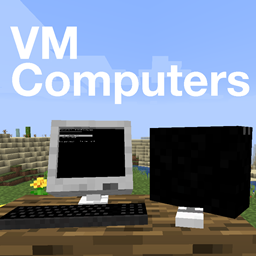
从环绕 Minecraft 世界的卫星订购电脑配件,组装一台真正能用的电脑!
安装方法
1) 将模组放入 mods 文件夹
2) 安装 VirtualBox(你需要以“6.1”开头的版本)
3) 完成!如果在安装 VirtualBox 后没有重启电脑,该模组(甚至 VirtualBox 本身)可能无法正常工作。
如何订购电脑配件
1) 制作一个订购平板。
2) 等待卫星经过你头顶。它每天绕 Minecraft 世界轨道飞行 5 次,因此你应该很快就能捕捉到它。
(提示显示:“发现卫星!使用 ENTER 连接到 'store'”)
3) 接下来就很简单了。菜单中布满了指南,你应该能快速订购所需物品。
如何创建虚拟硬盘
1) 获取一块硬盘。
2) 右键点击,无论它是否已分配给某个文件均可。
3) 使用菜单进行操作。
如何导入 ISO 镜像
将其放入 [minecraft 目录]/vm_computers/isos,游戏内会自动更新。
如何组装电脑
1) 放置一个机箱。
2) 右键点击机箱。
(我是 Windows 98 和 Windows XP 的合法副本持有者)
3) 打开机箱。
此后操作都很基础。灰色按钮表示你尚未拥有该物品。
如何使用电脑
点击 PC 机箱并选择“开机”。然后点击屏幕将输入焦点聚焦到虚拟机上。警告:快捷键组合仍由主机系统处理,例如 Alt+F4 仍会关闭游戏。
如何拾取已放置的物品
潜行 + 右键点击该物品
在 GitHub 上为该项目做出贡献!
Warning: This mod can screw with your VirtualBox settings. If VirtualBox doesn't start normally, delete your configuration folder and try to start it again. If this doesn't fix it, please contact me on Reddit.
You can donate in BTC to the address 3GubEkHV69gCkjWhRgRWYqWqyjcWW3gxFF, or in BCH to bitcoincash:qq6jttzlvgj68lvecnh75pt3znezj4vx6sysfvj3j5.
Order yourself computer parts from a satellite orbiting around your Minecraft world to build a computer that actually works!
How to install
1) Put the mod into your mods folder
2) Install VirtualBox (You need a version that starts with "6.1")
3) Done! The mod (or even VirtualBox) might not work if you don't restart your computer after installing VirtualBox.
How to order computer parts
1) Craft yourself an ordering tablet.
2) Wait until a satellite is over you. It orbits the minecraft world 5 times a day, so you should be able to catch it pretty quickly.
(It says "Satellite found! Connect to 'store' using ENTER")
3) From here on, it's pretty easy. The menus are plastered with guides and you should be able to order yourself some items pretty quickly.
How to create a virtual hard drive
1) Get a hard drive.
2) Right click, it doesn't matter if it's already assigned to a file or not.
3) Use the menu.
How to import an ISO
Put it into [minecraft directory]/vm_computers/isos and it will be automatically updated in-game.
How to build a computer
1) Place down a case.
2) Right click it.
(I am the legal owner of a copy of Windows 98 and Windows XP)
3) Open the case.
From here on out, it's basic. Greyed out button means that you don't own that item.
How to use a computer
Start it by clicking on the pc case and clicking on "Turn on". Then focus your input to the VM by clicking a screen. Warning: Key combinations are still processed by the host, e.g. Alt+F4 still closes the game.
How to pick up placed stuff
Sneak + right click on the thing
Contribute to the project on GitHub!
下载 VM Computers
下载 VM Computers
下载 VM Computers
需要联机服务器吗?
稳定流畅、一键部署,几分钟即可和朋友联机开服
最低仅需 8 元/月 即可畅快联机
下载 VM Computers
需要联机服务器吗?
稳定流畅、一键部署,几分钟即可和朋友联机开服
最低仅需 8 元/月 即可畅快联机
下载 VM Computers
下载 VM Computers
下载 VM Computers
下载 VM Computers
下载 VM Computers
下载 VM Computers
上次更新中,许多用户点击屏幕时发生了崩溃,现在应该可以正常使用了。
关于这个资源的讨论、问题反馈与使用心得
还没有讨论,来发第一帖吧
你是这个资源的作者?登录后可认领此资源。
相似资源
 模组

一个用于收集生物掉落物的多区块模组。
 模组

让你能够在世界中的任何位置定位结构。
 模组

一款轻量级模组,允许服务器管理员对抗透视作弊者。
 模组
AE2:一款流行的自动化与存储模组
 模组

基于 GTCEu 1.12.2 的现代 GregTech
 模组
自动附魔,搭配 Create
评论 0
登录后参与评分
还没有评论,来抢沙发吧