
一个为 Simple Voice Chat 提供的客户端覆盖层(Overlay)。它会列出你当前能听到的玩家,每个玩家都显示其头像、名字以及跟随其说话音量变化的波形图。当几个人站在一起且有人开始说话时,你可以清楚地看到是谁在说话。

功能
- 显示你当前能听到的所有玩家:头像、名字和动态指示器。
- 指示器跟随说话者的实际音量变化,因此你可以区分大声和小声说话。
- 支持近距离定位音频、位置音频和群组(静态)音频。
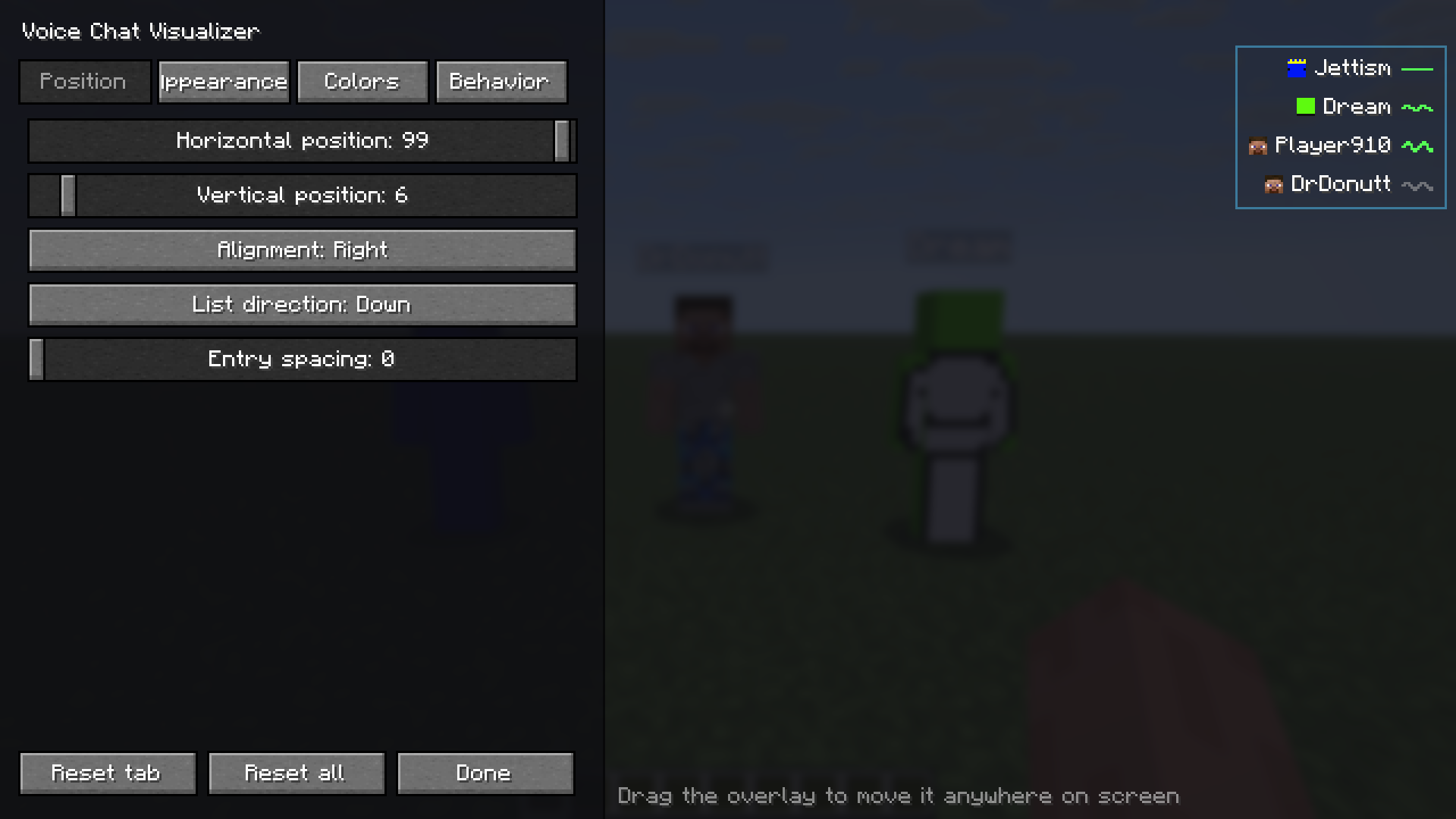
- 你可以将覆盖层拖动到屏幕上的任意位置,将其左对齐或右对齐,并让列表向上或向下延伸。
- 游戏内配置器有四个选项卡(位置、外观、颜色、行为),并提供 HSV 和十六进制颜色选择器。
- 配置器会显示带有示例说话者的实时预览,因此你可以在没有第二名玩家在线的情况下独自设置一切。
- 设置面板会移动到与覆盖层相反的屏幕一侧,这样它永远不会遮挡你正在调整的内容。
- 默认设置极简:小头像且无背景。
- 两个快捷键:打开配置器(默认为 V)和切换覆盖层(默认未绑定)。
- 如果你安装了 Mod Menu,它会添加一个“Configure”按钮。
- 提供英文和波兰文翻译。
你可以更改的项目包括:头像大小(最小至 4 px)、名字缩放和最大宽度、背景和边框、圆角半径、内边距、距离显示、最大条目数、淡入淡出、保持时间、滑入动画、响度灵敏度、排序顺序、低语标记、“显示我自己”以及指示器样式(波形、条形或点状)。
工作原理
该模组使用 Simple Voice Chat 插件 API,仅读取你接收到的音频。你听到的每个语音数据包都会将该玩家添加到列表中,并在他们停止说话后不久淡出。名字和皮肤来自标签页列表,因此即使玩家躲在墙后,信息也是正确的。
所需依赖
- Fabric API
- Simple Voice Chat。服务器也必须运行它,这是通常的做法。
- Mod Menu 是可选的。它会添加一个 Configure 按钮。
该模组仅限客户端使用,因此你不需要在服务器上安装它。它在 Fabric 上运行,并根据 MIT 许可证发布。
Versions 选项卡中的每个文件都列出了它所支持的 Minecraft 版本及其所需的依赖项。选择与你的游戏匹配的那个即可。
安装方法
- 安装 Fabric Loader。
- 将 Fabric API、Simple Voice Chat 和 Voice Chat Visualizer 放入你的
mods文件夹中。 - 加入一个使用 Simple Voice Chat 的服务器。
- 按 V(默认键),或通过 Mod Menu → Voice Chat Visualizer → Configure 打开配置器。
配置
通过快捷键或 Mod Menu 打开配置器。更改会在预览中实时显示,并保存到 config/svc-visualizer.json。Reset tab(重置选项卡)和 Reset all(重置全部)可恢复默认设置。
在 Position(位置)选项卡中,你可以拖动预览以将覆盖层放置在想要的位置。
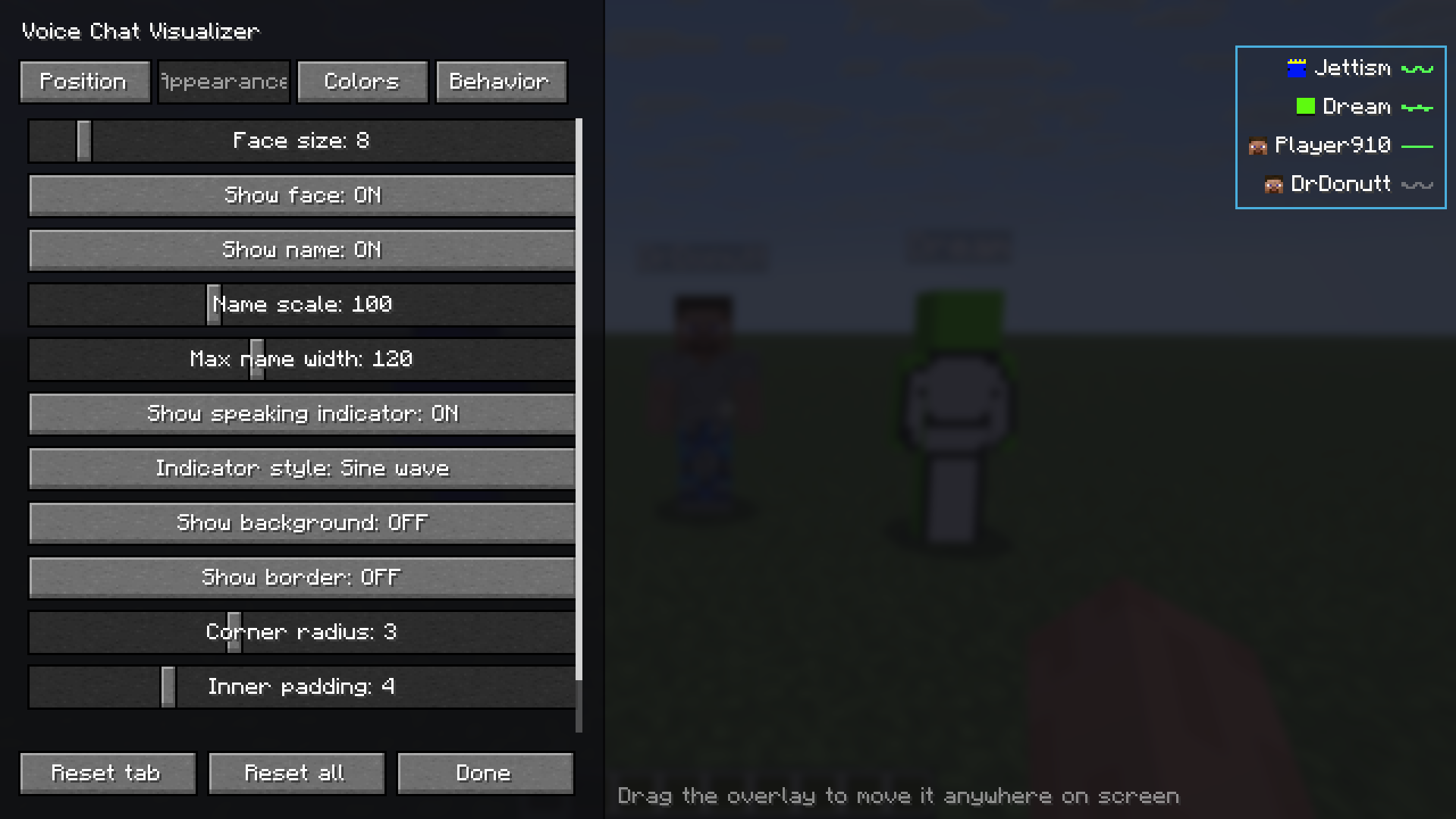
Appearance(外观)选项卡包含头像大小、名字缩放和宽度、指示器样式、背景、边框和内边距的设置。
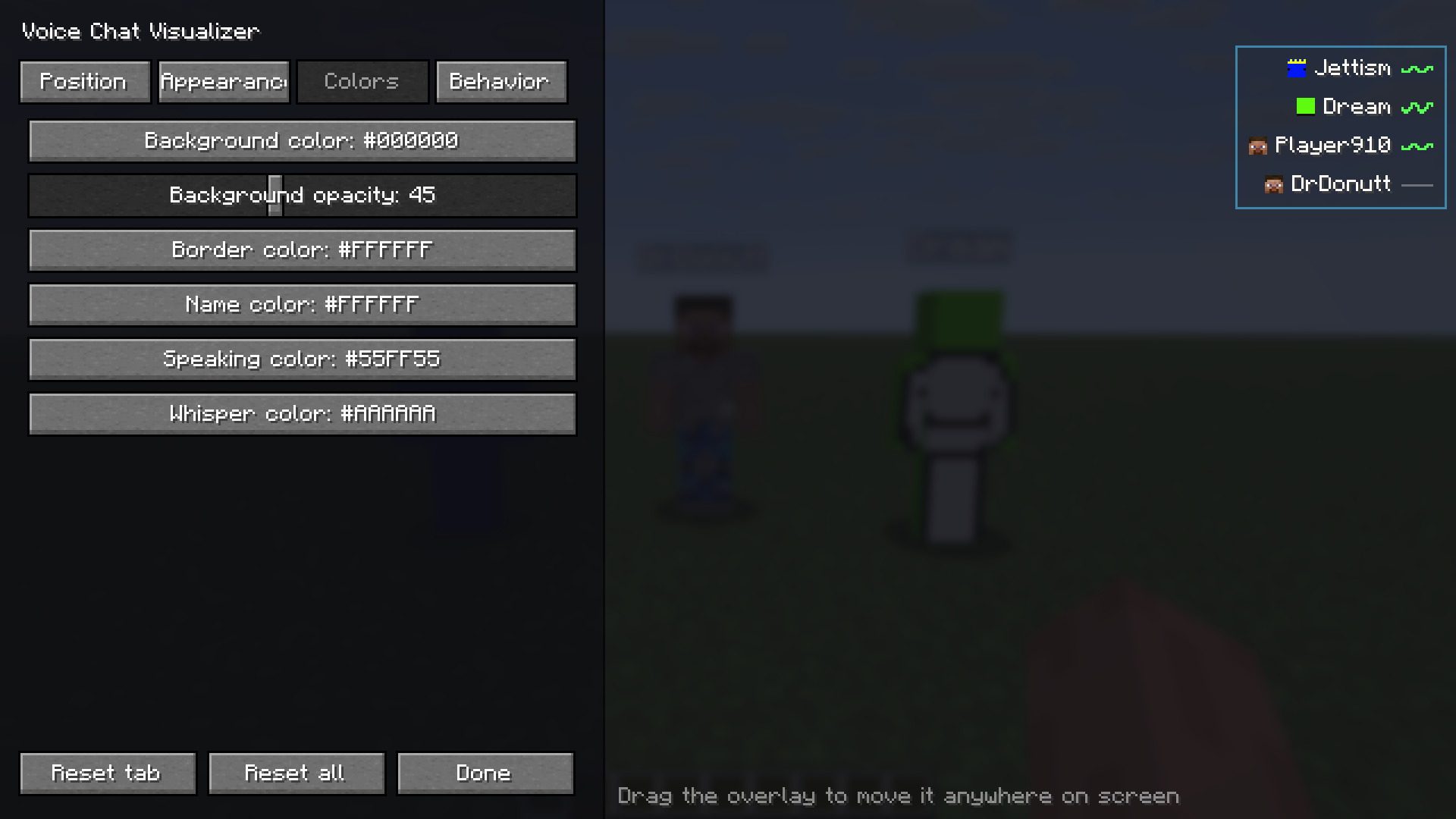
Colors(颜色)选项卡包含用于背景、边框、名字、说话和低语颜色的 HSV 和十六进制颜色选择器。
A client-side overlay for Simple Voice Chat. It lists the players you can hear right now, each with their face, their name and a waveform that follows how loud they talk. When a few people are standing around and someone starts speaking, you can see who it is.
Features
- Shows everyone you can currently hear: face, name and an animated indicator.
- The indicator follows the speaker's actual volume, so you can tell loud from quiet.
- Works with proximity, locational and group (static) audio.
- You can drag the overlay anywhere on screen, align it left or right, and have the list grow up or down.
- The in-game configurator has four tabs (Position, Appearance, Colors, Behavior) and HSV and hex color pickers.
- The configurator shows a live preview with sample speakers, so you can set everything up alone, with no second player online.
- The settings panel moves to the opposite side of the screen from the overlay, so it never covers what you are positioning.
- The defaults are minimal: a small face and no background.
- Two keybinds: open the configurator (V by default) and toggle the overlay (not bound by default).
- Adds a Configure button to Mod Menu, if you have it installed.
- English and Polish translations.
Things you can change: face size (down to 4 px), name scale and max width, background and border, corner radius, padding, distance display, max entries, fade in and out, hold time, slide-in animation, loudness sensitivity, sort order, whisper marking, "show myself" and the indicator style (wave, bars or dot).
How it works
The mod uses the Simple Voice Chat plugin API and only reads the audio you receive. Every voice packet you hear puts that player on the list, and they fade out shortly after they stop talking. Names and skins come from the tab list, so they are correct even for players behind a wall.
What you need
- Fabric API
- Simple Voice Chat. The server has to run it too, as usual.
- Mod Menu is optional. It adds a Configure button.
The mod is client-side only, so you don't need it on the server. It runs on Fabric and is released under the MIT license.
Every file in the Versions tab lists the Minecraft version it supports and the dependencies it needs. Pick the one that matches your game.
Installation
- Install Fabric Loader.
- Put Fabric API, Simple Voice Chat and Voice Chat Visualizer in your
modsfolder. - Join a server that uses Simple Voice Chat.
- Press V (the default key), or open Mod Menu → Voice Chat Visualizer → Configure, to open the configurator.
Configuration
Open the configurator with the keybind or through Mod Menu. Changes show in the preview as you make them and are saved to config/svc-visualizer.json. Reset tab and Reset all bring back the defaults.
On the Position tab you drag the preview to where you want the overlay.
The Appearance tab has face size, name scale and width, indicator style, background, border and padding.
The Colors tab has HSV and hex pickers for the background, border, name, speaking and whisper colors.

下载 Voice chat visualizer
下载 Voice chat visualizer
下载 Voice chat visualizer
需要联机服务器吗?
稳定流畅、一键部署,几分钟即可和朋友联机开服
最低仅需 8 元/月 即可畅快联机
下载 Voice chat visualizer
下载 Voice chat visualizer
需要联机服务器吗?
稳定流畅、一键部署,几分钟即可和朋友联机开服
最低仅需 8 元/月 即可畅快联机
下载 Voice chat visualizer
需要联机服务器吗?
稳定流畅、一键部署,几分钟即可和朋友联机开服
最低仅需 8 元/月 即可畅快联机
下载 Voice chat visualizer
需要联机服务器吗?
稳定流畅、一键部署,几分钟即可和朋友联机开服
最低仅需 8 元/月 即可畅快联机
暂无更新日志
关于这个资源的讨论、问题反馈与使用心得
还没有讨论,来发第一帖吧
你是这个资源的作者?登录后可认领此资源。
相似资源
 模组

显示你正在注视的方块的信息。(适用于 Minecraft 1.16+ 的 Hwyla/Waila 分支)
 模组
使用 JavaScript 编辑配方、添加自定义物品、编写世界事件!
 模组

查看物品与配方
 模组
在游戏画面角落显示附近世界地形、玩家、生物和实体的地图。可创建路径点,帮助你找到标记过的位置。
 模组
AE2:一款流行的自动化与存储模组
 模组
那是什么?一个 Waila/Hwyla 的分支。
评论 0
登录后参与评分
还没有评论,来抢沙发吧