为 Simple Voice Chat 提供实时字幕:屏幕底部显示字幕流,标明说话者及其内容。
语音聊天会将部分玩家排除在外。 如果你是聋人或听力障碍者,基于距离的语音聊天是一场围绕着你发生、你却无法参与的对话——在角色扮演服务器上,大部分剧情都是通过口头讲述的,这意味着你将错过游戏本身。如果你关闭声音、身处嘈杂环境,或者你阅读某种语言比听它更容易,情况也是如此。此模组将这场对话呈现在屏幕上。
所有处理均在你的本地机器上运行。不会录制任何内容,不会上传任何数据,也不需要服务端模组。
功能特性
-
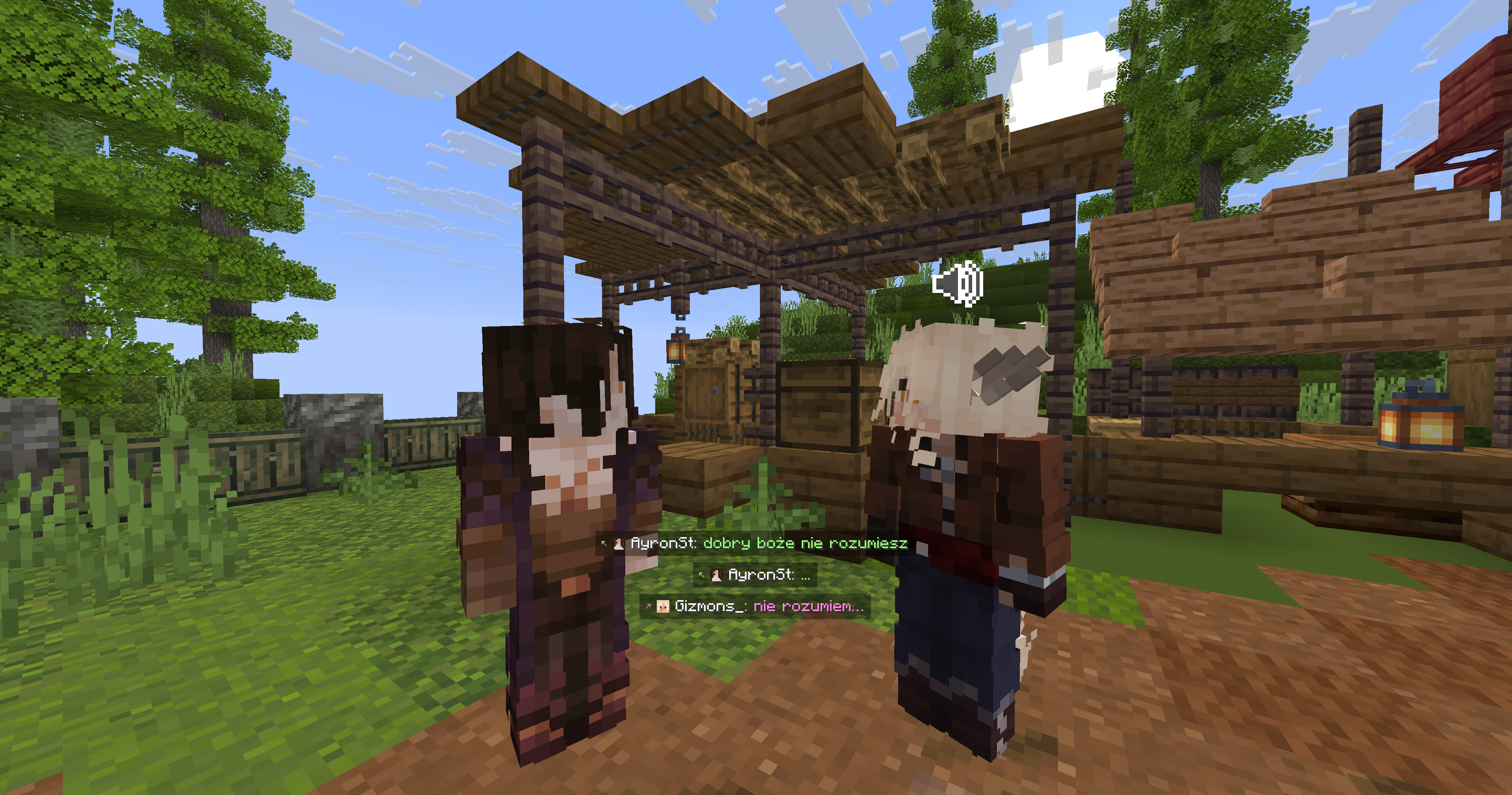
字幕流:灵感源自《Minecraft: Story Mode》——说话者的头像、名字和台词堆叠在快捷栏上方,并在对话结束后淡出。
-
角色扮演名称:名称来自玩家列表,因此你认识的角色会显示其角色名,而未见过面的角色则显示服务器分配的确切名称。
-
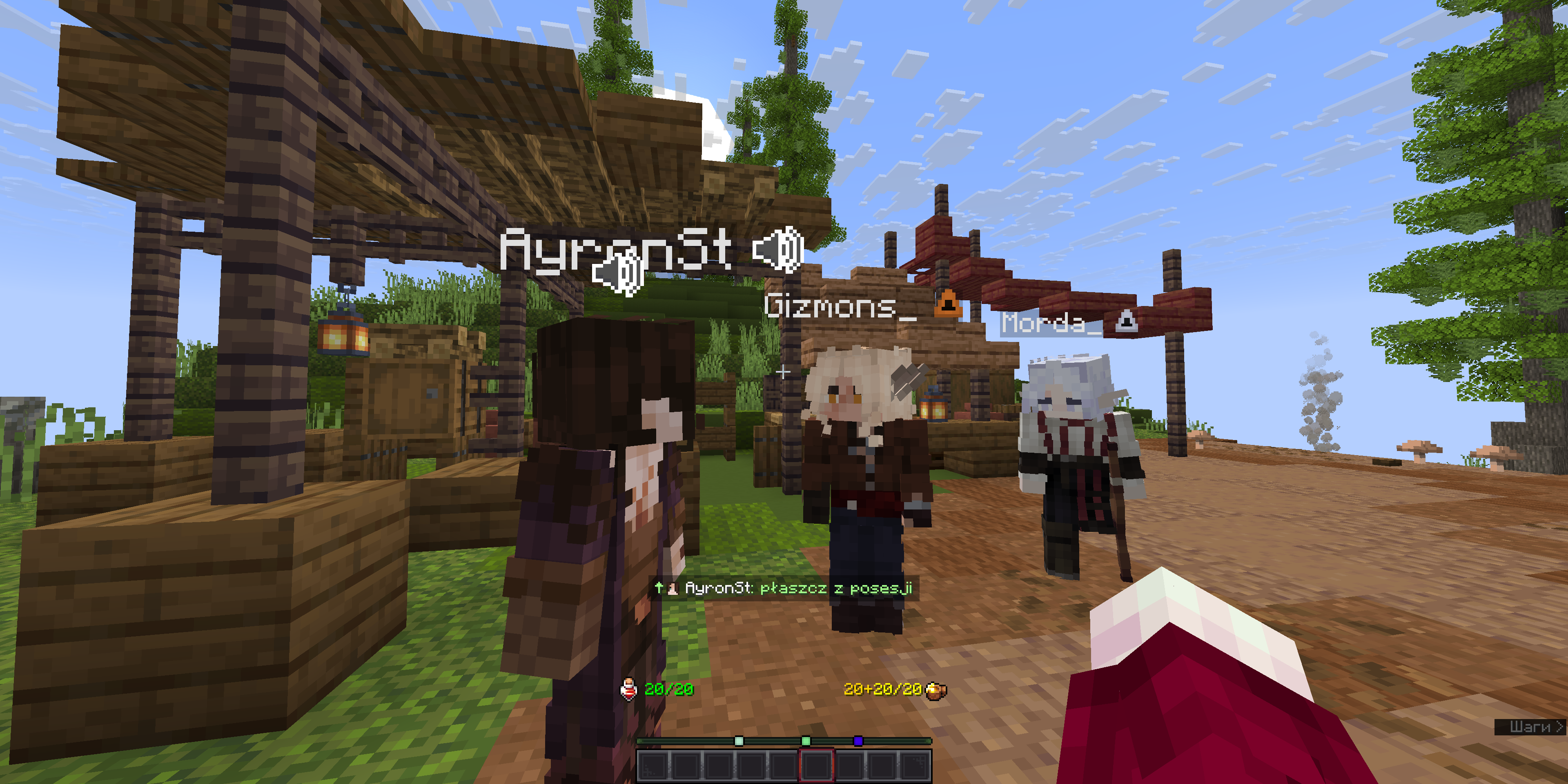
按说话者着色:颜色基于每个玩家的 UUID 生成,因此对于所有安装了该模组的玩家来说,同一个人的颜色是固定的。可以设置为纯白色,也可以手动指定。
-
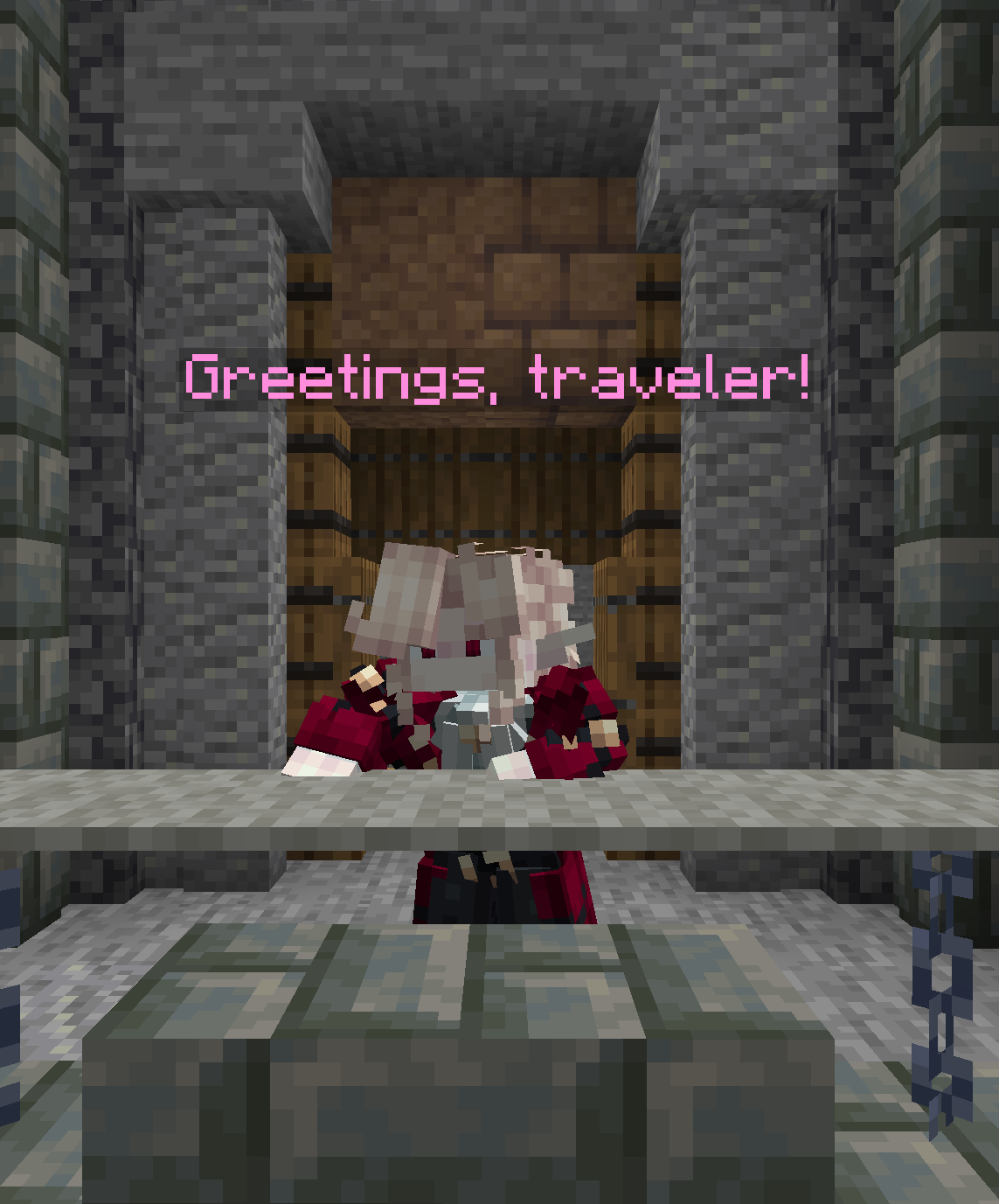
位于说话者头顶:作为字幕流的替代方案,独立于姓名标签绘制,因此在隐藏姓名标签的服务器上也能正常工作。
-
距离可见,不被过滤。客户端能听到的所有内容都会生成字幕;声音越远、越小,文字就越淡。耳语会更淡。永远不会因为距离远而隐藏任何内容。
-
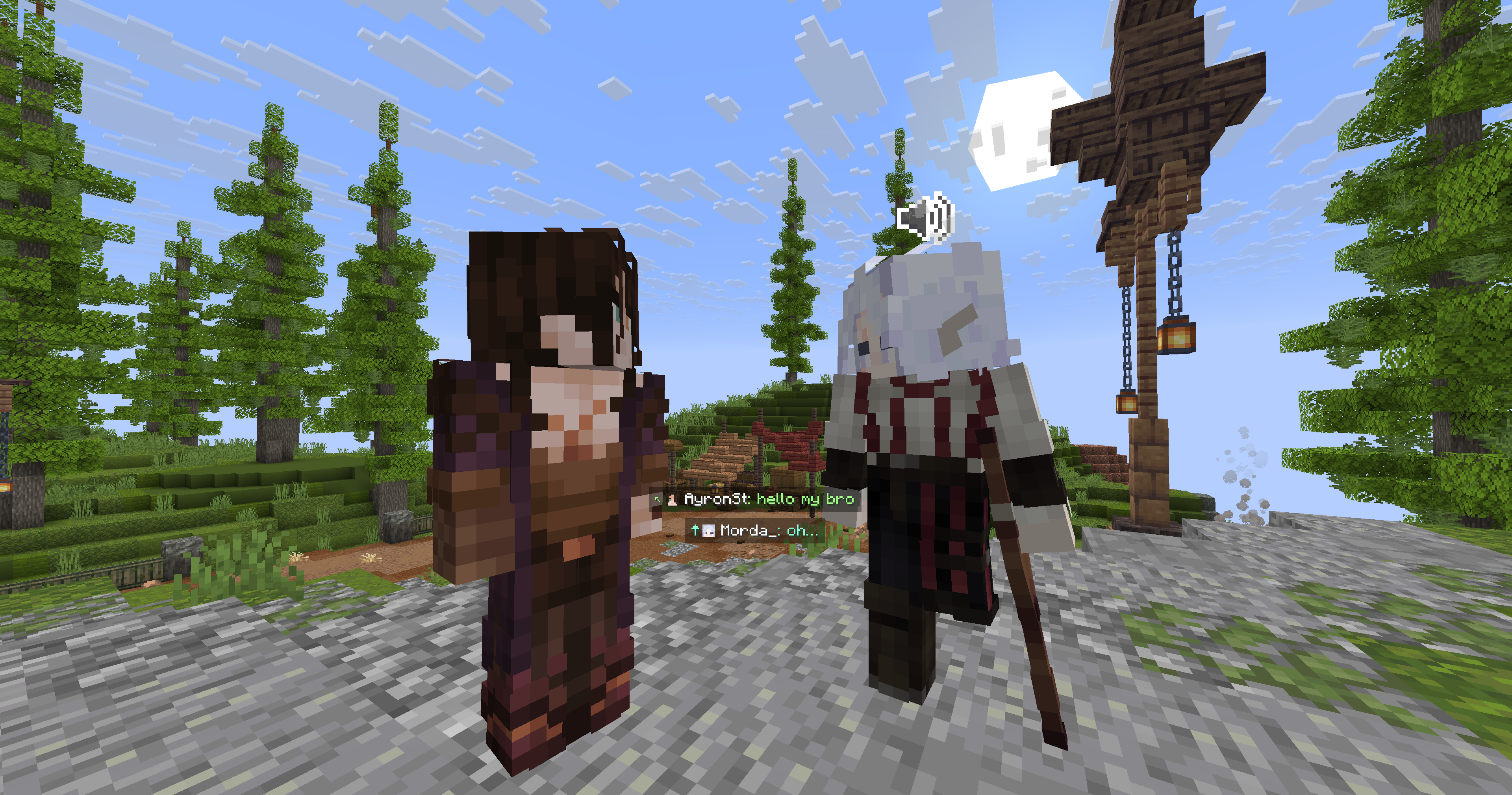
语音来源方向(可选):每行前方有一个小箭头指向说话者——向上表示前方,向下表示身后。默认关闭。
-
也支持文本聊天(如需):默认仅语音,或语音与聊天同时显示,或将两者写入日志且不显示在屏幕上。
-
翻译:适用于并非所有人使用同一种语言的服务器。支持俄语和英语的双向翻译,且仅在本地运行。详见下文。
翻译功能
角色扮演服务器是一个口述的故事,而不懂该语言的人只能站在故事之外。此功能将你听到和读到的内容转换为你自己的语言,且不会向外发送任何单词。
标记使用其他语言说话的玩家,模组会自动完成其余工作:
/vsub lang Gizmons_ en
此后,该玩家的语音将进入英语模型而非俄语模型,生成的结果会在原文下方进行翻译。其他玩家继续使用他们原有的模型。文本聊天、/me、/do、/try 等命令也会被就地翻译,显示在原行下方。
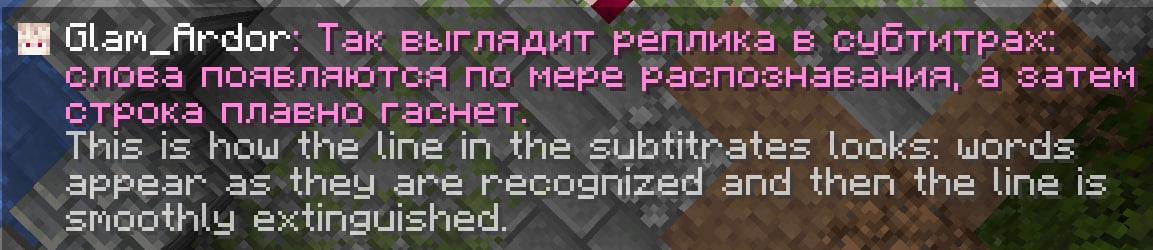
共有四种设置,区别在于加载的内容和时机:
|
|
| Off |
无。所有人的语音都进入你自己的模型,这相当于用俄语模型处理英语语音:以西里尔字母逐音拼写出来,读起来毫无意义 |
| Recognise only |
为已标记的玩家加载第二个识别模型,以便至少他们的单词能以正确的字母显示出来。不进行翻译,也不下载翻译模型 |
| Automatic |
识别并翻译,当听到这些人的声音时立即加载两个模型,并在他们安静五分钟后卸载。适用于这类玩家在服务器中属于例外的情况 |
| Always |
同上,但在加入服务器时即加载。适用于你自己就是例外、整晚都在听另一种语言的玩家 |
译文下方保留原文,以便即使译者搞错了名字,仍可按原发音读取。括号中的名字和服务端添加的括号内容完全避开翻译器,之后再重新放回,因为翻译后的角色名代表的是不同的角色。
翻译通过赫尔辛基大学的 OPUS-MT 实现,量化至 8 位并由 ONNX Runtime 运行:每个方向 113 MB,每句话耗时几百毫秒,全程无需网络连接。目前仅支持俄语和英语的双向翻译。
对话日志
回顾整晚的对话,进行搜索,并将过滤器筛选出的内容保存到文件中。
- 重启后保留。边玩边写入,每天一个文件,默认保留两周,仅存储在你的磁盘上。
- 搜索和过滤:按文本、按说话者、按语音或聊天、按时间回溯顺序(最旧或最新优先)。
- 包含当晚的其他活动:加入世界或服务器、死亡事件、输入的命令以及完整的聊天记录。登录和注册信息不会被记录,因为它们包含密码。
- 已密封。每行均已加密并带有前一行指纹,因此无法在文本编辑器中篡改内容,任何篡改行为都会被报告,而不是伪装成真实内容。密钥存储在本地机器上,因此这并不能向任何人证明任何东西;它只是将静默篡改转化为可见篡改。
语音行来自识别器,因此请将其视为对话的提示而非完整转录。文本聊天行是精确的,并标记为此类。
语音识别
识别完全在您的本地计算机上运行,通过 sherpa-onnx 或 Vosk 进行,具体取决于所选模型的需求。
本模组在安装后会下载所需内容。 识别引擎和语言模型都过于庞大,无法打包进一个 3 MB 的模组中,因此当首次需要时,模组会获取它们:引擎来自项目自身的 GitHub 发布页面,模型来自那里或 alphacephei.com,翻译模型则来自 Hugging Face。所有内容都会存入 config/voice_subtitles 目录。这是该模组唯一的网络请求。不会上传任何数据,也不会报告任何信息,音频永远不会离开您的机器。
由于引擎是可执行代码而非数据,因此在解压或加载之前,其归档文件会与内置于模组中的 SHA-256 哈希值进行比对,如果不匹配则拒绝使用。
如果您不希望它下载任何东西:请在设置中关闭 Download the model automatically(自动下载模型),并通过 /vsub model download <id> 手动获取您想要的模型。没有模型时,模组仍会显示说话者是谁,只是不包含文字。
/vsub model list
/vsub model download ru-giga-rnnt
/vsub model use ru-giga-rnnt
此模组的两个版本
这里的每个版本都有 两个文件。
普通版为 3 MB,会在首次需要时获取引擎和模型。请下载这个版本。
标记为 full(完整版)的版本为 177 MB,是同一模组,但已内置识别引擎和 Russian GigaAM 模型。在首次运行时,它会在大约一秒钟内将文件复制到磁盘,并且不再向网络请求任何内容。
提供此版本是因为对某些人来说,下载过程才是问题所在,而不是文件大小。从某些地区访问 GitHub 和 Hugging Face 速度缓慢,而从其他地区则根本无法访问,花一个晚上盯着进度条缓慢移动意味着少了一个晚上的游戏时间。如果这不是您的问题,普通的 jar 包更小,支持所有平台,并允许您选择不同的模型。
完整的 jar 包仅包含针对 Windows x64 构建的引擎,因为六个平台的构建版本会占据其大部分体积。在其他平台上,它仍然会为您节省模型文件并获取引擎(大小为 7 到 30 MB)。翻译模型也不包含在内;它们在两个 jar 包中都是单独下载的。
模型介绍
两种类型。流式(Streaming) 模型会随着语音的输入实时打出文字。整句(Whole-utterance) 模型会在确定单词含义前通读整个句子,这也是其准确性的来源,以及为什么字幕会比实际发言晚一秒左右出现的原因;模组会不断重新读取累积的音频,因此在有人说话时字幕仍在增长。
俄语:
| id |
size |
kind |
notes |
ru-giga-rnnt |
162 MB |
whole utterance |
默认选项。 Sber 的 GigaAM v3,此处最准确的模型,能自主添加标点和大写字母 |
ru-giga |
156 MB |
whole utterance |
相同模型的 CTC 形式:加载更快,但对词尾的处理稍显粗糙 |
ru-big |
237 MB |
whole utterance |
导出为 ONNX 的大号 Vosk 模型:与 ru-large 同源,加载只需几秒而不是一分钟 |
ru-big-int8 |
57 MB |
whole utterance |
同上,量化版本 |
ru-tone |
123 MB |
streaming |
T-one,基于电话语音训练;理解压缩信道,但会丢失词尾 |
ru-stream |
85 MB |
streaming |
ONNX 格式的小号 Vosk 模型 |
ru-fast |
23 MB |
streaming |
同上,量化版本:此处最轻量级 |
ru |
45 MB |
streaming |
Vosk,原始小号模型 |
ru-large |
1.8 GB |
streaming |
Vosk 的最佳表现,但加载需一分钟。ru-big-int8 具有相同的准确率,但体积仅为四十分之一 |
英语:
| id |
size |
kind |
notes |
en-fast |
103 MB |
whole utterance |
默认选项。 NVIDIA Parakeet,包含标点和大小写,基于人们日常说话方式而非朗读书籍训练 |
en-heavy |
465 MB |
whole utterance |
Parakeet 0.6B:准确率更高,实际上支持 25 种欧洲语言,包括俄语和乌克兰语 |
en |
40 MB |
streaming |
Vosk,原始小号模型 |
en-large |
1.8 GB |
streaming |
Vosk 的最佳表现 |
其他语言,均为 Vosk:uk, de, fr, es, pl, it, ja。对于大多数其他语言,建议尝试使用 en-heavy,因为它也涵盖这些语言。
诚实的准确性评估
小型流式模型在通过压缩语音信道进行的即兴对话中,大约每三个词就会错一个。大意是可以理解的,但它并非逐字转录。角色名是最糟糕的情况:一个基于普通语音训练的模型从未见过 "Элиандрэль фон Сильверхейм",也无法正确生成它。
整句模型明显更好,代价是增加一秒的延迟。这是本模组默认的权衡方案,因为一条正确但稍迟的字幕优于即时但错误的字幕。
命令
| Command |
What it does |
/vsub lang <player> <ru|en|reset> |
标记某人使用另一种语言,通过 UUID 而非名称:在角色扮演服务器中,名称只是一层伪装,而背后的人依然说着同一种语言 |
/vsub lang |
显示所有已标记的人员,以及其他人被认为使用的语言 |
/vsub color <player> <#RRGGBB|reset> |
手动分配颜色 |
/vsub model list|download <id>|use <id>|status |
管理识别模型 |
/vsub model repair |
丢弃上次导致游戏崩溃的文件并重新获取 |
/vsub log |
打开对话日志 |
/vsub preview |
在屏幕上放置示例字幕,以便在不等待有人说话的情况下设置外观 |
设置
Mod Menu 会打开设置屏幕:如果安装了 Cloth Config,则是功能更丰富的 Cloth 配置界面,否则是内置的设置界面。无论如何,config/voice_subtitles.json 都是权威配置文件。
在游戏的控制设置中,语音字幕(Voice Subtitles) 下提供了三个按键——用于开启和关闭字幕、在“跟随视角”与“头顶显示”之间切换,以及打开对话记录。这三个按键默认均未绑定:该模组所预留的按键可能正是你已在使用的按键。
与其他模组配合
Absolute Cinema Camera 会隐藏其电影模式下的整个界面。字幕仍会保留,仅位于底部遮罩之上,因为阅读对话而非聆听的人不应因镜头角度而丢失内容。无需安装或启用任何额外配置;如果未安装该模组,也不会产生任何变化。
依赖项
- Minecraft 1.21.6 – 1.21.8,Fabric
- Fabric API
- Simple Voice Chat
致谢
感谢 Contik 和 Gizmons_ 参与测试。
第三方组件
模组本体约 3 MB。所有重型资源均在首次需要时获取,或已包含在全量 jar 包中。
打包在模组 jar 内的组件:
- JNA – Apache License 2.0 / LGPL 2.1+
- Apache Commons Compress – Apache License 2.0
- Microsoft 提供的 ONNX Runtime Java API – MIT 协议,不含其原生运行时:sherpa-onnx 写入磁盘的副本即为同一库,因此无需携带第二个副本
- Xiaomi Corporation 提供的 sherpa-onnx Java API – Apache License 2.0,取自标签 v1.13.4
- Alpha Cephei Inc 提供的 Vosk Java API – Apache License 2.0,取自标签 v0.3.45
按需下载,且仅下载你所使用的部分:
- 适用于你平台的识别引擎:sherpa-onnx(7–30 MB)或 Vosk(25 MB),均为 Apache License 2.0。此为可执行代码而非数据,因此在解压或加载前,模组会通过内置的 SHA-256 哈希值校验归档文件,若不匹配则拒绝使用。
- 你选择的模型:
- 你所需方向的翻译模型:赫尔辛基大学提供的 OPUS-MT,由 Xenova 量化至八位 – Apache License 2.0,每个方向约 113 MB
全量 jar 包已预解压其中两项:Windows x64 平台的 sherpa-onnx 引擎与 GigaAM 俄语模型。两者并无差异,无论哪种方式使用的都是同一份代码。
文件存放位置
所有内容均位于 config/voice_subtitles 目录下:
|
|
models/ |
你下载的语言模型 |
translate/ |
翻译模型,每个方向一个文件夹 |
native/ |
识别引擎 |
history/ |
对话记录,每天一个文件 |
logs/ |
你从记录屏幕手动保存的任何内容 |
对话记录会在游戏过程中实时写入,因此即使关闭游戏也能保留,默认保留两周。这些数据绝不会离开你的设备。保留时长及是否启用保留均为可设置项;从记录屏幕清空记录也会同步删除对应文件。
许可证
LGPL-3.0-or-later。源代码托管于 Codeberg。
Live subtitles for Simple Voice Chat: who is speaking, and what they are saying, in a caption feed along the bottom of the screen.
Voice chat leaves some players out. If you are deaf or hard of hearing, proximity voice chat is a conversation happening around you that you cannot join – on roleplay servers, where most of the story is told out loud, that means missing the game itself. The same is true if you play with the sound off, in a noisy room, or in a language you read more easily than you hear. This mod puts that conversation on screen.
Everything runs on your own machine. Nothing is recorded, nothing is uploaded, and no server-side mod is needed.
What it does
-
Caption feed in the spirit of Minecraft: Story Mode – the speaker's head, their name, and their speech, stacked above the hotbar and fading out when the conversation moves on.
-
Roleplay names. The name comes from the player list, so a character you know shows up as their character name and one you have not met shows up exactly as the server calls them.
-
Per-speaker colours, derived from each player's UUID, so the same person is the same colour for everybody running the mod. Can be set to plain white, or assigned by hand.
-
Above the speaker's head as an alternative to the feed, drawn independently of name tags so it works on servers that hide them.
-
Distance is visible, not filtered. Everything the client can hear gets a caption; the further away and the quieter the voice, the fainter its text. Whispers are fainter still. Nothing is ever hidden for being far away.
-
Where the voice came from, optionally: a small arrow in front of each line points at the speaker – up for ahead, down for behind you. Off by default.
-
Text chat too, if you want it – voice only by default, or voice and chat together, or either one written to the log and drawn nowhere.
-
Translation, for a server where not everybody speaks the same language. Russian and English, both ways, on your own machine. See below.
Translation
A roleplay server is a story told out loud, and somebody who does not speak the language it is told in is standing outside it. This turns what they hear and what they read into their own language, and it does that without sending a word of it anywhere.
Mark whoever speaks something else and the mod does the rest:
/vsub lang Gizmons_ en
From then on that player's voice goes into an English model rather than a Russian one, and what it produces is translated under the original. Everybody else carries on through the model they always did. Text chat, /me, /do, /try and the rest are translated too, in place, under the line they belong to.
Four settings, and the difference between them is how much is loaded and when:
|
|
| Off |
nothing. Everybody's voice goes into your own model, which is what a Russian model does to English speech: writes it out in Cyrillic, phonetically, and it reads as nonsense |
| Recognise only |
a second recognition model for the people you marked, so at least their words come out in their own alphabet. Nothing is translated and no translation model is downloaded |
| Automatic |
recognise and translate, loading both the moment one of those people is heard and letting go of them once they have been quiet for five minutes. For a server where they are the exception |
| Always |
the same, loaded from the moment you join. For somebody who is the exception themselves and hears another language all evening |
The original is kept under the translation, so a name a translator mangled can still be read as it was said. Names in brackets and words the server put in brackets are held back from the translator entirely and put back afterwards, because a translated character name is a different character.
The translation runs through OPUS-MT by the University of Helsinki, quantised to eight bits and run by ONNX Runtime: a hundred and thirteen megabytes per direction, a few hundred milliseconds per sentence, and no network at any point. Russian and English only for now, both ways.
The conversation log
Scroll back through the evening, search it, and save what the filters are showing to a file.
- Kept across restarts. Written as you play, one file per day, held for a fortnight by default, on your disk and nowhere else.
- Search and filters: by text, by speaker, by voice or chat, by how far back, oldest or newest first.
- The rest of the evening too: joining a world or a server, deaths, commands as they were typed, the whole of the chat. Login and registration are never written down; they carry a password.
- Sealed. Each line is encrypted and carries the fingerprint of the one before it, so the file cannot be reworded in a text editor and any tampering is reported rather than shown as though genuine. The key sits on the same machine, so this is not proof of anything to anybody; it turns silent tampering into visible tampering.
Spoken lines come from the recogniser, so treat them as a reminder of the conversation rather than a transcript. Text chat lines are exact and marked as such.
Speech recognition
Recognition runs entirely on your machine, through sherpa-onnx or Vosk, whichever the chosen model needs.
This mod downloads what it needs after installation. A recognition engine and a language model are both far too large to ship inside a 3 MB mod, so the first time one is needed the mod fetches it: the engine from the project's own GitHub releases, the model from there or from alphacephei.com, a translation model from Hugging Face. All of it lands in config/voice_subtitles. Those are the only network requests the mod ever makes. Nothing is uploaded, nothing is reported, and no audio ever leaves your machine.
The engine is executable code rather than data, so its archive is checked against a SHA-256 hash built into the mod before anything is unpacked or loaded, and refused if it does not match.
If you would rather it did not download anything: turn off Download the model automatically in the settings, and fetch what you want by hand with /vsub model download <id>. Without a model the mod still shows who is speaking, just without the words.
/vsub model list
/vsub model download ru-giga-rnnt
/vsub model use ru-giga-rnnt
Two downloads of this mod
Every version here has two files.
The plain one is 3 MB and fetches the engine and the model the first time it needs them. Take this one.
The one marked full is 177 MB and is the same mod with the recognition engine and the Russian GigaAM model already inside it. On the first run it copies them onto disk in about a second and never asks the network for anything.
It exists because for some people the download is the problem rather than the size. GitHub and Hugging Face are reached slowly from some places and not at all from others, and an evening spent watching a progress bar crawl is an evening not spent playing. If that is not you, the ordinary jar is smaller, covers every platform, and lets you pick a different model.
The full jar carries the engine built for Windows x64 only, since six platform builds would be most of its weight. On anything else it still saves you the model and fetches the engine, which is 7 to 30 MB. Translation models are not in it either; they are a separate download in both jars.
The models
Two kinds. Streaming models type the words out as they are spoken. Whole-utterance models look both ways through a sentence before deciding what a word was, which is where their accuracy comes from and why a line arrives a second or so after it was said; the mod re-reads the audio as it accumulates, so the caption still grows while somebody talks.
Russian:
| id |
size |
kind |
notes |
ru-giga-rnnt |
162 MB |
whole utterance |
the default. GigaAM v3 by Sber, the most accurate here, and it writes punctuation and capitals of its own accord |
ru-giga |
156 MB |
whole utterance |
the same model in its CTC form: quicker to load, a little rougher on word endings |
ru-big |
237 MB |
whole utterance |
the big Vosk model exported to ONNX: same lineage as ru-large, seconds to load instead of a minute |
ru-big-int8 |
57 MB |
whole utterance |
the same, quantised |
ru-tone |
123 MB |
streaming |
T-one, trained on telephone speech; understands a compressed channel but drops word endings |
ru-stream |
85 MB |
streaming |
the small Vosk model in ONNX form |
ru-fast |
23 MB |
streaming |
the same, quantised: the lightest thing here |
ru |
45 MB |
streaming |
Vosk, the original small model |
ru-large |
1.8 GB |
streaming |
Vosk at its best, and a minute to load. ru-big-int8 is the same accuracy for a fortieth of the size |
English:
| id |
size |
kind |
notes |
en-fast |
103 MB |
whole utterance |
the default. NVIDIA Parakeet, punctuation and capitals included, trained on the way people talk rather than on read-aloud books |
en-heavy |
465 MB |
whole utterance |
Parakeet 0.6B: more accurate again, and in fact 25 European languages, Russian and Ukrainian among them |
en |
40 MB |
streaming |
Vosk, the original small model |
en-large |
1.8 GB |
streaming |
Vosk at its best |
Other languages, all Vosk: uk, de, fr, es, pl, it, ja. For most of them en-heavy is worth trying instead, since it covers them too.
How accurate, honestly
The small streaming models get roughly every third word wrong on spontaneous speech through a compressed voice channel. The gist reads fine; a word-for-word transcript it is not. Character names are the worst case: a model trained on ordinary speech has never seen "Элиандрэль фон Сильверхейм" and will never produce it.
The whole-utterance models are markedly better and cost a second of delay. That is the trade this mod defaults to, because a caption that is right and a moment late beats one that is instant and wrong.
Commands
| Command |
What it does |
/vsub lang <player> <ru|en|reset> |
Marks somebody as speaking another language, by UUID rather than by name: on a roleplay server a name is a costume and the person underneath goes on speaking the same language |
/vsub lang |
Everybody who has been marked, and what everyone else is taken to speak |
/vsub color <player> <#RRGGBB|reset> |
Assigns a colour by hand |
/vsub model list|download <id>|use <id>|status |
Manages recognition models |
/vsub model repair |
Throws away whatever took the game down last time and fetches it again |
/vsub log |
Opens the conversation log |
/vsub preview |
Puts a sample caption on screen, so their look can be set without waiting for somebody to talk |
Settings
Mod Menu opens the settings screen: the richer Cloth Config version when Cloth is installed, the built-in one otherwise. Either way config/voice_subtitles.json is the source of truth.
Three keys are available under Voice Subtitles in the game's controls – turn subtitles on and off, switch between the feed and above the head, and open the conversation log. All three ship unbound: whatever key this mod could claim is a key somebody already uses.
Alongside other mods
Absolute Cinema Camera hides the whole interface for its film mode. Subtitles stay, sitting just on top of the bottom matte, because somebody reading the conversation instead of hearing it should not lose it to a camera angle. Nothing to install or switch on, and nothing changes if that mod is not there.
Requirements
- Minecraft 1.21.6 – 1.21.8, Fabric
- Fabric API
- Simple Voice Chat
Thanks
Thanks to Contik and Gizmons_ for testing.
Third-party components
The mod itself is about 3 MB. Everything heavy is fetched when it is first needed, or already sitting in the full jar.
Bundled inside the mod jar:
- JNA – Apache License 2.0 / LGPL 2.1+
- Apache Commons Compress – Apache License 2.0
- The Java API of ONNX Runtime by Microsoft – MIT, without its native runtime: the copy sherpa-onnx puts on disk is the same library, so there is no sense carrying a second one
- The Java API of sherpa-onnx by Xiaomi Corporation – Apache License 2.0, copied from tag v1.13.4
- The Java API of Vosk by Alpha Cephei Inc – Apache License 2.0, copied from tag v0.3.45
Downloaded on demand, and only what you use:
- The recognition engine for your platform: sherpa-onnx (7–30 MB) or Vosk (25 MB), both Apache License 2.0. This is executable code rather than data, so the archive is checked against a SHA-256 hash built into the mod before it is unpacked or loaded, and refused if it does not match.
- The model you chose:
- The translation model for the direction you need: OPUS-MT by the University of Helsinki, quantised to eight bits by Xenova – Apache License 2.0, 113 MB per direction
The full jar carries two of those already unpacked: the sherpa-onnx engine for Windows x64 and the GigaAM Russian model. Nothing about them is different, and it is the same code either way.
Where things are kept
Everything lives under config/voice_subtitles:
|
|
models/ |
the language models you downloaded |
translate/ |
the translation models, one folder per direction |
native/ |
the recognition engines |
history/ |
the conversation log, one file per day |
logs/ |
anything you saved from the log screen by hand |
The conversation log is written as you play so it survives closing the game, and kept for a fortnight by default. It never leaves your machine. Both the keeping and the keeping-for-how-long are settings, and emptying it from the log screen deletes the files too.
Licence
LGPL-3.0-or-later. Source on Codeberg.


 模组

 模组
 模组

 模组
 模组
 模组
评论 0
登录后参与评分
还没有评论,来抢沙发吧