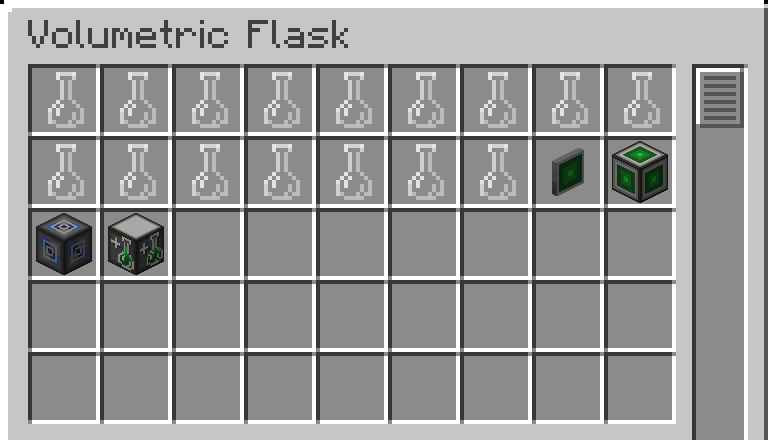
Volumetric Flask 是 Applied Energistics 2 的一个附加组件,主要专注于与流体相关的自动合成。
<figure class="wp-block-image">
</figure>
此模组添加了各种不同容量的容量瓶以及一些辅助方块。
新物品:Volumetric Flask
<figure class="wp-block-image">
</figure>
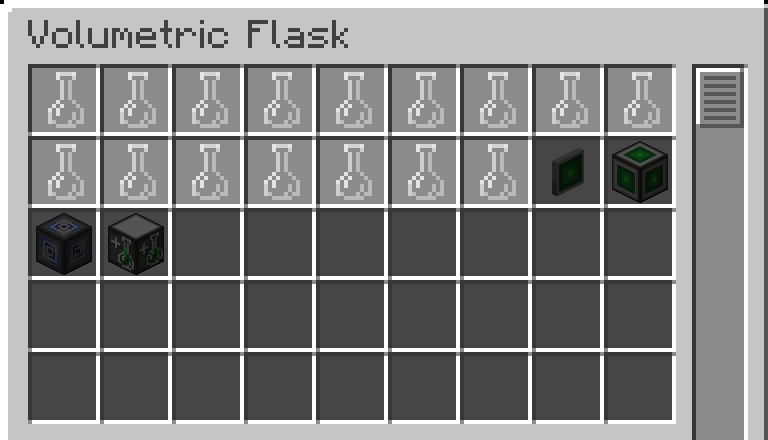
16 种不同的容量:16、32、18、36、72、144、50、100、250、1000、2000、4000、8000、16000、32000、64000 mB
<figure class="wp-block-image">

</figure>
一个空的 Volumetric Flask,装满 Lava,装满水。
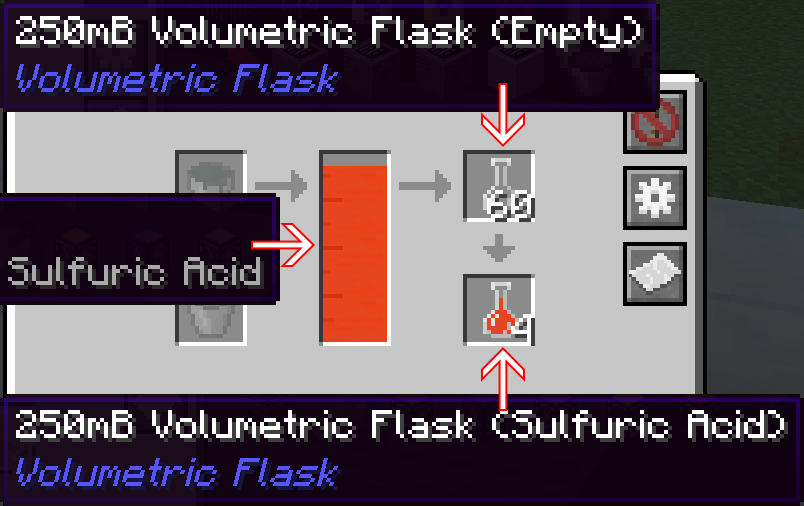
容量瓶是一种流体容器,就像原版水桶一样,但可以堆叠至 64 个。你可以手持容量瓶并对流体罐进行右键操作以填充或排空它。如同原版水桶,容量瓶只能完全装满或完全排空。
<figure class="wp-block-image">
</figure>
使用 Ender IO 的流体罐填充 Volumetric Flask
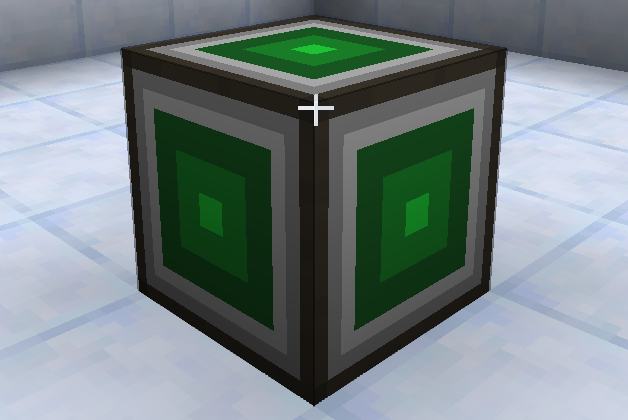
新方块:Volumetric Interface
<figure class="wp-block-image">
</figure>
<figure class="wp-block-image">
</figure>
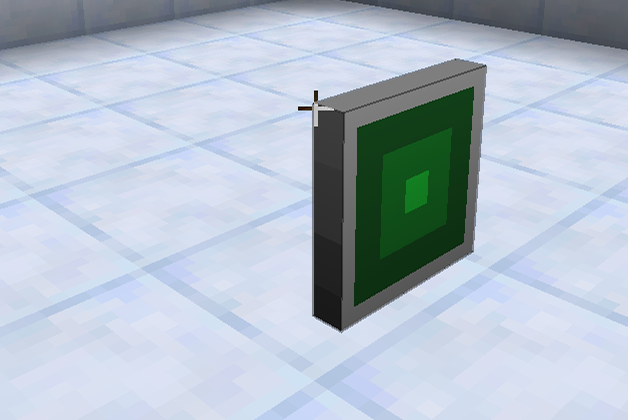
这是一个对容量瓶具有特殊支持的 ME 接口。它拥有 ME 接口的所有功能,例如接受物品并将其导入 ME 网络,或者根据编码模板导出物品。还提供了一种替代的面板版本,允许与 ME 线缆共享同一个方块。
但是,如果提供了包含已填充容量瓶的编码模板,在请求该模板时,Volumetric Interface 不会将容量瓶推送到目标机器。相反,它会将容量瓶内的流体推送到目标机器,并将排空的容量瓶放入接口的内部库存中。(当然,排空的容量瓶会被传回 ME 网络)
与 ME 接口类似,Volumetric Interface 仅在 ALL 材料都可以插入时才会向目标机器推送物品。如果编码模板中包含已填充的容量瓶作为材料,容量瓶内的流体也会被考虑在内。
阻塞模式可以配置,是的,它可以被目标机器中的流体阻塞。
Volumetric Interface 拥有一个 64000mB 的内部储罐,并将把内部的流体传输到 ME 网络,除非满足以下条件。
当提供一个以空容量瓶为输入、以已填充容量瓶为输出的模板时,Volumetric Interface 不会将空容量瓶推送到机器,而是将其保存到内部的“队列”中。此后,当流体传输到 Volumetric Interface 时,它会填充队列中的空容量瓶,并将已填充的容量瓶传输到 ME 网络。如果提供的流体体积小于队列中空容量瓶的容量,流体会保留在内部储罐中并等待更多流体。
模板中输入的空容量瓶和输出的已填充容量瓶必须具有相同的容量才能触发此行为。Volumetric Interface 只会用与输出模板中已填充容量瓶内相同的流体来填充空容量瓶。其他流体会立即传输到 ME 网络。
典型用法:Volumetric Interface
自动化 GregTech Community Edition 中的 TNT
<figure class="wp-block-image">
</figure>
解决方案
<figure class="wp-block-image">
</figure>
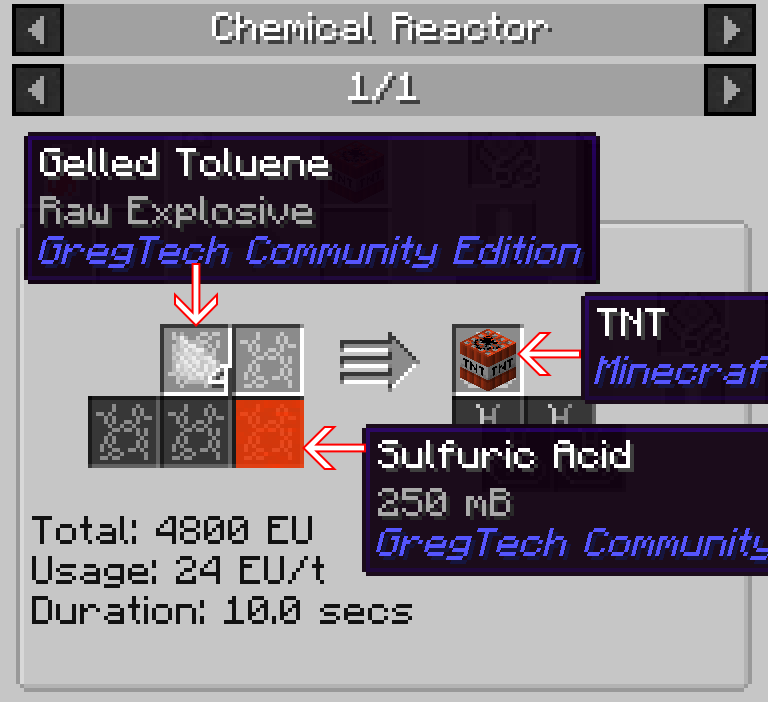
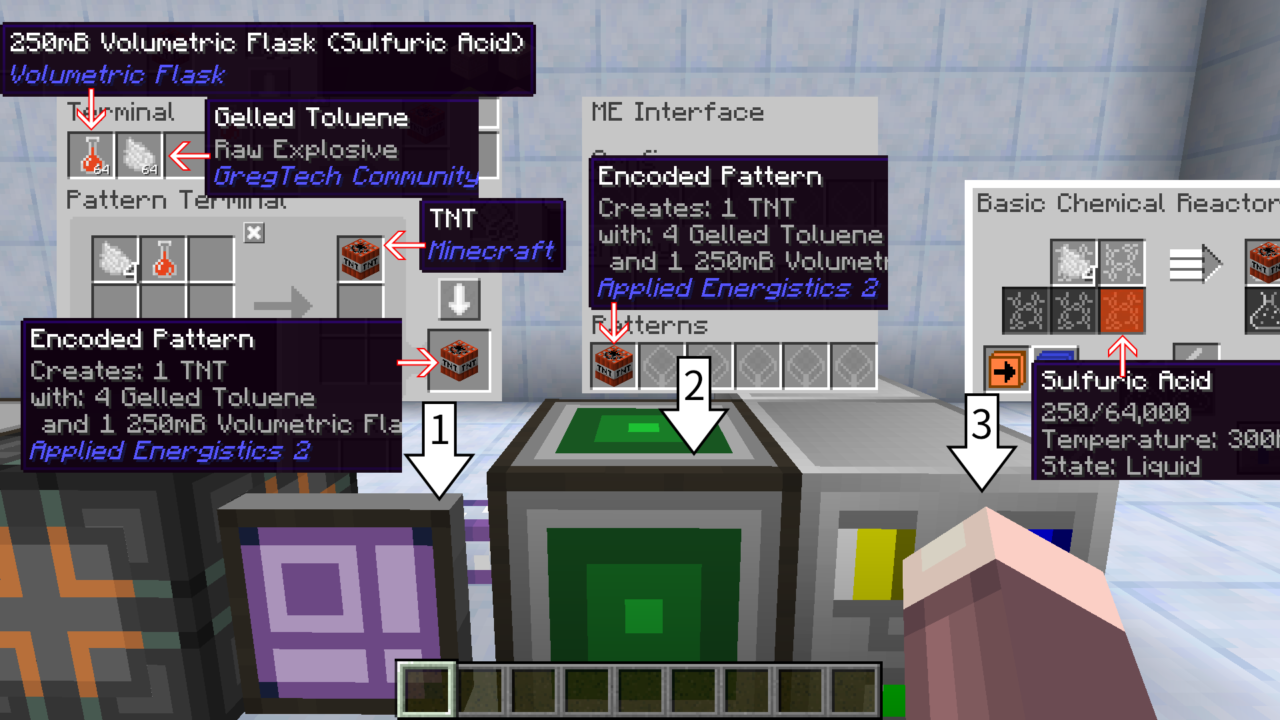
首先,组合一个编码模板,使用 4 * Gelled Toluene 和 1 * 250mB Volumetric Flask (Sulfuric Acid) 作为输入材料,以及 1 * TNT 作为输出。将它们中的一些存储在 ME 网络中。
其次,将编码模板放入 Volumetric Interface。
第三,将所需的机器(Basic Chemical Reactor)放置在 Volumetric Interface 旁边,并设置为自动向接口输出。你可能还需要使用螺丝刀设置机器以“允许从输出侧输入”。
最后,请求合成一些 TNT 并获利!
典型用法:Volumetric Interface
自动化不稳定红石容量瓶以备后用。
<figure class="wp-block-image size-large">
</figure>
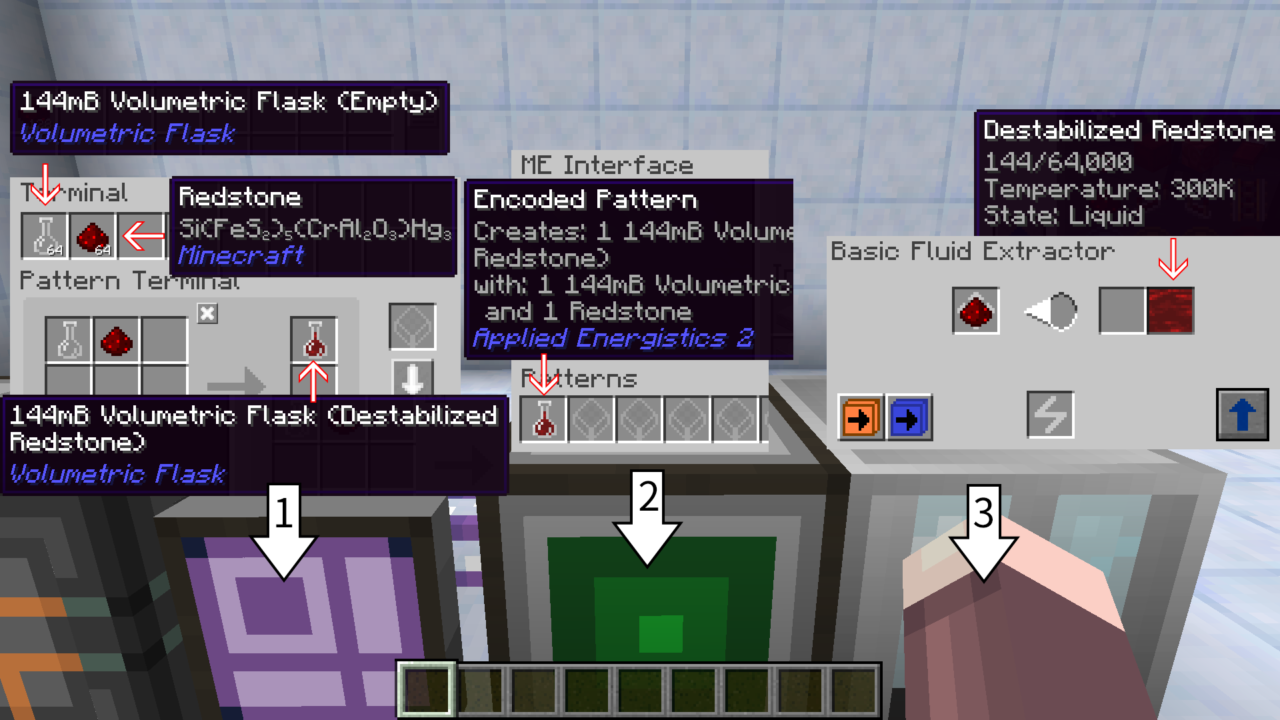
首先,制作一个编码模式(Encoded Pattern),使用 1 * 144mB 体积烧瓶(空)和 1* 红石作为输入材料,以 1 * 144mB 体积烧瓶(失稳红石)作为输出。将其中一部分存储到 ME 网络中。
其次,将该编码模式放入体积接口(Volumetric Interface)中。
第三,在体积接口旁边放置所需的机器(基础流体提取器 Basic Fluid Extractor),并设置其自动向接口输出物品/流体。你可能还需要使用螺丝刀将机器设置为“允许从输出侧输入”(Allow Input from Output side)。
当请求合成 144mB 体积烧瓶(失稳红石)时,体积接口会将红石推送到基础流体提取器,但将体积烧瓶(空)保留在其内部队列中。当基础流体提取器完成工作并将失稳红石流体输出到体积接口后,体积接口会将体积烧瓶(空)填充,并将 144mB 体积烧瓶(失稳红石)传输至 ME 网络。
新方块:Filler
<figure class="wp-block-image">
</figure>
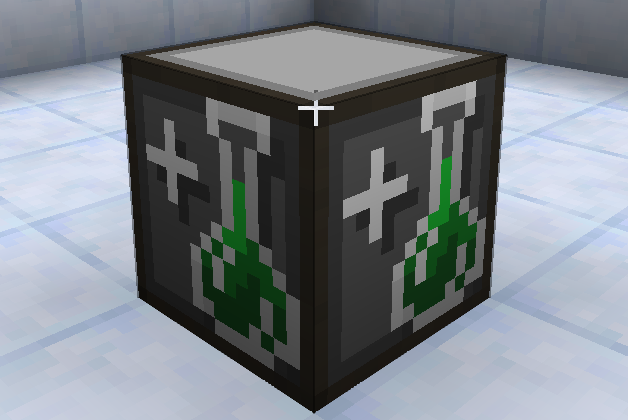
Filler 是一种指定给 ME 流体自动填充机(来自 Extra Cells 2)的体积烧瓶。每当请求某种流体的已填充体积烧瓶时,它会自动从 ME 网络中的液体中填充一个体积烧瓶。Filler 需要能量和 ME 通道才能运行。Filler 的优先级为 -1。(接口的默认优先级为 0。)因此,ME 网络会优先使用由接口提供的其他配方,如果其他配方中的材料不满足要求,则回退到 Filler。
典型用法:Filler
<figure class="wp-block-image">
</figure>
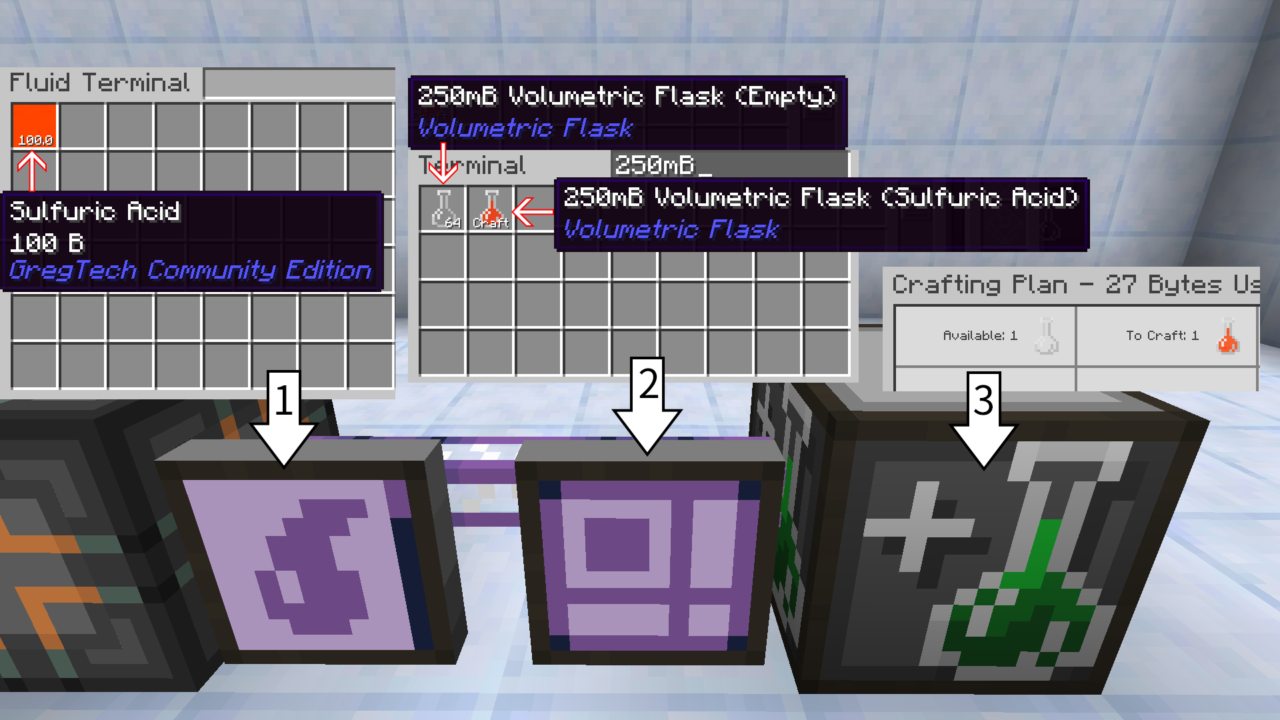
首先,在 ME 网络中存储一些流体(硫酸 Sulfuric Acid)。
其次,在 ME 网络中存储一些空的体积烧瓶。
第三,请求一些已填充的体积烧瓶,Filler 将在原位将其填充。
新方块:Buffer
<figure class="wp-block-image">
</figure>
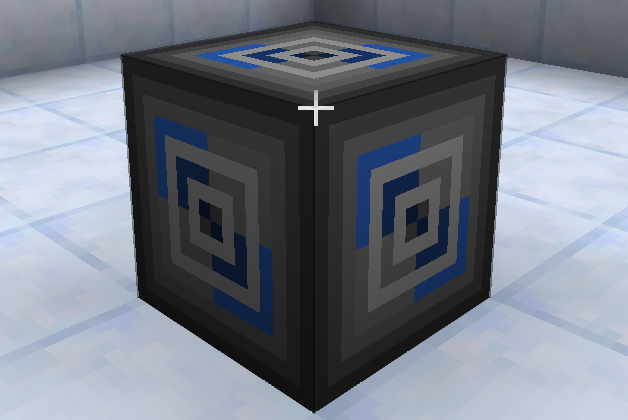
Buffer 拥有 9 组物品栏和 9 个容量为 64000mB 的流体槽。你可以使用任何管道/出口总线/接口向其插入物品和流体,并使用任何管道进行提取。Buffer 总是尝试将其库存中的物品和流体推送到附近的方块。
Buffer 不会将物品和流体推送到以下方块:ME 接口、ME 流体接口、体积接口以及上述方块的面板版本。
Buffer 没有任何用于交互的 GUI,且不能被扳手拆解。当被破坏时,Buffer 会丢失内部的所有物品和流体。
<figure class="wp-block-image">
</figure>
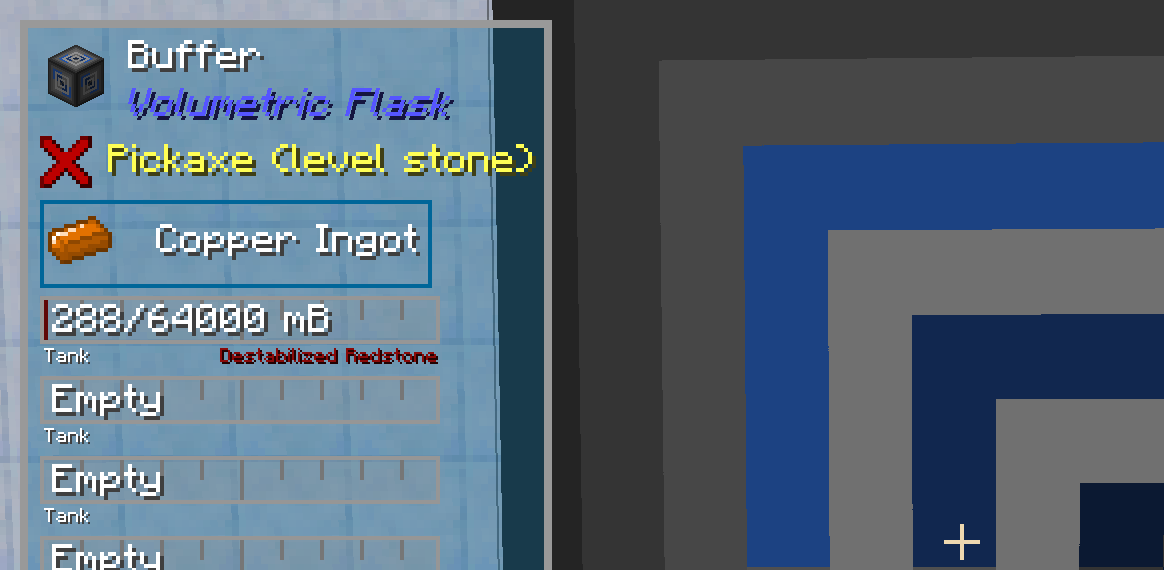
若要查看 Buffer 中存储的内容,你可能需要使用 The One Probe 或类似的模组。
典型用法:Buffer
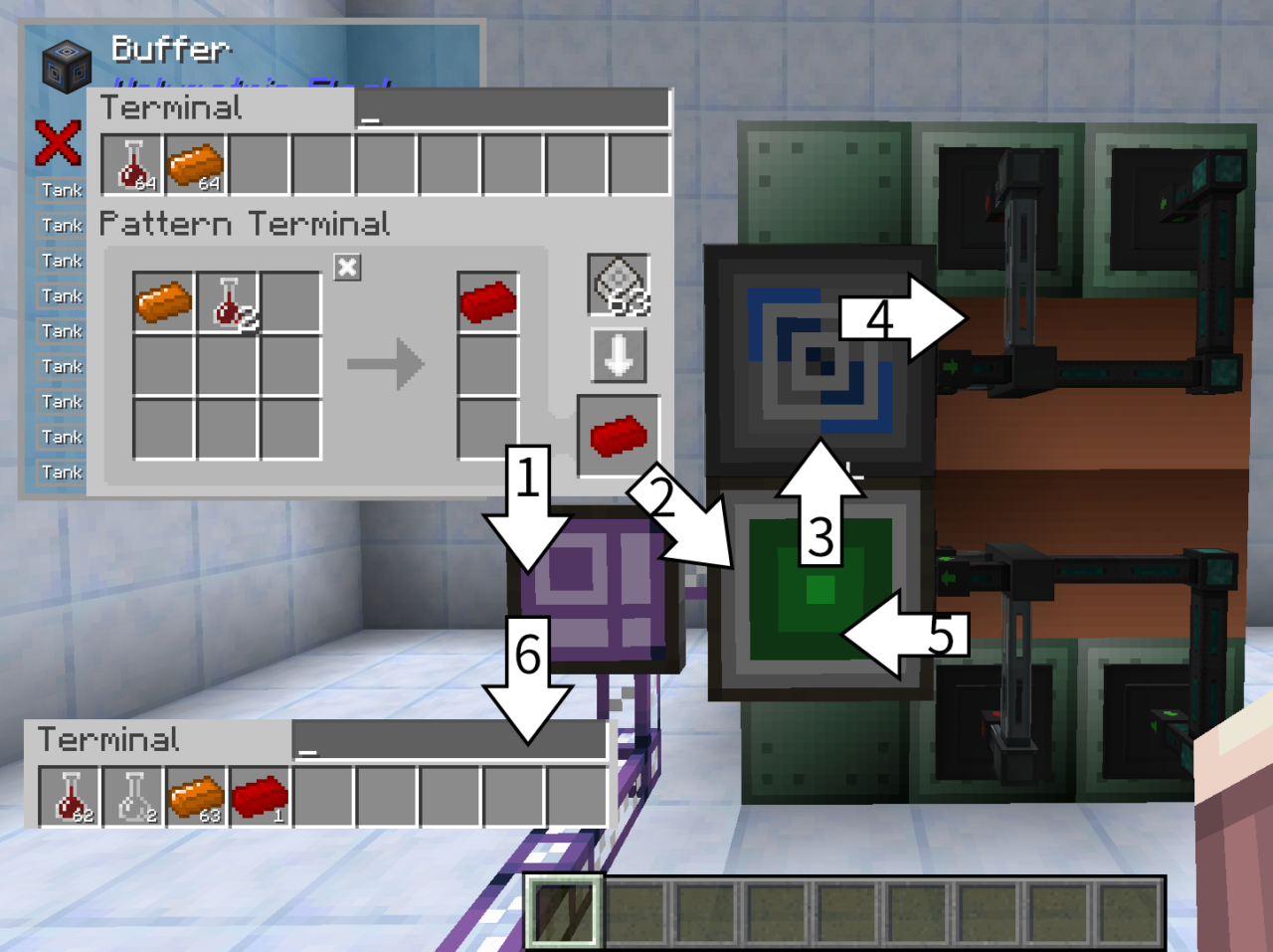
自动化格雷科技 GregTech 的红合金锭 Red Alloy Ingot(在高炉 Blast Furnace 中生产)。
输入:铜锭 Copper Ingot * 1,失稳红石 Destabilized Redstone * 288mB
输出:红合金锭 Red Alloy Ingot * 1
<figure class="wp-block-image">
</figure>
首先,在 ME 网络中存储一些铜锭和红石 144 个体积烧瓶(失稳红石)。当然,你也可以在 ME 网络中存储失稳红石流体和空的体积烧瓶,并使用 Filler。
其次,制作一个编码模式,并将其放入体积接口中。注意,我们需要两个 144 体积烧瓶来满足需求。
第三,在体积接口旁边放置一个 Buffer,以及必要的导管(Ender IO)以将物品/流体从 Buffer 传输到输入总线/舱口(上方两个方块),并将物品/流体从输出总线/舱口(下方两个方块)传输到体积接口。
请求红合金锭后,体积接口会将铜锭和失稳红石推送到 Buffer。然后导管理会将它们提取到相应的输入总线/舱口中。当高炉完成任务后,导管理会将红合金锭提取到体积接口。因此,ME 网络中将有两个空的体积烧瓶和一个红合金锭。自动化完成!
局限性
使用此模组无法实现完美的流体自动化。它只能帮助你处理带有流体输入的配方。如果你想要自动化带有流体输出的配方,你可能需要使用一些虚假合成的技巧。
合成表
此模组仅提供新物品和方块的最小合成表。整合包制作者可以自由更改合成表。
已知问题
体积接口不会显示在 ME 接口终端中。
源代码
许可与权限
源代码:LGPL
资源文件:CC BY-NC-SA
对于二进制 JAR 文件,
你可以:
在你的整合包中使用此模组。
发布此模组的截图或视频。
只要不违反以下规则,你可以做任何你想做的事。
你必须:
遵守 LGPL 和 CC BY-NC-SA 许可证。
在任何形式重新分发此模组(整合包、在其他网站 repost 等)时,保留作者信息并包含指向本页面的链接。
鸣谢
部分代码和资源源自 Applied Energistics 2 和 Extra Cells2。
感谢 AlgorithmX2 和 Team Applied Energistics 为 Applied Energistics 2,以及 Team Extra Cells 为 Extra Cells2。
感谢 miguo(龙飞虎)提供的纹理灵感,ustc-zzzz(Yanbing Zhao)和 3TUSK(Urey. Xue)提供的模组制作教程。
感谢 Damien-Reave 制作了 Omnifactory,这激发了我制作本模组的想法。感谢 SDYG Group 的成员们鼓励我发布此模组。所有截图均取自 SDYG Group 私服上修改版的 Omnifactory。
Volumetric Flask is an Applied Energistics 2 addon mainly focusing on fluid-related auto crafting.
<figure class="wp-block-image">
</figure>
This mod adds various volumetric flasks with different sizes and some helper blocks.
New Item: Volumetric Flask
<figure class="wp-block-image">
</figure>
16 different sizes: 16, 32, 18, 36, 72, 144, 50, 100, 250, 1000, 2000, 4000, 8000, 16000, 32000, 64000 mB
<figure class="wp-block-image">
</figure>
An empty Volumetric Flask, Filled with Lava, Filled with water.
A volumetric flask is a fluid container just like a vanilla bucket but can stack up to 64. You may hold a volumetric flask and right-click on a tank to fill/empty it. Like a vanilla bucket, a volumetric flask is only allowed to be fully filled or empty.
<figure class="wp-block-image">
</figure>
Fill Volumetric Flask using Fluid Tank from Ender IO
New Block: Volumetric Interface
<figure class="wp-block-image">
</figure>
<figure class="wp-block-image">
</figure>
A ME Interface with special support for a volumetric flask. It has all the functions a ME Interface has, like accepting items and importing them into ME network, or export items according to Encoded Patterns. An alternative panel version is also available to share one block with ME Cable.
However, if an Encoded Pattern that has filled Volumetric Flask is provided, when requesting that pattern, the Volumetric Interface won’t push the volumetric flask to the target machine. Instead, it will push the fluid inside the volumetric flask to the target machine, and put the emptied volumetric flask in the internal inventory of the interface. (And of course, the emptied volumetric flask will be transferred back into the ME network)
Like the ME Interface, Volumetric Interface will push to target machine ONLY if ALL ingredients can be inserted. If the Encoded Pattern has filled volumetric flask as an ingredient, the fluid inside the volumetric flask will also be considered.
The blocking mode can be configured, and yes, it can be blocked by fluid in the target machine.
Volumetric Interface has an internal tank of 64000mB and will transfer fluid inside into the ME network, except the following condition.
When provided a pattern with empty volumetric flask as input and filled volumetric flask as output, the Volumetric Interface will not push empty volumetric flask to the machine, but save it to a “queue” inside it. After that, when fluid is transferred into the Volumetric Interface, it will fill the empty volumetric flask in its queue, and transfer filled volumetric flask to ME Network. If the volume of fluid provided is less than the capacity of the empty volumetric flask in the queue, fluid will be held in the internal tank and wait for more fluid to come.
The empty volumetric Flask in input and filled volumetric flask in the output of the pattern MUST have the SAME capacity to trigger this behavior. The Volumetric Interface will ONLY fill an empty volumetric flask with the SAME fluid as the fluid is filled volumetric flask in the output of the pattern. Other fluid will be transfer to ME Network immediately.
Typical Usage: Volumetric Interface
Automate TNT in GregTech Community Edition
<figure class="wp-block-image">
</figure>
Solution
<figure class="wp-block-image">
</figure>
First, compose an Encoded Pattern to use 4 * Gelled Toluene and 1 * 250mB Volumetric Flask (Sulfuric Acid) as input materials, and 1 * TNT as output. Store some of them in the ME network.
Second, put the Encoded Pattern in the Volumetric Interface.
Third, place needed machine (Basic Chemical Reactor) next to the Volumetric Interface, and set it automatically outputting to the interface. You may also need to set the machine to “Allow Input from Output side” using a screwdriver.
Finally, request crafting some TNT and profit!
Typical Usage: Volumetric Interface
Automate Destablied Redstone Volumetric Flask for later usage.
<figure class="wp-block-image size-large">
</figure>
First, compose an Encoded Pattern to use 1 * 144mB Volumetric Flask(Empty) and 1* Redstone as input materials, and 1 * 144mB Volumetric Flask (Destabilized Redstone) as output. Store some of them in the ME network.
Second, put the Encoded Pattern in the Volumetric Interface.
Third, place needed machine (Basic Fluid Extractor) next to the Volumetric Interface, an set it automatically outputting to the interface. You may also need to set the machine to “Allow Input from Output side” using a screwdriver.
When requesting crafting 144mB Volumetric Flask (Destabilized Redstone), the Volumetric Interface will push Redstone to Basic Fluid Extractor but keep Volumetric Flask (Empty) in its internal queue. After Basic Fluid Extractor did the job and output Destabilized Redstone fluid to Volumetric Interface, the Volumetric Interface will fill the Volumetric Flask (Empty) and transfer 144mB Volumetric Flask (Destabilized Redstone) to ME network.
New Block: Filler
<figure class="wp-block-image">
</figure>
A Filler is a volumetric flask specified ME Fluid Auto Filler(from Extra cells2). Whenever a filled volumetric flask of a certain fluid is requested, it automatically fills a volumetric flask from the ME network with the liquid from the ME network. A Filler needs energy and ME channel to operate. The Filler has the priority of -1. (Interfaces have the priority of 0 by default.) Thus, the ME network will prefer to use other recipes provided by interfaces first, and fallback to Filler if materials are not satisfied in other recipes.
Typical Usage: Filler
<figure class="wp-block-image">
</figure>
First, store some fluid (Sulfuric Acid) in the ME network.
Second, store some empty Volumetric Flask in Me network.
Third, request some filled Volumetric Flask and Filler will fill them in place.
New Block: Buffer
<figure class="wp-block-image">
</figure>
A Buffer has an inventory of 9 stacks and 9 tanks of 64000mB fluid. You may use any pipe/export bus/interface to insert items and fluid into it, and use any pipe to extract. A Buffer will always try to push out items and fluid from its inventory and tank to nearby blocks.
A buffer will NOT push items and fluid to the following blocks: ME Interface, ME Fluid Interface, Volumetric Interface, panel version of above.
A buffer does not have any GUI to interact with, and can not be dismantled by a wrench. A buffer will lose all items and fluid inside when broken.
<figure class="wp-block-image">
</figure>
To view what stored in a Buffer, you may need The One Probe or similar mods.
Typical Usage: Buffer
Automate Red Alloy Ingot (GregTech) in Blast Furnace (GregTech).
Inputs: Copper Ingot * 1, Destabilized Restone * 288mB
Output: Red Alloy Ingot * 1
<figure class="wp-block-image">
</figure>
First, store some Copper Ingots and 144 Volumetric Flasks (Destabilized Redstone) in ME network. Of course, you may store Destabilized Redstone fluid and empy Volumetric Flasks in ME network and use a Filler.
Second, compose an Encoded Pattern, and put it in the Volumetric Interface. Note that we need two 144 Volumetric Flask to meet demand.
Third, place a Buffer next to the Volumetric Interface, and necessary conduits (Ender IO) to transfer item/fluid from Buffer to Input Bus/Hatch (upper two blocks), and transfer item/fluid from Output Bus/Hatch (lower two blocks) to Volumetric Interface.
After requesting Red Alloy Ingot, the Volumetric Interface will push Copper Ingot and Destabilized Redstone to the Buffer. Then conduits will extract them into corresponding Input Bus/Hatch. After the job is done by Blast Furnace, conduits will extract Red Alloy Ingot to Volumetric Interface. Hence there will be two empty Volumetric Flasks and one Red Alloy Ingot in ME network. Automation performed!
Limitations
Using this mod can NOT achieve PERFECT fluid automation. It can only help you deal with recipes with fluid INPUT. If you want to automate recipes with fluid OUTPUT, you may need some fake crafting tricks.
Recipes
This mod only provides minimum recipes for new items and blocks. Modpack makers, feel free to change recipes.
Known Issues
Volumetric Interface will not show in ME Interface Terminal.
Source Code
License and Permission
Source Code: LGPL
Assets: CC BY-NC-SA
For binary JAR file,
You can:
Use this mod in your modpack.
Post screenshot or videos of this mod.
Do whatever you want as long as you do not break rules below.
You must:
Follow LGPL and CC BY-NC-SA license.
Keep author info and a link to this page for redistributing this mod in any form (modpack, repost in another website, etc.)
Credits
Some code and assets are derived from Applied Energistics 2 and Extra Cells2.
Thanks to AlgorithmX2 and Team Applied Energistics for Applied Energistics 2, Team Extra Cells for Exra Cells2.
Thanks to miguo (龙飞虎) for texture inspiration, ustc-zzzz (Yanbing Zhao) for modding tutorials and 3TUSK (Urey. Xue) for modding tutorials.
Thanks to Damien-Reave for making Omnifactory, which motivate me to make this mod. Thanks to members of SDYG Group for encouraging me to release this mod. All screenshots are captured from a modified version of Omnifactory on SDYG Group Private Server.

 模组

 模组
 模组

 模组

 模组
 模组

评论 0
登录后参与评分
还没有评论,来抢沙发吧