
VoxelMap
Minecraft 的小地图与世界地图。简洁、快速、无杂乱。



关于 VoxelMap
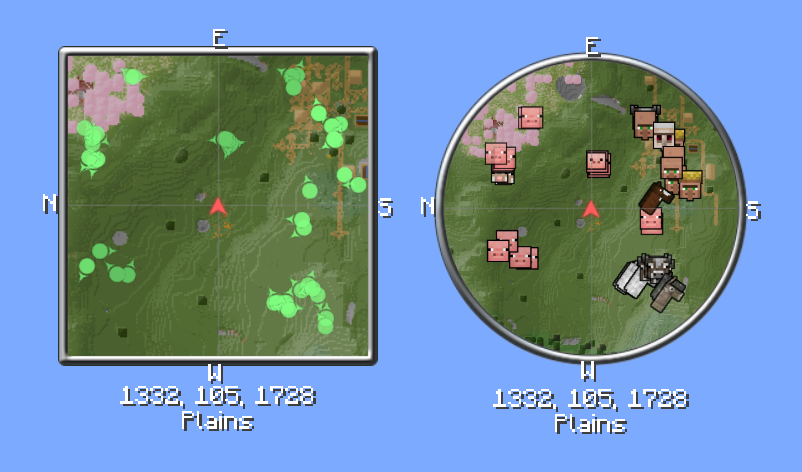
VoxelMap 始终让你知道自己身处何处。小地图随游戏一同运行,全屏世界地图则展示你迄今为止探索过的所有区域。除此之外,还有:路径点、雷达,以及一些让探索和建造更轻松的工具。
仅客户端 mod —— 无需在服务器安装。可选的服务端组件可让服主为所有人限制和配置地图。
功能
小地图与世界地图
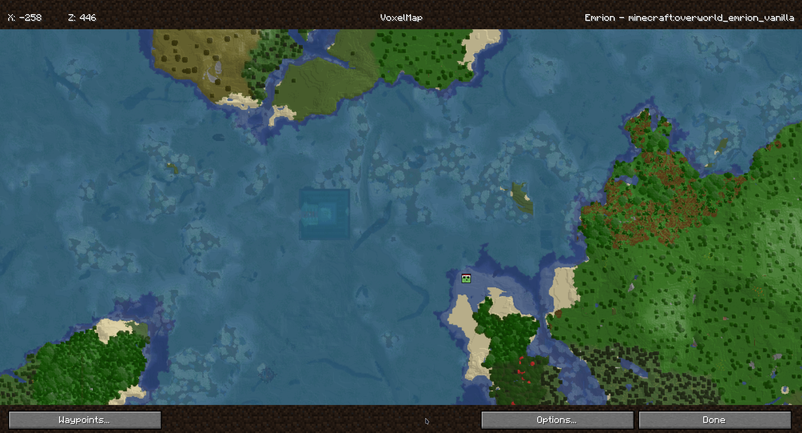
角落里的紧凑小地图,按键即可打开全屏世界地图。缩放级别可自由调整,可选随玩家旋转。
路径点
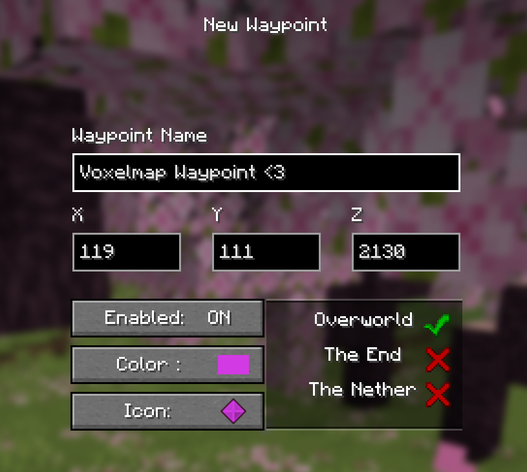
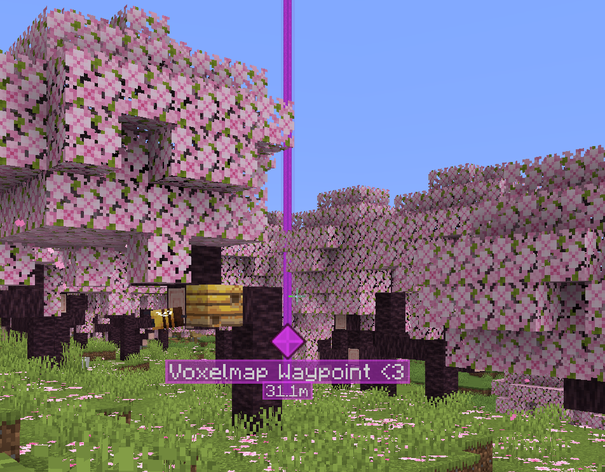
设置你自己的标记,为其指定图标和颜色,并按维度单独切换可见性。路径点可通过聊天与其他玩家分享。
洞穴模式
在地表视线被遮挡的地下时,地图会自动切换到洞穴视图。
雷达
显示附近的玩家和生物。名称、头盔和朝向可分别切换显示,潜行的玩家可以隐藏。
生物群系与史莱姆区块
生物群系在地图上以颜色区分或显示为叠加层。在有正确种子的多人服务器上,可显示史莱姆区块。
死亡点
会在你的死亡位置自动放置一个路径点。可配置为仅保留最近一个或全部保留。
服务器标识
拥有多个地址或代理的网络可以向客户端发送固定标识,使路径点和地图数据在所有地址间保持一致。也可手动设置自定义别名映射。
面向服主
VoxelMap 可以在服务端进行限制和配置,玩家无需额外安装任何东西。这不限于 Paper —— 完全相同的服务端功能集在所有平台上都可用:
| 服务器软件 | 需要安装的内容 |
|---|---|
| Fabric | 常规的 VoxelMap mod jar —— 它包含服务端部分 |
| Forge | 常规的 VoxelMap mod jar —— 它包含服务端部分 |
| NeoForge | 常规的 VoxelMap mod jar —— 它包含服务端部分 |
| Paper / 基于 Spigot | 单独的 VoxelMap Paper 插件 |
Fabric、Forge 和 NeoForge 的 mod jar 在客户端和独立服务器上均可使用。在独立服务器上,它会激活其服务端部分,行为与 Paper 插件完全一致 —— 相同的选项、相同的配置文件、相同的行为。Paper 插件之所以存在,仅仅是因为 Paper 服务器无法加载 mod jar。
可配置选项
- 单独允许或阻止小地图、世界地图和路径点
- 分别切换玩家和生物的雷达
- 启用或禁用洞穴模式
- 启用或禁用死亡点
- 用于路径点的自定义传送命令
- 固定的服务器标识,使路径点和地图数据在多个地址或代理间持久保留
- 按世界覆盖设置
配置文件与重载
| 平台 | 配置文件 |
|---|---|
| Fabric / Forge / NeoForge | config/voxelmap.json |
| Paper | plugins/VoxelMap/voxelmap.json |
文件会在首次启动时以默认值创建。/voxelmap reload 会在运行时应用更改,并将新设置推送给所有在线玩家 —— 在所有平台上均如此。
示例:voxelmap.json
{
  "defaultConfig": {
    "radarAllowed": true,
    "radarMobsAllowed": true,
    "radarPlayersAllowed": true,
    "cavesAllowed": true,
    "minimapAllowed": true,
    "worldmapAllowed": true,
    "waypointsAllowed": true,
    "deathWaypointAllowed": true,
    "teleportCommand": "tppos",
    "worldNameSuffix": "",
    "serverIdentity": "MyNetwork"
  },
  "worldOverrides": [
    {
      "worlds": ["world_the_end"],
      "settings": {
        "radarAllowed": false,
        "cavesAllowed": false
      }
    }
  ]
}
要求
可在 Fabric、Forge 和 NeoForge 上运行。仅客户端 mod —— 游玩无需在服务器安装。服务端配置是可选的,仅面向希望限制地图的服主。
VoxelMap
Minimap and world map for Minecraft. Clean, fast, no clutter.
About VoxelMap
VoxelMap always shows you where you are. The minimap runs alongside the game, and the fullscreen world map shows everything you've explored so far. On top of that: waypoints, radar, and a few tools that make exploring and building easier.
Client-side only — no server installation required. An optional server-side component lets server owners restrict and configure the map for everyone.
Features
Minimap & World Map
Compact minimap in the corner, fullscreen world map with a keypress. Zoom levels are freely adjustable, rotation with the player is optional.
Waypoints
Set your own markers, give them an icon and color, and toggle visibility per dimension. Waypoints can be shared with other players in chat.
Cave Mode
Underground, the map automatically switches to a cave view once the surface is blocked from view.
Radar
Shows nearby players and creatures. Names, helmets, and facing direction can be toggled individually, sneaking players can be hidden.
Biomes & Slime Chunks
Biomes are color-coded on the map or shown as an overlay. Slime chunks can be made visible, on multiplayer servers with the correct seed.
Deathpoints
A waypoint is automatically placed at your death location. Configurable to keep only the most recent one or all of them.
Server Identity
Networks with multiple addresses or proxies can send the client a fixed identity, so waypoints and map data stay the same across every address. Custom alias mappings can also be set manually.
For Server Owners
VoxelMap can be restricted and configured server-side, without players needing to install anything extra. This is not Paper-only — the exact same server-side feature set is available on every platform:
| Server software | What to install |
|---|---|
| Fabric | The regular VoxelMap mod jar — it contains the server part |
| Forge | The regular VoxelMap mod jar — it contains the server part |
| NeoForge | The regular VoxelMap mod jar — it contains the server part |
| Paper / Spigot-based | The separate VoxelMap Paper plugin |
The mod jar for Fabric, Forge, and NeoForge works on both client and dedicated server. On a dedicated server it activates its server-side part and behaves exactly like the Paper plugin — same options, same config file, same behavior. The Paper plugin exists only because Paper servers can't load mod jars.
Configurable options
- Allow or block minimap, world map, and waypoints individually
- Toggle radar for players and mobs separately
- Allow or disable cave mode
- Enable or disable deathpoints
- Custom teleport command for waypoints
- Fixed server identity, so waypoints and map data persist across multiple addresses or proxies
- Per-world setting overrides
Config file & reloading
| Platform | Config file |
|---|---|
| Fabric / Forge / NeoForge | config/voxelmap.json |
| Paper | plugins/VoxelMap/voxelmap.json |
The file is created with defaults on first start. /voxelmap reload applies changes at runtime and pushes the new settings to all online players — on every platform.
Example: voxelmap.json
{
  "defaultConfig": {
    "radarAllowed": true,
    "radarMobsAllowed": true,
    "radarPlayersAllowed": true,
    "cavesAllowed": true,
    "minimapAllowed": true,
    "worldmapAllowed": true,
    "waypointsAllowed": true,
    "deathWaypointAllowed": true,
    "teleportCommand": "tppos",
    "worldNameSuffix": "",
    "serverIdentity": "MyNetwork"
  },
  "worldOverrides": [
    {
      "worlds": ["world_the_end"],
      "settings": {
        "radarAllowed": false,
        "cavesAllowed": false
      }
    }
  ]
}
Requirements
Runs on Fabric, Forge, and NeoForge. Client-side only — no server installation required to play. The server-side configuration is optional and only intended for server owners who want to restrict the map.

下载 VoxelMap-Updated
下载 VoxelMap-Updated
下载 VoxelMap-Updated
下载 VoxelMap-Updated
下载 VoxelMap-Updated
下载 VoxelMap-Updated
下载 VoxelMap-Updated
下载 VoxelMap-Updated
下载 VoxelMap-Updated
下载 VoxelMap-Updated
- 添加对 Alex's Mobs 雷达图标的支持
修复
- Retina / 高 DPI 显示器——小地图及所有地图元素恢复清晰渲染,不再以错误的缩放比例显示。
- Retina / 高 DPI 显示器上的世界地图——光标和点击坐标现在与屏幕上看到的内容一致。
- Forge——Forge 版 jar 已回归。此前在加入 GeckoLib 雷达图标后它无法编译,并且缺少启动所需的捆绑 VoxelConfig 库。
变更
- Iris 兼容性现在通过共享渲染路径实现,而不再走单独路径,因此使用光影的玩家可以获得与其他人相同的渲染行为。
关于这个资源的讨论、问题反馈与使用心得
还没有讨论,来发第一帖吧
你是这个资源的作者?登录后可认领此资源。
相似资源
 模组

显示你正在注视的方块的信息。(适用于 Minecraft 1.16+ 的 Hwyla/Waila 分支)
 模组
在游戏画面角落显示附近世界地形、玩家、生物和实体的地图。可创建路径点,帮助你找到标记过的位置。
 模组
使用 JavaScript 编辑配方、添加自定义物品、编写世界事件!
 模组

查看物品与配方
 模组
AE2:一款流行的自动化与存储模组
 模组
那是什么?一个 Waila/Hwyla 的分支。
评论 0
登录后参与评分
还没有评论,来抢沙发吧