WaLL Teams
WaLL Teams 是一款面向 Minecraft Forge 服务器的团队管理模组。
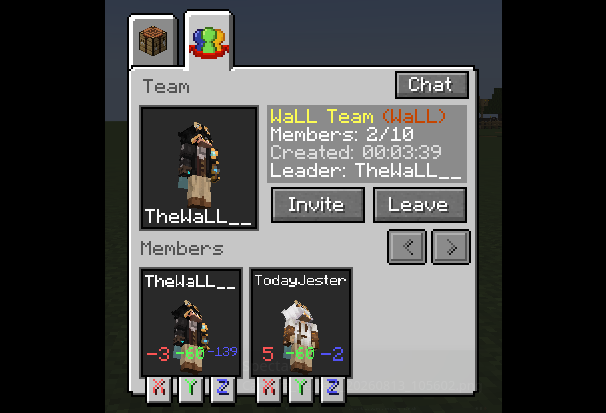
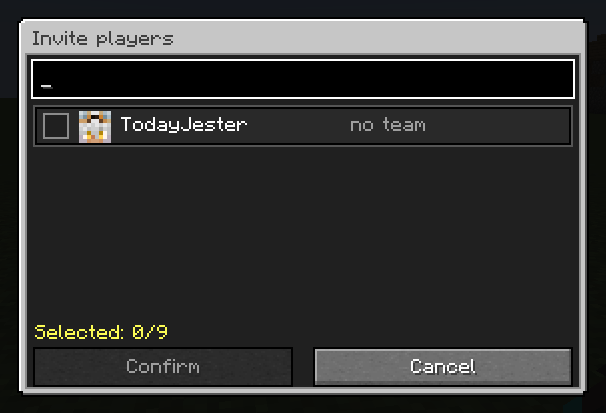
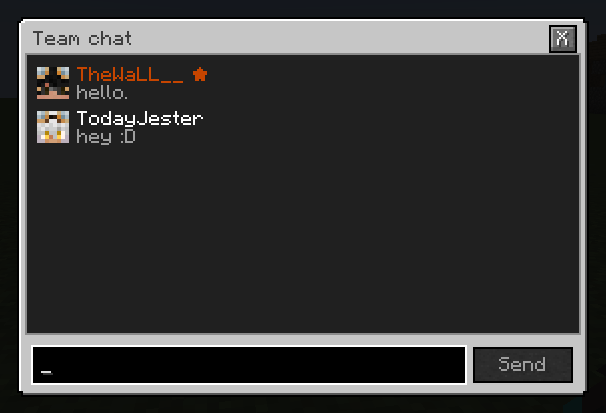
它允许玩家创建和管理团队,邀请其他玩家加入,使用私密的团队聊天频道,并在客户端也安装了该模组时访问图形化的团队菜单。
所有的团队逻辑、数据、权限和规则执行均由服务器端处理。客户端模组仅用于支持图形界面和本地化用户界面等客户端功能。
功能特性
- 创建和管理团队
- 邀请、接受、拒绝和移除玩家
- 私密团队聊天
- 团队成员管理
- 可配置的队伍伤害(Friendly Fire)
- 可配置的姓名标签可见性
- 可配置的玩家人数上限
- 针对特定团队的规则覆盖
- 服务端权限支持
- 为客户端安装了模组的玩家提供 GUI 支持
- 支持原版客户端
配置
通用服务器配置文件位于:
config/wallteams-common.toml
默认值:
| 设置项 |
默认值 |
描述 |
localization.serverLanguage |
"en_us" |
未安装模组的玩家使用的原版备用语言。接受的值:pt_br, en_us。 |
teams.friendlyFireBetweenMembers |
false |
允许同一团队的成员互相造成伤害。 |
teams.nameTagsVisibleToTeamMembers |
true |
团队成员可以看到彼此的姓名标签。来自其他团队的玩家永远无法看到它们。 |
teams.maximumPlayersPerTeam |
10 |
玩家数量和预留邀请槽位的默认上限。接受范围:1 到 4096。 |
teams.enforceTeamMemberLimit |
true |
启用默认的团队人数限制。当禁用时,没有覆盖设置的团队将拥有无限槽位。 |
commands.requireCommandPermissions |
false |
常规命令需要 wallteams.command.* 权限节点。 |
邀请计入团队人数限制的预留槽位。
/wteams modify 命令可以为 PvP、姓名标签可见性和玩家槽位设置针对特定团队的覆盖值。这些覆盖值的优先级高于全局配置。
当重新加载 Forge 配置时,全局规则会安全地重新应用到现有团队,而不会替换它们的单独覆盖设置。
命令与权限
默认情况下,commands.requireCommandPermissions 设置为 false,这意味着普通玩家无需显式权限节点即可使用常用命令。
如果启用了该选项,则需要以下权限:
| 命令 |
权限 |
/wteams create |
wallteams.command.create |
/wteams delete |
wallteams.command.delete |
/wteams invite |
wallteams.command.invite |
/wteams accept |
wallteams.command.accept |
/wteams deny |
wallteams.command.deny |
/wteams cancel |
wallteams.command.cancel |
/wteams promote |
wallteams.command.promote |
/wteams kick |
wallteams.command.kick |
/wteams leave |
wallteams.command.leave |
/wteams members |
wallteams.command.members |
/wteams chat |
wallteams.command.chat |
/wteams list |
wallteams.command.list |
管理命令
管理权限节点始终进行检查。
如果没有权限模组或插件授予这些节点,WaLL Teams 将回退到 Minecraft OP 等级 2。
| 命令 / 操作 |
权限 |
/wteams join <team_id> [player] |
wallteams.command.admin.join |
/wteams delete <team_id> |
wallteams.command.admin.delete |
/wteams members <team_id> |
wallteams.command.admin.members |
/wteams chat <team_id> |
wallteams.command.admin.chat |
通过团队菜单进行管理员传送 |
wallteams.command.admin.teleport |
/wteams modify <team_id> pvp <true|false> |
wallteams.command.admin.modify |
/wteams modify <team_id> nametag <true|false> |
wallteams.command.admin.modify |
/wteams modify <team_id> slots <n|inf> |
wallteams.command.admin.modify |
/wteams modify <team_id> reset |
wallteams.command.admin.modify |
姓名标签规则
当团队的姓名标签设置设为 true 时,玩家姓名标签仅对同一团队的成员可见。
当设置为 false 时,姓名标签将对所有人隐藏,包括队友。
来自其他团队的玩家永远无法看到属于受管理团队玩家的姓名标签。
没有特定覆盖设置的团队使用全局的 teams.nameTagsVisibleToTeamMembers 设置。
团队 ID
需要指定团队的命令使用其内部 ID,不包含空格。
例如:
Tung Sahur → Tung_Sahur
命令自动补全会显示内部 ID,同时将其视觉名称作为描述展示。
WaLL Teams
WaLL Teams is a team management mod for Minecraft Forge servers.
It allows players to create and manage teams, invite other players, use private team chat, and access a graphical team menu when the mod is also installed on the client.
All team logic, data, permissions, and rule enforcement are handled by the server. The client mod is only required for client-side features such as the graphical interface and localized UI.
Features
- Create and manage teams
- Invite, accept, deny, and remove players
- Private team chat
- Team member management
- Configurable friendly fire
- Configurable nametag visibility
- Configurable player limits
- Per-team rule overrides
- Server-side permission support
- GUI support for players with the mod installed client-side
- Vanilla client support
Configuration
The common server configuration file is located at:
config/wallteams-common.toml
Default values:
| Setting |
Default |
Description |
localization.serverLanguage |
"en_us" |
Vanilla fallback language used for players without the mod installed. Accepted values: pt_br, en_us. |
teams.friendlyFireBetweenMembers |
false |
Allows members of the same team to damage each other. |
teams.nameTagsVisibleToTeamMembers |
true |
Team members can see each other's nametags. Players from other teams can never see them. |
teams.maximumPlayersPerTeam |
10 |
Default limit for players and reserved invitation slots. Accepted range: 1 to 4096. |
teams.enforceTeamMemberLimit |
true |
Enables the default team size limit. When disabled, teams without an override have unlimited slots. |
commands.requireCommandPermissions |
false |
Requires wallteams.command.* permission nodes for regular commands. |
Invitations count as reserved slots toward the team member limit.
The /wteams modify commands can set per-team overrides for PvP, nametag visibility, and player slots. These overrides take priority over the global configuration.
When the Forge configuration is reloaded, global rules are safely reapplied to existing teams without replacing their individual overrides.
Commands & Permissions
By default, commands.requireCommandPermissions is set to false, meaning regular players do not need explicit permission nodes to use common commands.
If it is enabled, the following permissions are required:
| Command |
Permission |
/wteams create |
wallteams.command.create |
/wteams delete |
wallteams.command.delete |
/wteams invite |
wallteams.command.invite |
/wteams accept |
wallteams.command.accept |
/wteams deny |
wallteams.command.deny |
/wteams cancel |
wallteams.command.cancel |
/wteams promote |
wallteams.command.promote |
/wteams kick |
wallteams.command.kick |
/wteams leave |
wallteams.command.leave |
/wteams members |
wallteams.command.members |
/wteams chat |
wallteams.command.chat |
/wteams list |
wallteams.command.list |
Administrative Commands
Administrative permission nodes are always checked.
If no permission mod or plugin grants these nodes, WaLL Teams falls back to Minecraft OP level 2.
| Command / Action |
Permission |
/wteams join <team_id> [player] |
wallteams.command.admin.join |
/wteams delete <team_id> |
wallteams.command.admin.delete |
/wteams members <team_id> |
wallteams.command.admin.members |
/wteams chat <team_id> |
wallteams.command.admin.chat |
Admin teleport through the team menu |
wallteams.command.admin.teleport |
/wteams modify <team_id> pvp <true|false> |
wallteams.command.admin.modify |
/wteams modify <team_id> nametag <true|false> |
wallteams.command.admin.modify |
/wteams modify <team_id> slots <n|inf> |
wallteams.command.admin.modify |
/wteams modify <team_id> reset |
wallteams.command.admin.modify |
Nametag Rules
When a team's nametag setting is set to true, player nametags are visible only to members of the same team.
When set to false, nametags are hidden from everyone, including teammates.
Players from other teams can never see the nametags of players belonging to a managed team.
Teams without a specific override use the global teams.nameTagsVisibleToTeamMembers setting.
Team IDs
Commands that require a team use its internal ID without spaces.
For example:
Tung Sahur → Tung_Sahur
Command autocomplete suggests the internal ID while displaying the team's visual name as its description.

 模组

 模组
 模组
 模组

 模组
 模组
评论 0
登录后参与评分
还没有评论,来抢沙发吧