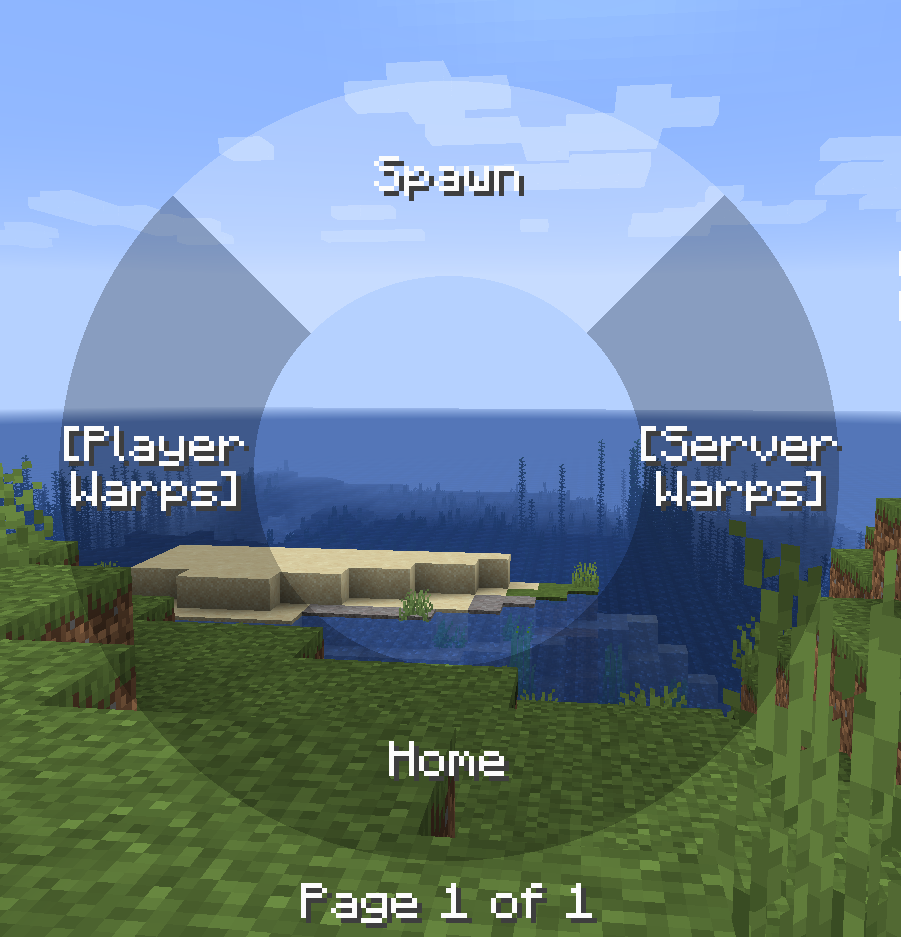
Warp radial
径向菜单的设计大量借鉴了出色的 Tool Belt 模组。
本模组需要 BML 1.0.18 或更高版本,这是因为本模组中使用的通用径向实现是由 BML 提供的,以便更广泛地使用。
功能
- 传送至不同地点,包括家园、出生点、管理员在服务器上添加的服务器传送点以及带有冷却时间的玩家传送点。
- 冷却时间可以设置为禁用、全局生效或按传送类别单独设置。
- 高度可配置,允许设定哪些传送点可用,以及各类别的冷却时间(如有)。
命令
除了出生点(如果该类型被允许)外,所有不同的传送点都可以通过命令设置(你也可以使用径向菜单来添加传送点)。
- warpradial(基础命令)
- wr(替代基础命令)
- wr home set
- wr home remove
- wr warp add "x"
- wr warp remove "x"
- wr serverwarp add "x"(仅限管理员和拥有创建权限的玩家)
- wr serverwarp remove "x"(仅限管理员和拥有删除权限的玩家)
- wr permission serverwarp create "player"
- wr permission serverwarp delete "player"
径向菜单
按下默认按键绑定 'r' 键打开径向菜单,然后可以使用鼠标悬停在物品上。如果选中的不是分类,松开鼠标即可传送到该地点;你也可以直接点击传送点进行传送。
你还可以通过右键点击分类和物品来添加或删除传送点。
服务器传送点和玩家传送点是分类,需要点击它们才能查看该类下的传送点。
每页最多显示 7 个物品,可以使用鼠标滚轮切换页面。
传送点
传送点存储在世界目录中,适用于单人世界和服务器世界。当玩家连接服务器,或者管理员/拥有权限的玩家添加或删除新的服务器传送点,或玩家创建玩家传送点时,这些传送点信息会发送给玩家。
可以禁用玩家传送点,此时径向菜单将仅包含三个主要项目。如果除一个项目外的所有项目都被禁用,且最后一个未禁用的项目是一个分类,则直接显示该分类内的传送点,而无需先选择该分类。
Warp radial
The radial menu is heavily inspired by the brilliant Tool Belt mod.
This mod requires BML version 1.0.18 or above, this is because the general radial implementation used in this mods is implemented in BML for wider use.
Features
- Warp to different points, this includes home, spawn, server warps added by ops on the server or player warps with cooldown.
- Cooldown can be either disabled, global or per warp category.
- Highly configurable in terms of what warps are allowed, the cooldown if any per category.
Commands
Commands can are used to set all the different warp points besides spawn if that type is allowed (You could also use the radial menu to add warps)
- warpradial (Base command)
- wr (Alternative base command)
- wr home set
- wr home remove
- wr warp add "x"
- wr warp remove "x"
- wr serverwarp add "x" (Only ops and players with create permissions)
- wr serverwarp remove "x" (Only ops and players with delete permissions)
- wr permission serverwarp create "player"
- wr permission serverwarp delete "player"
Radial
The radial menu is opened when the default keybind 'r' is pressed, then the mouse can be used to hover over items and it that item is not a category when releases you will warp to that point, you can also click on warp points to teleport to them.
You can also add and remove warps points by right clicking on categories and items.
The server and player warps are categories and requires you to click on them to view the warp points of that type.
There can be 7 items on each page and the scroll wheel can be used to switch pages.
Warps
Warps are stored in the world directory both for singleplayer worlds and server worlds. These warps are sent to the player when the player connects to the server or a new server warp is added / removed by a op / player with permission or player warp created by the player.
It is possible to disable player warps and then the radial will only have three main items. If all but one item is disabled and the last non-disabled item is a category the warps inside that category is shown instead of first having to select that category.
评论 0
登录后参与评分
还没有评论,来抢沙发吧
