
网络摄像头
允许玩家广播其网络摄像头的模组和插件。
下载
⚠️ 警告
此插件需要在服务器上特别设置才能工作。
如果您是服务器管理员,请先阅读“服务器端设置”部分。
功能
- 高质量的网络摄像头广播
- H.264 视频编码
- 使用自定义协议通过 UDP 传输视频
- AES 加密
- 码率控制
- 视频分辨率控制
- 不同的显示形状
- 显示大小和位置配置
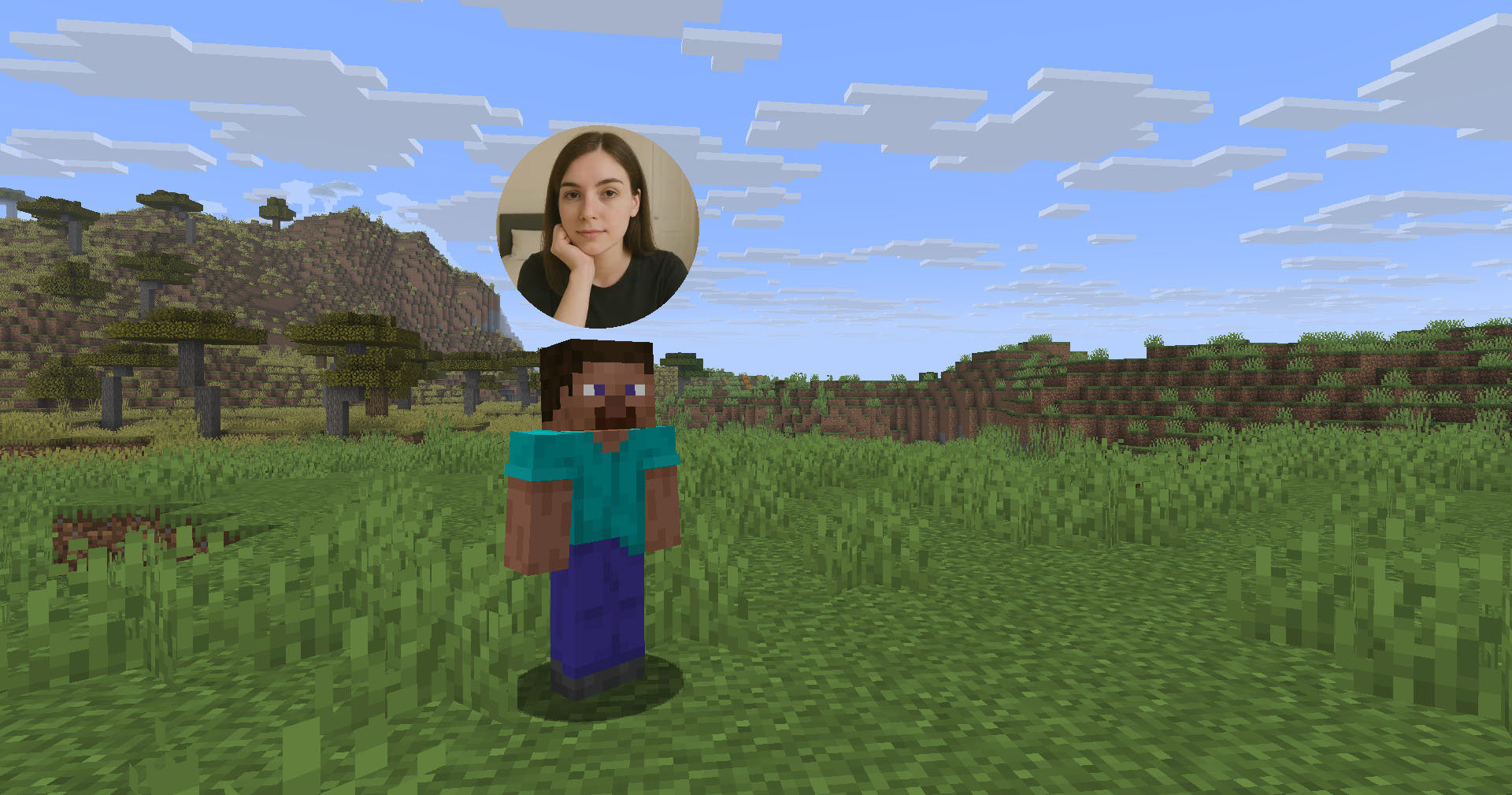
- 在玩家模型面部显示
- 显示距离限制
- 网络摄像头广播和查看权限
- 高级客户端配置(需要 Mod Menu 和 Cloth Config API)
- 能够隐藏选定玩家的摄像头
- Velocity 代理支持
- 与 ReplayMod 和 Flashback 兼容
客户端用法
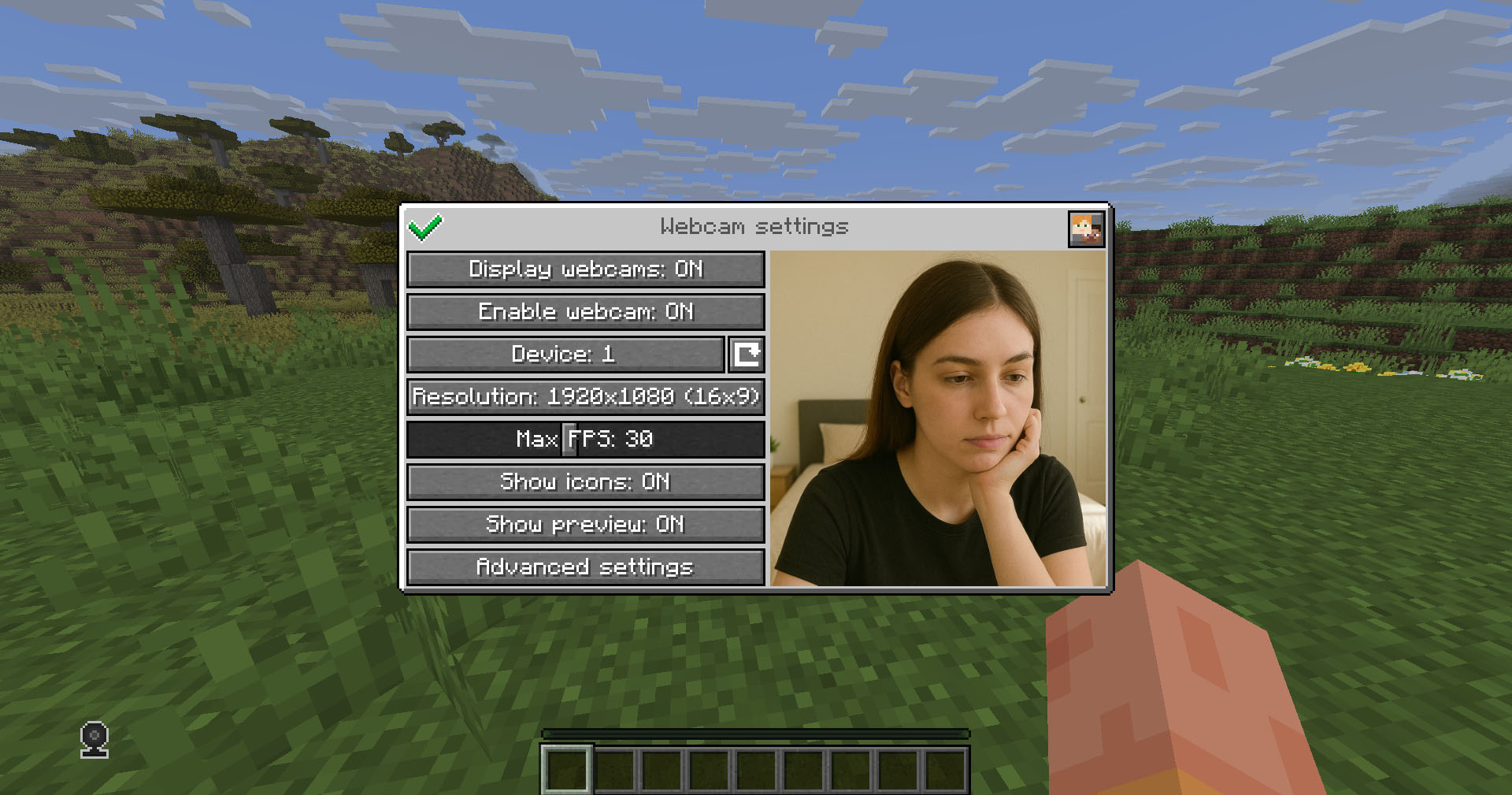
将模组放入 mods 目录中(如果您使用的是 Fabric,请同时包含 Fabric API)。可以通过热键(默认为 C)打开设置菜单。
图标
| 图标 | 描述 |
|---|---|
 |
您的摄像头已启用 |
 |
您的摄像头已禁用 |
 |
正在连接到摄像头服务器 |
 |
未连接到摄像头服务器 |
加密
网络连接是加密的,但我们不保证其安全性。使用风险自负!
服务器端设置
Webcam 插件使用 UDP 套接字来传输视频数据包。
因此,您需要在服务器的防火墙和控制面板(如果有)中打开一个 UDP 端口,以使 Webcam 服务器正常工作。默认情况下,这是端口 25454/udp。您可以在服务器配置中更改端口。
如果您使用的是 Velocity,请参阅“代理端设置”。
服务器配置
位置:
- Fabric / Quilt / NeoForge:
config/webcam/server.json - Bukkit / Spigot / Paper:
plugins/webcam/server.json
以下是带有描述的默认值:
{
  "port": 25454,                 // 摄像头 UDP 服务器端口。这不能与其他使用的 UDP 端口冲突(例如 Simple Voice Chat 端口)
  "bind_address": "",            // 绑定的摄像头服务器地址。留空以使用通配符 (0.0.0.0) 地址。例如,使用 "127.0.0.1" 仅接受本地连接
  "host": "",                    // 客户端用于连接到摄像头服务器的主机名。留空以使用玩家连接 Minecraft 的地址。可以是简单地址或带端口的地址。如果服务器被代理,则忽略此项
  "keep_alive_period": 1000,     // 发送保活数据包的周期,单位为毫秒
  "permission_check_period": 60, // 检查 webcam.broadcast 和 webcam.view 权限的周期,单位为刻
  "max_display_distance": 100.0, // 其他玩家可以看到其摄像头的玩家距离,单位为方块
  "display_on_face": false,      // 是否在玩家模型面部或头顶上方显示摄像头
  "display_shape": "round",      // 显示在玩家头顶上方的摄像头的形状。可能的值:"round"、"square"
  "display_offset_y": 1.3,       // 显示在玩家头顶上方的摄像头的 Y 轴偏移量
  "display_size": 1.2,           // 显示在玩家头顶上方的摄像头的大小
  "hide_nicknames": true,        // 是否在其摄像头启用时隐藏玩家的昵称
  "display_self_webcam": true,   // 是否向玩家自己显示其摄像头
  "synced": {                    // 这些设置会与客户端同步
    "image_dimension": 360,      // 方形摄像头图像的边长维度
    "mtu": 1100,                 // 数据包的最大传输单元。如果摄像头图像开始看起来有故障或完全无法到达,您可以降低此值
    "bitrate": 500               // 目标视频码率(kbps)
  },
  "messages": {                  // 发送给玩家在不同情况下的消息的自定义翻译。可能包含占位符 - %s
    "incompatible_mod_version": "不兼容的 Webcam 版本。您的 - %s,服务器的 - %s" // 如果玩家有不兼容的 Webcam 模组版本,将发送给玩家的消息。您可以将其设置为空以禁用发送此消息
  }
}
命令
/webcamconfig <field> [new_value]- 读取/更新配置值的命令。需要webcam.command.config权限或 OP 权限。
权限
webcam.command.config- 修改 Webcam 服务器配置的权限(默认:OP 级别)webcam.broadcast- 广播摄像头的权限(默认:true)webcam.view- 查看摄像头的权限(默认:true)
代理端设置
Webcam 的 Velocity 插件在后端的 Minecraft 服务器之间代理 Webcam 服务器,并允许通过单一端口连接到不同的 Webcam 服务器。
因此它充当 UDP 代理的角色。
如果您在同一台机器上运行代理和后端服务器,则需要为它们配置不同的端口。请参阅 在服务器上设置/服务器配置 和 在代理上设置/代理配置
代理配置
服务器配置文件位于 plugins/webcam/config.properties
以下是带有描述的默认值:
#Webcam 代理配置

# Webcam UDP 服务器端口。此端口不得与其他使用的 UDP 端口(例如 Simple Voice Chat 端口)冲突
port=25454

# 绑定 Webcam 服务器的地址。留空以使用通配符 (0.0.0.0) 地址。例如,使用 "127.0.0.1" 仅接受本地连接
bind_address=

# 客户端用于连接 Webcam 服务器的主机名。留空以使用玩家连接 Minecraft 的地址。可以是简单地址或带端口的地址。这将覆盖后端服务器中配置的值
host=
许可证
本模组采用 禁止未经授权分发许可证,完整文本可在 找到
摘要
-
整合包: 您可以在整合包中使用此模组,但不得直接包含其文件。相反,应将其列为指向官方下载来源的依赖项(模组引用)。
-
开发者: 您可以创建附加组件或集成对该模组的支持,但不得复制其任何代码。相反,应使其成为从官方源下载的独立依赖项。
-
重新分发限制: 未经作者明确许可,您不得公开重新上传或分享模组的代码或编译后的文件。个人用途的分叉是可以的,但分发编译后的分叉版本是不允许的。
-
个人使用: 您可以出于个人使用目的使用和修改该模组,但任何更改必须保持私密,不得公开分享。
-
官方下载要求: 任何依赖项或整合包引用都必须指向作者提供的官方下载源。
Webcam
Mod and plugin that allows players to broadcast their webcams
Downloads
⚠️ Warning
This plugin requires special setup on server to work.
If you are a server administrator, please read the section Setup on server first
Features
- High-quality webcam broadcasting
- H.264 video codec
- Video transmission via UDP using custom protocol
- AES encryption
- Bitrate control
- Video resolution control
- Different display shapes
- Display size and position configuration
- Display on player model face
- Display distance limit
- Webcam broadcast and view permissions
- Advanced client configuration (Mod Menu & Cloth Config API required)
- Ability to hide selected players' webcams
- Velocity proxy support
- Compatibility with ReplayMod & Flashback
Client Usage
Put the mod in the mods directory (with the Fabric API if you are using Fabric). The settings menu can be opened by hotkey (C by default)
Icons
| Icon | Description |
|---|---|
|
Your webcam is enabled |
|
Your webcam is disabled |
|
Connecting to Webcam server |
|
Not connected to Webcam server |
Encryption
Webcam connection is encrypted, but we don't guarantee the security of it. Use at your own risk!
Setup on server
Webcam plugin uses UDP socket to transfer video packets.
So you need to open a UDP port in your server's firewall and panel (if present) to make Webcam server work. This is port 25454/udp by default. You can change the port in server config
If you are using Velocity, see Setup on proxy
Server config
Location:
- Fabric / Quilt / NeoForge:
config/webcam/server.json - Bukkit / Spigot / Paper:
plugins/webcam/server.json
Here are the default values with their descriptions:
{
  "port": 25454,                 // Webcam UDP server port. This must not clash with any other used UDP port (like Simple Voice Chat port)
  "bind_address": "",            // Address to bind the Webcam server to. Leave blank to use the wildcard (0.0.0.0) address. F.e. use "127.0.0.1" to accept only local connections
  "host": "",                    // The hostname that clients should use to connect to the Webcam server. Leave blank to use the address, that player is connected to Minecraft with. Can be a simple address or an address with port. This will be ignored, if the server is proxied
  "keep_alive_period": 1000,     // Period of sending keep alive packets is milliseconds
  "permission_check_period": 60, // Period of checking webcam.broadcast and webcam.view permissions in ticks
  "max_display_distance": 100.0, // The distance in blocks from player, in which other players can see his webcam
  "display_on_face": false,      // Whether to display webcam on player model face or above his head
  "display_shape": "round",      // Shape of webcams displayed above players' head. Possible values: "round", "square"
  "display_offset_y": 1.3,       // Y offset of webcams displayed above players' head
  "display_size": 1.2,           // Size of webcams displayed above players' head
  "hide_nicknames": true,        // Whether to hide player's nickname if his webcam is enabled
  "display_self_webcam": true,   // Whether to show the player's webcam to himself
  "synced": {                    // These settings are synchronized with clients
    "image_dimension": 360,      // Side dimension of square webcam images
    "mtu": 1100,                 // Maximum Transmission Unit of packets. You can lower this, if image on webcam starts look glitchy or not arrives at all
    "bitrate": 500               // Target video bitrate (kbps)
  },
  "messages": {                  // Custom transtalions for messages, that are sent to players in different situations. May contain placeholders - %s
    "incompatible_mod_version": "Incompatible Webcam version. Your - %s, server's - %s" // The message that will be sent to player if he has incompatible Webcam mod version. You can set this to empty to disable sending this message
  }
}
Commands
/webcamconfig <field> [new_value]- command to read/update config values. Requireswebcam.command.configpermission or OP.
Permissions
webcam.command.config- permission to modify Webcam server config (default: OP Level)webcam.broadcast- permission to broadcast webcam (default: true)webcam.view- permission to view webcams (default: true)
Setup on proxy
Webcam has Velocity plugin that proxies Webcam servers on the backend MC servers and allows to connect to different Webcam servers through the single port.
So it acts like a UDP proxy.
If you running proxy and backend servers on the same machine, you need to configure different ports for them. See Setup on server/Server config and Setup on proxy/Proxy config
Proxy config
Server config is located in plugins/webcam/config.properties
Here are the default values with their descriptions:
#Webcam proxy config

# Webcam UDP server port. This must not clash with any other used UDP port (like Simple Voice Chat port)
port=25454

# Address to bind the Webcam server to. Leave blank to use the wildcard (0.0.0.0) address. F.e. use "127.0.0.1" to accept only local connections
bind_address=

# The hostname that clients should use to connect to the Webcam server. Leave blank to use the address, that player is connected to Minecraft with. Can be a simple address or an address with port. This will override configured values on backend server's
host=
License
This mod is licensed under No Unauthorized Distribution License, which full text can be found at
Summary
-
Modpacks: You can use this mod in modpacks, but you must not include its files directly. Instead, list it as a dependency (mod reference) that points to an official download source.
-
For Devs: You’re allowed to create addons or integrate support for the mod, but you must not copy any of its code. Instead, make it an external dependency that gets downloaded from an official source.
-
Redistribution Limits: You cannot re-upload or share the mod’s code or compiled files publicly without the author’s explicit permission. Forking for personal use is okay, but distributing a compiled fork is not allowed.
-
Personal Use: You may use and modify the mod for personal use, but any changes must remain private and not be shared publicly.
-
Official Download Requirement: Any dependency or modpack reference must point to the official download sources provided by the author.

下载 Webcam
需要联机服务器吗?
稳定流畅、一键部署,几分钟即可和朋友联机开服
最低仅需 8 元/月 即可畅快联机
下载 Webcam
需要联机服务器吗?
稳定流畅、一键部署,几分钟即可和朋友联机开服
最低仅需 8 元/月 即可畅快联机
下载 Webcam
需要联机服务器吗?
稳定流畅、一键部署,几分钟即可和朋友联机开服
最低仅需 8 元/月 即可畅快联机
下载 Webcam
需要联机服务器吗?
稳定流畅、一键部署,几分钟即可和朋友联机开服
最低仅需 8 元/月 即可畅快联机
下载 Webcam
需要联机服务器吗?
稳定流畅、一键部署,几分钟即可和朋友联机开服
最低仅需 8 元/月 即可畅快联机
下载 Webcam
需要联机服务器吗?
稳定流畅、一键部署,几分钟即可和朋友联机开服
最低仅需 8 元/月 即可畅快联机
下载 Webcam
需要联机服务器吗?
稳定流畅、一键部署,几分钟即可和朋友联机开服
最低仅需 8 元/月 即可畅快联机
下载 Webcam
需要联机服务器吗?
稳定流畅、一键部署,几分钟即可和朋友联机开服
最低仅需 8 元/月 即可畅快联机
下载 Webcam
需要联机服务器吗?
稳定流畅、一键部署,几分钟即可和朋友联机开服
最低仅需 8 元/月 即可畅快联机
下载 Webcam
需要联机服务器吗?
稳定流畅、一键部署,几分钟即可和朋友联机开服
最低仅需 8 元/月 即可畅快联机
Minecraft 26.3 更新
关于这个资源的讨论、问题反馈与使用心得
还没有讨论,来发第一帖吧
你是这个资源的作者?登录后可认领此资源。
相似资源
 模组

一个用于收集生物掉落物的多区块模组。
 模组

显示你正在注视的方块的信息。(适用于 Minecraft 1.16+ 的 Hwyla/Waila 分支)
 模组
使用 JavaScript 编辑配方、添加自定义物品、编写世界事件!
 模组

查看物品与配方
 模组
在游戏画面角落显示附近世界地形、玩家、生物和实体的地图。可创建路径点,帮助你找到标记过的位置。
 模组
AE2:一款流行的自动化与存储模组
评论 0
登录后参与评分
还没有评论,来抢沙发吧