
你可以通过 GET 请求发送指令和消息。
由此衍生出许多应用场景;以下是一些示例:
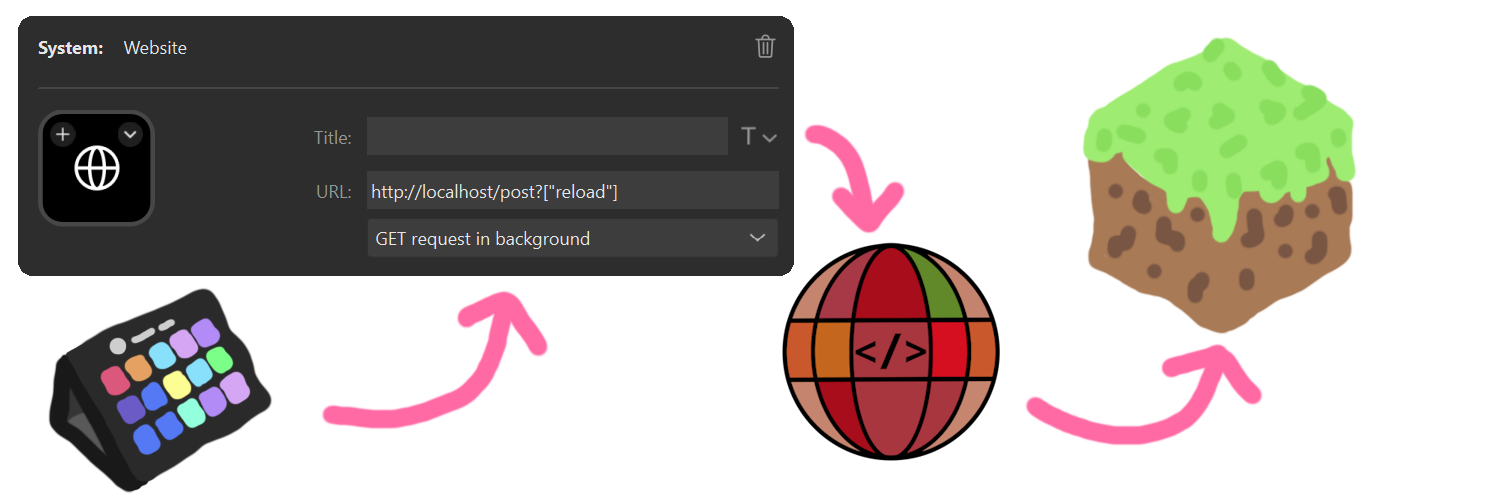
- 从 Elgato Stream Deck 执行指令(启用“后台获取请求”的“网站”按钮)
- 创建待执行的指令列表并运行它们(自动化)
- 外部应用可以与游戏进行交互
你可以在暂停菜单中指定端口(默认值:80)。
新增了一个 Web UI,允许你生成用于执行指令或发送聊天消息的链接。新网页还包含了 Spyglass 的指令补全和语法高亮功能,这有助于更轻松地调试。
在最新版本中,你还可以接收指令的执行结果。在网页上,你可以只执行一条指令并立即获得结果。当通过 GET 请求执行指令时,你也可以获取未格式化的原始数据。
访问 http://localhost/get?"/list" 获取来自 /list 指令的返回示例:
{
"commandResult":"translation{key='commands.list.players', args=[1, 8, literal{BlauToad}[style={clickEvent=class_10610[command=/tell BlauToad ],hoverEvent=class_10611[entity=net.minecraft.class_2568$class_5248@e5c10f33],insertion=BlauToad}]]}",
"commandResultText":"当前在线玩家共 1 人(上限 8 人):BlauToad",
"debug":0
}
You can send commands and messages with a GET request.
With that, there are many use cases; some examples:
- Executing commands from an Elgato Stream Deck (using the "Website" button with "Get Request in the Background" enabled)
- Making lists of commands to execute and running them (automation)
- External apps can interact with the game You can specify the port in the pause menu (default: 80).
With a new web UI, that allows you to generate the link to execute the command or send the chat message. The new webpage also includes the Spyglass command completion and syntax highlighting. This allows for easier debugging.
With the newest version, you can also receive the command result. On the webpage, you can just execute one command and instantly get the result. When you execute the command with the GET request, you can also get the unformatted data.
Sample return from the command /list from visiting http://localhost/get?"/list"
{
"commandResult":"translation{key='commands.list.players', args=[1, 8, literal{BlauToad}[style={clickEvent=class_10610[command=/tell BlauToad ],hoverEvent=class_10611[entity=net.minecraft.class_2568$class_5248@e5c10f33],insertion=BlauToad}]]}",
"commandResultText":"There are 1 of a max of 8 players online: BlauToad",
"debug":0
}

下载 Webcommands
需要联机服务器吗?
稳定流畅、一键部署,几分钟即可和朋友联机开服
最低仅需 8 元/月 即可畅快联机
下载 Webcommands
需要联机服务器吗?
稳定流畅、一键部署,几分钟即可和朋友联机开服
最低仅需 8 元/月 即可畅快联机
下载 Webcommands
需要联机服务器吗?
稳定流畅、一键部署,几分钟即可和朋友联机开服
最低仅需 8 元/月 即可畅快联机
下载 Webcommands
需要联机服务器吗?
稳定流畅、一键部署,几分钟即可和朋友联机开服
最低仅需 8 元/月 即可畅快联机
下载 Webcommands
需要联机服务器吗?
稳定流畅、一键部署,几分钟即可和朋友联机开服
最低仅需 8 元/月 即可畅快联机
下载 Webcommands
需要联机服务器吗?
稳定流畅、一键部署,几分钟即可和朋友联机开服
最低仅需 8 元/月 即可畅快联机
下载 Webcommands
下载 Webcommands
已更新至 Minecraft 官方映射 已更新至 26.1 Snapshot 1 或更高版本
关于这个资源的讨论、问题反馈与使用心得
还没有讨论,来发第一帖吧
你是这个资源的作者?登录后可认领此资源。
相似资源
 模组

显示你正在注视的方块的信息。(适用于 Minecraft 1.16+ 的 Hwyla/Waila 分支)
 模组

查看物品与配方
 模组
在游戏画面角落显示附近世界地形、玩家、生物和实体的地图。可创建路径点,帮助你找到标记过的位置。
 模组
使用 JavaScript 编辑配方、添加自定义物品、编写世界事件!
 模组
AE2:一款流行的自动化与存储模组
 模组
添加区块认领和玩家组队功能,并与 Xaero's Minimap 和 World Map 集成
评论 0
登录后参与评分
还没有评论,来抢沙发吧