
WhatIsInThatShelf (WIITS)
再也不用疑惑架子上放着什么了。
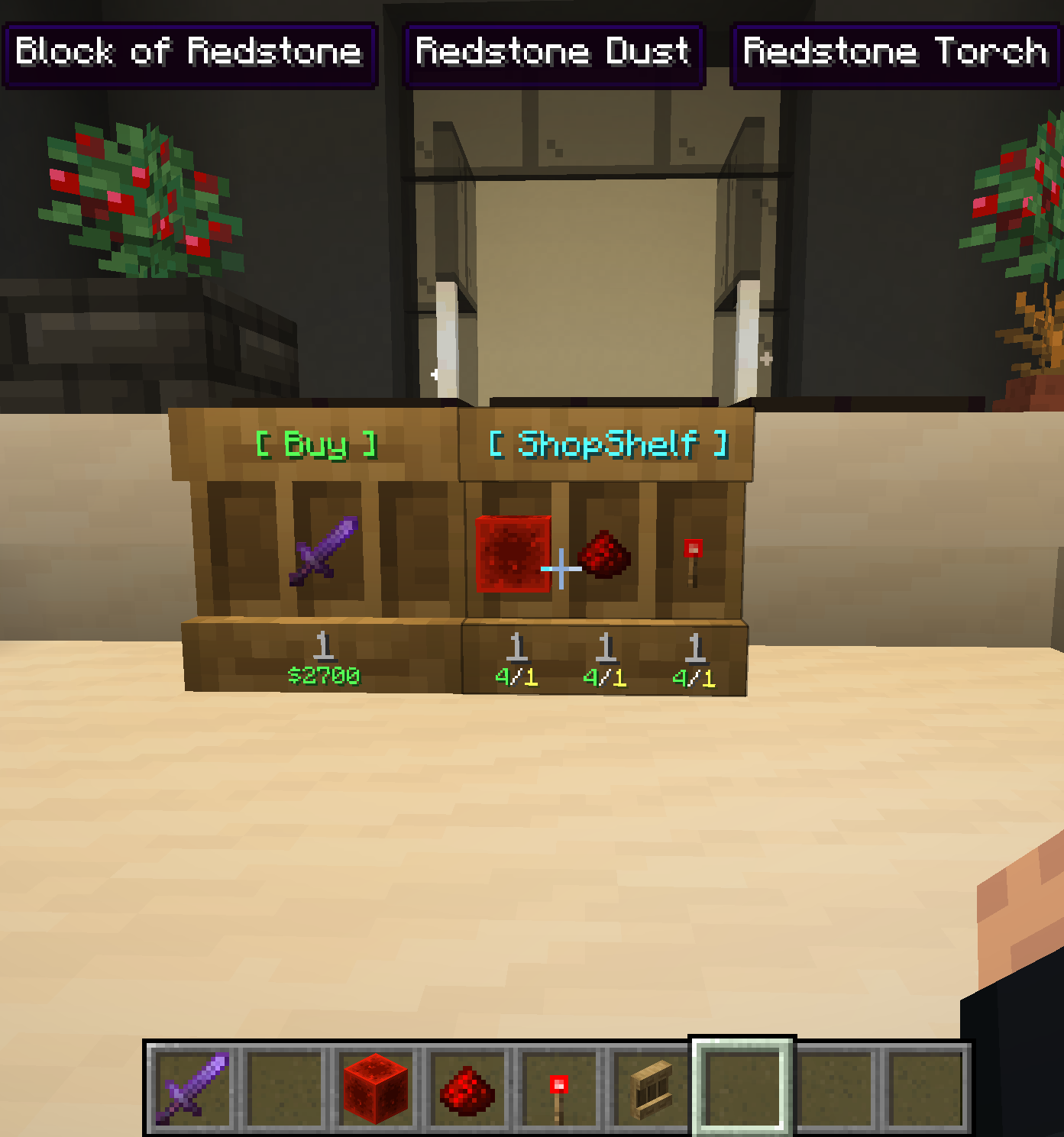
WhatIsInThatShelf 是一款轻量级实用模组,为架子(Shelf)方块添加了一个干净且高度可配置的 HUD 工具提示。你无需打开物品栏来检查物品,只需注视架子即可看到里面确切的内容。
✨ 主要功能
? 智能物品检测
当你注视架子时,模组会识别准星所针对的具体槽位,并即时显示其内容。
- 三重模式: 如果你希望一次性查看所有内容,可以在设置中启用“三重模式”。这将同时显示架子的三个槽位。
- 可调间距: 你可以使用“间距”滑块微调这三个工具提示之间的距离,无论它们是垂直堆叠还是水平排列。
?️ 实时配置
无需重启游戏即可更改设置。按下 “I”(默认按键,可重新绑定)即可打开专用的设置界面。
- 视觉反馈: 由于设置菜单可以在注视架子时使用,因此你可以在切换选项或拖动滑块时实时看到 HUD 的变化。
- 动态缩放: “缩放”滑块(0.25x 至 3.0x)允许你根据偏好调整工具提示的大小。
- 配置文件访问: 菜单中有一个专用按钮,可即时打开你的配置文件文件夹,方便进行手动编辑。
? 智能定位
HUD 包含六个锚点:左上、中、右上,以及左下、中、右下。
- 聊天栏感知: 如果你使用底部位置,当你打开聊天栏时,工具提示会自动跳至顶部,以免遮挡输入。
- 经验条安全: 底部中间位置已预配置了特定的边距,以确保其安全地位于经验条和快捷栏上方。
? 内容与样式
你可以完全控制 HUD 上显示的信息:
- 数据开关: 选择显示或隐藏物品属性、药水效果、模组名称以及高级技术信息。
- 数量格式: 以七种不同的位置显示物品数量,例如在名称上方、名称之后,甚至相对于物品描述文本的位置。
- 颜色覆盖: 模组支持自定义十六进制代码(
&#RRGGBB)、Minecraft 颜色代码(&6)以及命名颜色,用于模组名称、属性等。 - 透明模式: 你可以切换背景框的开启或关闭状态,以创建浮动文字效果,实现更极简的用户界面。
⚙️ 兼容性与要求
- WTHIT 集成: 内置兼容性防止工具提示重叠。当注视架子时,WIITS 会告知 WTHIT 隐藏其默认的方块工具提示,从而只显示物品信息。
- 要求: 需要 Minecraft 1.21.x、Fabric Loader 和 Fabric API。
WhatIsInThatShelf (WIITS)
Never wonder what's sitting on that shelf again.
WhatIsInThatShelf is a lightweight utility mod that adds a clean, highly houses-configurable HUD tooltip for Shelf blocks. Instead of opening an inventory to check your items, simply look at a shelf to see exactly what is inside.
✨ Primary Features
? Smart Item Detection
When looking at a shelf, the mod identifies the specific slot your crosshair is targeting and displays its contents instantly.
- Triple Mode: If you prefer to see everything at once, you can enable Triple Mode in the settings. This displays all three shelf slots simultaneously.
- Adjustable Spacing: You can use the "Gap" slider to fine-tune the distance between these three tooltips, whether they are stacked vertically or spread horizontally.
?️ Live Configuration
Forget about restarting your game to change settings. Pressing "I" (the default, rebindable key) opens a specialized settings screen.
- Visual Feedback: Because the settings menu can be used while looking at a shelf, you can see HUD changes in real-time as you toggle options or move sliders.
- Dynamic Scaling: The "Scale" slider (0.25x to 3.0x) allows you to resize the tooltip based on your preference.
- Config Folder Access: A dedicated button in the menu opens your configuration folder instantly, making manual edits easy.
? Intelligent Positioning
The HUD includes six anchor points: Top Left, Middle, and Right, and Bottom Left, Middle, and Right.
- Chat Awareness: If you use a Bottom position, the tooltip will automatically jump to the Top whenever you open the chat bar so it doesn't block your typing.
- XP Bar Safety: The Bottom-Middle position is pre-configured with a specific margin to sit safely above your experience bar and hotbar.
? Content & Style
You have total control over what information is displayed on the HUD:
- Data Toggles: Choose to show or hide item attributes, potion effects, mod names, and advanced technical info.
- Amount Formatting: Display item counts in seven different positions, such as above the name, after the name, or even relative to the item lore.
- Color Overrides: The mod supports custom Hex codes (
&#RRGGBB), Minecraft color codes (&6), and named colors for mod names, attributes, and more. - Transparency Mode: You can toggle the background box on or off to create a floating text effect for a more minimal UI.
⚙️ Compatibility & Requirements
- WTHIT Integration: Built-in compatibility prevents overlapping tooltips. WIITS tells WTHIT to hide its default block tooltip when looking at a shelf so only the item info is visible.
- Requirements: Requires Minecraft 1.21.x, Fabric Loader, and Fabric API.

下载 WhatIsInThatShelf
下载 WhatIsInThatShelf
下载 WhatIsInThatShelf
下载 WhatIsInThatShelf
下载 WhatIsInThatShelf
下载 WhatIsInThatShelf
需要联机服务器吗?
稳定流畅、一键部署,几分钟即可和朋友联机开服
最低仅需 8 元/月 即可畅快联机
下载 WhatIsInThatShelf
下载 WhatIsInThatShelf
需要联机服务器吗?
稳定流畅、一键部署,几分钟即可和朋友联机开服
最低仅需 8 元/月 即可畅快联机
暂无更新日志
关于这个资源的讨论、问题反馈与使用心得
还没有讨论,来发第一帖吧
你是这个资源的作者?登录后可认领此资源。
相似资源
 模组
缓冲的原始输入和线程化的事件轮询
 模组

一个用于收集生物掉落物的多区块模组。
 模组

显示你正在注视的方块的信息。(适用于 Minecraft 1.16+ 的 Hwyla/Waila 分支)
 模组
使用 JavaScript 编辑配方、添加自定义物品、编写世界事件!
 模组

查看物品与配方
 模组

原版世界生成优化模组
评论 0
登录后参与评分
还没有评论,来抢沙发吧