WingDepo
兼容性说明
WingDepo 专为 MysticMC 以及拥有可通过坐标关联远程开启箱子的物品(例如 Mystic wings)的服务器设计。它并非通用的箱子整理模组。
WingDepo 通过在你背包满时自动将选定的方块存入翼关联的箱子中,使方块收集变得更加轻松。
当你的背包变满时,WingDepo 会检查你配置好的规则,打开正确的翼关联箱子,存入匹配的方块,关闭箱子,并让你回到之前使用的快捷栏槽位。
它还支持可选的高级规则,可以在存入方块前打开 /stonecutter 或 /wb,允许你先手动合成或切割方块。
功能
- 为不同类型的方块配置多个翅膀
- 使用来自快捷栏或主背包中的翅膀
- 针对单个方块或创建自定义方块预设
- 创建如
deepslate + tuff 这样的预设
- 自动将目标方块存入翼关联的箱子
- 支持
/wb 和 /stonecutter 的高级规则
- 支持多个配置文件
- 可配置的冷却时间和时间选项
使用方法
打开配置
使用以下任一方式打开 WingDepo 配置:
- 按下默认键位
O
- 运行
/wd options
- 运行
/wingdepo options
- 通过 Mod Menu 打开
基础设置
- 打开配置界面。
- 为你的配置文件命名。
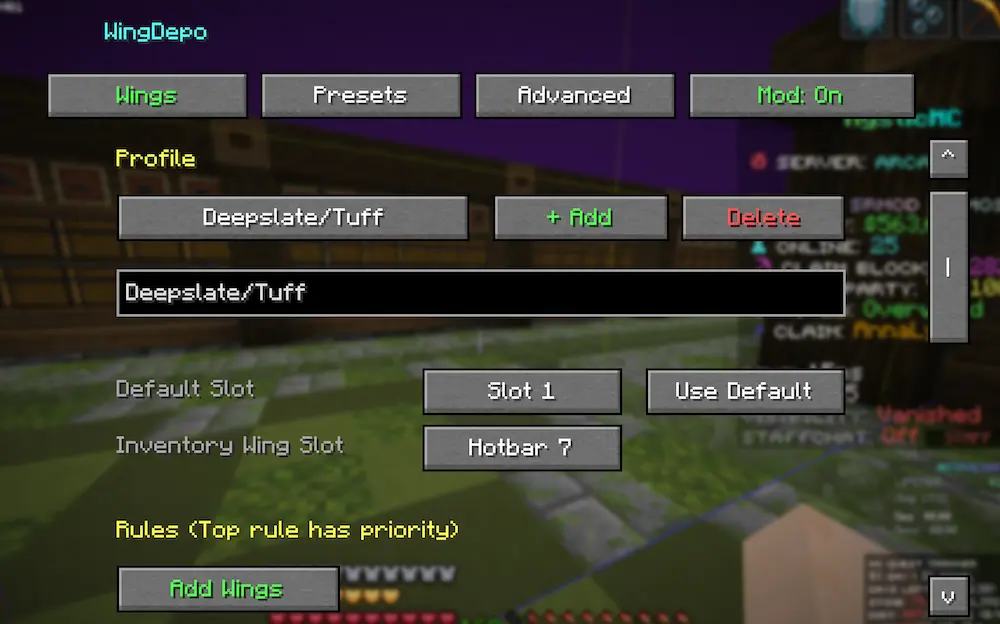
- 进入 Presets(预设)标签页。
- 创建一个预设。
- 添加一组翅膀需要处理的方块。
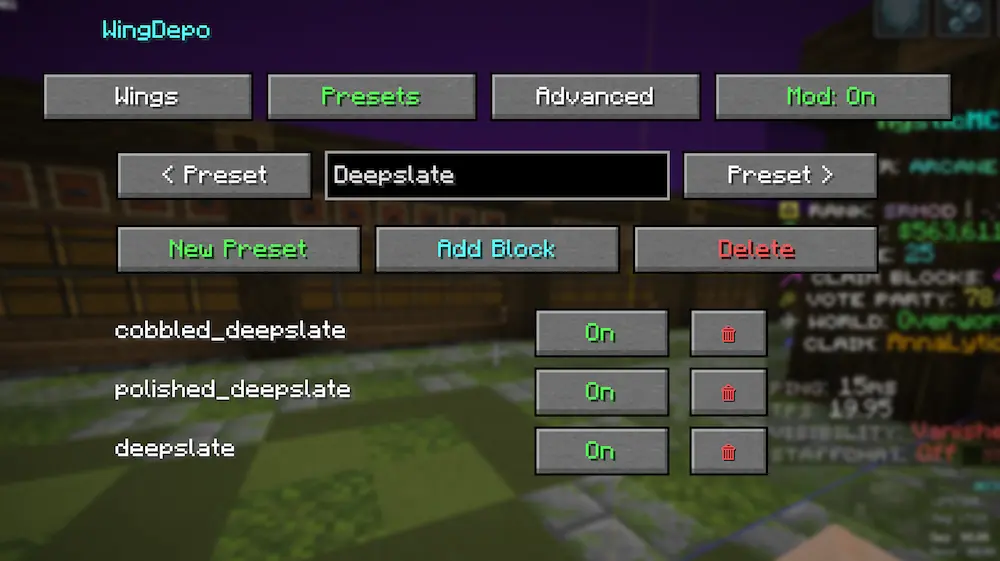
- 返回 Wings(翅膀)标签页。
- 点击 Add Wings(添加翅膀)。
- 选择该翅膀的目标类型:
- 选择翅膀所在的位置:
- 对其他翅膀重复上述步骤。
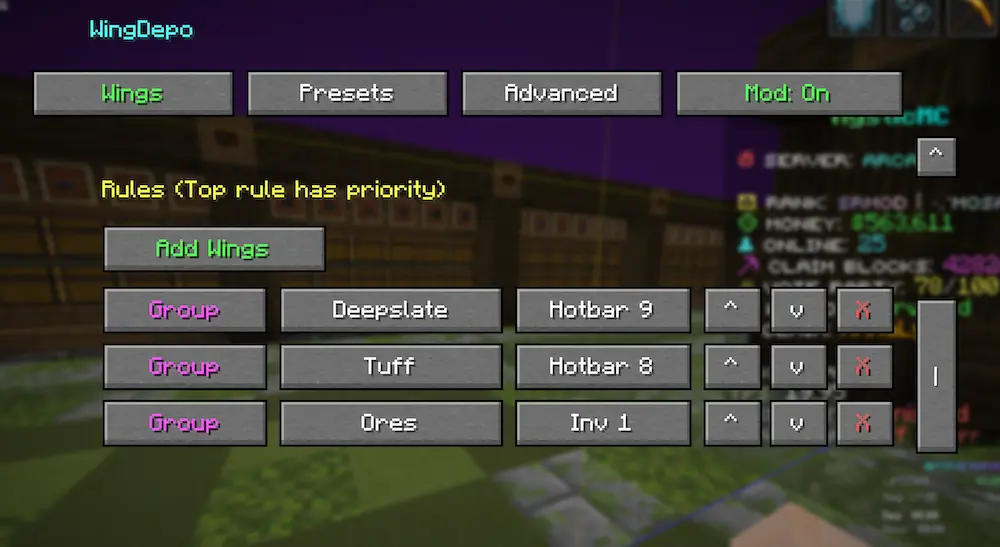
配置完成后,每当你的背包变满时,WingDepo 会自动将匹配的方块存入对应的翼关联箱子中。
高级规则
高级规则允许 WingDepo 在存入方块之前打开 /wb 或 /stonecutter。
如果你希望在方块被存入翼关联箱子前先进行合成或切割,这将非常有用。
设置高级规则
- 进入 Advanced(高级)标签页。
- 点击 + Add Rule(添加规则)。
- 选择已配置好匹配翅膀的槽位。
- 选择触发命令的方块。
- 选择以下任一选项:
WBStonecutter
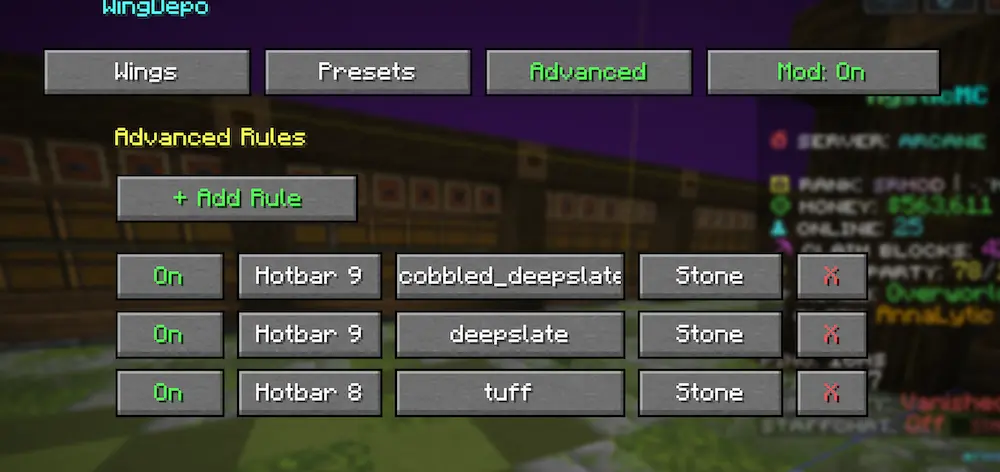
当你的背包变满且存在该方块时,WingDepo 会打开 /wb 或 /stonecutter。
完成合成或切割后,按下 Esc 键。WingDepo 将继续执行并将目标方块存入箱子。
重要提示
如果你希望合成后的输出物也被存入箱子,必须将该输出方块添加到同一个预设中。
例如,如果你的预设包含 tuff,而你打算制作 polished tuff,则需将 polished tuff 也添加到该预设中。
WingDepo 仅存入包含在你配置的单一方块目标或预设中的方块。
WingDepo
Compatibility Notice
WingDepo is only designed for MysticMC and servers with items that can remotely open chests linked by coordinates, such as Mystic wings. It is not a general chest-sorting mod.
WingDepo makes block collecting easier by automatically depositing selected blocks into wing-linked chests when your inventory fills up.
When your inventory becomes full, WingDepo checks your configured rules, opens the correct wing-linked chest, deposits the matching blocks, closes the chest, and returns you to the hotbar slot you were using.
It also supports optional advanced rules that can open /stonecutter or /wb before depositing, allowing you to craft or cut blocks manually first.
Features
- Configure multiple wings for different block types
- Use wings from either your hotbar or main inventory
- Target a single block or create custom block presets
- Create presets such as
deepslate + tuff
- Automatically deposit targeted blocks into wing-linked chests
- Optional advanced rules for
/wb and /stonecutter
- Supports multiple profiles
- Configurable cooldowns and timing options
How To Use
Opening The Config
Open the WingDepo config with any of the following:
- Press
O, the default keybind
- Run
/wd options
- Run
/wingdepo options
- Open it through Mod Menu
Basic Setup
- Open the config.
- Name your profile.
- Go to the Presets tab.
- Create a preset.
- Add the blocks you want one pair of wings to handle.
- Go back to the Wings tab.
- Press Add Wings.
- Choose whether that wing targets:
- a single block
- a preset/group
- Select where the wings are located:
- Hotbar slot
1-9
- Inventory slot
1-27
- Repeat for any other wings.
Once configured, WingDepo will automatically deposit matching blocks into the correct wing-linked chest whenever your inventory fills up.
Advanced Rules
Advanced rules allow WingDepo to open /wb or /stonecutter before depositing blocks.
This is useful if you want to craft or cut blocks before they are sent into the wing-linked chest.
Setting Up An Advanced Rule
- Go to the Advanced tab.
- Press + Add Rule.
- Select the slot where the matching wings are configured.
- Select the block that should trigger the command.
- Choose either:
WBStonecutter
When your inventory fills and that block is present, WingDepo will open /wb or /stonecutter.
After you finish crafting or cutting, press Esc. WingDepo will continue and deposit the targeted blocks.
Important Notes
If you want crafted output to be deposited, you must add that output block to the same preset.
For example, if your preset contains tuff and you plan to make polished tuff, add polished tuff to that preset as well.
WingDepo only deposits blocks that are included in your configured single-block target or preset.


 模组

 模组
 模组

 模组
 模组
 模组
评论 0
登录后参与评分
还没有评论,来抢沙发吧