Wireless Redstone
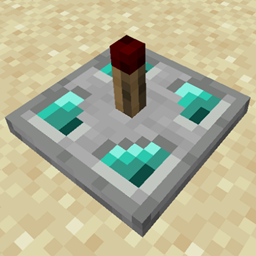
这是一个非常简单的模组,通过链接器(Linker)将红石发射器(Redstone Transmitters)与红石接收器(Redstone Receivers)关联,从而实现无线传输红石信号的功能。
红石发射器(Redstone Transmitter)
将接收到的红石信号(包括强度)传输至其编程设定的频率。
红石接收器
输出从其编程频率接收到的任何红石信号(包括强度)。
链接器
允许对无线方块(发射器和接收器)的频率进行编程。
每个频率多个发射器/接收器
红石信号通过红石发射器设定的频率进行传输,并由所有同样设置为该频率的红石接收器接收。
设置到同一频率的发射器或接收器的数量没有限制。如果多个发射器处于相同频率,则最后发生红石信号变化的发射器将成为该频率上的活动红石信号。该频率上的红石信号强度即为最后一个具有该频率并发生变化的发射器的信号强度。
使用链接器设置频率
对没有设置频率的无线方块(发射器或接收器)使用空白链接器,会创建一个新频率,并将链接器和无线方块的频率设置为该新频率。
对任意无线方块使用已设置频率的链接器,会将该无线方块的频率设置为链接器的频率。
对已设置频率的无线方块使用空白链接器,会将链接器的频率设置为该无线方块的频率。
手持链接器时按住潜行并右键点击,将清除链接器的频率。
补充信息
在无线方块上右键点击空手,会显示其设定的频率。
链接器具有工具提示,显示其频率并提供游戏内的使用说明。
Wireless Redstone
This is a very simple mod that adds the ability to transmit redstone signals wirelessly between Redstone Transmitters and Redstone Receivers linked by a Linker.
Redstone Transmitter
Transmits the redstone signal (including strength) it receives to the frequency it's programmed to.
Redstone Receiver
Outputs any redstone signal (including strength) it receives from the frequency it's programmed to.
Linker
Allows for the programming of wireless blocks' (Transmitters and Receivers) frequency.
Multiple Transmitters/Receivers per Frequency
Redstone signals are transmitted on the frequency the Redstone Transmitter is set on and received by all Redstone Receivers also set to that frequency.
There is no restriction on the number of Transmitters or Receivers that can be set to a frequency. If multiple Transmitters are on the same frequency, the last Transmitter to have a change in redstone signal will be the active redstone signal on the frequency. The redstone signal strength on a frequency is whatever strength the last Transmitter with that frequency to have a change was.
Setting Frequencies with Linkers
Using a blank Linker on a wireless block (a Transmitter or Receiver) that doesn't have a frequency set will create a new frequency and set both the Linker and the wireless block to that new frequency.
Using a Linker that is set to a frequency on any wireless blocks will set the wireless block to that frequency.
Using a blank Linker on a wireless block with a set frequency will set the Linker to the wireless block's frequency.
Sneak+Right Clicking with a Linker in your hand will clear the Linker's frequency.
Additional Info
Right Clicking on a wireless block with an empty hand will tell you the frequency it is set to.
Linkers have a tooltip stating their frequency and providing usage info in game.
评论 0
登录后参与评分
还没有评论,来抢沙发吧



