
无线红石
厌倦了为了点亮一盏灯而在整个基地里铺设红石线?在开关旁放置一个发射器,在灯旁放置一个接收器,匹配频道——搞定。无需布线,无需地板迷宫,也不会意外激活错误的活塞。
功能特性
- 发射器 — 可从任意侧面接收红石输入,并在其频道上广播信号。
- 接收器 — 输出其在频道上检测到的最强信号,行为类似于红石块。
- 频道(1–128)和频率(0–65535) — 选择任意组合即可隔离不同的网络。每个维度拥有超过 800 万种组合。
- 锁定切换 — 冻结频道/频率设置,防止意外更改。
- 私有切换 — 将频道/频率对绑定到特定玩家,这样在多人服务器中,两名玩家可以使用相同的频道而互不干扰。
- 物品提示 — 在不放置方块的情况下显示当前配置,方便在箱子中进行整理。
- 可配置范围 — 默认范围为 128 格。服务器管理员可将其提升至 1024 格,或完全禁用距离限制。
工作原理
- 合成一个发射器和一个接收器(配方见下文)。
- 放置发射器并从任意侧面为其提供红石信号——拉杆、按钮、比较器等均可。
- 在同一维度的有效范围内任意位置放置接收器。
- 右键点击任一方块以打开配置界面。匹配频道和频率。
- 接收器会镜像发射器所看到的信号强度。信号强度至关重要——比较器的输出会保持完整。
同一频道上有多个发射器怎么办?接收器会选择最强的信号。有多个接收器呢?它们都会输出相同的信号。目前不支持跨维度信号传输。
合成配方
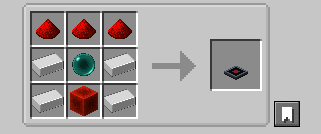
发射器 — 4 铁锭 + 3 红石粉 + 1 末影珍珠 + 1 红石块
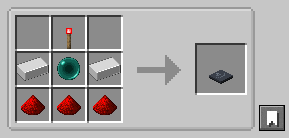
接收器 — 2 铁锭 + 3 红石粉 + 1 末影珍珠 + 1 红石火把
末影珍珠作为前置条件,将这些内容置于你击败第一个末影人之后——此时你已经探索了一定区域,但在钻石或下界级别之前即可获取。
配置
配置文件位于 config/wirelessredstone.json(首次启动时创建):
{
  "rangeLocked": true,
  "maxRange": 128
}
| 键名 | 默认值 | 作用 |
|---|---|---|
rangeLocked |
true |
为 true 时,接收器会忽略距离超过 maxRange 格的发射器。设为 false 可在单个维度内实现无限范围。 |
maxRange |
128 |
方块距离。限制在 [4, 1024] 之间。 |
编辑文件并重启 Minecraft(或专用服务器)以使更改生效。
运行环境要求
- Minecraft 26.1.x
- Java 25
- Fabric Loader 0.18.4+ 搭配 Fabric API,或者 NeoForge 26.1+
开发路线图
未来版本可能会添加:“固定强度”模式(发射器始终发出选定的 1–15 强度,而非镜像其输入)、Jade/WAILA 工具提示用于世界内检查,以及仅限所有者的私有游戏规则。
源代码
GitHub: kestalkayden/wireless-redstone — CC0‑1.0.
Wireless Redstone
Tired of running redstone wire through your whole base just to flip one lamp? Drop a transmitter next to your switch, a receiver next to your lamp, match the channel — done. No wire. No floor‑tile mazes. No accidentally powering the wrong piston.
Features
- Transmitter — takes a redstone input from any side, broadcasts on its channel.
- Receiver — outputs the strongest signal it sees on its channel, like a redstone block.
- Channel (1–128) and Frequency (0–65535) — pick any pair to keep your networks separate. Over 8 million combinations per dimension.
- Lock toggle — freezes the channel/frequency so you can't bump them by accident.
- Private toggle — binds the pair to your player, so two players can use the same channel without crossing wires on a multiplayer server.
- Item tooltips show the current config without placing the block — handy for sorting them in a chest.
- Configurable range — defaults to 128 blocks. Server admins can bump it up to 1024 or disable the limit entirely.
How it works
- Craft a transmitter and a receiver (recipes below).
- Place the transmitter and feed it redstone from any side — lever, button, comparator, whatever.
- Place the receiver anywhere in the same dimension within range.
- Right‑click either block to open the config screen. Match the channel + frequency.
- The receiver mirrors whatever signal strength the transmitter sees. Strength matters — comparator outputs travel intact.
Multiple transmitters on the same channel? The receiver picks the strongest. Multiple receivers? They all output the same. No cross‑dimension signalling (yet).
Recipes
Transmitter — 4 iron + 3 redstone + 1 ender pearl + 1 redstone block
Receiver — 2 iron + 3 redstone + 1 ender pearl + 1 redstone torch
The ender pearl gates these behind your first enderman kill — far enough out that you've explored a bit, but accessible long before diamond or Nether tier.
Configuration
Config file lives at config/wirelessredstone.json (created on first launch):
{
  "rangeLocked": true,
  "maxRange": 128
}
| Key | Default | What it does |
|---|---|---|
rangeLocked |
true |
When true, receivers ignore transmitters farther than maxRange blocks. Set false for unlimited range within a dimension. |
maxRange |
128 |
Block distance. Clamped to [4, 1024]. |
Edit the file and restart Minecraft (or the dedicated server) for changes to take effect.
Requirements
- Minecraft 26.1.x
- Java 25
- Fabric Loader 0.18.4+ with Fabric API, or NeoForge 26.1+
Roadmap
Future versions may add: a "fixed strength" mode (transmitter always emits a chosen 1–15 instead of mirroring its input), Jade/WAILA tooltips for in‑world inspection, and an owner‑only Private gamerule.
Source
GitHub: kestalkayden/wireless-redstone — CC0‑1.0.

下载 Wireless Redstone Lite
下载 Wireless Redstone Lite
下载 Wireless Redstone Lite
需要联机服务器吗?
稳定流畅、一键部署,几分钟即可和朋友联机开服
最低仅需 8 元/月 即可畅快联机
下载 Wireless Redstone Lite
需要联机服务器吗?
稳定流畅、一键部署,几分钟即可和朋友联机开服
最低仅需 8 元/月 即可畅快联机
下载 Wireless Redstone Lite
下载 Wireless Redstone Lite
下载 Wireless Redstone Lite
需要联机服务器吗?
稳定流畅、一键部署,几分钟即可和朋友联机开服
最低仅需 8 元/月 即可畅快联机
下载 Wireless Redstone Lite
需要联机服务器吗?
稳定流畅、一键部署,几分钟即可和朋友联机开服
最低仅需 8 元/月 即可畅快联机
下载 Wireless Redstone Lite
下载 Wireless Redstone Lite
修复
- Jade 不再清除你选定的资源包。 安装 Jade 后,Wireless Redstone 的 Tooltip 插件缺少两个配置界面的翻译;Jade 在主屏幕中检测到了这一问题,导致游戏在每次启动时都取消选择所有资源包。现在已包含这些翻译。
备注
- 无需更改世界或配置文件。与 Minecraft 26.3 版本的 v0.3.0 修复相同。
关于这个资源的讨论、问题反馈与使用心得
还没有讨论,来发第一帖吧
你是这个资源的作者?登录后可认领此资源。
相似资源
 模组

一个用于收集生物掉落物的多区块模组。
 模组

显示你正在注视的方块的信息。(适用于 Minecraft 1.16+ 的 Hwyla/Waila 分支)
 模组
在游戏画面角落显示附近世界地形、玩家、生物和实体的地图。可创建路径点,帮助你找到标记过的位置。
 模组
使用 JavaScript 编辑配方、添加自定义物品、编写世界事件!
 模组

查看物品与配方
 模组
AE2:一款流行的自动化与存储模组
评论 0
登录后参与评分
还没有评论,来抢沙发吧