

Wireless Redstone 为 Minecraft 添加了红石组件,允许远程操控红石元件。其工作原理类似于任何收发器功能。
发射器和接收器方块在卸载区块的红石更新方面采用懒加载方式。这意味着卸载的区块不会为了红石更新而被主动加载,但一旦接收器被加载,其红石状态将更新以匹配对应发射器的状态。
新增内容:
- P2P 发射器和接收器,于版本 1.2.0 添加
目前无线红石支持跨维度,但这可能在将来发生变化。
内容
红石发射器与接收器
当 红石发射器 被红石信号激活时,它会向红石网络发送信号,并将同一频率上的所有接收器设为高电平(通电)。如果有多个发射器在同一频率上发射信号,只要该频率上至少有一个发射器处于开启状态,该频率上的所有接收器都将保持高电平。右键点击此方块可设置频率。
红石接收器 会在同一频率上至少存在一个活跃发射器时,输出强度为 15 的红石信号。右键点击此方块可设置频率。
P2P 发射器与接收器
除了经典的基于频率的发射器和接收器对之外,现在还有 P2P 发射器和接收器。它们不是通过“频率”连接,而是在 Linker 的帮助下直接连接,因此得名 P2P(点对点)。这意味着不会与其他玩家发生频率冲突。但是,你只能将一个发射器连接到一个接收器,反之亦然。
这些组件具有两个方块状态:
powered:指示方块是否正在供电(发射器)或正在为其他东西供电(接收器)linked:指示方块是否已与其配对方块链接。可以使用比较器测试此属性。如果已链接,它将输出强度为 15 的红石信号,否则为 0。
一旦建立发射器和接收器对之间的链接,linked 属性会相应改变,发射器上的红石变化会反映在连接的接收器上。如果其中一个方块被破坏或重新链接到另一个方块,其配对方块的链接也会终止。
然而,linked 属性有一个独特的特性。一旦链接的 P2P 方块被卸载,它在视觉上会与配对方块断开链接。红石状态保持不变,它们之间的实际链接仍然被存储,并在两者再次加载时重新建立。在此期间,如果另一个方块被破坏或重新链接,则该方块在尝试再次连接到另一个方块时将完全取消链接(意味着两者都必须加载)。这种行为例如可用于检测某些区块是否已加载或卸载。我想看看你能利用这个特性开发出什么玩法。
遥控器
遥控器 是发射器的物品形式。手持遥控器时右键点击,遥控信号变为高电平。但它还有一个额外的功能:可以通过潜行并右键点击来复制发射器或接收器的频率。通过潜行并右键点击遥控器(非对准发射器/接收器),你可以通过图形用户界面 (GUI) 设置频率。
频率工具

频率工具 是一个方便的工具,使你能够轻松地将频率复制并将多个发射器和/或接收器设置为相同的频率。当手持它时,你可以潜行并右键点击发射器或接收器,将频率复制到频率工具中。要复制现在存储的频率,只需右键点击发射器或接收器即可。通过潜行并右键点击频率工具(非对准发射器/接收器),你可以通过图形用户界面 (GUI) 设置频率。
频率嗅探器
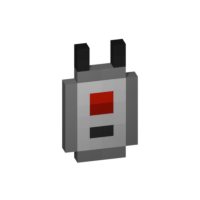
频率嗅探器 可用作查找给定频率上活跃发射器的工具。与其他频率工具一样,你可以通过 GUI 手动设置频率,或从发射器/接收器复制频率。当你右键点击嗅探器工具时,范围内设定频率的所有活跃发射器都会在其方块周围显示线框高亮。同时会有一个聊天消息告诉你所有活跃发射器的位置,通过显示方块坐标来实现。如果你是管理员/OP,你还可以点击方块坐标进行传送。请参阅截图部分中的示例。你也可以在配置文件中更改高亮颜色!
Linker

你可以使用 Linker(链接器)将 P2P Transmitter(P2P 发射器)与 P2P Receiver(P2P 接收器)连接起来。按住 Shift 并右键点击一个方块即可选中该方块进行链接。被选中的方块会高亮显示,并且可以透过其他方块看到它;其位置也可以在 Linker 物品的工具提示中查看。此高亮的颜色可以在配置文件中调整。要完成链接,只需右键点击对应另一端的方块即可完成操作。
Circuit
Circuit(电路)仅用于合成。
GUIs
注意:在频率 GUI 中按下 Shift 键时,所有用于更改频率的值将乘以 100(这样你就可以增加或减少 100 和 1000),或者你也可以手动输入所需的频率值。你同样可以在配置文件中更改接收器/发射器上频率显示的颜色。频率嗅探器的高亮显示也是如此!
Version & Loader Compatibility
一般来说,Wireless Redstone 在不同加载器之间 应该 始终保持兼容。这意味着你可以从使用 Forge 启动的世界进入,之后切换到 Fabric,Wireless Redstone 仍然 应该 正常工作。Minecraft 版本也是如此。较新版本的 Minecraft 和模组 应该 始终向后兼容旧版本。话虽如此,在切换加载器或版本之前,请务必备份你的世界;如果 Wireless Redstone 的某些功能不再正常工作,请 提交问题。
Wireless Redstone adds Redstone components to Minecraft, allowing Redstone components to be controlled remotely. The concept works like any transceiver functionality.
Transmitter and receiver blocks behave in a lazy-loaded manner with respect to redstone updates in unloaded chunks. This means that unloaded chunks will not be actively loaded to make the redstone update, but as soon as the receiver is loaded, its redstone state will be updated to match that of its corresponding transmitter.
New:
- P2P Transmitters and Receivers, added with version 1.2.0
Currently wireless redstone is dimensional but this might change in the future.
Content
Redstone Transmitter & Receiver
The Redstone Transmitter transmits a signal to the Redstone Network when it is turned on by a Redstone signal and sets all receivers on the same frequency to high as well. If there is more than one transmitter transmitting on the same frequency, all receivers on that frequency will be high as long as at least one transmitter on that frequency is on. This block can be right-clicked to set the frequency.
The Redstone Receiver will output a Redstone signal of 15 as long as there is at least one active transmitter on the same frequency. This block can be right-clicked to set the frequency.
P2P Transmitter & Receiver
In addition to the classic frequency based transmitter and receiver pair, there are now P2P transmitters and receivers. Instead of "connecting" them via a frequency, they are directly connected with the help of the Linker, thus the name P2P (point to point). This means that there cannot be any frequency clashes with other players. But you can only connect one transmitter to one receiver and vice versa.
These components have two block states:
powered: Indicating whether the block is being powered (transmitter) or powers something (receiver)linked: Indicating if the block is linked with its counterpart. This property can be tested for by using a comparator. It will output redstone power of 15 if linked, and 0 otherwise.
Once the link between a transmitter and receiver pair is established, the linked property changes accordingly and redstone changes on the transmitter are reflected by the connected receiver. In case one of the two blocks gets destroyed or relinked to another block, the link of its counterpart is terminated.
There is however a unique catch to the linked property. Once a linked p2p block gets unloaded it will visually be unlinked from its counterpart. The redstone state stays the same and the actual link between them is still stored and re-established once they are both loaded again. In case the other block gets destroyed or re-linked in the meantime the block will unlink completely as soon as it tries to connect to the other block again (meaning both must be loaded). This behavior can for example be used detect if certain chunks are loaded or unloaded. I'd like to see what you can come
up with using this feature.
Remote
The Remote is the item form of the Transmitter, while holding right-click the remote signal goes high. But it comes with the addition of being able to copy the frequency of a Transmitter or a Receiver by sneaking and right-clicking it. By sneaking and right-clicking the remote (not on a transmitter/receiver), you can set the frequency through the GUI.
Frequency Tool
The Frequency Tool is a handy tool that makes it easy for you to take a frequency and set multiple transmitters and/or receivers to the same frequency. When holding it in your hand you can copy a frequency into the Frequency Tool by sneaking and right-clicking on a transmitter or receivers. To copy the now-stored frequency, simply right-click either a transmitter or receiver. By sneaking and right-clicking the frequency tool (not on a transmitter/receiver), you can set the frequency through the GUI.
Frequency Sniffer
The Frequency Sniffer can be used as a tool to find active transmitters on a given frequency. As with other frequency tools too you can set the frequency either manually over the gui or copying it from a transmitter/receiver. When you right-click the sniffer tool all active transmitters on the set frequency within range are highlighted with a wireframe around the transmitter block. There is also a chat message that tells you where all the active transmitters are located at by showing the block position. If you are an admin/op, you can also click on the block position to teleport there. See example in the screenshot section. You can also change the highlight color in the configs!
Linker
You use the Linker to link a P2P Transmitter and a P2P Receiver together. By sneaking and right-clicking on a block you select this block for linkage. The selected block is highlighted and can be seen through other blocks, the position of it can also be seen in the tooltip of the Linker item. The color of this highlight can be adjusted in the configs. To complete the link, simply right-click the blocks counterpart and you are done.
Circuit
The Circuit is for crafting purposes only.
GUIs
Note: If you press Shift in the Frequency GUI, all values to change the frequency will be multiplied by 100 (so you can add/subtract 100 and 1000) or you can just type in your desired frequency manually. You can also change the color of the frequency display on a receiver/transmitter in the Configs. The same goes for highlighting with the Frequency Sniffer!
Version & Loader Compatibility
In general Wireless Redstone should always be compatible between mod loaders. Meaning you can enter a world you began with Forge and later switch to Fabric and everything should still work with Wireless Redstone. The same is true for Minecraft versions. Newer versions of Minecraft and the mod should always be backwards compatible with older ones. That being said, always make a backup of your world before switching loaders or versions and open an issue if something of Wireless Redstone isn't working anymore.

下载 Wireless Redstone
下载 Wireless Redstone
需要联机服务器吗?
稳定流畅、一键部署,几分钟即可和朋友联机开服
最低仅需 8 元/月 即可畅快联机
下载 Wireless Redstone
需要联机服务器吗?
稳定流畅、一键部署,几分钟即可和朋友联机开服
最低仅需 8 元/月 即可畅快联机
下载 Wireless Redstone
下载 Wireless Redstone
需要联机服务器吗?
稳定流畅、一键部署,几分钟即可和朋友联机开服
最低仅需 8 元/月 即可畅快联机
下载 Wireless Redstone
下载 Wireless Redstone
需要联机服务器吗?
稳定流畅、一键部署,几分钟即可和朋友联机开服
最低仅需 8 元/月 即可畅快联机
下载 Wireless Redstone
需要联机服务器吗?
稳定流畅、一键部署,几分钟即可和朋友联机开服
最低仅需 8 元/月 即可畅快联机
下载 Wireless Redstone
需要联机服务器吗?
稳定流畅、一键部署,几分钟即可和朋友联机开服
最低仅需 8 元/月 即可畅快联机
下载 Wireless Redstone
1.3.0+1.20.1 - 2026-10-03
Added
- Attachment 区块版本的红石发射器/接收器和 P2P 红石发射器/接收器
- 可配置的附件模式:定义附件区块是否仅从/向所附着的区块接收/输出红石信号,还是也包含所有相邻区块(除了附着侧的对面)
- 使用 Linker 观察 P2P 区块时,目标会显示在准星下方
- 频率物品在复制设置频率后会显示一条消息
Changed
- 接收器现在会在发射器(通/断电)后立即更新(此前:延迟 1 个红石刻)
- 这也允许向接收器发送 1 个游戏刻的信号(例如通过侦测器)
- 使用 int 数组标签(NBT)存储区块位置(发射器、p2p 链接等)
- 此更改仅向后兼容(即:你可以升级到更高版本,但回退到旧版本会导致红石网络损坏)
- 改进了配置屏幕中的名称和描述
- 红石发射器和接收器现在也在放置区块后直接更新(包括使用
/setblock和/fill命令时)- 如果你放置一个带有频率的发射器(例如在创造模式下按住 CTRL 拾取,其工具提示中也会显示频率),它现在会正确地在红石以太网络中注册自己,此前它不会这样做
- 如果你放置一个带有频率的接收器,当该频率上的任何发射器开启时,它会自动开启
- 注意:频率激活的接收器(发射器不在此列)在使用 Project Red 框架重新定位时也有效
Fixed
- Sniffer 堆叠大小应为 1
- 由于浮点数精度问题,Sniffer 和目标高亮在世界远处渲染时会抖动(距离越远,抖动越大)
- P2P 发射器和接收器区块实体未能正确更新数据
- Fabric:
- Mixin 配置错误(之前仅在客户端注册,失误)
- 红石线无法连接到发射器和接收器(如果在服务器上游玩)
- 远程激活的频率在以下情况下保持开启状态:
- 切换到快捷栏中的其他物品
- 玩家丢弃物品(如果在服务器上游玩)
- 正常使用(松开右键,如果在服务器上游玩)
关于这个资源的讨论、问题反馈与使用心得
还没有讨论,来发第一帖吧
你是这个资源的作者?登录后可认领此资源。
相似资源
 模组

一个用于收集生物掉落物的多区块模组。
 模组

显示你正在注视的方块的信息。(适用于 Minecraft 1.16+ 的 Hwyla/Waila 分支)
 模组

查看物品与配方
 模组
在游戏画面角落显示附近世界地形、玩家、生物和实体的地图。可创建路径点,帮助你找到标记过的位置。
 模组
使用 JavaScript 编辑配方、添加自定义物品、编写世界事件!
 模组
AE2:一款流行的自动化与存储模组
评论 0
登录后参与评分
还没有评论,来抢沙发吧