
WorldGen
WorldGen 是一款用于预生成 Minecraft 世界的模组,主要侧重于 速度。
安装
只需下载与您 精确 Minecraft 版本对应的最新 WorldGen JAR 文件。
此外,务必确保您使用的是与您的加载器(Fabric/Forge)匹配的正确版本。
然后将下载的 jar 文件保存到 Minecraft 实例的 mods 文件夹中。
最后,如果您使用的是 Fabric,您还需要下载 Fabric API。
用法
WorldGen 可用于为现有世界生成更多区块。 只需在世界选择界面中选择要扩展的世界,然后按下如图所示的“WorldGen”按钮:
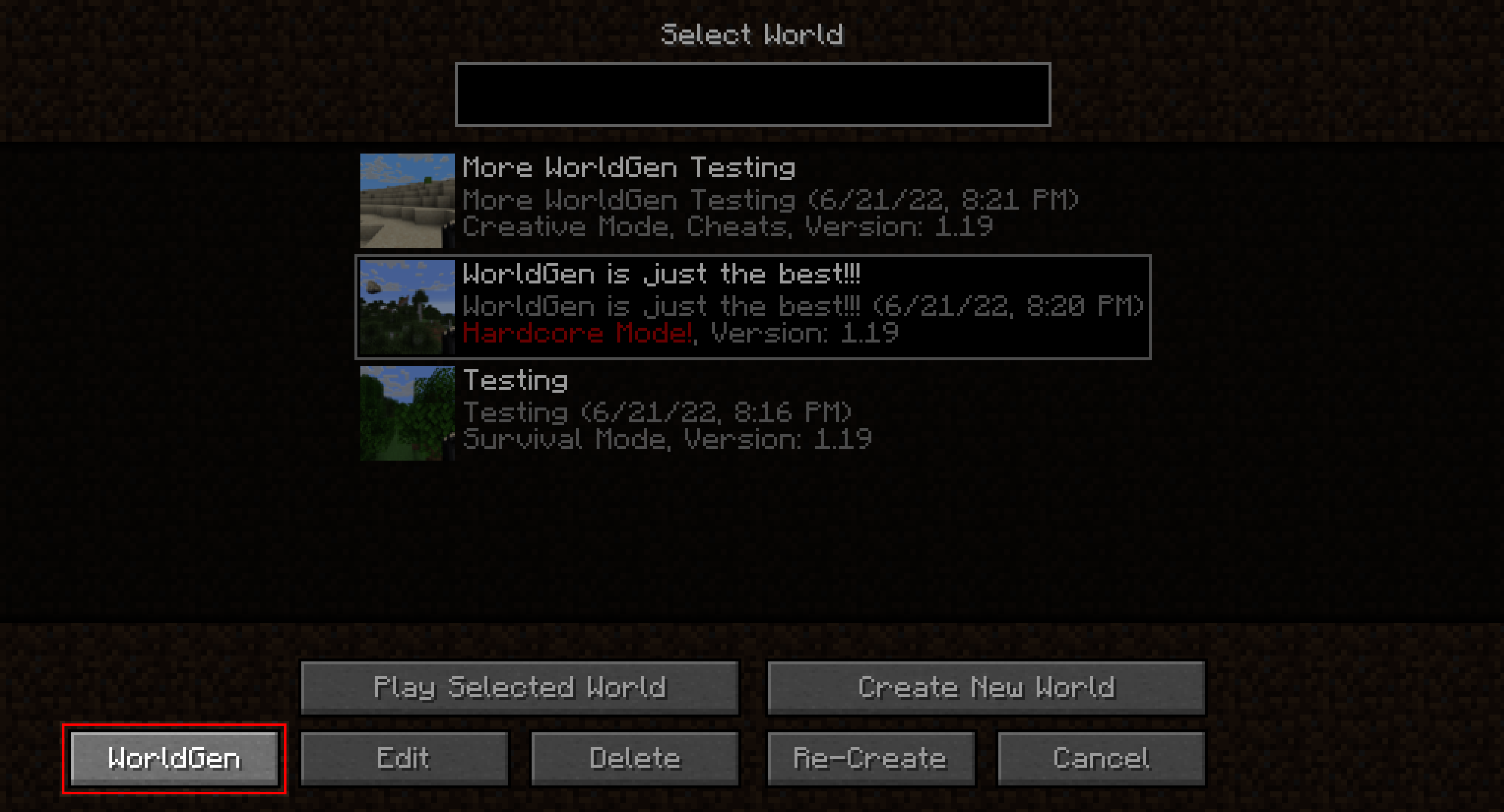
默认情况下,现有的区块不会被覆盖,只会生成新的区块。
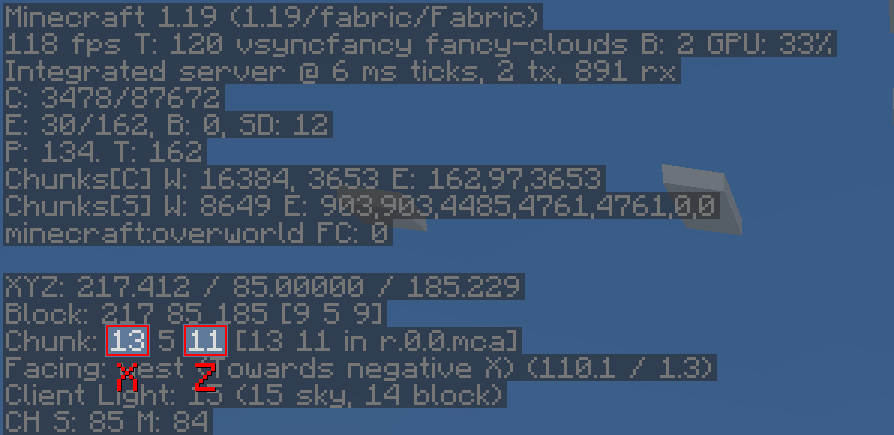
另外,请注意 WorldGen 使用的是区块坐标,而不是方块坐标!由于每个区块从俯视角度看测量为 16x16 个方块,您可以通过乘以/除以 16 轻松在方块坐标和区块坐标之间进行转换。您还可以在 F3 调试菜单中找到当前的区块位置:
目前无法直接从“创建新世界”屏幕使用 WorldGen。相反,您必须首先正常创建世界,保存并退出,然后使用 WorldGen 打开该世界。
此外,我们建议将您的世界存储在 SSD 上(至少在运行 WorldGen 时)。使用硬盘驱动器可能会导致新区块的生成速度快于先前生成的区块能够被保存的情况。这会导致内存不足错误,因为随着时间的推移,越来越多的区块会堆积在 RAM 中。此外,生成器本身的性能可能会受到负面影响。
虽然我们认为 WorldGen 是稳定的,但建议在使用此模组之前备份您的世界。如果您因遇到错误而丢失了世界,我们概不负责!
推荐设置
使用 WorldGen 时,生成的区块数量实际上没有上限。
但是,我们不建议使用超过 512 个区块的半径(即在每个方向上为 8192 个方块)。
工作原理
与其他现有的区块预生成方法不同,我们的模组不需要运行完整的 Minecraft 服务器。 相反,它使用轻量级内部服务器来高效生成区块。
这样做的好处是拥有专用的 GUI 并允许多线程。缺点是,必须在 Minecraft 客户端中打开世界,并且在 WorldGen 生成区块时无法在其他地方加载它。
支持版本
下表显示了当前对 Minecraft 版本的支持状态。
| Minecraft Version | Status |
|---|---|
1.20.x |
Supported |
1.19.x |
No future updates |
1.18.2 |
No future updates |
注意:对于 1.19.1 和 1.19.2,请使用 WorldGen 1.19.x 版本。但是,对于 Minecraft 1.19.3 及以上版本,需要特定于 Minecraft 版本的 WorldGen 版本!
常见问题解答
问: 进度屏幕不合适且被截断!
答: 尝试在 Minecraft 视频选项中减小 GUI 缩放比例,直到它合适为止
问: 如何将正方形/矩形/圆形居中到我的当前位置?
答: 点击中心区块选择行右侧的正方形按钮。这将自动加载玩家的最后位置。
问: 会支持 1.18.2 之前的 Minecraft 版本吗?
答: 不会。
问: 如何将区块重置为其原始状态?
答: 首先:备份您的世界! 之后:在高级 WorldGen 设置中启用“Please allow me to break my world!”复选框,然后启用“Override existing chunks”。此外,我们建议在主菜单中使用“模式:坐标”以减少重置不想要区块的可能性!
问: 如何制作周长/用空气替换区块中的所有方块?
答: 再次首先:备份您的世界! 之后:在高级 WorldGen 设置中启用“Please allow me to break my world!”复选框。然后,将“最大区块状态”设置为 structure_starts。接下来,启用“覆盖现有区块”。最后,将“假区块状态”设置为 full。
生成将提前停止并将区块保存为完全生成的状态。
“最大区块状态”选项允许在生成的不同阶段停止,从而允许进行实验。
模组不兼容
此模组应与大多数模组兼容(包括那些添加新生物群系和维度的模组)。 然而,干扰 Minecraft 世界生成过程的模组可能会造成问题。
目前已知的不兼容模组
| Mod | Failure |
|---|---|
| Starlight | Chunks generated with WorldGen will have no lighting |
致谢
非常感谢以下项目对开源开发的支持:
- GitHub 提供免费代码托管
- Java profiler - JProfiler 提供分析工具

WorldGen
WorldGen is a mod for pre-generating Minecraft worlds, with a main focus on speed.
Installation
Just download the latest WorldGen JAR file for your exact Minecraft version.
Additionally, always ensure that you are using the correct version for your modloader (Fabric/Forge).
Then save the downloaded jar to the mods folder of your Minecraft instance.
Finally, if you are on Fabric you also need to download the Fabric API.
Usage
WorldGen can be used to generate more chunks for an existing World. Simply select the world you want to expand from the World Selection screen and press the "WorldGen" button as seen below:
By default, existing chunks will not be overwritten and only new ones will be generated.
Also, please note that WorldGen uses chunk coordinates and not block coordinates! Since each Chunk
measures 16x16 blocks from a top-down view, you can easily convert between block and chunk coordinates by multiplying / dividing
by 16. You can also find the current chunk position with the F3 debug menu:
It is currently not possible to use WorldGen directly from the "Create New World" screen. Instead, you have to first create the world normally, save and quit, and then open the world with WorldGen.
Furthermore, we recommend storing your world on an SSD (at least for running WorldGen). Using a hard drive can lead to scenarios where new chunks are generated faster than previously generated chunks can be saved. This can cause out-of-memory errors, since more and more chunks will accumulate in RAM as time goes on. Additionally, the performance of the generator itself may be negatively affected.
Although we consider WorldGen to be stable, it is recommended to back up your world before using this mod. We are not responsible if you lose your world because you ran into a bug!
Recommended settings
When using WorldGen, there is no real upper limit on how many chunks can be generated.
However, we do not recommend using a radius of more than 512 chunks (which would be 8192 blocks in each direction).
How it works
In contrast to other existing chunk pre-generation methods our mod does not require a full Minecraft server to be running. Instead, a lightweight internal server is used to generate the chunks efficiently.
This has the advantage of having a dedicated GUI and allows multithreading. On the downside, the world must be opened in a Minecraft client and cannot be loaded elsewhere while the chunks are being generated with WorldGen.
Supported version
This table shows the current support status for the Minecraft version.
| Minecraft Version | Status |
|---|---|
1.20.x |
Supported |
1.19.x |
No future updates |
1.18.2 |
No future updates |
Note: For both 1.19.1 and 1.19.2 Use the WorldGen 1.19.x version. However, for Minecraft 1.19.3 and above, the specific WorldGen version for the Minecraft release is required!
FAQ
Q: The progress screen does not fit and is cut off!
A: Try reducing the GUI scale in the Minecraft video options until it fits
Q: How do I center the square / rectangle / circle around my current position?
A: Click on the square button on the right of the Center chunk selection row. This will automatically load the last position of the player.
Q: Will Minecraft versions before 1.18.2 be supported?
A: No.
Q: How do I reset chunks to their original state?
A: First of all: BACK UP YOUR WORLD! Afterwards: In the advanced WorldGen settings enable the "Please allow me to break my world!" checkbox, then enable "Override existing chunks". Also, we recommend using the "Mode: Coordinates" in the main menu to reduce the chance of resetting chunks you don't want to!
Q: How do I make a perimeter / replace all blocks in chunks with air?
A: First of all again: BACK UP YOUR WORLD! Afterwards: In the advanced WorldGen settings enable the "Please allow me to
break my world!" checkbox. Then, set "Max. chunk status" to structure_starts. Next, enable "Override
existing chunks". Finally, set "Fake chunk status" to full.
The generation will stop early and save the chunk as a fully generated one.
The "Max. chunk status" option allows stopping at different stages of generation, allowing for experimentation.
Mod incompatibilities
This mod should be compatible with most mods (including those adding new biomes and dimensions). However, mods that interfere with the Minecraft world generation process might pose a problem.
Currently known incompatible mods
| Mod | Failure |
|---|---|
| Starlight | Chunks generated with WorldGen will have no lighting |
Acknowledgments
Many thanks to the following projects for supporting open source development:
- GitHub for free code hosting
- The Java profiler - JProfiler for providing a profiling tool

下载 WorldGen
下载 WorldGen
下载 WorldGen
下载 WorldGen
下载 WorldGen
下载 WorldGen
需要联机服务器吗?
稳定流畅、一键部署,几分钟即可和朋友联机开服
最低仅需 8 元/月 即可畅快联机
下载 WorldGen
下载 WorldGen
需要联机服务器吗?
稳定流畅、一键部署,几分钟即可和朋友联机开服
最低仅需 8 元/月 即可畅快联机
下载 WorldGen
需要联机服务器吗?
稳定流畅、一键部署,几分钟即可和朋友联机开服
最低仅需 8 元/月 即可畅快联机
下载 WorldGen
需要联机服务器吗?
稳定流畅、一键部署,几分钟即可和朋友联机开服
最低仅需 8 元/月 即可畅快联机
修复了区块光照问题。
关于这个资源的讨论、问题反馈与使用心得
还没有讨论,来发第一帖吧
你是这个资源的作者?登录后可认领此资源。
相似资源
 模组

显示你正在注视的方块的信息。(适用于 Minecraft 1.16+ 的 Hwyla/Waila 分支)
 模组

原版世界生成优化模组
 模组
使用 JavaScript 编辑配方、添加自定义物品、编写世界事件!
 模组

查看物品与配方
 模组
在游戏画面角落显示附近世界地形、玩家、生物和实体的地图。可创建路径点,帮助你找到标记过的位置。
 模组
AE2:一款流行的自动化与存储模组
评论 0
登录后参与评分
还没有评论,来抢沙发吧