
WorldGen Editor
WorldGen Editor 是一款用于 Minecraft 的世界生成模组,可通过简单的 JSON 预设文件创建岛屿世界。
该模组面向希望配置群岛风格世界,而无需手动重建完整自定义数据包的玩家、服务器管理员和整合包开发者。模组以 Minecraft 原有的噪声生成为基础,然后通过岛屿感知的生物群系和密度逻辑对主世界进行路由处理。
功能特性
- 添加用于岛屿生成的类似数据包风格的世界预设。
- 添加三种内置世界类型:
WGE: IslandsWGE: ArchipelagoWGE: Small Island
- 在
config/worldgen_editor/presets/中添加可配置的预设文件。 - 添加主配置文件:
config/worldgen_editor/worldgen_editor.json。 - 支持
island(岛屿)、ocean(海洋)和archipelago(群岛)条目类型。 - 支持普通岛屿、海洋开凿出的海峡/海湾以及生成的群岛集群。
- 支持自定义位置、半径、拉伸、旋转、基础形状、海岸线粗糙度、温度、生物群系补丁大小和噪声设置。
- 支持使用精确的生物群系 ID 和生物群系标签进行每条目生物群系排除。
- 支持基于气候的陆地和海洋回退生物群系选择。
- 支持可配置的外围海洋生物群系,默认为
minecraft:deep_ocean。 - 保持地形生成柔和,使岛屿仍使用原版风格的地形,而非强制平坦的形状。
- 尽可能保留洞穴、矿石、结构、原版地表逻辑和地形特征,使其接近正常的 Minecraft 生成效果。
- 包含一个独立的开发者预览器,可在生成 Minecraft 世界之前检查岛屿布局。
主配置
主配置文件位于:
config/worldgen_editor/worldgen_editor.json
{
  "enabled": true,
  "active_preset": "archipelago"
}
预设文件存储于此处:
config/worldgen_editor/presets/default.json
config/worldgen_editor/presets/archipelago.json
config/worldgen_editor/presets/small_island.json
内置预设包括:
default:一个混合示例,包含出生点岛屿、海洋切割区、较大的岛屿以及温暖的群岛。archipelago:一个带有许多较小岛屿及其周围额外岛屿的出生点群岛。small_island:一个简单的生存开局或测试用的紧凑岛屿。
预设优先级如下:
世界类型预设 > 配置 active_preset > 旧版 continents.json
这意味着使用 WGE: Archipelago 创建的世界将使用 presets/archipelago.json,即使全局配置的回退选项为 "active_preset": "default"。
基本示例:
在预览器中: 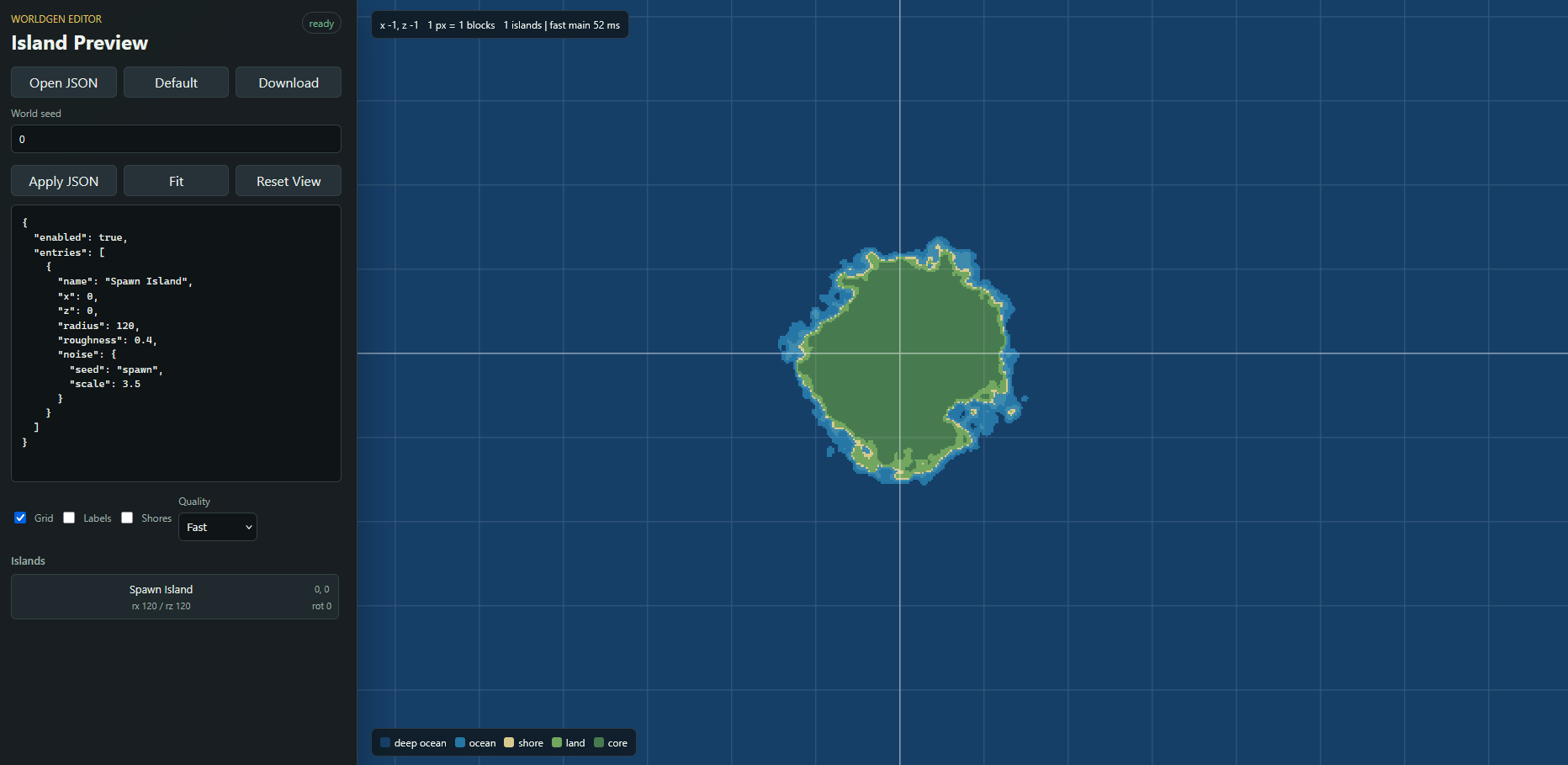
在游戏中: 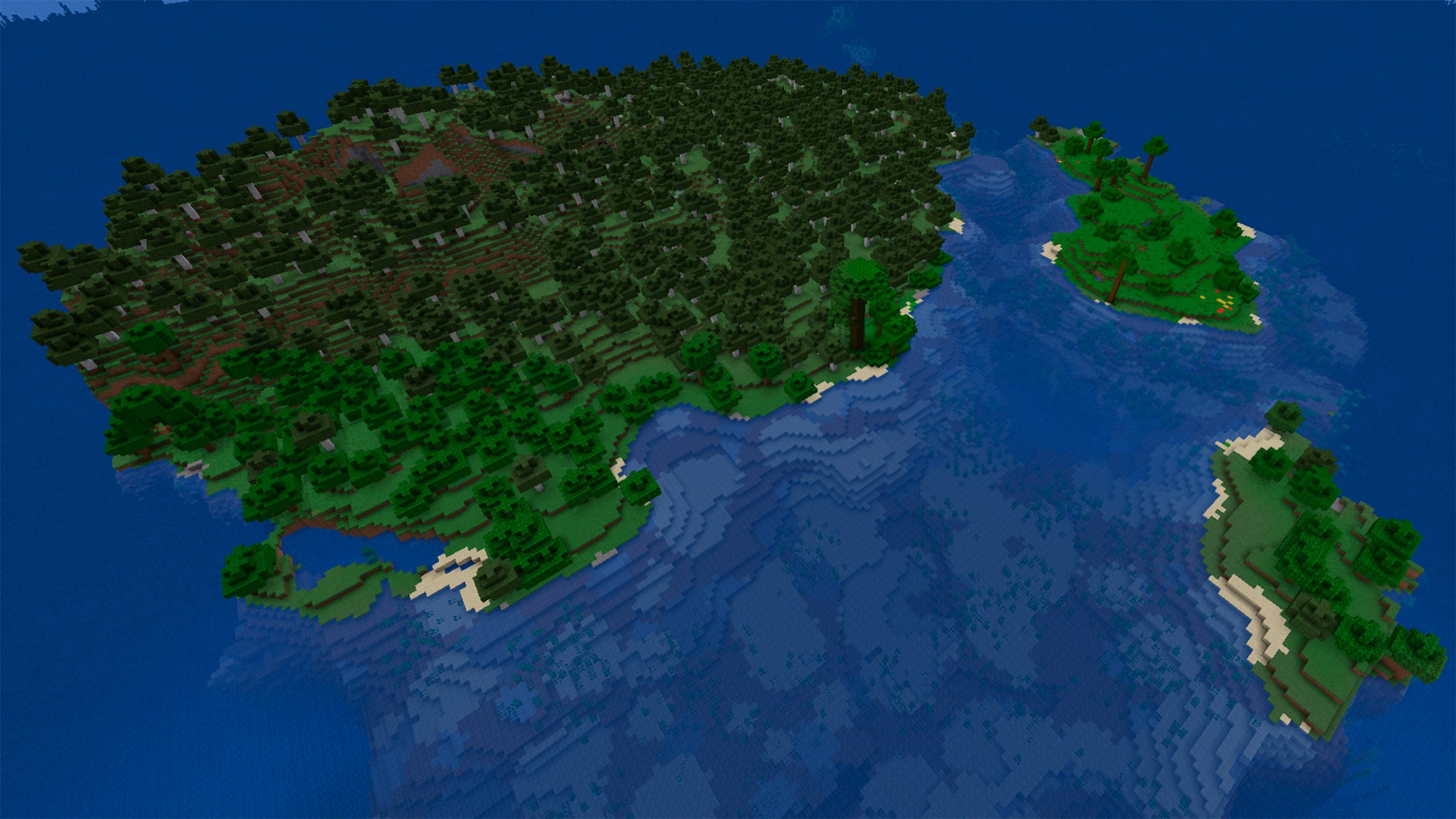
有关所有字段的完整说明,请参阅 GitHub 上的 wiki。
使用方法
- 为你的加载器安装正确的模组 jar 文件。
- 启动一次 Minecraft,以便创建配置文件。
- 编辑
config/worldgen_editor/presets/中的一个文件。 - 创建一个新世界并选择你编辑过的 WGE 世界类型:
WGE: Islands
WGE: Archipelago
WGE: Small Island
如果你在世界已打开的情况下编辑了配置,请运行:
/worldgen_editor reload
重载仅影响新生成的区块。现有区块不会重新生成。
预览器
WorldGen Editor 还提供了一个独立的预览工具用于开发。它帮助你在打开 Minecraft 并生成新的测试世界之前,调整岛屿位置、大小、海岸线、粗糙度、海洋切割区和群岛布局。
WorldGen Editor preview github
预览器旨在作为规划布局的辅助工具。Minecraft 的最终地形仍然取决于原版世界生成、选定的种子以及当前激活的世界预设。
命令
/worldgen_editor enable
/worldgen_editor disable
/worldgen_editor status
/worldgen_editor preset <name>
/worldgen_editor reload
status 显示有效状态、全局配置标志、按世界划分的标志、选定的世界类型预设、活动预设、条目数量、活动配置路径和世界状态路径。
preset <name> 更改配置的回退预设。如果世界是使用 WGE 世界类型创建的,则该世界类型仍然是新生成区块的主要依据。
注意事项
- 该模组适用于新世界。
- 现有区块不会自动重新生成。
- 在进行重大配置更改后,为了获得干净的结果,请创建新世界或小心删除受影响的区域文件。
continents.json仅作为旧配置的遗留回退方案。新配置使用worldgen_editor.json和presets/*.json。- 预览器是供开发者和整合包制作者使用的辅助工具。它不是玩模组所必需的,也不会模拟 Minecraft 世界生成的每一个部分。
链接
- 模组 github: waterflane/WorldGen-Editor
- 预览器 github: waterflane/WorldGen-Editor-Preview
- 许可证:Creative Commons BY-NC-SA 4.0
WorldGen Editor
WorldGen Editor is a Minecraft world generation mod for creating island worlds from simple JSON preset files.
It is made for players, server owners, and modpack developers who want configurable archipelago-style worlds without rebuilding a full custom datapack by hand. The mod keeps Minecraft's normal noise generation as the base, then routes the Overworld through island-aware biome and density logic.
What It Does
- Adds datapack-style world presets for island generation.
- Adds three bundled world types:
WGE: IslandsWGE: ArchipelagoWGE: Small Island
- Adds configurable preset files in
config/worldgen_editor/presets/. - Adds a main config file:
config/worldgen_editor/worldgen_editor.json. - Supports
island,ocean, andarchipelagoentry types. - Supports normal islands, ocean-carved straits/bays, and generated archipelago clusters.
- Supports custom position, radius, stretch, rotation, base shape, coastline roughness, temperature, biome patch size, and noise settings.
- Supports per-entry biome exclusions using exact biome ids and biome tags.
- Supports climate-aware land and ocean fallback biome selection.
- Supports configurable outer ocean biome, defaulting to
minecraft:deep_ocean. - Keeps terrain generation soft, so islands still use vanilla-style terrain instead of flat forced shapes.
- Keeps caves, ores, structures, vanilla surface logic, and terrain features as close to normal Minecraft generation as possible.
- Includes a separate developer previewer for checking island layouts before generating a Minecraft world.
Main Config
The main file is:
config/worldgen_editor/worldgen_editor.json
{
  "enabled": true,
  "active_preset": "archipelago"
}
Preset files are stored here:
config/worldgen_editor/presets/default.json
config/worldgen_editor/presets/archipelago.json
config/worldgen_editor/presets/small_island.json
The bundled presets are:
default: a mixed example with a spawn island, an ocean cut, a larger island, and a warm archipelago.archipelago: a spawn archipelago with many smaller islands plus extra islands around it.small_island: one compact island for simple survival starts or testing.
Preset priority is:
world type preset > config active_preset > legacy continents.json
That means a world created with WGE: Archipelago uses presets/archipelago.json, even if the global config fallback says "active_preset": "default".
Basic example:
in previewer:
in game:
For a full explanation of all fields, see wiki in the GitHub.
How To Use
- Install the correct mod jar for your loader.
- Start Minecraft once so the config files can be created.
- Edit one of the files in
config/worldgen_editor/presets/. - Create a new world and select WGE world types, where you edited:
WGE: Islands
WGE: Archipelago
WGE: Small Island
If you edit the config while a world is already open, run:
/worldgen_editor reload
Reload affects only newly generated chunks. Existing chunks are not rebuilt.
Previewer
WorldGen Editor also has a separate previewer tool for development. It helps tune island positions, sizes, coastlines, roughness, ocean cuts, and archipelago layouts before opening Minecraft and generating a new test world.
WorldGen Editor preview github
The previewer is intended as a helper for planning layouts. Minecraft's final terrain still depends on vanilla world generation, the selected seed, and the active world preset.
Commands
/worldgen_editor enable
/worldgen_editor disable
/worldgen_editor status
/worldgen_editor preset <name>
/worldgen_editor reload
status shows the effective state, global config flag, per-world flag, selected world type preset, active preset, entry count, active config path, and world-state path.
preset <name> changes the config fallback preset. If the world was created with a WGE world type, that world type remains the main source of truth for newly generated chunks.
Notes
- The mod is intended for new worlds.
- Existing chunks are not automatically regenerated.
- For clean results after major config changes, create a new world or delete the affected region files carefully.
continents.jsonis only a legacy fallback for old configs. New configs useworldgen_editor.jsonandpresets/*.json.- The previewer is a helper tool for developers and modpack makers. It is not required to play with the mod and does not simulate every part of Minecraft world generation.
Links
- Mod github: waterflane/WorldGen-Editor
- Previewer github: waterflane/WorldGen-Editor-Preview
- License: Creative Commons BY-NC-SA 4.0

下载 WorldGen Editor
下载 WorldGen Editor
下载 WorldGen Editor
下载 WorldGen Editor
下载 WorldGen Editor
下载 WorldGen Editor
下载 WorldGen Editor
下载 WorldGen Editor
下载 WorldGen Editor
暂无更新日志
关于这个资源的讨论、问题反馈与使用心得
还没有讨论,来发第一帖吧
你是这个资源的作者?登录后可认领此资源。
相似资源
 模组

显示你正在注视的方块的信息。(适用于 Minecraft 1.16+ 的 Hwyla/Waila 分支)
 模组

原版世界生成优化模组
 模组
在游戏画面角落显示附近世界地形、玩家、生物和实体的地图。可创建路径点,帮助你找到标记过的位置。
 模组

查看物品与配方
 模组
使用 JavaScript 编辑配方、添加自定义物品、编写世界事件!
 模组
AE2:一款流行的自动化与存储模组
评论 0
登录后参与评分
还没有评论,来抢沙发吧