Ykrez Client
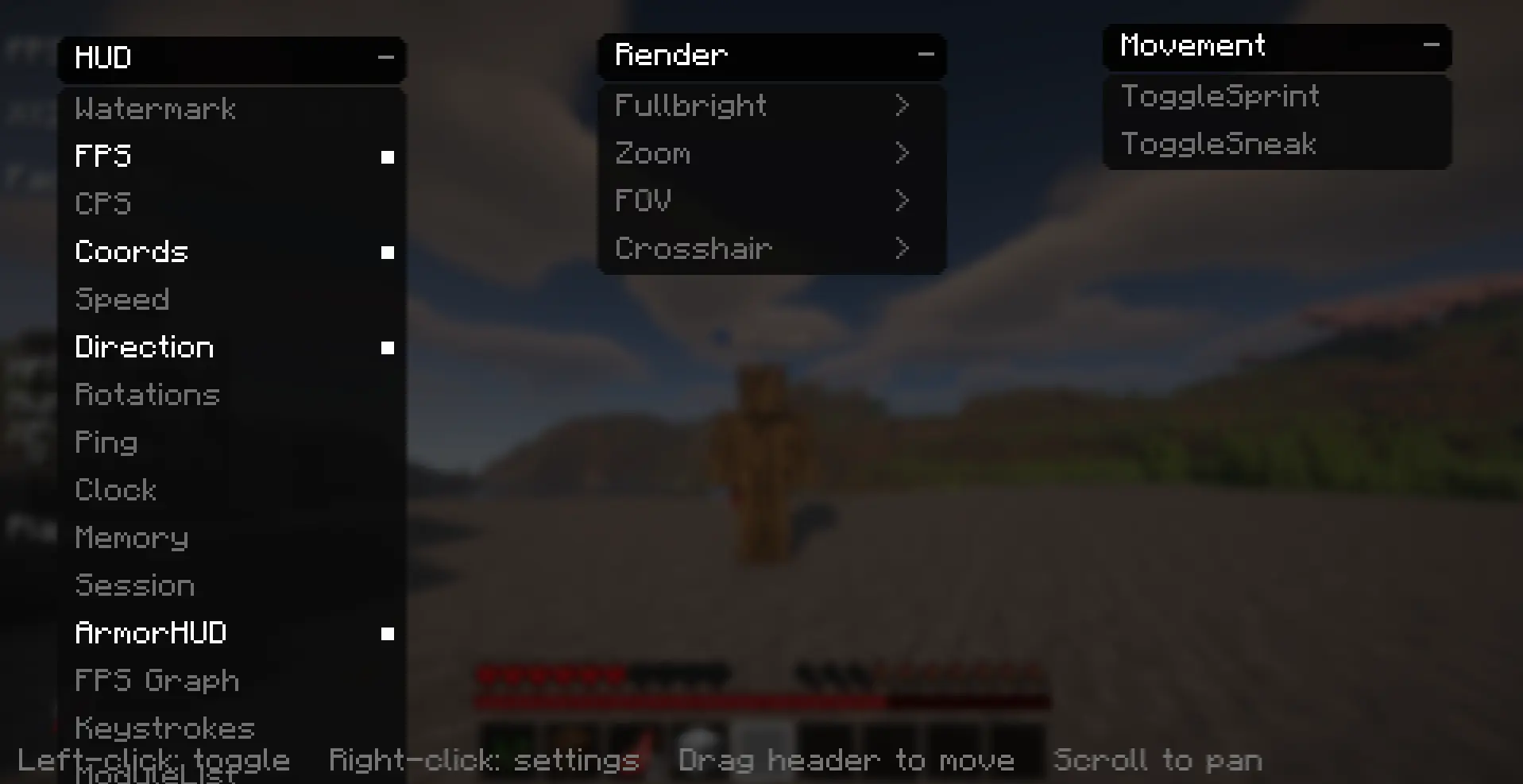
Ykrez Client 是一款轻量级、服务器合法的 Fabric 生活优化客户端。它提供干净且完全可自定义的 HUD(抬头显示)、一系列实用的视觉调整项,以及一个可按你喜好自由排列的游戏内菜单——无作弊、无外挂,绝不会让你的账号面临风险。它是为那些只想拥有更好看、信息更丰富的 Minecraft 体验的玩家而设计的。
Minecraft 1.21.11 | Fabric | Java 21
HUD
在屏幕上精准显示你所需的信息:FPS、FPS 图表、CPS(每秒点击次数)和右键 CPS、坐标、速度、朝向、偏航角/俯仰角、延迟、实时时钟、游戏内天数、生物群系、生命值、饥饿值、经验等级、手持物品、盔甲显示、玩家数量、内存占用、会话计时器、按键状态(WASD 和鼠标)、已启用模块列表,以及水印。
视觉调整
全亮度(Fullbright)、缩放、可调视场角(FOV),以及自定义准星。
移动辅助
切换疾跑(Toggle Sprint)和切换潜行(Toggle Sneak)。
可自定义菜单
- 全黑、圆角、带动画效果的菜单,包含分类下拉菜单
- 可拖拽的面板,让你按自己的方式布局菜单
- 启用项目过多时,可通过滚动进行平移
- 右键任意模块即可打开其设置——滑块和开关可让你精确设定 FOV、缩放级别、伽马值、准星大小等
- 所有设置自动保存,下次启动时恢复
控制键
- 右 Shift — 打开菜单
- V — 缩放
- B — 全亮度
- R — 切换疾跑
所有按键均可在“选项 > 控制”中重新绑定。在菜单中:左键切换模块,右键打开设置,拖动标题栏可移动列,滚动可进行平移。
要求
- Minecraft 1.21.11
- Fabric Loader(0.16 或更高版本)
- Fabric API
- Java 21
安装
- 为 1.21.11 安装 Fabric Loader。
- 将 Fabric API 和 Ykrez Client 的 jar 文件放入 mods 文件夹。
- 启动游戏并按右 Shift 打开菜单。
Ykrez 是一款合法的工具类客户端——仅添加 HUD、显示和便利性功能。不包含任何战斗、移动或世界漏洞利用类的作弊模块。
由 ERTZ 制作。

Ykrez Client
Ykrez Client is a lightweight, server-legal quality-of-life client for Fabric. It gives you a clean, fully customizable HUD, a handful of useful visual tweaks, and an in-game menu you can arrange however you like — no cheats, no hacks, nothing that puts your account at risk. It's built for players who just want a better-looking and more informative Minecraft.
Minecraft 1.21.11 | Fabric | Java 21
HUD
Show exactly the info you want on screen: FPS, FPS graph, CPS and right-click CPS, coordinates, speed, facing direction, yaw/pitch, ping, real-time clock, in-game day, biome, health, hunger, XP level, held item, armor display, player count, memory usage, session timer, keystrokes (WASD and mouse), an enabled-module list, and a watermark.
Visual tweaks
Fullbright, Zoom, an adjustable FOV, and a custom crosshair.
Movement helpers
Toggle Sprint and Toggle Sneak.
Customizable menu
- All-black, rounded, animated menu with category dropdowns
- Draggable panels so you can lay the menu out your way
- Scroll to pan when you have a lot enabled
- Right-click any module to open its settings — sliders and toggles let you set your exact FOV, zoom level, gamma, crosshair size, and more
- Everything saves automatically and is restored the next time you launch
Controls
- Right Shift — open the menu
- V — Zoom
- B — Fullbright
- R — Toggle Sprint
All keys are rebindable in Options > Controls. In the menu: left-click toggles a module, right-click opens its settings, drag a header to move a column, and scroll to pan.
Requirements
- Minecraft 1.21.11
- Fabric Loader (0.16 or newer)
- Fabric API
- Java 21
Installation
- Install Fabric Loader for 1.21.11.
- Place Fabric API and the Ykrez Client jar in your mods folder.
- Launch the game and press Right Shift to open the menu.
Ykrez is a legitimate utility client — it only adds HUD, display, and convenience features. It does not include any combat, movement, or world-exploit cheat modules.
Made by ERTZ.
评论 0
登录后参与评分
还没有评论,来抢沙发吧