⚡ Aura •ᴗ• - 请阅读完整说明
这不是另一个“极致帧率、零冗余”的资源包。
本整合包包含两种模式,并需要执行一个必要的设置步骤。
跳过此步骤将导致游戏崩溃。请在下载前仔细阅读。
⬇️ 下载 • ⚠️ 设置警告 • ? Discord • ? 捐赠
如果该整合包的关注数达到 15(即 15 颗心),我将发布 v26 版本!
? 启动前的准备
Aura 同时内置了 Flashback 和 ViaFabricPlus。它们无法共存。请选择你的模式,并在打开游戏之前禁用另一个。
|
? 创作者模式 |
? 服务器模式 |
| 保留 |
Flashback |
ViaFabricPlus |
| 禁用 |
ViaFabricPlus |
Flashback |
| 适合场景 |
回放 • 自由视角 • 电影感镜头 • 截图 |
Hypixel • 1.8 PvP • 旧版服务器 • 版本切换 |
如果你的游戏在启动时崩溃,几乎总是因为这个原因。你可以随时切换模式。
那么 Aura 到底是什么?
好吧,说实话。
现在所有的优化模组整合包都说着同样的话。“极致帧率。零冗余。最佳性能。轻量级。”这些词早已失去了意义。每一个严肃的 Fabric 整合包都已经包含了 Sodium、Lithium 和 FerriteCore。这就是现在的引擎。这是预期的基准线。拥有它们并不能成为卖点。
真正的问题是引擎之外,整合包还做了什么。这也是大多数整合包分裂成两个阵营的地方,而这两个阵营都让人感到有些沮丧。
阵营 1:快但空洞。 你安装了一个精简的 FPS 提升整合包,帧数上去了,然后你得花一个小时去添加缩放、潜影盒预览、回放工具、聊天修复、服务器兼容性以及所有你实际会用到的东西。到那时,你其实是在自己构建客户端。
阵营 2:功能丰富但杂乱。 你安装了一个更大的整合包,其中一半的模组未经处理,有些模组相互重叠,少数已过时,整个感觉就像有人把 150 个 JAR 文件扔进文件夹就完事了。
Aura 不属于这两者中的任何一个。
Aura 的构建方式与众不同。该整合包会与 Modrinth 上最大的优化类和客户端类整合包进行逐一比较。它们哪里做得更好?Aura 缺少什么?哪些看起来有用但实际上并没有改善任何东西?哪些正在 silently 导致冲突?然后围绕那些真正通过测试的内容重新构建堆栈。
如果它能在 2012 年的 MacBook Air 上运行,那么在你的 PC 上它将如飞一般顺畅。但除了原始帧数之外,目标是让设置在游戏打开的那一刻就感觉已经完成。快速、精致,并且堆满了你通常需要花时间自己去寻找的一切。
每个整合包现在都有引擎。区别在于整个客户端体验。
? 基准测试(估算值)
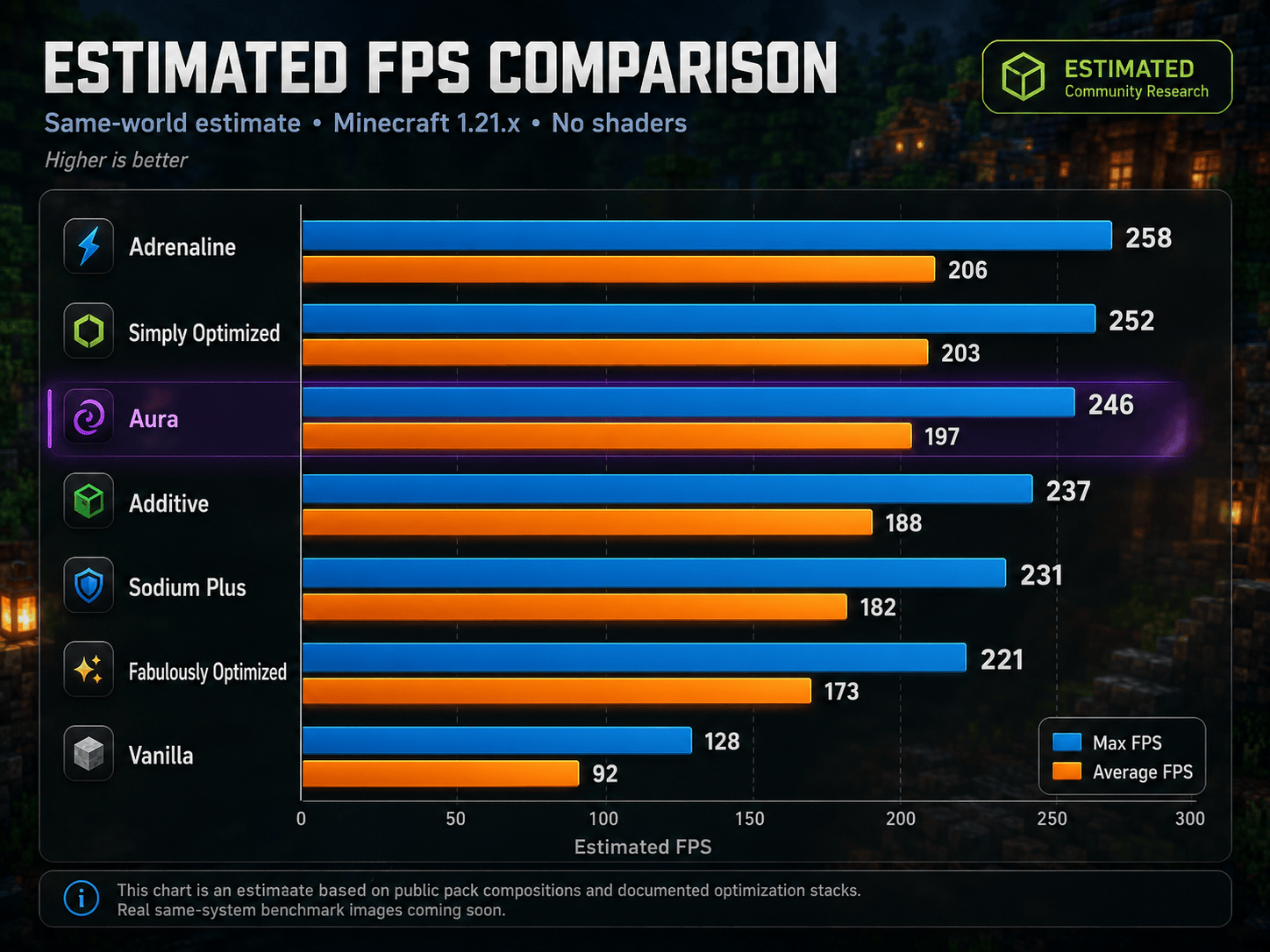
Aura 的核心构建领域
| 领域 |
含义 |
| 原始帧率 |
更好的渲染、更低的内存使用、更少的浪费帧、更平滑的帧调度 |
| 加载速度 |
更快的启动、更快的重载、更少的等待时间 |
| 视觉效果 |
光影、连接纹理、更好的光照、更好的实体、更清晰的 UI |
| 客户端手感 |
缩放、更好的菜单、更好的控制、更好的聊天、实用的 HUD 和物品栏工具 |
| 创作者工具 |
回放、自由视角、高分辨率截图、语音聊天、建筑工具 |
| 多人游戏 |
版本切换、聊天隐私、数据包修复、更快的延迟、服务器体验优化 (QoL) |
Aura 的定位
| 如果你想要... |
更适合... |
| 绝对最小的 Sodium 设置,没有任何多余内容 |
Simply Optimized, Adrenaline |
| 带有光影的 OptiFine 替代品 |
Fabulously Optimized, Additive |
| 锁定管理的客户端 |
Lunar, Feather, Badlion |
| 一个快速、开放、且已经感觉完整的客户端风格设置 |
Aura |
与锁定客户端不同,你可以移除或添加内容,使其成为你自己的定制。Aura 是那种试图提供像客户端一样的体验,而不将你锁定在特定客户端中的 Fabric 设置。
内部包含内容
⚡ 性能核心
你不会看到大部分模组在工作。你会感受到它们的效果。
渲染
| 模组 |
作用 |
| Sodium |
完整的渲染重写。Fabric 上 FPS 的黄金标准。 |
| ImmediatelyFast |
更快的 HUD、文本、实体和 UI 批量渲染。 |
| Iris Shaders |
支持光影,且开启后不会摧毁你的帧率。 |
| Entity Culling |
停止渲染墙壁后方和视野之外的实体。 |
| Ixeris |
激进的逐层剔除。More Culling 的继任者。 |
| Cull Fewer Leaves |
减少树叶渲染开销,同时不破坏视觉效果。 |
| Better Block Entities |
箱子、告示牌、床和旗帜的性能改进。 |
| Particle Core |
优化的粒子渲染,在传送门和农场附近尤为重要。 |
内存与加载
| 模组 |
功能说明 |
| Lithium |
优化游戏逻辑、实体 ticking、AI 和寻路。 |
| FerriteCore |
大幅降低内存占用。 |
| ModernFix |
修复内存泄漏,缩短启动时间。 |
| Dynamic FPS |
切出窗口时降低帧率以节省资源。 |
| FastQuit |
保存并立即退出世界。 |
| Remove Reloading Screen |
跳过资源重载覆盖层界面。 |
| Clumps |
合并经验球以减少农场附近的实体卡顿。 |
世界、光照与网络
| 模组 |
功能说明 |
| ScalableLux |
更快的光照引擎,替代原版光照系统。 |
| NoisiumForked |
加速世界生成噪声计算。 |
| Fast Noise |
加速整个引擎中的噪声数学运算。 |
| ServerCore |
提升连接和 ticking 性能。 |
| Packet Fixer |
防止因数据包过大或格式错误导致的断连。 |
| Debugify |
修复大量已确认的原版漏洞。 |
| Crash Assistant |
提供更完善的崩溃诊断和恢复信息。 |
? 视觉效果与资源包支持
让 Minecraft 拥有现代感。但请根据你的电脑性能量力而行。
光影与光照
| 模组 |
功能说明 |
| Iris Shaders |
在 Fabric 上提供完整的 OptiFine 兼容光影支持。 |
| Complementary Shaders - Unbound |
随附的光影包,启用即可使用。 |
| LambDynamicLights |
手持火把即可照亮周围区域,无需放置。 |
资源包特性对齐
| 模组 |
功能说明 |
| Continuity |
支持连接纹理和玻璃效果,这是大多数人安装 OptiFine 的主要原因。 |
| BetterGrassify |
类似 OptiFine 的改进草方块渲染。 |
| Animatica |
为资源包提供动画纹理支持。 |
| Entity Model Features |
通过资源包自定义实体模型。 |
| Entity Texture Features |
支持实体发光、随机及分层纹理。 |
| Entity Sound Features |
通过资源包自定义实体声音。 |
| OptiGUI |
通过资源包自定义容器和 GUI 纹理。 |
| Skyboxify |
支持自定义天穹(天空盒)。 |
| Cape Provider |
支持来自所有主要提供商的披风。 |
UI 与细节打磨
| 模组 |
功能说明 |
| Chat Heads |
聊天消息旁显示玩家头像图标。 |
| Chat Patches |
改进聊天历史记录并提供一些小体验修复。 |
| Clean Tooltips |
更简洁、现代化的物品提示框样式。 |
| Natural Motion Blur |
适度的运动模糊效果,带来更流畅的视觉感受。 |
| BetterHandBobbing |
改进第一人称视角下的手部摆动动作。 |
| Reese's Sodium Options |
重新组织 Sodium 的视频设置界面,使其更易于管理。 |
追求最高帧数:光影是可选的。Aura 在不启用光影的情况下也能运行良好。
?️ 生活质量提升与客户端体验
这部分内容让 Aura 感觉像一个真正的客户端,而不仅仅是一堆提升帧率的模组堆砌。
HUD 与信息显示
| 模组 |
功能说明 |
| AppleSkin |
显示真实的饥饿值和饱和度数值,不再需要猜测。 |
| Held Item Info |
在主手物品上显示耐久度、附魔及物品详细信息。 |
| Pick Up Notifier |
角落弹出窗口显示你刚刚拾取的物品。 |
| Better Statistics Screen |
分类统计数据,界面更加整洁。 |
| Better Mount HUD |
骑乘马匹、船只和其他坐骑时更简洁的 HUD。 |
| Better Selection |
改进方块选中的高亮显示。 |
| Ping View |
显示实际 Ping 数值,而非彩色条状图。 |
控制与相机
| 模组 |
功能说明 |
| Zoomify |
平滑的滚轮缩放功能,可配置。比 OptiFine 的缩放更好用。 |
| Controlling |
支持搜索和过滤的按键绑定管理器。 |
| BactroMod |
一键全亮度、低火叠加层、雾效移除开关。 |
| MacOS Input Fixes |
为 Mac 用户提供输入处理修复。 |
| Smooth Scrolling |
在所有菜单中实现更平滑的滚动效果。 |
库存与管理
| 模组 |
功能说明 |
| Item Scroller |
使用鼠标滚轮移动整组物品。 |
| Mouse Tweaks |
改善库存中的鼠标拖拽和交互操作。 |
| Shulker Box Tooltip |
预览潜影盒内容,无需将其放置。 |
| Searchables |
在创造模式菜单和容器界面中支持搜索功能。 |
世界与游戏
| 模组 |
功能说明 |
| Cherished Worlds |
将喜爱的世界置顶到列表顶部。 |
| Cubes Without Borders |
真正的无边框全屏窗口模式。 |
| Auth Me |
无需关闭游戏即可重新认证。 |
| Stfu |
移除重复且不必要的垃圾消息。 |
| clientcommands |
添加实用的客户端侧命令。 |
| Stendhal |
高级书籍和告示牌编辑,支持丰富的格式排版。 |
还包含: Mod Menu, Resourcify, quick pack, Paginated Advancements, CalcMod, Emoji Type, Client Tweaks, Language Reload, YOSBR, Title Fixer, Main Menu Credits
? 创作者模式与 ? 服务器模式
两种设置方案。选择适合你玩法的那一种,并在启动前禁用另一种。
? 创作者模式 — 保留 Flashback,禁用 ViaFabricPlus
| 模组 |
功能说明 |
| Flashback |
电影级品质的游戏内回放录制工具。 |
| Freecam |
分离你的相机视角,用于拍摄电影镜头或穿墙飞行。 |
| Fabrishot |
以远超原版的超高分辨率截图。 |
| Simple Voice Chat |
适用于生存多人游戏内容和团队录音的近景语音聊天。 |
| Axiom |
高级游戏内世界编辑器和建造工具箱。 |
| Stendhal |
高级书籍和告示牌编辑,支持丰富的格式排版。 |
| BactroMod |
提供全亮度、低火、去雾效果,以便获得干净的录制画面。 |
? 服务器模式 — 保留 ViaFabricPlus,禁用 Flashback
| 模组 |
功能说明 |
| ViaFabricPlus |
加入运行 1.8 至当前任意版本的服务端。 |
| NoChatReports |
移除签名聊天举报,保护隐私。 |
| Gnetum |
提升网络层面的性能。 |
| Fast Server Pings |
加快服务器列表加载速度。 |
| Noxesium |
减少大型服务端上的卡顿峰值。 |
| e4mc |
无需端口转发即可与好友共享世界。 |
| Auth Me |
会话过期时无需重启即可重新验证身份。 |
| Packet Fixer |
防止因数据包问题导致的断线。 |
Aura 不是一个作弊客户端。没有辅助瞄准,没有战斗优势。话虽如此,某些服务器会限制如自由视角(Freecam)或全亮等特性,无论你的意图如何。请查看你所游玩服务器的规则。
? 库和依赖项
这些组件在后台静默运行,确保其他一切正常工作。
Fabric API, Fabric Language Kotlin, Cloth Config API, YetAnotherConfigLib (YACL), Fzzy Config, Forge Config API Port, Balm, MaLiLib, MidnightLib, Puzzle, Puzzles Lib, TCDCommons API, Text Placeholder API, MixinTrace
⚡ 安装
1. 为 Minecraft 1.21.11 安装 Modrinth App 或 Fabric Loader
2. 从 Modrinth 安装 Aura
3. 决定:创作者模式还是服务端模式?
4. 禁用 Flashback 或 ViaFabricPlus 其中之一(不能两个都禁用,也不能两个都启用)
5. 启动 Minecraft
6. 根据你的硬件调整光影、动态光照和渲染距离
首次启动构建配置时会稍慢一些,之后便会快速启动。
为了获得最高帧率: 首先关闭光影,将动态光照设置为“关闭”或“简单”,在调整其他设置前先降低渲染距离,并且不要过度分配内存。4 到 6 GB 是最佳区间。越多并不越好。
❓ 常见问题
Aura 仅适用于客户端吗?
是的。适用于任何原版或模组化的 Java 版服务器。服务器端无需安装任何东西。
为什么 Flashback 和 ViaFabricPlus 冲突?
它们是为完全不同的场景设计的,无法共存于此。一个是用于回放,另一个是用于版本切换。选择你需要的那个。你可以随时更换。
我会在 Hypixel 或竞技服务器上被封号吗?
Aura 没有辅助瞄准,没有战斗优势,也没有类似的东西。但有些服务器会限制如自由视角(Freecam)或全亮等特性,无论你的意图如何。请查看规则并禁用任何不被允许的功能。
这只是一个其他的 FPS 优化包吗?
不是。如果你只需要最小的 Sodium 配置,请使用精简包。Aura 面向那些希望拥有基础帧率以及通常花费大量时间自行添加的所有客户端工具的玩家,这里已经包含且已就绪可用。
为什么有这么多模组?
列表中很大一部分是库、配置 API 以及在后台运行的小修复程序。目标并不是“模组越多越好”。目标是打造一个感觉已经完整无缺的配置。
游戏启动时崩溃。
几乎可以肯定是同时启用了 Flashback 和 ViaFabricPlus。滚动到顶部,选择你的模式,禁用另一个。
我可以添加自己的模组吗?
可以。Aura 是一个基础框架,而不是一个锁定系统。添加你想要的,进行测试,并移除任何导致问题的内容。
❤️ 支持
Aura 的存在归功于 Minecraft 模组社区真正的卓越贡献。本整合包中的每一个模组都来自致力于让游戏变得更好的开发者。Aura 只是将这些最优秀的部分汇聚在一起。
如果它对你有所帮助,请考虑支持持续开发。
? 致谢
向 Fabric 团队、CaffeineMC(Sodium、Lithium、FerriteCore)、Iris Shaders 以及本整合包中所有模组的开发者致敬。Aura 建立在他们的工作之上。也请去支持他们。
每个整合包现在都有引擎了。区别在于整个客户端。
专为希望 Minecraft 运行更流畅、体验更清爽、无需从零开始重建的玩家打造。
⚡ Aura •ᴗ• - READ THE FULL DESCRIPTION
Not another "maximum FPS, zero bloat" pack.
This pack has two modes and one required setup step.
Skip it and your game crashes. Read this before downloading.
⬇️ Download • ⚠️ Setup Warning • ? Discord • ? Donate
15 hearts (follows) on the modpack and i'll make a version 26 release!
? Before You Launch
Aura ships with both Flashback and ViaFabricPlus. They do not work together. Pick your mode and disable the other before opening the game.
|
? Creator Mode |
? Server Mode |
| Keep |
Flashback |
ViaFabricPlus |
| Disable |
ViaFabricPlus |
Flashback |
| Best for |
Replays • Freecam • Cinematics • Screenshots |
Hypixel • 1.8 PvP • Old Servers • Version Switching |
If your game crashes on launch, this is almost always why. You can switch modes any time.
So what actually is Aura?
Alright, honest talk.
Every optimization modpack says the same thing now. "Maximum FPS. Zero bloat. Best performance. Lightweight." Those words stopped meaning anything a while ago. Every serious Fabric pack already runs Sodium, Lithium, and FerriteCore. That is the engine now. That is the expected baseline. Having it is not a selling point.
The real question is what the pack does after the engine. And that is where most packs split into two camps that are both kind of frustrating.
Camp 1: Fast but empty. You install a barebones FPS pack, your frames go up, and then you spend an hour adding zoom, shulker previews, replay tools, chat fixes, server compatibility, and all the stuff you actually use. At that point you are building the client yourself anyway.
Camp 2: Feature-packed but messy. You install a bigger pack and half the mods are untouched, some of them overlap, a few are outdated, and the whole thing feels like someone dropped 150 JARs into a folder and called it a day.
Aura is neither of those.
The way Aura gets built is different. The pack gets compared against the biggest optimization and client-style packs on Modrinth, one by one. What are they doing better? What is Aura missing? What looks useful but does not actually improve anything? What is silently causing conflicts? Then the stack gets rebuilt around what actually passes that test.
If it runs on a 2012 MacBook Air, it will fly on your PC. But beyond raw frames, the goal is a setup that feels finished the second it opens. Fast, polished, and stacked with everything you would normally spend time hunting down yourself.
Every pack has the engine now. The difference is the whole client.
? Benchmarks (estimated)
What Aura is built around
| Area |
What that means |
| Raw FPS |
Better rendering, lower memory use, fewer wasted frames, smoother frame pacing |
| Loading |
Faster startup, faster reloads, less waiting around |
| Visuals |
Shaders, connected textures, better lighting, better entities, cleaner UI |
| Client feel |
Zoom, better menus, better controls, better chat, useful HUD and inventory tools |
| Creator tools |
Replays, Freecam, high resolution screenshots, voice chat, building tools |
| Multiplayer |
Version switching, chat privacy, packet fixes, faster pings, server QoL |
How Aura fits
| You want... |
Better fit... |
| Absolute minimum Sodium setup, nothing extra |
Simply Optimized, Adrenaline |
| OptiFine replacement with shaders |
Fabulously Optimized, Additive |
| A locked managed client |
Lunar, Feather, Badlion |
| A fast, open, client-style setup that already feels complete |
Aura |
Unlike locked clients, you can remove things, add things, and make it yours. Aura is the Fabric setup that tries to feel like a client without locking you into one.
What's Inside
⚡ Performance Core
You will not see most of these working. You will feel them.
Rendering
| Mod |
What it does |
| Sodium |
Complete rendering rewrite. The gold standard for FPS on Fabric. |
| ImmediatelyFast |
Faster HUD, text, entity, and UI batch rendering. |
| Iris Shaders |
Full shader support that does not destroy your framerate to enable. |
| Entity Culling |
Stops rendering entities behind walls and out of view. |
| Ixeris |
Aggressive multi-layer culling. The More Culling successor. |
| Cull Fewer Leaves |
Reduces leaf rendering overhead without ruining the look. |
| Better Block Entities |
Performance improvements for chests, signs, beds, and banners. |
| Particle Core |
Optimized particle rendering, matters near portals and farms. |
Memory and Loading
| Mod |
What it does |
| Lithium |
Optimizes game logic, ticking, AI, and pathfinding. |
| FerriteCore |
Cuts RAM usage significantly. |
| ModernFix |
Fixes memory leaks, slashes startup time. |
| Dynamic FPS |
Drops frame rate when tabbed out to save resources. |
| FastQuit |
Saves and exits worlds instantly. |
| Remove Reloading Screen |
Skips the resource reload overlay. |
| Clumps |
Merges XP orbs to reduce entity lag near farms. |
World, Lighting and Network
| Mod |
What it does |
| ScalableLux |
Faster lighting engine replacing the vanilla one. |
| NoisiumForked |
Faster worldgen noise calculations. |
| Fast Noise |
Speeds up noise math across the engine. |
| ServerCore |
Connection and tick performance improvements. |
| Packet Fixer |
Prevents disconnects from oversized or malformed packets. |
| Debugify |
Fixes a long list of confirmed vanilla bugs. |
| Crash Assistant |
Better crash diagnostics and recovery info. |
? Visuals and Resource Pack Support
Make Minecraft feel modern. But only as much as your PC can handle.
Shaders and Lighting
| Mod |
What it does |
| Iris Shaders |
Full OptiFine-compatible shader support on Fabric. |
| Complementary Shaders - Unbound |
Included shader pack, ready to enable. |
| LambDynamicLights |
Hold a torch and it lights the area around you. No placing needed. |
Resource Pack Parity
| Mod |
What it does |
| Continuity |
Connected textures and glass, the thing most people install OptiFine for. |
| BetterGrassify |
OptiFine-style improved grass rendering. |
| Animatica |
Animated texture support for resource packs. |
| Entity Model Features |
Custom entity models through resource packs. |
| Entity Texture Features |
Emissive, random, and layered entity textures. |
| Entity Sound Features |
Custom entity sounds through resource packs. |
| OptiGUI |
Custom container and GUI textures from resource packs. |
| Skyboxify |
Custom skybox support. |
| Cape Provider |
Cape support from all major providers. |
UI and Polish
| Mod |
What it does |
| Chat Heads |
Player face icons next to chat messages. |
| Chat Patches |
Chat history improvements and small QoL fixes. |
| Clean Tooltips |
Cleaner, modern item tooltip styling. |
| Natural Motion Blur |
Subtle motion blur for a smoother feel. |
| BetterHandBobbing |
Improved first-person hand movement. |
| Reese's Sodium Options |
Better organized Sodium video settings screen. |
For max FPS: shaders are optional. Aura runs well without them.
?️ Quality of Life and Client Feel
This is the part that makes Aura feel like a real client instead of a pile of FPS mods.
HUD and Information
| Mod |
What it does |
| AppleSkin |
Real hunger and saturation display instead of guessing. |
| Held Item Info |
Durability, enchantments, and item details on held items. |
| Pick Up Notifier |
Corner popup showing what you just picked up. |
| Better Statistics Screen |
Categorized stats with a cleaner interface. |
| Better Mount HUD |
Cleaner HUD while riding horses, boats, and mounts. |
| Better Selection |
Improved block selection highlight. |
| Ping View |
Shows your actual ping number instead of colored bars. |
Controls and Camera
| Mod |
What it does |
| Zoomify |
Smooth scroll-to-zoom. Configurable. Better than OptiFine zoom. |
| Controlling |
Searchable, filterable keybind manager. |
| BactroMod |
Instant fullbright, low fire overlay, fog removal toggles. |
| MacOS Input Fixes |
Input handling fixes for Mac users. |
| Smooth Scrolling |
Smoother scrolling in all menus. |
Inventory and Management
| Mod |
What it does |
| Item Scroller |
Move entire stacks using the scroll wheel. |
| Mouse Tweaks |
Better mouse drag and interaction in inventories. |
| Shulker Box Tooltip |
Preview shulker contents without placing them. |
| Searchables |
Search in creative menus and container screens. |
World and Game
| Mod |
What it does |
| Cherished Worlds |
Pin favorite worlds to the top of the list. |
| Cubes Without Borders |
True borderless fullscreen window mode. |
| Auth Me |
Re-authenticate without closing the game. |
| Stfu |
Removes repetitive and unnecessary spam messages. |
| clientcommands |
Useful client-side command additions. |
| Stendhal |
Advanced book and sign editing with formatting support. |
Also includes: Mod Menu, Resourcify, quick pack, Paginated Advancements, CalcMod, Emoji Type, Client Tweaks, Language Reload, YOSBR, Title Fixer, Main Menu Credits
? Creator Mode and ? Server Mode
Two setups. Pick the one that fits how you play and disable the other before launching.
? Creator Mode — Keep Flashback, Disable ViaFabricPlus
| Mod |
What it does |
| Flashback |
Cinema-quality in-game replay recorder. |
| Freecam |
Detach your camera for cinematic shots and fly through walls. |
| Fabrishot |
Screenshots at massive resolutions, way beyond vanilla. |
| Simple Voice Chat |
Proximity voice for SMP content and group recording. |
| Axiom |
Advanced in-game world editor and building toolkit. |
| Stendhal |
Advanced book and sign editing with rich formatting. |
| BactroMod |
Fullbright, low fire, fog removal for clean recordings. |
? Server Mode — Keep ViaFabricPlus, Disable Flashback
| Mod |
What it does |
| ViaFabricPlus |
Join servers running any version from 1.8 through current. |
| NoChatReports |
Removes signed chat reporting for privacy. |
| Gnetum |
Network-level performance improvements. |
| Fast Server Pings |
Server list loads faster. |
| Noxesium |
Reduces lag spikes on large servers. |
| e4mc |
Share your world to friends without port forwarding. |
| Auth Me |
Re-authenticate when your session expires without restarting. |
| Packet Fixer |
Prevents disconnects from packet issues. |
Aura is not a cheat client. No aim assist. No combat advantages. That said, some servers restrict features like Freecam or fullbright regardless of intent. Check the rules of whatever server you play on.
? Libraries and Dependencies
These run silently in the background and make everything else work.
Fabric API, Fabric Language Kotlin, Cloth Config API, YetAnotherConfigLib (YACL), Fzzy Config, Forge Config API Port, Balm, MaLiLib, MidnightLib, Puzzle, Puzzles Lib, TCDCommons API, Text Placeholder API, MixinTrace
⚡ Installation
1. Install the Modrinth App or Fabric Loader for Minecraft 1.21.11
2. Install Aura from Modrinth
3. Decide: Creator Mode or Server Mode?
4. Disable either Flashback or ViaFabricPlus (not both, not neither)
5. Launch Minecraft
6. Adjust shaders, dynamic lights, and render distance for your hardware
First launch takes longer while configs are built. After that it is fast.
For max FPS: turn shaders off first, set dynamic lights to Off or Simple, lower render distance before touching anything else, and do not over-allocate RAM. 4 to 6 GB is the sweet spot. More is not better.
❓ FAQ
Is Aura client-side only?
Yes. Works on any vanilla or modded Java Edition server. The server needs nothing installed.
Why do Flashback and ViaFabricPlus conflict?
They are built for completely different setups and do not coexist here. One is for replays. One is for version switching. Pick the one you need. You can swap any time.
Will I get banned on Hypixel or competitive servers?
Aura has no aim assist, no combat advantages, nothing like that. But some servers restrict features like Freecam or fullbright regardless of intent. Check the rules and disable anything that is not allowed.
Is this just another FPS pack?
No. If you only want the smallest Sodium setup, use a barebones pack. Aura is for players who want the FPS base and all the client tools they would normally spend time adding afterward, already included and already working.
Why are there so many mods?
A lot of the list is libraries, config APIs, and small fixes running in the background. The goal is not "more mods equals better." The goal is a setup that already feels complete.
My game crashes on launch.
Almost certainly both Flashback and ViaFabricPlus are enabled at the same time. Scroll to the top, pick your mode, disable the other one.
Can I add my own mods?
Yes. Aura is a foundation, not a locked system. Add what you want, test it, and remove anything that causes problems.
❤️ Support
Aura exists because the Minecraft modding community is genuinely incredible. Every mod in this pack comes from developers who put real work into making the game better. Aura just brings the best pieces together.
If it helped you, consider supporting continued development.
? Credits
Respect to the Fabric team, CaffeineMC (Sodium, Lithium, FerriteCore), Iris Shaders, and every mod developer whose work is in this pack. Aura is built on top of their work. Go support them too.
Every pack has the engine now. The difference is the whole client.
Built for players who want Minecraft to run better, feel cleaner, and not need rebuilding from scratch.


 整合包
 整合包

 整合包

 整合包
 整合包

 整合包

评论 0
登录后参与评分
还没有评论,来抢沙发吧