Better 2Gether
有伙伴相伴,Minecraft 更加美好。这是一款适合情侣和小团体好友的温馨、轻度模组化的整合包。
这是什么
你熟悉的 Minecraft,变得更加顺滑、美观且易于分享。没有庞大的科技树,也不需要查阅 Wiki:一起建造家园、耕种、烹饪、探索,并在夜晚互相守护存活。单人游玩同样乐趣十足。
多人游玩
- 同住一屋:其中一人按下 Esc,打开世界选项…,在多人游戏下开启局域网(LAN),然后按下应用更改。另一人则在多人游戏中找到该世界。
- 异地联机:以相同方式开启局域网,e4mc 会在聊天栏中生成一个链接(以
e4mc.link 结尾)。点击复制该链接,发送给好友,他们将其粘贴到多人游戏 > 直接连接即可。无需设置路由器。
- 语音聊天(Simple Voice Chat):靠近时能听到彼此的声音。按一次V 键设置麦克风。
- 寻找彼此:小地图和世界地图(按M)显示好友的位置。通过一键聊天共享信标点。
- 标记事物:按` 键(Esc 下方的键)对某个地点或生物进行 ping 操作,以便好友看到。
- 公平战利品:每位玩家从每个箱子中获得各自的战利品(Lootr),确保无人落空。
- 物品不丢失:死亡后,你的物品会保留在尸体旁。
- 一起睡觉:在新世界中,两名躺在床上玩家中的任意一人即可跳过夜晚。
- 记录美好瞬间:WorldLedger 会记录你的位置、箱子和死亡事件,你可以将条目发送给好友。
- 村民朋友:Village Standing 为每位玩家提供与村民的声望、村庄任务悬赏板,善待村民可获得更好的价格和傀儡协助。
- 合作项目:BlockByte Exchange 添加了加密货币挖矿机和市场;组建合作社,好友之间共享机器、研究成果和收益。
- Waystones 可快速返回彼此身边,聊天消息旁显示玩家头像。
温馨建造与农耕
- Macaw's 家具、窗户、门、屋顶、栅栏、桥梁、灯具、路径和画作。
- 右键成熟作物进行收获并重新种植。
- 共同建造的厨房,展示可制作的料理(Cooking for Blockheads)。
- 装饰花盆中的作物、更多石质方块、电梯以及廉价的木质和砖制漏斗。
- 末影人不会破坏你的建筑。
额外小功能
- 背包、可升级的箱子和垃圾桶(Sophisticated Backpacks and Storage, Trash Cans)。
- 滑翔翼、改进的船只和矿车,驯服马匹前可查看其属性。
- 新动物和海洋生物、多种风格的村庄、新的下界和末地结构、稀有的巨型矿石沉积。
- 配方查询(JEI)、当前查看的物品信息(Jade)、食物值、工具耐久度和效果描述。
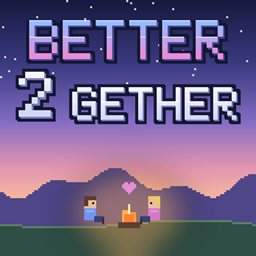
- 独特外观:手绘标题画面(温馨小屋旁的篝火边坐着两位好友)和加载屏幕,整洁的菜单界面,以及长春花蓝色按钮。
常用按键
| 按键 |
功能 |
| V |
语音聊天设置 |
| J |
静音麦克风 |
| M |
世界地图 |
| N |
新建信标点 |
| ` |
标记地点 |
| B |
打开背包 |
| H |
打开日志 |
| R |
查看村民声望 |
| P |
查看 BlockByte Exchange 投资组合 |
| E,然后点击物品 |
查看合成方法 |
所有按键均可在 选项 > 控制 中更改。整合包的按键绝不会覆盖你已设置的按键。
要求与安装
- 需要 Minecraft 26.3 和 NeoForge。CurseForge 应用会自动为你配置:安装整合包并按“开始游戏”。
- Java 25(CurseForge 应用会自动选择)。
- 分配 6 GB 内存(设置 > Minecraft > Java 设置)。
- 所有共同游玩的玩家都需要该整合包,且版本必须一致。
- 包含光影但默认关闭(Complementary 和 BSL)。在 选项 > 视频设置 > 光影包 中开启其中一个。Faithful 64x 也包含在内,位于资源包中。
常见问题
我可以使用我的 0.6 版本世界吗?
不可以。1.0.0 版已迁移至 Minecraft 26.3,许多模组已更新。请创建新世界,或继续游玩 0.6 版本(它仍在此页面供 1.21.8 使用)。
Essential 去哪了?
Essential 没有适用于 Minecraft 26.3 的 NeoForge 版本。e4mc 现在为你提供链接,好友可从任何地方加入。
语音聊天能通过 e4mc 链接工作吗?
不能。语音聊天需要独立的连接:它在局域网世界和支持开放端口(24454, UDP)的服务器上有效。
我可以在服务器上运行它吗?
可以。将模组安装在 NeoForge 26.3 服务器上(客户端专属模组如 e4mc、光影和菜单模组在此不需要)。
致谢
本整合包中的每个模组均属于其原作者。感谢所有作者的支持。菜单艺术、Better 2Gether Core 模组以及整合包设置均为本整合包专门制作。
反馈与错误报告
发现错误、崩溃或看起来不对劲的地方?请在本页面留下评论,注明你游玩的版本以及具体情况。崩溃日志或截图会有很大帮助。我们也欢迎任何想法和反馈。
许可权限
- 你可以游玩此整合包,进行直播并制作相关视频。
- 整合包自身的文件(包括其设置、菜单艺术图以及 Better 2Gether Core 模组)均为保留所有权利:请勿在未事先征得同意的情况下重新上传或在其他整合包中复用这些内容。
- 整合包中的每个模组均属于其各自的作者,并保留其原有的许可证。
广告
这是一则广告。JustJosh99 制作了本整合包,同时也运营 Swift Web Design。

共同构建些什么?让我们为您打造网站。 Swift Web Design 制作快速、清晰且在任何屏幕上易于使用的网站。访问 Swift Web Design
Better 2Gether
Minecraft is better with someone else. This is a cosy, lightly modded pack for couples and small groups of friends.
What it is
The Minecraft you know, made smoother, prettier and easier to share. No big tech trees and no wiki needed: build a home together, farm, cook, explore, and keep each other alive at night. It works just as well on your own.
Playing together
- Same house: one of you presses Esc, opens World Options…, turns LAN on under Multiplayer and presses Apply Changes. The other finds the world under Multiplayer.
- Anywhere else: turn LAN on the same way, and e4mc puts a link in chat (it ends in
e4mc.link). Click it to copy it, send it to your friend, and they paste it into Multiplayer > Direct Connection. No router setup.
- Voice chat (Simple Voice Chat): hear each other when you are close. Press V once to set up your microphone.
- Find each other: a minimap and a world map (press M) show where your friends are. Share a waypoint in chat with one click.
- Point things out: press ` (the key under Esc) to ping a spot or a mob so your friend sees it.
- Fair loot: every player gets their own loot from each chest (Lootr), so nobody misses out.
- No lost items: when you die, your things wait in your corpse.
- Sleep together: in a new world, one of two players in bed is enough to skip the night.
- Remember the good bits: WorldLedger writes down your places, chests and deaths, and you can send an entry to your friend.
- Village friends: Village Standing gives each of you a standing with the villagers, a bounty board of village requests, and better prices and golem help when you treat villagers well.
- Co-op projects: BlockByte Exchange adds crypto-mining machines and a market; start a co-op and friends share machines, research and payouts.
- Waystones to get back to each other fast, and player heads next to chat messages.
Cosy building and farming
- Macaw's furniture, windows, doors, roofs, fences, bridges, lamps, paths and paintings.
- Right-click ripe crops to harvest and replant them.
- A kitchen you build together that shows what you can cook (Cooking for Blockheads).
- Crops in decorated pots, more stone blocks, elevators, and cheap wooden and brick hoppers.
- Endermen leave your builds alone.
Little extras
- Backpacks, upgradable chests and bins (Sophisticated Backpacks and Storage, Trash Cans).
- Hang gliders, better boats and minecarts, and horse stats before you tame one.
- New animals and sea life, villages in many styles, new Nether and End structures, rare huge ore deposits.
- Recipe lookup (JEI), what you are looking at (Jade), food values, tool durability and effect descriptions.
- Its own look: a drawn title screen (two friends at a campfire by a cosy cottage) and loading screen, a tidy menu, and periwinkle buttons.
Handy keys
| Key |
What it does |
| V |
voice chat settings |
| J |
mute your microphone |
| M |
world map |
| N |
new waypoint |
| ` |
ping a spot |
| B |
open your backpack |
| H |
open your ledger |
| R |
your villager standing |
| P |
your BlockByte Exchange portfolio |
| E, then an item |
how to make it |
All keys can be changed in Options > Controls. The pack's keys never overwrite ones you have already set.
Requirements and install
- Minecraft 26.3 with NeoForge. The CurseForge app sets this up for you: install the pack and press Play.
- Java 25 (the CurseForge app picks it).
- Give it 6 GB of memory (Settings > Minecraft > Java Settings).
- Everyone who plays together needs the pack, the same version.
- Shaders are included but switched off (Complementary and BSL). Turn one on in Options > Video Settings > Shader Packs. Faithful 64x is there too, in Resource Packs.
FAQ
Can I use my 0.6 world?
No. 1.0.0 moves to Minecraft 26.3 and many mods changed. Start a new world, or keep playing 0.6 (it is still on this page for 1.21.8).
Where did Essential go?
Essential has no NeoForge version for Minecraft 26.3. e4mc now gives you a link your friend can join from anywhere.
Does voice chat work through the e4mc link?
No. Voice chat needs its own connection: it works in LAN worlds and on servers that open its port (24454, UDP).
Can I run it on a server?
Yes. Put the mods on a NeoForge 26.3 server (the client-only mods, such as e4mc, the shaders and the menu mods, are not needed there).
Credits
Every mod in this pack belongs to its author. Thank you to all of them. The menu art, the Better 2Gether Core mod and the pack's settings are made for this pack.
Feedback and bugs
Found a bug, a crash or something that looks wrong? Leave a comment on this page with the version you play and what happened. A crash log or screenshot helps a lot. Ideas and feedback are welcome too.
Permissions
- You can play this pack, stream it and make videos with it.
- The pack's own files (its settings, menu art and the Better 2Gether Core mod) are All Rights Reserved: please don't re-upload them or reuse them in another pack without asking first.
- Every mod in the pack belongs to its own author and keeps its own licence.
Advert
This is an ad. JustJosh99 makes this modpack and also runs Swift Web Design.
Building something together? Let us build your website. Swift Web Design makes websites that are fast, clear and easy to use on any screen. Visit Swift Web Design

 整合包

 整合包

 整合包

 整合包

 整合包

 整合包

评论 0
登录后参与评分
还没有评论,来抢沙发吧