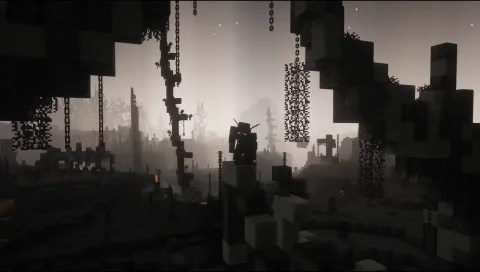
这是一个专注于在不牺牲原版经典风格的前提下丰富 Minecraft 原版的 Fabric 整合包。它拥有由 Terralith+Tectonic+Geophilic 组合驱动的惊艳景观,增强了音频环境音效,当然还有 Distant Horizons。一套与 DH 兼容的光影进一步完善了整体体验。
?《Cartographer's Dream》支持手柄操作,可通过菜单设置进行完全自定义。
⚡以 Sodium、Fast noise、Lithium、C2me 和 Krypton 作为核心性能优化器进行优化。
为了充分发挥 Distant Horizons 的效果,请确保使用预装的 ?Chunky 模组来预生成你即将游玩的世界的区块,这是该中心模组的关键所在。
示例:
常见的 Chunky 命令包括 /chunky radius。例如,你可以将半径设置为 500x500 方块。如果你拥有强大的 PC,推荐的最大半径为 5000x5000 方块。⚠️生成超过此范围的区块可能会导致内存溢出错误或导致模组崩溃;不过,你也可以分批次较小范围地生成区域。配置完成后,使用 /chunky start 开始生成区块。此过程需要时间,具体取决于你的 PC 性能。
注意:这一步完全是可选的。你可以使用默认设置进行游戏,或者尝试实验以找到最适合你的配置。然而,请注意,如果没有预加载的区块,游戏将会出现显著卡顿。
要求:在开始之前,你必须分配更多的 RAM:
⚠️6GB 是最低要求。
⚠️ 推荐 8GB 或 10GB,不要尝试分配更多。
如果你仍然遇到因 Java 垃圾回收器导致的卡顿问题,可以尝试在 Java 参数中添加以下内容:
-Xms8G -Xmx8G -XX:+UseZGC -XX:+ZGenerational -XX:+AlwaysPreTouch -XX:+DisableExplicitGC -XX:+PerfDisableSharedMem
你可以根据个人偏好更改 Xms 和 Xmx 的值,上述参数适用于 8GB。
?选择与配置光影?
?在本整合包中,光影是可选的,但由于视距较大,强烈建议使用。请按照以下说明启用或禁用它们。
?前往 选项 → 视频设置。
?在左侧列表中找到“光影包”按钮。
?点击它以打开包列表 → 选择你喜欢的,如 Complementary 或 bliss。
在此处应用并调整设置:根据你的 PC 目标帧率调整画质(低/中/高/极高)。
如果你在骑鞘翅或高速移动时遇到区块加载缓慢或视觉上不完整的区块,也可以尝试在 Sodium 中使用这些针对 DH 的特定设置:
视频设置 > 性能 > 区块更新线程 → 设置为 Full 或 agresive.
始终延迟区块更新 → 设置为 Immediately 以避免区块视觉加载缓慢。
⚠️请注意,这些设置会影响性能和发热量。默认情况下,Distant Horizons 将渲染距离设置为 256 个区块,你可以将其增加到 512 或更高以获得更广阔的视野。
⚠️请记住,Distant Horizons 高度依赖 CPU。⚠️
⚠️ Chunky Wiki
Home · pop4959/Chunky Wiki · GitHub
希望你享受这个整合包,如果有任何问题,我在这里提供帮助!
祝你有美好的一天!
?想和朋友在线一起玩吗?
? 使用 Wabbanode 更智能地游戏 — 使用推荐码 JUANCHOS 获取折扣!
? 使用 Wabbanode 无限制畅玩,寻找快速、稳定且易于使用的 Minecraft 服务器?通过 Wabbanode,你可以构建自己的世界,无需担心技术问题。
⚡优化性能:服务器已准备好支持模组和大型社区。
?️ 完全兼容:支持多个 Minecraft 版本。
? 简单的控制面板:使用清晰、无忧的工具管理你的服务器。
? 友好的支持:一个真正了解 Minecraft 并帮助你解决任何问题的团队。
? 注册时使用我的推荐码 "JUANCHOS" 获取独家折扣!
This is a Fabric modpack focused on enriching vanilla Minecraft without compromising its classic style. It features stunning landscapes powered by the combination of Terralith+Tectonic+Geophilic, enhanced audio ambience and of course Distant Horizons. A set of compatible shaders with DH completes the experience.
?Cartographer's Dream has controller support, fully customizable through the menu settings.
⚡Optimized with Sodium, Fast noise, Lithium, C2me and Krypton as core performance boosters.
To get the most out of Distant Horizons, make sure to use the pre-installed ?Chunky mod to pregenerate the chunks of the world you're gonna play, this is the key of the center mod.
Example:
Common Chunky commands include /chunky radius. For example, you can set the radius to 500x500 blocks. If you have a powerful PC, the maximum recommended radius is 5000x5000 blocks. ⚠️Generating more than this is likely to cause out-of-memory errors or crash the mod; however, you can also generate the area in smaller batches. Once configured, use /chunky start to begin generating the chunks. This process takes time and depends on your PC's performance.
Note: This step is completely optional. You can play with the default settings or experiment to see which configuration works best for you. However, keep in mind that playing without preloaded chunks will cause significant lag.
Requirements: Before starting, you must allocate more RAM:
⚠️6GB Is the Minimum.
⚠️ 8GB or 10GB Recommended, don't try more.
If you are still having troubles with lag spikes, likely for java garbage collector, you can try this in the java arguments:
-Xms8G -Xmx8G -XX:+UseZGC -XX:+ZGenerational -XX:+AlwaysPreTouch -XX:+DisableExplicitGC -XX:+PerfDisableSharedMem
You can change the values of Xms and Xmx for you preference, this are for 8gb
?Selecting & Configuring Shaders?
?Shaders are Optional in this modpack but estrongly recommended due the larguer chunks distance, follow the next instructions to enable or unable it.
?Head to Options → Video Settings.
?Spot the Shader Packs button in the list at the left corner.
?Click it to open the pack list → pick your fave like Complementary or bliss.
Apply and tweak settings right there: Adjust quality (Low/Med/High/Ultra) for your PC's target FPS.
You can also try these particular settings in Sodium for DH if you are experiencing slow chunk loading or visually incomplete chunks that may occur when you are with elytras or going to fast:
Video Settings > Performance > Chunk Update Threads → set to Full or agresive.
Always Defer Chunk Updates → set to Immediately to avoid slow visual loading of chunks.
⚠️Be aware that these settings are gonna impact in performance and heat. By default, Distant Horizons sets the render distance to 256 chunks, which you can increase to 512 or higher for a broader view.
⚠️Keep in mind that Distant Horizons is highly CPU-dependent.⚠️
⚠️ Chunky Wiki
Home · pop4959/Chunky Wiki · GitHub
Hope you enjoy this modpack, If you have any questions, I'm here to help!
Have a good day!
?Want to play online with friends?
? Play smarter with Wabbanode — Get a discount using referral code JUANCHOS!
? Play Without Limits with Wabbanode, Looking for a fast, stable, and easy-to-use Minecraft server? With Wabbanode, you can build your world without worrying about the technical side.
⚡Optimized performance: servers ready for mods and large communities.
?️ Full compatibility: supports multiple Minecraft versions.
? Simple control panel: manage your server with clear, hassle-free tools.
? Friendly support: a team that truly understands Minecraft and helps you solve any issue.
? Use my referral code "JUANCHOS" to get an exclusive discount when signing up!


 整合包
 整合包

 整合包

 整合包

 整合包

 整合包

评论 0
登录后参与评分
还没有评论,来抢沙发吧