
Emotecraft+
感谢所有下载了我的整合包 Emotecraft+ 的玩家,因为我们刚刚突破了 12,000 次下载量!!!
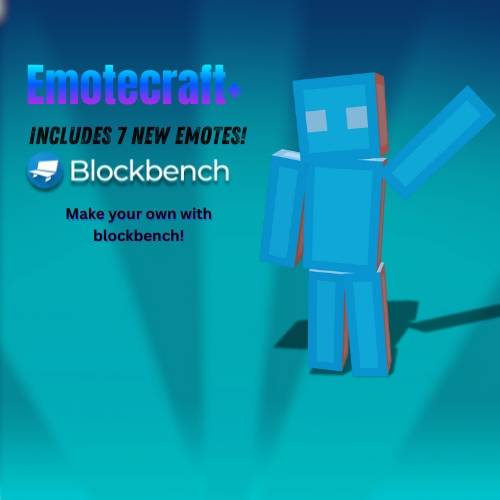 该整合包提供的内容!
“厌倦了千篇一律的表情动作?本整合包通过添加一套全新、富有表现力、有趣且有时令人捧腹的动画表情,对 Emotecraft 进行了升级。无论你是庆祝胜利、发脾气,还是仅仅与朋友一起放松,总有一个表情适合每个时刻。深入体验,让你的 Minecraft 经历比以往更加生动 animated!”
如何游玩!
?️ 在本整合包中使用表情动作的方法
要使用表情动作,请确保已安装该整合包。进入 Minecraft 后:
-
按下
B键以打开表情轮盘。 -
在轮盘底部,点击标有“全部表情”的选项卡。
-
现在你将看到所有可用表情的列表。
-
要装备一个表情:
-
点击“配置表情”选项卡。
-
选择你想要的表情。
-
然后,点击表情轮盘中的一个槽位将其分配上去。
-
-
装备完成后,在游戏中只需按下
B键并从轮盘中选择你的表情——你的角色就会执行该动作!
如何使用 Essentials 表情动作!
要使用Essentials 表情动作,请按照以下步骤操作:
-
从 Minecraft 主菜单界面,查看屏幕左侧 — 你会看到你的角色。
-
点击角色下方的“衣柜”选项卡。
-
这将打开一个新菜单,你可以在其中找到:
-
表情动作
-
装饰物品
-
以及更多自定义选项!
-
-
要装备一个表情动作:
-
浏览可用的表情动作 — 有些是免费的,而另一些可能需要购买。
-
点击某个表情动作即可为你的角色装备它。
-
-
在游戏中,按住
R键以打开Essentials 表情轮盘。 -
点击你想要的表情,你的角色就会执行该动作!
我计划很快添加更多表情动作,所以请关注我,以便你能及时准备好迎接新更新!
哦,也请去看看我的频道!!
Emotecraft+
Thanks to everyone that Downloaded my modpack Emotecraft+ because we just HIT 12,000 downloads!!!!
What the modpack offers!
"Bored of the same old emotes? This modpack upgrades Emotecraft by adding a fresh set of expressive, fun, and sometimes hilarious emotes. Whether you're celebrating a victory, throwing a tantrum, or just vibing with friends, there's an emote for every moment. Dive in and make your Minecraft experience more animated than ever!"
How to play!
?️ How to Use Emotes in This Modpack
To use emotes, make sure you have the modpack installed. Once you're in Minecraft:
-
Press the
Bkey to open the Emote Wheel. -
At the bottom of the wheel, click the tab labeled "All Emotes".
-
You'll now see a list of all available emotes.
-
To equip an emote:
-
Click on the "Config Emotes" tab.
-
Select the emote you want.
-
Then, click on one of the slots in the emote wheel to assign it.
-
-
Once equipped, just press
Bwhile playing and select your emote from the wheel—your character will perform it!
How to use Essentials Emotes!
To use Essentials Emotes, follow these steps:
-
From the Minecraft home screen, look at the left side of the screen — you’ll see your character.
-
Click the "Wardrobe" tab below to your character.
-
This will open a new menu where you’ll find:
-
Emotes
-
Cosmetics
-
And more customization options!
-
-
To equip an emote:
-
Browse through the available emotes — some are free, while others may require purchase.
-
Click on an emote to equip it to your character.
-
-
In-game, hold the
Rkey to open the Essentials Emote Wheel. -
Click on the emote you want, and your character will perform it!
I am planning on adding more Emote soon so please follow me so you can be ready for new updates!
Oh and please check out my channel!!

下载 Emotecraft+
需要联机服务器吗?
稳定流畅、一键部署,几分钟即可和朋友联机开服
最低仅需 8 元/月 即可畅快联机
下载 Emotecraft+
需要联机服务器吗?
稳定流畅、一键部署,几分钟即可和朋友联机开服
最低仅需 8 元/月 即可畅快联机
下载 Emotecraft+
需要联机服务器吗?
稳定流畅、一键部署,几分钟即可和朋友联机开服
最低仅需 8 元/月 即可畅快联机
下载 Emotecraft+
需要联机服务器吗?
稳定流畅、一键部署,几分钟即可和朋友联机开服
最低仅需 8 元/月 即可畅快联机
下载 Emotecraft+
需要联机服务器吗?
稳定流畅、一键部署,几分钟即可和朋友联机开服
最低仅需 8 元/月 即可畅快联机
下载 Emotecraft+
需要联机服务器吗?
稳定流畅、一键部署,几分钟即可和朋友联机开服
最低仅需 8 元/月 即可畅快联机
下载 Emotecraft+
需要联机服务器吗?
稳定流畅、一键部署,几分钟即可和朋友联机开服
最低仅需 8 元/月 即可畅快联机
下载 Emotecraft+
需要联机服务器吗?
稳定流畅、一键部署,几分钟即可和朋友联机开服
最低仅需 8 元/月 即可畅快联机
下载 Emotecraft+
需要联机服务器吗?
稳定流畅、一键部署,几分钟即可和朋友联机开服
最低仅需 8 元/月 即可畅快联机
下载 Emotecraft+
需要联机服务器吗?
稳定流畅、一键部署,几分钟即可和朋友联机开服
最低仅需 8 元/月 即可畅快联机
暂无更新日志
关于这个资源的讨论、问题反馈与使用心得
还没有讨论,来发第一帖吧
你是这个资源的作者?登录后可认领此资源。
相似资源
 整合包

《星露谷物语》体验!深度农业、动物饲养和钓鱼,机制完全源自游戏!
 整合包
享受更加刺激和逼真的游戏体验,并附带大量全新动画。
 整合包

一个原版+整合包,包含少量模组,让您在低配电脑上也能享受流畅无卡顿的游戏体验!
 整合包

一个大型探索与生存整合包,包含自定义任务、世界生成、地牢、Boss 战、建造、农耕以及多人冒险。
 整合包
在 1.20 中体验 beta Minecraft 的怀旧感。尽管有些东西可能最好还是被遗忘……
 整合包

1.18 整合包,包含大家最喜爱的模组以及大量可供尝试的新模组。
评论 0
登录后参与评分
还没有评论,来抢沙发吧