

准备好体验有史以来最伟大的恐怖项目了吗?专为那些问出 "͑̈͜I̴̡̟̓͜s̩̞̙ ̧̥̝͂̄M̵̞̗̿̑͞į̦̇͏n̴̠̦̝̆e̫̗c̞̘̍ŗ͜ȃ̠͜f͞ț̵̗̀̐͞ ̟͑͞͝s̢̥ç̜̠̐̑ą̵̛͒̈r̤̊y̦̆̑?̈͏̵̄"̖̤́ 的人而设计

唯一一个重视 Minecraft 中所有恐怖模组的在线可玩整合包,将它们汇聚一堂,且没有任何恶俗的点击诱饵

曾几何时,它是全世界人都知道的最和平的游戏。直到他……从迷雾中现身……
世界空虚带来的孤独让他变得愈发强大。他让我们感到自己从未孤单。他打开了通往此后种种恐怖的门户。
在他带来的噩梦中,你有十次死亡的机会来逃离嗜血的怪物大军。当你的生命耗尽,你必须在新的世界中重新开始。要逃离这个噩梦,你必须先前往下界,然后找到 12 种不同的眼球并将其放置在传送门中以抵达末地。别忘了:唯一的出路在于远古城市中的监守者!
本整合包并非一次性恐怖体验;它专为长期游玩而设计。玩得越久,恐惧感越强。随着天数推移,会出现不同的怪物。如果你连续游玩 50 天,你将几乎见识到绝大多数怪物。所有能想到的恐怖题材都汇聚于此:史前恐龙 / 蜘蛛恐惧症 / 心理恐怖 / ARG(替代现实游戏) / 模拟信号 / 宇宙恐怖 / Jumpscare(突发惊吓) / 追逐恐怖…… 本整合包不同于其他随机的恐怖整合包,无法与之相提并论。所有精细细节均已考虑在内。所有经过修复或随最新补丁新发布的高质量恐怖模组都将包含在本整合包中。请务必使用最新版本游玩。 本整合包包含超过 400 个模组!


???????? :
- 许多等待被发现的诡异建筑 ?️
- 以最佳方式营造出的紧张氛围 ?️
- 数百种不同的怪物充实氛围 ☠️
- 所有居民、僵尸、动物等都能听到你的麦克风声音
- 每过 13 天就会爆发一次僵尸入侵 ?
- 精心挑选的恐怖模组与设置,在长时间游戏过程中不会让人感到无聊或重复 ?
- OneBlock(一块石)作为娱乐附加功能 ?
- 所有恐怖模组均无重大 Bug,适合在线游玩 ✅
- 惊人的优化能力,可同时运行所有恐怖模组 ⚡
- 适合所有人:通过资源包和光影,你可以打造想要的恐怖氛围。此外,你还可以添加你想要的额外模组。只要兼容且不重新发布该项目即可!
- 服务器端支持 10,000 次下载 ?
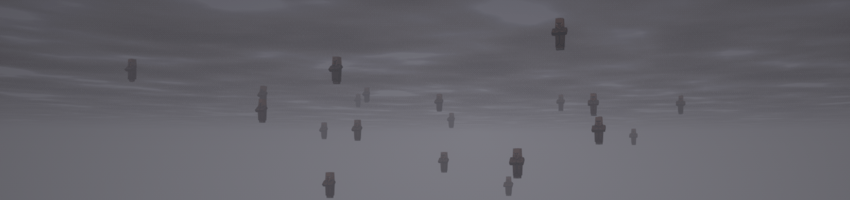
/ 在这个残酷的世界中,玩家的目标是什么?
*在这个残酷的世界中,所有恐怖模组都会向你袭来,你有10次死亡机会,之后游戏就会结束。当你的生命用尽时,你将被永久禁止进入这个世界。因此,你必须小心谨慎,避免不必要的死亡。别忘了通往下界和末地的路径已经改变。黑曜石传送门不再起作用。要到达下界,你必须使用回声石来激活古城中的传送门。对于通往末地的传送门,你必须找到12种不同的眼睛并将其放置在传送台中。如果你找不到12种不同的眼睛,可以使用末影之眼。在这个充满挑战的世界中,有多种方法可以抵御所有怪物。
/ 会添加其他模组吗?
*我会积极审查 CurseForge 上的所有模组。我已经添加了所有与我版本兼容且没有重大错误的优质恐怖模组,并且我将继续添加更多。
*我对 1.19.2 版本的所有恐怖模组及其错误了如指掌。如果你是高质量的恐怖模组开发者,而你的模组未被收录,主要有以下两个原因:
- 1- 你的模组可能仍在审核中。或者因为存在少量bug,我在等待更新。
- 2- 你的模组包含太多bug,无法进行审核。可能存在非常严重的优化问题或不可控的烦人“刷怪/刷屏”问题(更可能是优化问题)。
该整合包已经足够恐怖,但尚未达到我预期的水平。我们需要模组创作者的理解,以便添加更多恐怖的模组。
/ 为什么我要做这个项目?
*大约三年前,当第一批恐怖模组发布时,我听到有人说:“这里有什么好怕的?”从那时起,我就产生了制作这个整合包的想法。起初我只是出于娱乐,但随着时间推移,我学到了更多,并(部分)成为了该领域的专家。我创建这个项目是为了向所有人证明,Minecraft 及其模组拥有巨大的潜力,不容忽视。尽管模组方面仍有一些不足,但我将通过添加随时间修复的模组,将所有恐怖模组纳入此整合包中。
以下内容均为旧版信息(即将更新)⤵
你需要了解的信息:
- 到目前为止,许多错误已通过新更新修复。尽管如此,我已将刷怪设置调整到最佳状态。随着未来的更新,我还将修复任何我可能忽略的小改动。如果在玩最新版本时遇到任何问题,请随时在 issues 板块中报告。我将尽力改进。
- 如果某个声音让你感到困扰,请按一次 “G” 键。这将暂时静音所有游戏内声音。仅在必要时使用,不要频繁点击。 “H” 键同理,用于闭上眼睛。不必要地频繁点击可能会导致游戏冻结。
- 游戏通过最新更新已变得更容易上手。如果你自认为水平一般,无需更改此设置;但如果你认为自己是个高手,在进入世界后输入以下命令:“/gamerule oldCombat false”。你可以开启或关闭旧的刷怪战斗机制。
- /function fromthefog:admin/config :按下回车后,打开菜单并选择最后一个选项,“Give him control”(给他控制权)。
- 如果遇到意外问题,返回主菜单并重新加入世界即可解决。
- F3 界面中的天数计数器可能不准确,但屏幕上以大写字母显示的天数计数器是准确的。如果你的物品栏中有时钟,此信息也会显示在左上角。
- (你不再需要这样做)
如果你的系统使用的语言不是英语,则必须在游戏的 JVM Arguments(JVM 参数)部分,即附加参数部分中输入以下代码:
-Duser.language=en -Duser.country=US
*如果不这样做,游戏可能根本无法启动,或者由于不同语言的字符不兼容而崩溃。这段代码的目的是以纯英文模式启动游戏。打开 CurseForge 应用程序。点击左下角的设置图标,选择 Minecraft,然后向下滚动。将代码粘贴到附加参数部分中。这必须在游戏启动之前完成。不用担心,这样做没有任何危害。
- 如果你的生命即将耗尽,你可以通过输入 “/ll set-lives (玩家名称) (数值)” 来作弊。你输入的数值将成为你剩余的生命次数。但是,你必须在生命完全耗尽之前执行此操作,否则你将被禁止进入世界,且永远无法再次进入。(为了获得最佳体验,建议不要作弊)
- 在某些怪物遭遇战中,你可能会被踢回主菜单。这种情况相当罕见,一旦发生,你可以回到自己的世界并继续游戏。
- 如果周围没有怪物且你无法睡觉,疯狂点击床不会有任何效果。如果它们不想让你睡觉,你就不能睡觉。睡觉就像是一个稀有事件。(不要疯狂点击空格键)
- 为了获得更好的恐怖体验,按下 F5 键切换视角的功能已被禁用。改为按住左侧 Alt 键并转动头部以查看身后。在逃跑时边跑边回头看非常有效。(务必关闭字幕并使用耳机游玩)
*你必须竭尽全力生存。如果你毫不在意地毫无意义地死亡,说明你不是个好玩家。如果你多次尝试仍无法通关,你需要学习如何游玩。因为不懂玩法的人无法体验真正的恐惧。
*此外,不要指望所有怪物都能同样吓到你。虽然有些确实令人惊恐,但另一些只是为了营造氛围而加入的。
*请勿手动更新项目中的任何模组,否则可能会遇到问题。
提醒
由于某些问题,我无法将这些模组包含在内。如果你愿意,可以手动添加这些模组的最新版本:
- The Man From The Fog -------)
- 如果你愿意,也可以添加 The Slumbering Omen 模组。我没有将其包含在整合包中是因为它存在一些问题,但配置已包含在内。(请注意,该模组会影响帧率)------)
*仅在你打算单人游玩时,才添加 In Your World 和 ooo.jar 模组。它们在多人游戏中会导致 NBT 错误。
*如果你信任你电脑的性能,可以添加 The Man From The Fog 模组。它会导致轻微的性能下降。
调整设置:
- 区块渲染距离应设置为 8-10(你可以根据电脑性能增加或减少)
- 加入世界后,你可以预加载区块以获得更流畅的游戏体验。为此,按顺序输入以下命令:
/chunky center
/chunky radius 500
/chunky start
*你输入的半径越大,加载的区块就越远。在加载过程中,TPS 可能会略有下降,但加载完成后游戏运行流畅。即使你不这样做,游戏也能流畅运行;如果做了,运行会更加流畅。
推荐组合:
*添加了不同的光影以吸引每位玩家。通过“资源包 + 光影”的组合,你可以根据自己的喜好定制恐怖风格。
*如果你的显卡是 RTX 3060 Ti 或更强,可以使用 Patrix 资源包。
1- Spooklementary 光影 + Patrix 资源包
2- 你可以使用此组合搭配所有 ARG 和 VHS 类光影:
MC_VHS 光影 / Genesis 光影 / Rudimentary 光影 + Golden Days Base 资源包 + Programmer Art 资源包
排列顺序应为: (The Moon 和 Default Dark Mode 资源包应保持在最顶层)
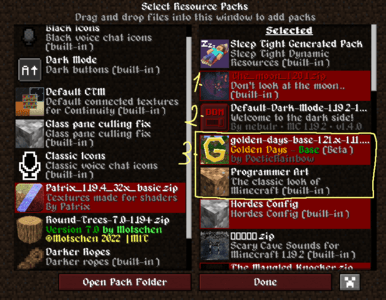
*如果你至少有 6 GB 内存,即使是在低配电脑上,关闭光影也能畅玩。(与其完全关闭光影,不如使用 Rudimentary 光影或 Genesis 光影)
*为了获得流畅的游戏体验,建议分配至少 7 GB 内存
游戏玩法:
*当你遇到某些怪物时,你需要闭上眼睛或捂住耳朵几秒钟,直到怪物消失。要捂住耳朵,请按住 “G” 键。要闭上眼睛,请按住 “H” 键。遭遇期间屏幕上会出现警告,提示你需要遮住眼睛或耳朵。但你必须迅速行动并及时反应,否则将导致死亡。
*你可以按 F6 键打开或关闭身体视角。
*当怪物试图杀死你时,你不会立即死亡,而是倒地。如果倒地后继续受到攻击,你将死亡。不过,朋友可以来到你身边并按住左Shift键来复活你。如果在被他人帮助复活后再次倒地,这次你将真正死亡,因为你的“倒地机会”已用完。但如果你在重新站起后吃下金苹果,若再次倒地寻求救援,你将获得另一次倒地机会。金苹果意味着你拥有额外的倒地机会。若想无人帮助自行站起,则需要食用附魔金苹果。附魔金苹果是可以合成的。
*部分怪物能听到你的声音、撞破墙壁、跳到你面前,并做出许多其他行为。请确保你持有盾牌,且快捷栏中备有充足的方块。
*记得按时服用你的药丸。否则你可能会产生幻觉,这甚至可能导致死亡。如果你丢失了药丸,可以自己制作。
*大多数怪物的奔跑速度不如你。(有些怪物的速度远超你。)每种怪物都有各自的应对方法。因此,整体是平衡的。最好你自己去发现它们 :)
*我在项目中使用了少量 Dweller 模组的内容,但这绝对不意味着这是 Dweller 的缝合怪。我对这个词的理解比任何人都深,并据此进行了专门的调整。
*跑步时想查看身后,请按住左下角按钮(通常为鼠标侧键)。
*按 C 键蹲下。
*借助 Wall Jump 模组,你可以攀爬墙壁以更快逃离怪物。要在墙壁间跳跃:按住左Shift + W 键,然后按空格键在墙壁间跳跃。不过请记住,跳跃会增加饥饿值消耗。
*按 ‘V’ 键启用游戏内麦克风,让怪物能听到你的声音。
*在床上躺下后,按空格键进入睡眠模式。
*按 J 键查看你上次死亡的坐标。
*要点燃篝火,需添加燃料(如木头、煤炭或书)。然后用燧石引燃。添加的燃料越多,燃烧时间越长。此外,注意防雨,否则火势会更快熄灭。
*按 'K' 键查看特殊任务。
*要从某些动物身上获取肉类,需要将其悬挂并切割。为此,你需要绳索和肉钩。
*你可以食用任何活体生物以避免饿死。(蜜蜂、山羊、狼等)
*按住左Shift键可逐个击倒原木。
*使用鼠标侧键进行缩放。
*按 O 和 P 键完成成就。
*你可以使用 (.) 键打开和关闭方块模板。建造时可能用得上。
*第20天后,“恐惧之根”可能会出现。它会试图关掉你的灯光,让你在黑暗中毫无防备并被杀死。为了保护灯光,请在灯光即将熄灭时左击它们,使其始终保持开启状态。不要试图逃跑,因为它跑得比你快。(它不会在第15/20天结束前出现。)
*如果你的 Atlas 地图为空,它将不会绘制内容。你可以将已绘制的位置转移到新地图上,或者在地图耗尽绘制空间后,向其中添加一张空白纸张以继续绘制。
点击图片查看本项目中使用的所有视频⤵
Startup Music Tone Mod By MeroSsSany
如果您有任何问题、困难或建议,请随时告知我。
本项目并非以任何形式旨在接受捐赠或收费。如上所述,它仅专为那些声称“我不怕 Minecraft”的人设计。然而,如果您仍希望支持:
禁止任何形式的再发布。保留所有权利。
Are you ready to play the greatest horror project ever created designed for those who ask "͑̈͜I̴̡̟̓͜s̩̞̙ ̧̥̝͂̄M̵̞̗̿̑͞į̦̇͏n̴̠̦̝̆e̫̗c̞̘̍ŗ͜ȃ̠͜f͞ț̵̗̀̐͞ ̟͑͞͝s̢̥ç̜̠̐̑ą̵̛͒̈r̤̊y̦̆̑?̈͏̵̄"̖̤́
The only online-playable modpack that values all horror mods in Minecraft, brings them together under one roof and contains no ridiculous clickbait
Once upon a time, it was the most peaceful game in the world that everyone knew. Until he emerged from the fog...
The loneliness brought on by the emptiness in the world made him even stronger. He made us feel that we were never alone. He opened the door to many horrors that would come after that day.
In the nightmare he brought, you have ten chances to die to escape the bloodthirsty all monsters. When your lives are over, you will have to start over in a new world. To escape this nightmare, you must first go to the Nether, then find 12 different eyes and place them in the portal to reach The End. Don't forget: The only way out is the Warden Ancient City!
This pack is not a one-time horror experience; it is designed for long-term play. The more you play, the scarier it becomes. Different monsters will appear as the days progress. If you play a 50 day streak you will see almost most of the monsters. All imaginable horror genres are combined under one roof: Prehistoric Dinosaurs / Arachnophobia / Psychological / ARG / Analog / Cosmic / Jumpscare / Chase Horror... This pack is different from other random horror packs and cannot be compared to them. All the fine details have been considered. All high-quality horror mods that have been fixed or newly released with the latest update will be included in the modpack. Always play the latest version. The modpack contains over 400 mods!
???????? :
- Many spooky structures waiting to be discovered ?️
- A tense atmosphere created in the best way possible ?️
- Hundreds of different monsters to fill the atmosphere ☠️
- All dwellers , zombies , animals and more can hear your microphone
- Every 13 days a zombie invasion ?
- Specially selected horror mods and settings that don't bore or repeat themselves during long gaming sessions ?
- OneBlock as an extra feature for entertainment purposes ?
- All horror mods free of major bugs and suitable for online play ✅
- An amazing optimization that can handle all horror mods at the same time ⚡
- Suitable for everyone: With the resourcepacks and shaders, you can create the horror atmosphere you want. What's more, you can also include additional mods you want. As long as it is compatible and you do not republish the project !
- 10,000 downloads for the server ?
/ What is the purpose of the player in this cruel world ?
*In this ruthless world where all horror mods come at you, you have 10 chances to die before the game ends. When you run out of lives, you’ll be permanently banned from the world. So you must be careful and avoid dying unnecessarily. Don’t forget that the paths to the Nether and the End have changed. Obsidian portals no longer work. To reach the Nether, you must use an echo stone to activate the portal in the ancient city. For the portal going to the End, you must find 12 different eyes and place them in the portal. If you can’t find 12 different eyes, you can use an Eye of Ender. In this challenging world, there are different ways to survive all the monsters.
/ Will other mods be added ?
*I actively review all mods on the CurseForge. I have added all high-quality horror mods that are compatible with my version and have no major bugs, and I will continue to add more.
*I know all the horror mods in version 1.19.2 down to their bugs. If you are a quality horror mod developer and your mod has not been included in the pack, there are two main reasons for this :
- 1- Your mod may still be under review. Or I may be waiting for an update due to a few bug.
- 2- Your mod contains too many bug to be reviewed. There may be very serious optimization or uncontrollably annoying ''spawn/spam'' issue (optimization is more likely).
The pack is sufficiently scary, but it hasn't reached the level I'm aiming for yet. We need mod creators' understanding to add more scary mods.
/ Why did I have to do this project ?
*About three years ago, when the first horror mods were released, I heard some people say, “Is there anything to be afraid of here?” and since then, I've felt the need to create this pack. I started out doing it for fun, but over time I learned more and (partially) became an expert in this field. I created this project to prove to everyone that Minecraft and its mods have enormous potential that cannot be underestimated. Although there are still some shortcomings in the mod section, I will include all horror mods in this pack by adding mods that will be fixed over time.
Everything below this point is old (will be updated soon)⤵
What you need to know :
- So far many bugs have been fixed with the new updates. Despite everything, I set it to the best possible the spawn settings setting. With future updates, I will also fix any minor changes I may have overlooked. If you encounter any issues while playing the latest version, please don't hesitate to report them in the issues section. I will do my best to improve it.
- If a sound is bothering you, press the “G” key once. This will temporarily mute all in-game sounds. Use it only when necessary and do not spam it constantly. The same applies to the “H” key, which closes your eyes. Spamming it unnecessarily may cause the game to freeze.
- The game has been made easier with the latest updates. If you're below average, you don't need to change this, but if you think you're a good player, type this command after entering the world: “/gamerule oldCombat false” You can turn the old spam combat mechanic on and off.
- /function fromthefog:admin/config : After pressing Enter, open the menu and select the last option, “Give him control”.
- If you encounter an unexpected problem, returning to the main menu and rejoining the world will resolve the issue.
- The day counter in f 3 may be incorrect, but the day counter displayed in capital letters on the screen is correct. If you have a clock in your inventory, this information will also be displayed in the upper left corner.
- (You don't need to do that anymore)
If your system uses a language other than English, you must enter the following code in parentheses in the JVM Argumentation section of the game, i.e., the additional parameters section:
-Duser.language=en -Duser.country=US
*If you don't do this, the game may not open at all or may crash due to character incompatibility in different languages. The purpose of this code is to start the game entirely in English. Open the Curse Forge application. Click on the settings icon in the bottom left, select Minecraft, and scroll down. Paste the code into the additional parameters section. This must be done before the game starts. Don't worry, there's no harm in doing this.
- If your lives are about to run out, you can cheat by typing “/ll set-lives (player name) (value)”. The value you enter will be set as your remaining life chance. However, you must do this before your lives are completely depleted, otherwise you will be banned from the world and will never be able to enter it again. (For the best experience, it's better not to cheat)
- During some monster encounters, you may be kicked back to the main menu. This is quite rare, and once it happens, you can return to your world and continue playing.
- If there are no monsters around and you can't sleep, spamming your bed won't change anything. If they don't want you to sleep, you can't sleep. Sleeping is like a rare event. (Do not spam the space bar)
- For a better horror experience, the ability to change your viewpoint by pressing the F5 key has been disabled. Instead, hold down the left Alt key and turn your head to look behind you. Looking behind you while running is quite effective when escaping from monsters. (Definitely avoid subtitles and play with headphones)
*You must do everything in your power to survive. If you die needlessly without caring about anything, it means you're not a good player. And if you can't finish the game despite many attempts, you need to learn how to play it. Because those who don't know how to play it can't experience true fear.
*Also, don't expect all monsters to scare you equally. While some may genuinely frighten you, others are only included to create atmosphere.
*Do not manually update any mods in the project; you may encounter problems.
Reminder
I cannot include these mods due to certain issues. If you wish, you can manually add these mods with their latest versions :
- The Man From The Fog -------)
- You can also include The Slumbering Omen mod if you want. I didn't include this mod in the pack because it contains some issues, but the configurations are included. (Keep in mind that this mod will affect FPS) ------)
*Only include the In Your World and ooo.jar mods if you're going to play single-player. They cause NBT errors in multiplayer.
*Include The Man From The Fog mod if you trust your computer's performance. It will cause a slight performance drop.
??????????? :
- Chunks must be 8-10 (You can increase or decrease it depending on your computer's power)
- After joining the world, you can preload the chunks for smoother gameplay. To do this, enter the following commands in order:
/chunky center
/chunky radius 500
/chunky start
*The larger the radius you enter, the farther the chunks will be loaded. While the chunks are loading, the TPS may drop slightly, but after loading, the game runs smoothly. Even if you don't do this, the game runs smoothly. If you do, it will run even more smoothly.
Recommended Combinations :
* Different shaders have been added to appeal to every player. With the “ResourcePack + Shaders” combination, you can customize the game according to your preferred horror genre.
* If your graphics card is a 3060 Ti or more powerful, you can use the Patrix resource pack.
1- Spooklementary Shaders + Patrix resource pack
2- You can use all ARG and VHS shaders with this combination:
MC_VHS Shaders / Genesis Shaders / Rudimentary Shaders + Golden Days Base resource pack + Programmer Art resource pack
The order should be: (The Moon and Default Dark Mode resource pack should remain on top)
* If you have at least 6 GB of RAM, you can play even on a toaster by turning off the shaders. (Instead of turning off the shaders completely, you can use Rudimentary shader or Genesis shader)
* The recommended amount of RAM for a smooth gaming experience is at least 7 GB
???????? :
*When you encounter some monsters, you will need to close your eyes or ears for a few seconds until the monster disappears. To close your ears, hold down the “G” key. To cover your eyes, hold down the “H” key. Warnings will appear on your screen during encounters indicating that you need to cover your eyes or ears. However, you must act quickly and react promptly. Otherwise, it will result in death.
*You can open and close the body view angle by pressing the F6 key.
*When a monster tries to kill you, you fall to the ground instead of dying immediately. If you continue to be hit after falling, you will die. However, a friend can come to you and hold down the left shift key to revive you. If you fall again after being revived with someone else's help, you will die this time, as your fall chance has expired. However, if you eat a golden apple after getting back up, you will gain another chance to fall if you fall to be rescued. The golden apple means you have another chance to fall. To get back up without help, you need to eat an enchanted golden apple. You can craft the enchanted golden apple.
*Some monsters can hear you, break through walls, jump in front of you, and do many other things. Make sure you have a shield and plenty of blocks in your hotbar.
*Remember to take your pills on time. Otherwise, you may experience hallucinations. And this can even lead to death. If you lose your pills, you can make them yourself.
*Most monsters can't run faster than you. (Some are many times faster than you.) There's a different solution to get rid of each monster. So, everything is balanced. It's best to find it yourself :)
*I used a few dweller in the project, but that definitely doesn't mean it's dweller slop. I know this word better than anyone, and I made special adjustments accordingly.
*To look behind you while running, press and hold the left bottom button.
*Press the C key to crouch.
*With the Wall Jump mod, you can climb walls to escape monsters faster. To jump from wall to wall: Hold down the Left Shift + W keys and press the space bar to jump from wall to wall. However, remember that jumping will increase your hunger.
*Press the ‘V’ key for the in-game microphone that lets monsters hear your voice.
*After lying down on the bed, press the space bar to enter sleep mode.
*Use the J to see the coordinates of your last death.
*To light a campfire, add fuel (like wood, coal, or a book). Then light it with a flint. The more fuel you add, the longer it will burn. Also, protect it from rain, or it will go out faster.
*Press the 'K' key for special tasks.
*To get the meat from some animals, you need to hang them and cut them. For this, you need a rope and a meat hook.
*You can eat any living creature to avoid starving to death. (Bee, goat, wolf)
*Hold down the left shift key to break the logs one by one.
*Use the side mouse button to zoom in.
*Use the O and P keys to perform achievements.
*You can open and close the block template using (.) key. May need it while building
*After day 20, The Root of Fear may appear. It will try to turn off your lights, leaving you defenseless in the dark and killing you. To save your lights, prevent this by left-clicking your dying lights and keeping them on at all times. Don't try to run away, as it runs faster than you. (It won't appear until day 15/20is up.)
*If your Atlas map is empty, it won't draw. You can transfer the locations you've drawn to your new map, or you can continue drawing by adding a blank sheet of paper to your map after it runs out of drawing space.
Click on the image to see all the videos used in this project⤵
Startup Music Tone Mod By MeroSsSany
If you have any questions, problems, or suggestions, please don't hesitate to let me know.
This project was not created for donations or fees in any way. As I mentioned above, it is designed only for those who say, “I'm not scared of Minecraft” However, if you still want to support it:
Any republication of this project is prohibited. All rights reserved.

 整合包
 整合包

 整合包

 整合包

 整合包

 整合包

评论 0
登录后参与评分
还没有评论,来抢沙发吧