Full Spectrum Realism: Lightweight Immersion Modpack
一款高度优化的整合包,为配置较低的电脑带来逼真的视觉效果和沉浸感。
概述:
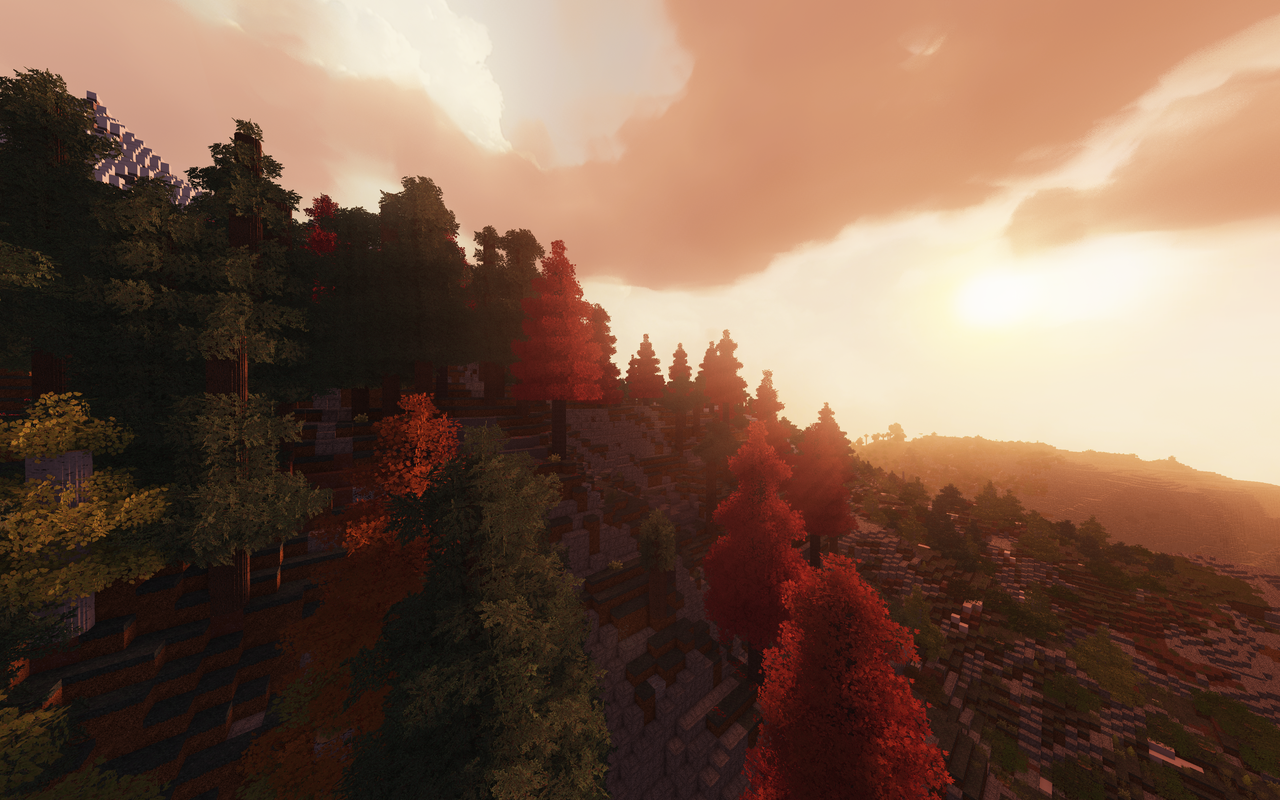
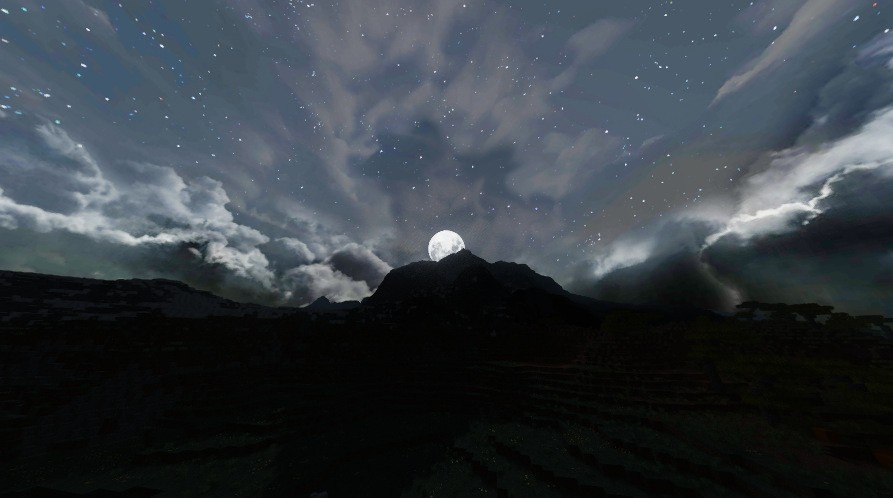
Full Spectrum Realism 是一款针对低配或老旧电脑玩家精心调校的 Minecraft 1.21.11 整合包,旨在提供丰富且沉浸的游戏体验。与那些需要高端显卡的臃肿整合包不同,本整合包经过仔细筛选和配置模组,以模拟栩栩如生的环境、音效和机制——同时不牺牲性能。
核心理念:
极致真实,最小系统负载。
无论你是探索迷雾森林,还是欣赏细腻的光影效果——本整合包确保在包括笔记本电脑和学校设备在内的预算硬件上,保持 30+ FPS 的流畅游戏。
整合包规格:
Full Spectrum Realism 使用了 80 多个性能和沉浸式模组,以提供深度真实的 Minecraft 体验——而不会大幅降低你的帧率。一些核心模组包括 Sodium、Lithium、FerriteCore 等。游戏内设置已手动优化以最大化帧率,并修复了一些 Minecraft 漏洞(如物品缝合问题)以获得更平滑的视觉效果。
真实感来自细微但有意义的添加,如增强的地形、环境声音景观、生物动画、物理效果等等。你可能不会立刻注意到一些细微的功能——但如果移除它们,世界会显得扁平、黑暗和空旷。
我们使用自定义和资源包原版资源包。我们的内部资源包——Sound Realism Tweaks 和 Visual Realism Tweaks——改进了 HUD、粒子、天气效果和环境声音。这些是使用 Vanilla Tweaks 以及自定义资源创建的。此外,游戏使用 64x 纹理包,在真实感和性能之间取得平衡——没有付费墙或不完整的资产。
纹理与动画增强:
Fresh Animations 为生物添加了细微的逼真运动。
轻量级 3D 纹理包为栅栏等方块增加了深度——不占用 FPS。
(注意:Fresh Animations 可能在人口密集区域如村庄中导致卡顿。)
最新版本的 Full Spectrum Realism 带来了 Physics Mod 的兼容性,允许沉浸式体验。为了维持增强的原版体验,移除了非纯图形化的功能。
光影:
MakeUp Ultra Fast 等轻量级光影已预配置以实现真实感,对性能影响极小。Complementary Reimagined 等其他光影也已预调整,可通过我们的 Simple Mod Manager 启用。可根据需要自定义光影。
游戏内配置器:
我们开发了一个自定义模组管理器 UI,通过 F8 访问,可在游戏中实时切换光影、资源包和模组。核心依赖的模组受到保护,无法被禁用。如果发生崩溃,你可以将禁用的模组从 disabled-mods 文件夹移回 mods 文件夹以重新启用它们。
对于高级配置,Mod Menu 包含在主菜单或暂停屏幕中可访问。
macOS、Windows & Linux 上的安装过程:
1: 在 Modrinth 上下载正确的 .mrpack 文件。
2: 将此文件上传到此 .mrpack 转 zip 转换器:
3: 之后下载 .zip 文件并将其移动到桌面(或下载文件夹)。
4: 右键单击文件夹并选择“打开”或“展开”。文件夹应出现在与 .zip 文件相同的目录中。
5: 打开并登录你的 minecraft 启动器。
6: 创建一个新的 fabric 安装(确保它与 .mrpack 下载的版本相同)。你可以在此处下载软件以安装 fabric:
7: 在新的 fabric 安装上点击三个点,然后点击浏览并将你的“游戏目录”设置为 Full Spectrum Realism 目录。
8: 点击安装并启动游戏。
注意:由于此整合包相当大,如果你的游戏没有正确保存,你可以强制退出 Minecraft,只要你等待足够长的时间(最多 30 秒),你的进度仍会保存。
系统兼容性:
本整合包专为低端 PC 设计,包括 2014/2015 MacBooks(用于测试)和学校设备。
在 2014 MacBook Pro 上(规格如下),整合包运行在 30–50 FPS,具体取决于世界复杂度。大多数现代系统将超过 120 FPS。
快捷键:
| 操作 |
按键 |
| 切换夜视效果 (Gamma Utils) |
N |
| 增强夜视效果 |
→ (右箭头) |
| 减弱夜视效果 |
← (左箭头) |
| 切换全亮度模式 (Gamma Utils) |
G |
| 增强伽马值 |
↑ (上箭头) |
| 减弱伽马值 |
↓ (下箭头) |
| 打开模组管理器 (Realism Mod Manager) |
F8 |
| 打开世界地图 (Xaero’s) |
O |
| Xaero 小地图设置 |
Y |
| 打开 Xaero 的设置 |
] (右方括号) |
| 创建路标点 (Xaero’s) |
B |
| 打开路标点菜单 (Xaero’s) |
U |
| 放大地图 (Xaero’s) |
Z |
| 快速确认 (Xaero’s) |
右 Shift |
| 即时路标点 (Xaero’s) |
数字键盘 + |
| 缩放 (Zoomify) |
C |
| 二级缩放 (Zoomify) |
F6 |
| 重载光影 (Iris) |
R |
| 切换光影 (Iris) |
K |
| 打开光影选择器 (Iris) |
J |
| 切换第一人称视角 |
F7 |
| 禁用语音聊天 |
I |
| 静音麦克风 |
M |
| 语音聊天菜单 |
H |
| 隐藏语音图标 |
退格键 (Backspace) |
| Weapon Master: 打开 GUI |
V |
| 检查 GUI (OptiGUI) |
F12 |
| 渲染比例选项 |
` (反引号) |
| 快捷操作 |
F4 |
| 打开物理模组 UI |
F9 |
默认配置:
材质包:
["vanilla","fabric","file/Semos Animation Lib 1.1.5.zip","file/Freshly Modded 2.0.3.zip","file/Round-Trees-8.0.zip","file/Faithful 64x - September 2025 Release.zip","file/HodCraft-PBR-64X-1.21.x","file/FreshAnimations_v1.10.2.zip","file/1.21.x-Sound-Realism-Tweaks","file/1.21.x-Visual-Realism-Tweaks","file/Dramatic Skys Demo 1.5.3.36.1.zip"]
--> 需要注意的是,尽管其中一些材质包可能不支持最新版本的 Minecraft,但经过修改和广泛测试,这些材质包已与游戏最新版本兼容
禁用的模组:
Distant Horizons 和 Big Globe
Big Globe 可以启用,但建议同时禁用 Tectonic 和 Terralith,以防止模组之间相互干扰
Distant Horizons 是可选的,但由于会导致随机卡顿而被禁用
光影:
MakeUp Ultra-Fast
主资源包:
HodCraft-PBR-64X-1.21.x
调试说明:
未包含 Replay Mod(与 Iris 光影不兼容)
Distant Horizons 因加载时间过长而默认禁用
不要启用你在世界中创建的地形生成模组(例如:使用 Terralith 生成了世界,但在游戏中途将其禁用)
性能建议:
首次启动时仅使用本整合包自带的资产运行
避免与其他整合包或光影混合使用——这可能导致崩溃
在非常老旧的系统上,请禁用第一人称视角模组(该模组允许用户看到自己的角色身体),以减少卡顿
在非常老旧的机器上,请禁用 Dramatic skies
测试系统配置:
macOS Big Sur
MacBook Pro (Retina, 15-inch, Mid 2014)
2.5 GHz 四核 Intel i7
16 GB DDR3 RAM
Intel Iris Pro 1536 MB 显卡
许可与使用说明
您可以自由:
下载、游玩并修改此整合包用于个人用途。
仅在明确注明原作者的情况下分享版本。
您被禁止:
在未给予适当署名和/或未进行实质性修改的情况下重新上传或分发此整合包。
声称此整合包或其任何修改版本为原创。
必须始终署名给:Akshay Gillett(Full Spectrum Realism 原作者)
模组致谢:
此整合包包含了超过 75 个由 Minecraft 社区中才华横溢的开发者制作的模组。所有 included 模组均在其各自的许可证和用户最终许可协议 (EULA) 框架内使用。
尽管我们的材质包使用了大量自定义资源,但我们也从网络上借用了一些纹理,并通过社区制作的纹理进行了补充,在此我们想要向它们致谢。
免责声明:
通过下载和使用此整合包,您需自行承担由此引发的任何问题或崩溃。性能在不同系统上可能会有所差异。
Full Spectrum Realism: Lightweight Immersion Modpack
A highly optimized modpack that brings realistic visuals and immersion—even to the weakest PCs.
Overview:
Full Spectrum Realism is a finely tuned Minecraft 1.21.11 modpack designed for players with low-end or older computers who still want a rich, immersive experience. Unlike bloated packs that demand high-end GPUs, this one carefully selects and configures mods to simulate lifelike environments, audio, and mechanics—without sacrificing performance.
Core Philosophy:
Maximum realism, minimal system load.
Whether you're exploring misty forests, or admiring subtle lighting effects—this pack ensures fluid gameplay at 30+ FPS on budget hardware, including laptops and school-issued devices.
Modpack Specs:
Full Spectrum Realism uses 80+ performance and immersion mods to deliver a deeply realistic Minecraft experience—without tanking your FPS. Some core mods include Sodium, Lithium, FerriteCore, and others. In-game settings have been manually optimized to maximize framerate, and several Minecraft bugs (like item stitching) are patched for smoother visuals.
The realism comes from subtle but meaningful additions like enhanced terrain, ambient soundscapes, mob animations, physics, and so much more. You might not notice some of the subtle features right away—but remove them, and the world feels flat, dark, and empty.
We use both custom and stock resource packs. Our in-house packs—Sound Realism Tweaks and Visual Realism Tweaks—improve the HUD, particles, weather effects, and ambient sounds. These were created using Vanilla Tweaks, as well as custom resources. Additionally, the game uses 64x texture packs that strike a balance between realism and performance—without paywalls or incomplete assets.
Texture & Animation Enhancements:
Fresh Animations adds subtle lifelike motion to mobs.
A lightweight 3D texture pack adds depth to blocks like fences—at no FPS cost.
(Note: Fresh Animations may cause lag in densely populated areas like villages.)
The latest version of Full Spectrum Realism brought compatibility to Physics Mod, allowing for an immersive experience. Features which were not purely graphical were removed as to sustain an enhanced vanilla experience.
Shaders:
Lightweight shaders like MakeUp Ultra Fast are pre-configured for realism with minimal performance impact. Other shaders like Complementary Reimagined also come pre-tuned, and can be enabled through our Simple Mod Manager. Shaders can be customized as needed.
In-Game Configurator:
We developed a custom mod manager UI, accessible via F8, to toggle shaders, resource packs, and mods live in-game. Mods that are core dependencies are protected from being disabled. If a crash occurs, you can re-enable disabled mods by moving them back from the disabled-mods folder into the mods folder.
For advanced configuration, Mod Menu is included and accessible from the main menu or pause screen.
Installation Process on macOS, Windows & Linux:
1: Download the correct .mrpack file on Modrinth.
2: Upload this file to this .mrpack to zip converter:
3: After this download the .zip file and move to desktop (or downloads folder).
4: Expand the folder by right clicking and selecting "open" or "expand." The folder should appear in the same directory of the .zip file.
5: Open and sign into your minecraft launcher.
6: Make a new fabric installation (make sure it's the same version as the .mrpack download). You can download the software to install fabric here:
7: On the new fabric installation click the three dots, then click browse and set your "Game Directory" to the Full Spectrum Realism directory.
8: Click install and launch the game.
Note: Since this modpack is pretty big, if your game does not save properly, you can force-quit Minecraft and your progress should still be saved if you have waited for long enough (30 seconds max).
System Compatibility:
This pack was designed for low-end PCs, including 2014/2015 MacBooks (which was used for testing) and school-issued devices.
On a 2014 MacBook Pro (specs below), the pack runs at 30–50 FPS, depending on world complexity. Most modern systems will exceed 120 FPS.
Keybinds:
| Action |
Key |
| Toggle Night Vision (Gamma Utils) |
N |
| Increase Night Vision |
→ (Right Arrow) |
| Decrease Night Vision |
← (Left Arrow) |
| Toggle Fullbright (Gamma Utils) |
G |
| Increase Gamma |
↑ (Up Arrow) |
| Decrease Gamma |
↓ (Down Arrow) |
| Open Mod Manager (Realism Mod Manager) |
F8 |
| Open World Map (Xaero’s) |
O |
| Xaero Minimap Settings |
Y |
| Open Xaero’s Settings |
] (Right Bracket) |
| Create Waypoint (Xaero’s) |
B |
| Open Waypoints Menu (Xaero’s) |
U |
| Enlarge Map (Xaero’s) |
Z |
| Quick Confirm (Xaero’s) |
Right Shift |
| Instant Waypoint (Xaero’s) |
Keypad + |
| Zoom (Zoomify) |
C |
| Secondary Zoom (Zoomify) |
F6 |
| Reload Shaders (Iris) |
R |
| Toggle Shaders (Iris) |
K |
| Open Shader Selector (Iris) |
J |
| Toggle First Person View |
F7 |
| Disable Voice Chat |
I |
| Mute Microphone |
M |
| Voice Chat Menu |
H |
| Hide Voice Icons |
Backspace |
| Weapon Master: Open GUI |
V |
| Inspect GUI (OptiGUI) |
F12 |
| Render Scale Options |
` (Grave Accent) |
| Quick Actions |
F4 |
| Open Physics Mod UI |
F9 |
Defaults:
Texture Packs:
["vanilla","fabric","file/Semos Animation Lib 1.1.5.zip","file/Freshly Modded 2.0.3.zip","file/Round-Trees-8.0.zip","file/Faithful 64x - September 2025 Release.zip","file/HodCraft-PBR-64X-1.21.x","file/FreshAnimations_v1.10.2.zip","file/1.21.x-Sound-Realism-Tweaks","file/1.21.x-Visual-Realism-Tweaks","file/Dramatic Skys Demo 1.5.3.36.1.zip"]
--> It is important to note that while some of these packs may not support the latest version of minecraft, through modification and extensive testing, these packs are compatible with the latest version of the game
Disabled Mods:
Distant Horizons and Big Globe
Big Globe can be enabled, but it is recommended that you disable Tectonic and Terralith so that the mods do not interfere with each other
Distant Horizons is optional, but was disabled due to random lag spikes
Shaders:
MakeUp Ultra-Fast
Main Resource Pack:
HodCraft-PBR-64X-1.21.x
Debug Notes:
Replay Mod not included (incompatible with Iris shaders)
Distant Horizons disabled by default due to load times
Do not enable terrain generation mods that you made with the world (Example: Made world with Terralith but then disabled it halfway through gameplay)
Performance Tips:
Run the pack with only the included assets on first launch
Avoid mixing with other modpacks or shaders—this may cause crashes
Disable First Person View Mod (which allows the user to see their body) on very old systems to reduce lag
Disable Dramatic skies on very old machines
Test System Specs:
macOS Big Sur
MacBook Pro (Retina, 15-inch, Mid 2014)
2.5 GHz Quad-Core Intel i7
16 GB DDR3 RAM
Intel Iris Pro 1536 MB Graphics
License & Usage
You are free to:
Download, play, and modify this modpack for personal use.
Share versions only if clear credit is given to the original creator.
You are not allowed to:
Reupload or redistribute this modpack without giving proper credit and/or substantial changes.
Claim this modpack or any modified version as your own.
Credit must always be given to: Akshay Gillett (Original Creator of Full Spectrum Realism)
Mod Credits:
This modpack includes over 75 mods created by talented developers across the Minecraft community. All included mods are used in accordance with their respective licenses and End-User License Agreements (EULAs).
Even though our texture packs use many custom resources, we have also borrowed textures from the web, and through community made textures, which we would like to give credit to.
Disclaimer:
By downloading and using this pack, you accept responsibility for any issues or crashes. Performance may vary across systems.


 整合包

 整合包
 整合包
 整合包

 整合包

 整合包

评论 0
登录后参与评分
还没有评论,来抢沙发吧