专为 VR 打造的模组整合包,力求尽可能真实与沉浸
特性
3D 物品栏与全身追踪
本整合包使用 ImmersiveMC 和 Vivecraft,所有菜单和合成均在 VR 的 3D 空间中进行。如需了解使用方法,请参阅 Wiki。
Vivecraft 现已支持全身追踪!
触觉反馈
如果您拥有触觉反馈服(如 bhaptics 等),您可以感受到雨滴落在身上的触感、被怪物击打的冲击,每一斧砍树的动作以及挖掘每个方块的感觉都清晰可感。
仅限 VR 的服务器
本整合包内置了一个仅限 VR 连接的服务器!请在服务器菜单中找到它!该服务器锁定为仅 VR 接入,欢迎加入这个不断壮大的服务器,体验其中的乐趣!
材质与资源包
此处主要使用的资源包是 Patrix(已进行编辑以更好地适配 VR)
我还加入了 Faithful x64,如果您想要更经典的外观,可以随意替换掉 Patrix,以免其过于写实的风格不适合您
此外,还有一个可选的低画质版 Faithful 资源包,如果您需要更高的性能表现可以使用它
光影
此处主要使用的光影是 Sildurs,设置为中等画质并经过自定义优化,以便在 VR 中呈现更佳效果
在光影菜单中,我还提供了 Chopotic 光影的低画质(Low)和轻量版(Lite)作为选项,您可以随意切换,它们的运行效率要高得多(不过使用它们时方块上会出现轻微的材质瑕疵……但如果您在稳定帧率方面遇到困难,切换后 FPS 会有显著提升)
地形、结构、生物群系与生物
相比原版游戏,这里的多样性大大增加。您将看到更优美的地形、更多的结构、更丰富的生物群系、更好的地牢等。所有这些均使用原版方块实现,没有任何令人厌烦的冗余内容或复杂的合成需求!仅仅是增加了多样性和更美观的景色
游戏内语音聊天
语音聊天功能已预装。您可以在游戏中通过控制器上的 B 键进行自定义设置(然后进入语音聊天菜单)。因此,如果您想在服务器上运行此整合包,可以直接在游戏中进行语音交流
无复杂合成,无新增方块
本整合包旨在提供沉浸且放松的体验,而非那种需要合成成千上万种物品的复杂系统
其中包含一些提升便利性的模组(QOL Mods),例如航点,但没有新增方块,所有合成方式均与原版保持一致
支持桌面端(平屏模式)
虽然本整合包专为 VR 设计,但它同样适用于 Minecraft 桌面端(平屏模式)。因此,如果您想在与没有 VR 设备的朋友同玩一个服务器时,他们也可以使用此整合包来查看他人的全身动作等。即使不使用头显,游戏也可完全游玩,但您将无法体验到部分预设特性
性能
这很大程度上取决于您的硬件配置……我个人完全没有卡顿,但我使用的是相当强劲的电脑
配置如下:
RTX 4090
AMD 9950x
64GB 6000MHz 内存
我还使用了带有无线适配器的 Vive Pro Eye 头显……这在 PCVR 应用中的运行效果通常优于通过 Wi-Fi 连接 Quest。我尚未在我的 Quest 3 上测试此整合包,但只要您的系统配置尚可,应该不会有太大差异
最低系统要求
我无法对此进行测试。也许它在低于以下配置的硬件上也能运行,但保守估计您至少需要:
RTX 3080
i9 或更新的 AMD 处理器
32 GB 内存
此整合包至少需要分配 8GB 内存给它。
为何不包含 Distinct Horizons?
我所使用的光影和地形模组与 Distinct Horizons 兼容性不佳,因此未将其包含在内。由于光影/地形模组配合雾效和体积光生成了巨大的山脉和远景,您实际上可能根本注意不到缺少 Distinct Horizons。此外,Distinct Horizons 会严重损害 VR 下的性能
安装指南
-
下载 Modrinth App,下载本整合包,然后双击安装。过程应非常简单直观
-
重要提示 在开始游戏之前,请务必正确设置内存。点击角落的设置齿轮图标,然后点击 Java and Memory
勾选 Custom Java Installation(自定义 Java 安装)和 Custom Memory Allocation(自定义内存分配),并将内存设置为至少 8192 MB(您也可以分配更多)
点击 Java arguments(Java 参数),然后添加以下行
-XX:+UseZGC
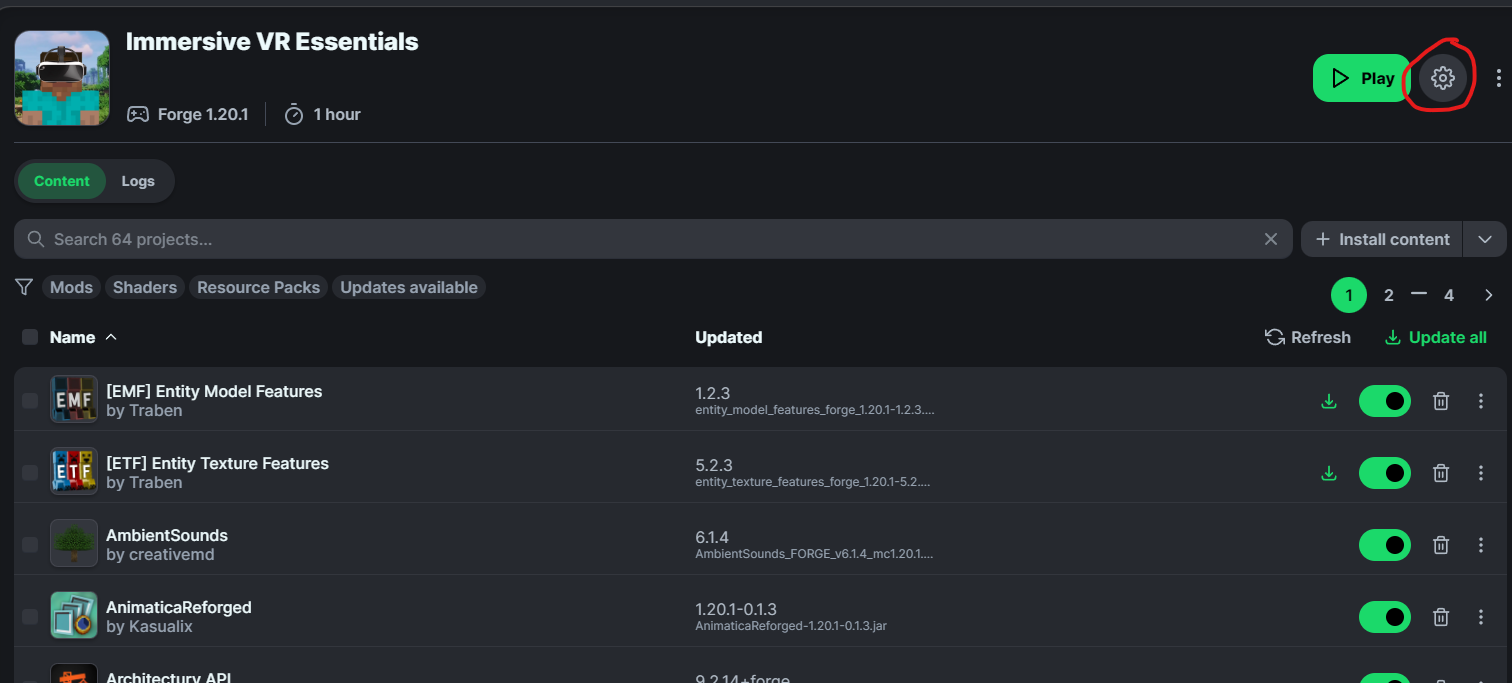
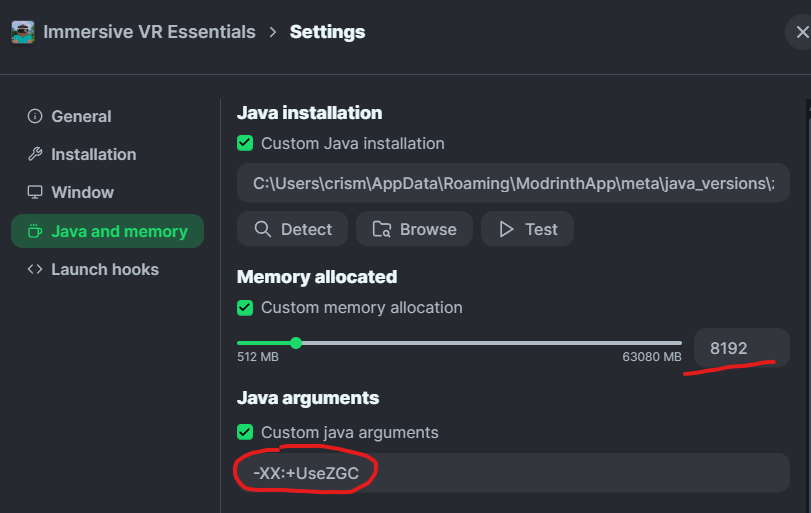
现在您应该可以在 VR 中畅玩此整合包了
请勿更新本整合包内的模组,否则游戏将会崩溃
如果某个特定模组有更新版本……我会更新整个整合包,否则请不要单独更新各个模组。我使用了一些较旧版本的模组,要么是因为它们在 VR 中表现不佳,要么是因为它们与 Vivecraft 一起运行时会导致崩溃
自定义设置
要自定义 Vivecraft 设置,您可以在 VR 设置菜单中找到相关选项
要自定义 Immersive MC(更改背包类型、关闭某些功能或恢复原版物品栏等),请进入模组菜单,找到 ImmersiveMC 并点击 config(配置),您可以在此处更改和尝试任何您想要的设置
要自定义 Waypoints 模组,请进入模组菜单,找到 waypoints 并点击 config,然后找到 client(客户端)设置
语音聊天
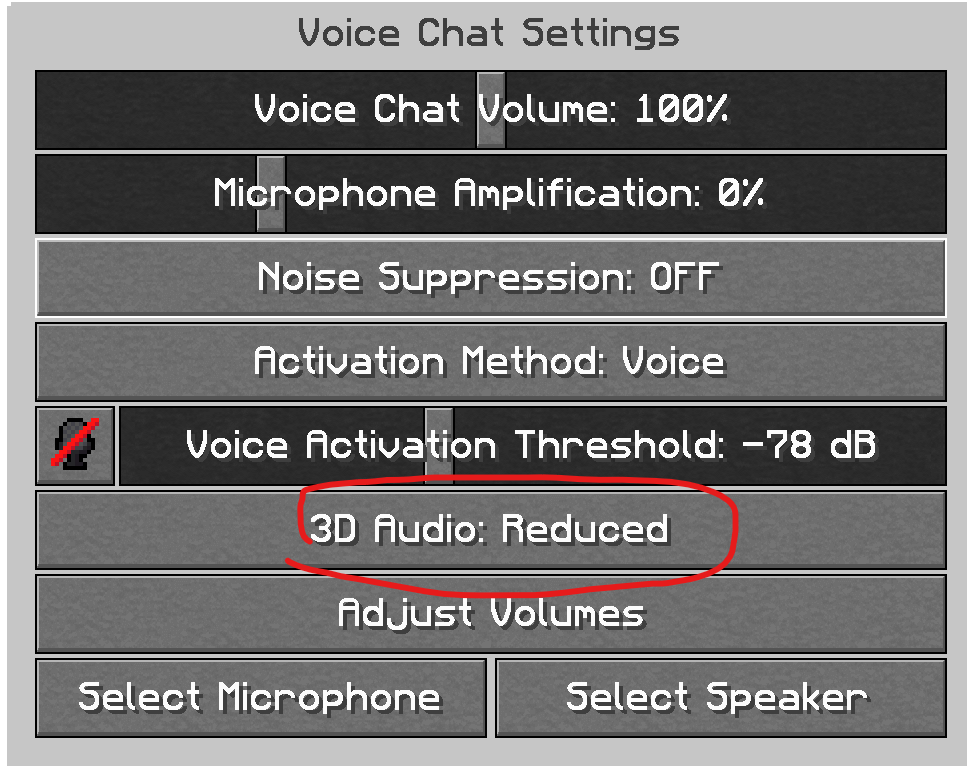
要更改语音聊天设置,请按右控制器上的 B 键,将麦克风和扬声器设置为您需要的选项(建议将扬声器设置为头显扬声器,麦克风则根据情况设置为头显麦克风或外接麦克风)
我还建议将 3D Audio(3D 音频)设置为 Reduced(降低),因为 Vivecraft 已经内置了 3D 音频,如果在其他玩家附近可能会出现故障
时间控制
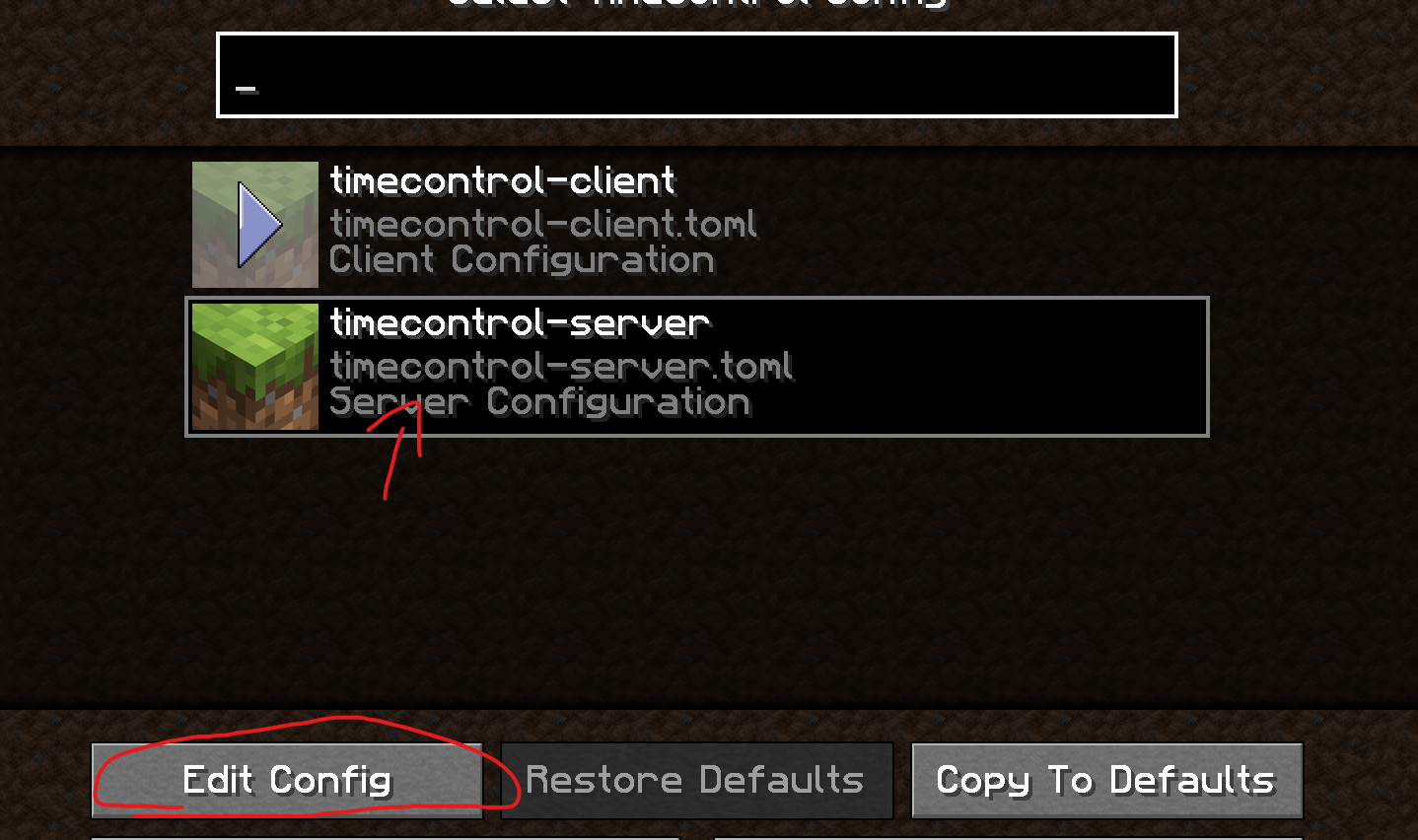
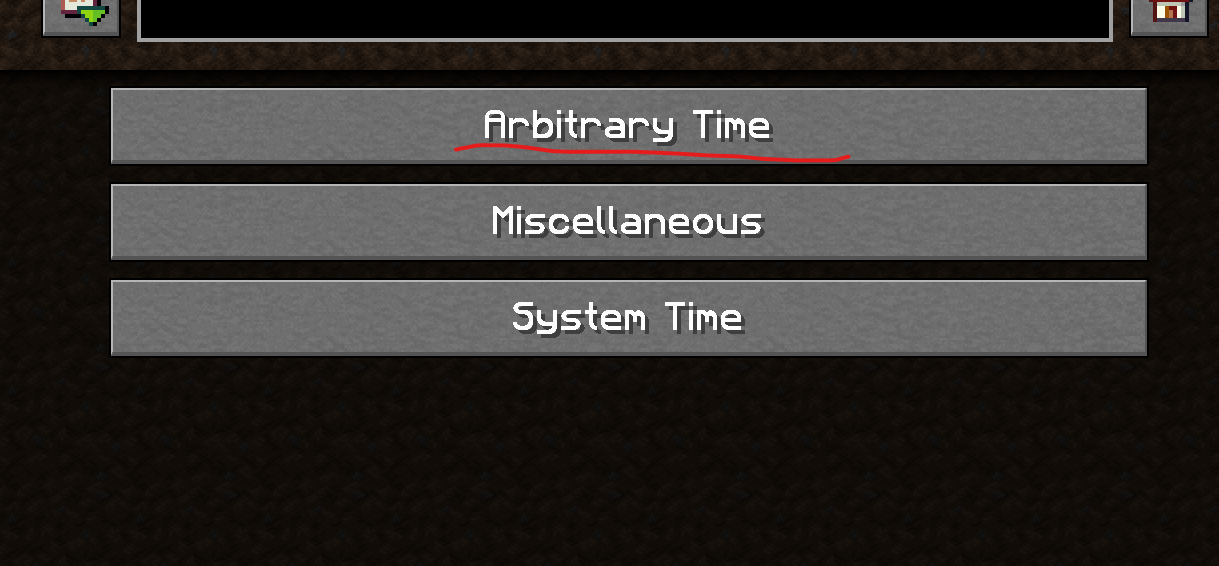
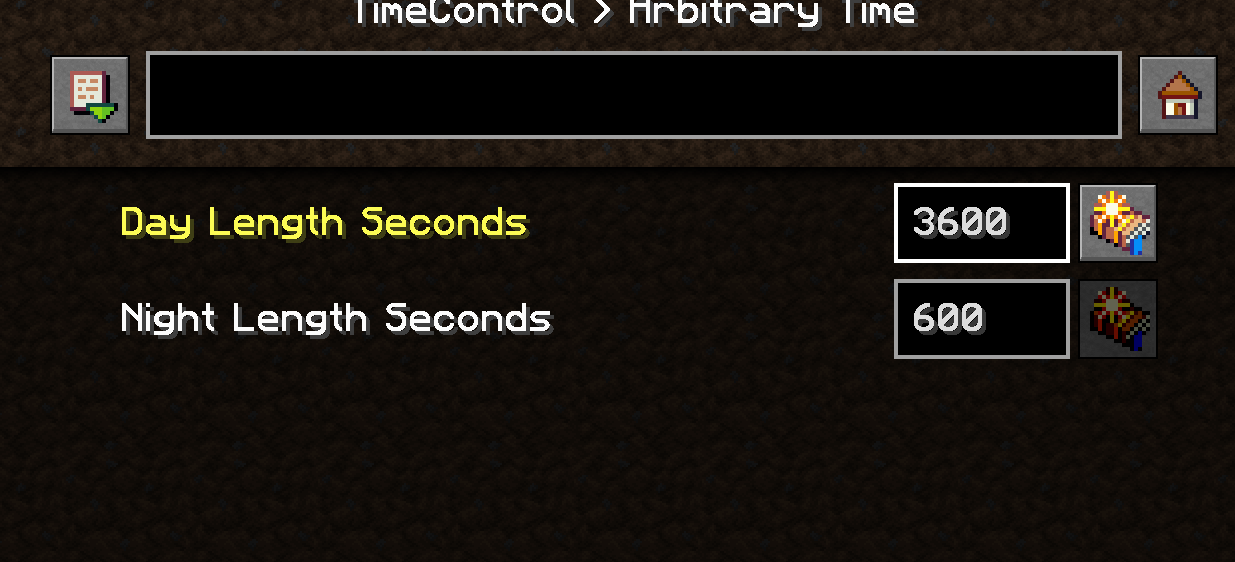
如果您想改变白天和夜晚的长度,您需要创建一个新世界,然后进入模组菜单找到 Time Control 模组,点击 config,接着进入 server settings(服务器设置),您可以更改每个时段持续的时间(秒)
建议将白天时长设置为 3600(现实时间 1 小时为一天)。每个选项的默认值为 600(白天 10 分钟,夜晚 10 分钟),但你可以自由自定义这些设置。
添加模组
你可以随意添加任何你想要的模组,只需注意并非所有模组在 VR 中都能完美运行。
本整合包基于 Minecraft Forge 1.20.1 构建。我在此使用了 Sinytra Connector,因此大多数 Fabric 模组也可以安装……但并非全部都能正常工作。如果你要添加 Fabric 模组,请尝试一些测试和排除法。
常见问题解答
我不确定如何访问背包或在 VR 中设置全身追踪
请参阅 Vivecraft 和 ImmersiveMC 的帮助部分。
Vivecraft 官网
ImmersiveMC Wiki
这能在多人游戏中使用吗?
可以!这应该与服务器完全兼容。它已经内置了语音聊天,只需将此整合包添加到你想使用的任何服务器即可。不过,客户端也需要安装此整合包才能正常工作。
事实上,我最近还启动了一个仅限 VR 的服务器!请在服务器菜单中找到它!
为什么是 1.20.1?为什么不使用更新的 Minecraft 版本?
这里的某些模组仅在 1.20.1 或更早版本上可用……这是主要原因。如果兴趣足够浓厚,我未来可能会考虑为更新的 Minecraft 版本制作替代版本。
为什么你使用 Forge 而不是 Fabric/NeoForge?
本整合包中的大量模组(以及专门针对 VR 的模组)仅支持 Forge。我在此使用了 Sinytra Connector,因此许多 Fabric 模组确实可以运行。但该连接器仅在 Forge 上有效……反之则不行。在 Fabric/NeoForge 模组开发变得更加成熟之前,坦白说,切换并没有太大好处,你只会为了微小的性能提升而失去使用大量模组的能力。如果我使用的模组被移植到 Fabric,或者有更好的替代品出现,我会考虑切换。
在此之前,Forge + Sinytra Connector 目前是我认为的最佳 Minecraft 模组化方案,你可以安装基本上任何 Minecraft 模组,而无需担心不同的加载器。
我无法让它正常运行
这不仅适用于 Modrinth,也适用于其他模组加载器。但如果实在无法让它正常工作,我在这里提供了松散的文件包。只需将它们放入你的 .minecraft 文件夹即可。
社交链接
我的网站
Instagram
TikTok
Twitter
BlueSky
A ModPack created Specifically for VR to be as realistic and Immersive as possible
Features
3D Inventory and Fullbody Tracking
This uses ImmersiveMC and Vivecraft, all menus and crafting are done in a 3D space in VR, Take a look at the Wiki for help on how to use it.
Vivecraft is also now Fullbody Tracking Compadable!
HAPTIC Feedback
If you have a Haptic Feedback Suit (bhaptics etc), you can feel rain on your body, getting punched by mobs, you'll feel every chop of a tree and every block you mine.
VR Only Server
There is now a VR Only server Included in this Modpack! Find it in the Server Menu! Locked to VR only, come join the fun of this growing server!
Textures and Resource Packs
The Primary Resource Pack in here is Patrix (edited so it works better with VR)
I included faithful x64 if you want a more classic look, so feel free to switch it out with that if you don't like the realistic feel of Patrix
There is also an optional lower quality version of Faithful included if you need more performance
Shaders
Primary shader in here is Sildurs on medium settings with it customized to look better in VR
I have Chopotic shaders on Low and Lite as options in the shader menu, feel free to switch it out with that as they run quite a bit better (there is a minor texture glitch on blocks with them though.. but your FPS will go up a ton if you're struggleing to run this at a stable fps)
Landscape, Structures, Biomes and Mobs
This has quite a bit more variety the vanilla game, You'll see better landscapes, more structures, more biomes, better dungeons ect. This is all done with vanilla blocks and doesn't have any annoying bloat or complicated crafting involved! It's just more variety and prettier views
In Game Voice Chat
Voice Chat is already pre installed. You can customize it in game using the B Button on your Controller (then go to voice chat Menu) So if you want to run this on a server you can already talk in game
No Complex crafting, No added Blocks
This Modpack is made to be Immersive and relaxing, not some complicated system where you have to craft a million things.
There are a few QOL Mods in here like waypoints, but no added blocks and all the crafting is the same as Vanilla
WORKS on Desktop(Flatscreen)
Although this is intended to be played in VR, it does work on flatscreen minecraft as well, so if you want to play with your friends on a server and they don't have VR, they can use this to see peoples Fullbody movement etc. Game is fully playable without a Headset, but you'll be missing out on some intended features.
Performance
This is going to largely depend on your System Specs..I do not lag at all.. but I have a fairly beefy system.
Specs:
RTX 4090
AMD 9950x
64GB 6000mhz RAM
I also use a Vive Pro eye with the Wireless adapter.. which tends to run better on PCVR apps then using a Quest over wifi. I have not tested this modpack with my Quest 3 yet, it should not make a huge difference as long as you have a decent system though.
Minimum System Requrements
I have no way to test this, It might work with lower system specs then this, but at a minimum I'm guessing you'll need:
RTX 3080
i9 or newier AMD Chip
32 GB RAM
This modpack needs at least 8GB Ram Dedicated to it.
Why no Distent Horizons?
The shader and landscape mods I'm using do not play well with Distent Horizon so thats why it's not included. You won't really notice it because of the fog and volumentirc lighting with the shader/landscape mods generating huge mountains and vistas, also Distent Horizons sort of wrecks preformance in VR
Installation
-
Download the modrinth App, download This this, then double click to install. Should be pretty strightforward
-
Important BEFORE you play, Make sure to set memory correctly. Go to the gear icon in the corner then Click on Java and Memory
Check on custom java Installation, custom Memory Allocation and **Set it to a minimum of 8192 **(you can also use more)
Click on Java arguments then Add this Line
-XX:+UseZGC
You should now be good to play this in VR
DO NOT UPDATE MODS IN THIS, YOUR GAME WILL BREAK
If there is an update out for a particular mod.. I'll update the pack, otherwise do not update individual mods. I'm using a couple of older versions of mods either because it didn't work well in VR.. or they were crashing with vivecraft.
Customization
To Customize Vivecraft settings you can find that in the VR Settings menu
To Customize Immersive MC (Change type of backpack, turn off features/bring back vanilla inventory etc) go to the mods Menu, then find ImmersiveMC and click on config, you can change and mess around with any settings here that you want
To customize the Waypoints Mod, go the mod menu, find waypoints and click on config, then find client
Voice Chat
To change voice chat settings, press the B button on your right controller, set your Mic and speakers to whatever (prob want to set speakers to your headset speakers and then mic to either headset or an external one if you're using that)
I would also recommend putting 3D Audio on Reduced otherwise you might notice it glitching out when close to other players as vivecraft already includes 3D audio
Time Control
If you want to change How long the Day and Nights are, you need to make a new world, then go to the mods menu and find the time control mod, click on config, then go to server settings, you can change the amound of time in seconds each is.
I recommend putting day at 3600 (1 Hour IRL Time for Day) the Default value for each is 600 (10 Minute day 10 Minute Night) but feel free to customize this to whatever
Adding Mods
Feel free to add whatever you want, just keep in mind not every mod is going to work great in VR.
This is using Minecraft Forge 1.20.1 I AM using Sinytra Connector in this, so most fabric mods can also be installed.. but not every one will work.. if you're adding fabric mods just do some trial and error
FAQ
I'm not sure how to access the Backpack or setup Fullbody tracking on VR
Take a look at the help section for Vivecraft and ImmersiveMC
Vivecraft Website
ImmersiveMC Wiki
Does this work in Multiplayer?
Yes! This should be fully compadable with servers, it already includes voice chat, just add the modpack to any server you want to use. Clients will need to have this installed as well for this to work though.
In fact I recently launched a VR Only server! Find it in the server menu!
Why 1.20.1? Why not newier versions of Minecraft?
Some of the mods in here ONLY work on 1.20.1 or older.. so thats the main reason. At some point I may look into making an alternative version of this for newier versions of minecraft if there is enough interest.
Why are you using Forge and not Fabric/NeoForge
A large percentage of mods (and VR Specific Mods) in this are Forge Only. I'm using Sinytra connector in this so tons of Fabric Mods DO work. The connector ONLY works on forge... not the other way around. Until Fabric/NeoForge modding becomes more advanced, In my honest opnion there isn't a huge benefit to switching, you'll just be loosing out on the ability to use tons of mods for a tiny performance gain. If the mods that I'm using in this gets converted to Fabric or better alternatives become available, I'll consider switching.
Until then, Forge+Sinytra connector is currently the Best way to mod Minecraft IMHO, you're getting the ability to Install basically ANY mod for minecraft without having to worry about different loaders.
I'm having trouble getting this to work
This should work with other modloaders not just modrinth, but if you really can't get it to work properly, I have the loose files here. Just drop them into your .minecraft folder
Social Links
My Website
Instagram
TikTok
Twitter
BlueSky


 整合包
 整合包

 整合包

 整合包
 整合包

 整合包

评论 0
登录后参与评分
还没有评论,来抢沙发吧