TFC Lost Light
在原版探索精神的指引下,体验 TerraFirmaCraft 的生存玩法。
CurseForge · Discord
TerraFirmaCraft 致力于呈现逼真的技术与世界风貌,但我始终怀念原版 Minecraft 中探索地标的乐趣。
因此,本整合包将 TFC 的核心玩法与原版 Minecraft 的氛围相结合。
它灵感来源于 TerraFirmaAdventure,但我不喜欢其中 TFC 与其他模组之间的兼容实现方式,所以我想做得更完善一些。
主要的灵感来源则是 J. R. R. Tolkien 的中土世界。
TerraFirmaCraft 是本整合包的基础:提供从石器时代到前工业时代的逼真世界生成与技术体系。
石器时代通过 Better Stone Age 模组得到增强。
中世纪通过各类 TFC 附加模组得到丰富。
前工业技术则通过 Create 模组进行提升。
Distant Horizons 模组让你能够欣赏从最近山峰眺望的风景。
此外:还包含大量提升生活质量和优化的模组。
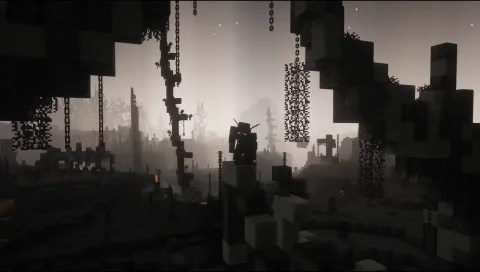
TFC 世界中重新引入了地标结构,现在你有了更多理由去探索主世界,下界也可抵达。
收拾好你的背包,拿起剑,骑上马,踏上冒险之旅吧! :)
TFC Lost Light 拥有自己的 Discord,欢迎加入。
配置要求
- Minecraft 1.20.1
- Forge 47.4.28
- 推荐内存:8 GB
可选模组
部分模组可根据个人喜好开启或关闭。操作方法如下:
- 在 CurseForge 中:打开整合包,进入 Mods 标签页,并使用模组旁边的切换按钮;
- 手动操作:在
mods 文件夹中,将 <mod>.jar 重命名为 <mod>.jar.disabled 以禁用该模组,或改回 .jar 以启用它。
更改后请重启游戏。
性能优化
如果遇到帧数过低的情况,你可以禁用以下模组:
- Distant Horizons
- Stellar View
音乐
如果你更喜欢原版音乐,请禁用 Medieval Music 模组。
动态树木
Dynamic Trees 相关模组默认处于禁用状态。若要启用,请同时开启所有相关模组,并且务必在世界创建之前进行设置,因为它们会改变世界生成机制:
- Dynamic Trees
- Dynamic Trees Addon Lib
- Dynamic Trees+
- Dynamic Trees TFC
- Dynamic Trees TFC - Seeds
- Dynamic Trees AFC (与 ArborFirmaCraft 兼容)
- Burnt DT (与 Burnt 兼容)
开发工具
这些禁用的模组仅用于整合包的开发和调试,游玩时不需要它们:
- Spark (性能分析器)
- ProbeJS (KubeJS 类型定义生成器)
- KubeJS Offline (KubeJS 文档生成器)
报告错误
请在 Discord 中报告错误。
- 如果游戏崩溃,Crash Assistant 窗口会自动弹出。点击 Upload all logs and copy a message for support(上传所有日志并复制支持消息),然后将复制的消息粘贴到你的报告中。
- 如果没有崩溃,请附上整合包文件夹中的
logs/latest.log。对于没有 Crash Assistant 窗口的崩溃情况,还需附上 crash-reports/ 中最新的文件。
- 描述问题发生时你所做的操作,并提及你对整合包所做的任何更改(启用或禁用的模组、添加的模组、光影等)。
- 如果是专用服务器,请一并附上服务器的日志。
AI 使用情况
在创建本整合包的过程中使用了 AI 工具,具体用于:
- Logo 设计
- 文本内容(描述、任务、提示)
- 内容配置(配置文件、脚本、配方、任务、地标设置)
如何搭建专用服务器
- 下载适用于 Minecraft 1.20.1 的 Forge 47.4.28 安装程序,选择“Install server”(安装服务器)至空的服务器文件夹中。
- 首次运行服务器,然后打开
eula.txt 并将 eula=true。
- 在
user_jvm_args.txt 中设置服务器内存,例如 -Xmx8G。
- 从整合包文件夹中将以下文件夹复制到服务器文件夹:
configdefaultconfigskubejs — 仅需其 config、data、server_scripts 和 startup_scripts 子文件夹modstfc_structures_datapacks — 必须保留在服务器根目录下,TFC Structures 会从此处加载数据包
- 从服务器的
mods 文件夹中移除以下仅限客户端的模组。文件名未包含版本号,* 代表任意版本。
- 启动服务器。
注意事项:
defaultconfigs 仅在新世界创建时应用。对于已有世界,请将其复制到 <world>/serverconfig 中。- Distant Horizons 在服务器上是可选的。如果你想让服务器为玩家生成远景地形,请保留它;否则请移除。
- 已禁用的模组(
*.jar.disabled)不会被加载,因此可以保持原样不动。
- 如果服务器启动时因类似
Attempted to load class net/minecraft/client/... for invalid dist DEDICATED_SERVER 的错误而崩溃,说明仍有仅限客户端的模组被安装。请在 crash-reports/ 中的崩溃报告里找到提到的模组名称并将其移除。
需要从服务器中移除的仅限客户端的模组:
仅客户端模组 (77)
advanced_tfc_info-*.jar — Advanced TFC InfoAmbientSounds_*.jar — AmbientSoundsAuroras-*.jar — AurorasBadOptimizations-*.jar — BadOptimizationsBetterAdvancements-*.jar — Better Advancementsbetterworldloading20-*.jar — Better World Loadingbrandnewday-*.jar — Brand New DayBridgingMod-*.jar — Bridging Modcatalogue-*.jar — Cataloguecave_dust_rethinking-*.jar — Cave Dust Rethinkingchat_heads-*.jar — Chat Headscherishedworlds-forge-*.jar — Cherished Worldscontrollable-*.jar — ControllableCrashAssistant-*.jar — Crash Assistantdefaultoptions-*.jar — Default OptionsDetail Armor Bar Re-equipment-*.jar — Detail Armor Bar Re-equipmentDing-*.jar — Dingdistraction_free_recipes-*.jar — Distraction Free Recipes (EMI)Drip Sounds-*.jar — Drip Soundsembeddium-*.jar — EmbeddiumEnchanted-Book-Redesign-*.jar — Enchanted-Book-Redesignentity_model_features-*.jar — Entity Model Featuresentity_sound_features-*.jar — Entity Sound Featuresentity_texture_features-*.jar — Entity Texture Featuresentityculling-*.jar — EntityCullingflerovium-*.jar — Fleroviumframework-*.jar — Frameworkftb-quests-ui-overhaul-*.jar — FTB Quests UI Overhaulfusion-*.jar — Fusiongnetum-*.jar — Gnetumgpumemleakfix-*.jar — GPU 内存泄漏修复guieffecttimer-*.jar — GUI Effect Timerguifollowers-*.jar — GUI Followershideexperimentalwarning-*.jar — Hide Experimental WarningHighlighter-*.jar — Highlighterihearttfc-*.jar — I <3 TFCImmediatelyFast-*.jar — ImmediatelyFastInventoryParticles-*.jar — Inventory ParticlesInventoryProfilesNext-*.jar — Inventory Profiles NextItemPhysicLite_*.jar — ItemPhysicLiteJustEnoughProfessions-*.jar — Just Enough Professions (JEP)keysmithing-*.jar — Easy Smithlanguagereload-*.jar — LanguageReloadlibIPN-*.jar — libIPNmodelfix-*.jar — Model Gap Fixmore-enchantment-info-*.jar — More Enchantment InfoMossyLib-*.jar — MossyLibMouseTweaks-forge-*.jar — Mouse Tweaksnotenoughanimations-*.jar — NotEnoughAnimationsoculus-*.jar — Oculusparticle_core-*.jar — Particle Corepreloading-tricks-*.jar — PreloadingTricksPresenceFootsteps-*.jar — Presence Footstepsrandomworldname-*.jar — RandomWorldNameresourcefulconfig-*.jar — ResourcefulconfigResourcePackOverrides-*.jar — Resource Pack Overridesrubidium-extra-*.jar — Embeddium Extraseamless-loading-screen-*.jar — Seamless Loading ScreenSearchables-*.jar — Searchablesseriousplayeranimations-*.jar — Serious Player Animationsskinlayers3d-*.jar — 3d-Skin-Layerssodiumdynamiclights-*.jar — Sodium Dynamic Lightssodiumextras-*.jar — Sodium Extrassodiumoptionsapi-*.jar — Sodium Options APIsound-physics-remastered-*.jar — Sound Physics RemasteredStellar.View-*.jar — Stellar Viewtfc_anvil_enhancer-*.jar — TFC Anvil Enhancertfc_detailab-*.jar — Detail Armor Bar (TFC)tfc_preservation_predictor-*.jar — TFC Preservation Predictortfc_support_indicator-*.jar — TFC Support IndicatorTFCVesselTooltip-*.jar — TFC Vessel TooltipTips-*.jar — Tipstooltipoverhaul-*.jar — Tooltip Overhaultreasuredistance-*.jar — Treasure Distanceworldplaytime-*.jar — World Play Timeyet_another_config_lib_*.jar — YetAnotherConfigLibzmedievalmusic-*.jar — 中世纪音乐
TFC Lost Light
TerraFirmaCraft survival with the spirit of vanilla exploration.
CurseForge · Discord
While TerraFirmaCraft aims at realistic technology and world presentation, I always miss the spirit of exploring structures that vanilla Minecraft has.
So this modpack combines TFC core gameplay with the feel of vanilla Minecraft.
It's inspired by TerraFirmaAdventure, but I don't like how compatibility between TFC and other mods was implemented there, so I want to do it better.
The main source of inspiration, though, is Middle-earth by J. R. R. Tolkien.
TerraFirmaCraft is the foundation of this modpack: realistic world generation and technology from the Stone Age to the pre-industrial era.
The Stone Age is improved with the Better Stone Age mod.
The Middle Ages are improved with various TFC addons.
Pre-industrial technology is improved with the Create mod.
The Distant Horizons mod lets you enjoy the view from the nearest mountain.
And on top of that: a lot of QoL and optimization mods.
Structures are back in the TFC world, so now you have more reasons to explore the Overworld, and the Nether is reachable too.
So, pack your backpack, take your sword, mount your horse and set off on adventures! :)
TFC Lost Light has its own Discord, you're welcome to join.
Requirements
- Minecraft 1.20.1
- Forge 47.4.28
- Recommended RAM: 8 GB
Optional mods
Some mods can be turned on or off to your taste. To do it:
- in CurseForge: open the modpack, go to the Mods tab and use the toggle next to the mod;
- manually: in the
mods folder, rename <mod>.jar to <mod>.jar.disabled to disable a mod, or back to .jar to enable it.
Restart the game after the change.
Performance
If you experience low FPS, you may disable the following mods:
- Distant Horizons
- Stellar View
Music
If you prefer vanilla music, disable the Medieval Music mod.
Dynamic Trees
The Dynamic Trees mods are disabled by default. Enable all of them together, and do it before creating a world, since they change world generation:
- Dynamic Trees
- Dynamic Trees Addon Lib
- Dynamic Trees+
- Dynamic Trees TFC
- Dynamic Trees TFC - Seeds
- Dynamic Trees AFC (compatibility with ArborFirmaCraft)
- Burnt DT (compatibility with Burnt)
Development tools
These disabled mods are only for modpack development and debugging, you don't need them for playing:
- Spark (performance profiler)
- ProbeJS (KubeJS typings generator)
- KubeJS Offline (KubeJS documentation generator)
Reporting bugs
Please report bugs in the Discord.
- If the game crashes, the Crash Assistant window opens. Press Upload all logs and copy a message for support and paste the copied message into your report.
- If there's no crash, attach
logs/latest.log from the modpack folder. For a crash without the Crash Assistant window, also attach the newest file from crash-reports/.
- Describe what you did when the problem happened, and mention any changes you made to the modpack (enabled or disabled mods, added mods, shaders).
- For a dedicated server, attach the server's logs as well.
AI usage
AI tools were used while creating this modpack, namely for:
- the logo
- texts (descriptions, quests, tips)
- content configuration (configs, scripts, recipes, quests, structure settings)
How to set up a dedicated server
- Download the Forge 47.4.28 installer for Minecraft 1.20.1 and choose "Install server" into an empty server folder.
- Run the server once, then open
eula.txt and set eula=true.
- Set the server memory in
user_jvm_args.txt, for example -Xmx8G.
- Copy the following folders from the modpack folder to the server folder:
configdefaultconfigskubejs — only its config, data, server_scripts and startup_scripts subfolders are neededmodstfc_structures_datapacks — it must stay in the server root, TFC Structures loads the pack's datapacks from there
- Remove the client-only mods listed below from the server's
mods folder. File names are given without versions, * stands for any version.
- Start the server.
Notes:
defaultconfigs are applied only when a new world is created. For an existing world, copy them into <world>/serverconfig instead.- Distant Horizons is optional on the server. Keep it if you want the server to generate distant terrain for players, otherwise remove it.
- Disabled mods (
*.jar.disabled) aren't loaded, so you can leave them as they are.
- If the server crashes on start with an error like
Attempted to load class net/minecraft/client/... for invalid dist DEDICATED_SERVER, a client-only mod is still installed. Find the mod named in the crash report in crash-reports/ and remove it.
Client-only mods to remove from the server:
<details>
<summary>Client-only mods (77)</summary>
advanced_tfc_info-*.jar — Advanced TFC InfoAmbientSounds_*.jar — AmbientSoundsAuroras-*.jar — AurorasBadOptimizations-*.jar — BadOptimizationsBetterAdvancements-*.jar — Better Advancementsbetterworldloading20-*.jar — Better World Loadingbrandnewday-*.jar — Brand New DayBridgingMod-*.jar — Bridging Modcatalogue-*.jar — Cataloguecave_dust_rethinking-*.jar — Cave Dust Rethinkingchat_heads-*.jar — Chat Headscherishedworlds-forge-*.jar — Cherished Worldscontrollable-*.jar — ControllableCrashAssistant-*.jar — Crash Assistantdefaultoptions-*.jar — Default OptionsDetail Armor Bar Re-equipment-*.jar — Detail Armor Bar Re-equipmentDing-*.jar — Dingdistraction_free_recipes-*.jar — Distraction Free Recipes (EMI)Drip Sounds-*.jar — Drip Soundsembeddium-*.jar — EmbeddiumEnchanted-Book-Redesign-*.jar — Enchanted-Book-Redesignentity_model_features-*.jar — Entity Model Featuresentity_sound_features-*.jar — Entity Sound Featuresentity_texture_features-*.jar — Entity Texture Featuresentityculling-*.jar — EntityCullingflerovium-*.jar — Fleroviumframework-*.jar — Frameworkftb-quests-ui-overhaul-*.jar — FTB Quests UI Overhaulfusion-*.jar — Fusiongnetum-*.jar — Gnetumgpumemleakfix-*.jar — Gpu memory leak fixguieffecttimer-*.jar — GUI Effect Timerguifollowers-*.jar — GUI Followershideexperimentalwarning-*.jar — Hide Experimental WarningHighlighter-*.jar — Highlighterihearttfc-*.jar — I <3 TFCImmediatelyFast-*.jar — ImmediatelyFastInventoryParticles-*.jar — Inventory ParticlesInventoryProfilesNext-*.jar — Inventory Profiles NextItemPhysicLite_*.jar — ItemPhysicLiteJustEnoughProfessions-*.jar — Just Enough Professions (JEP)keysmithing-*.jar — Easy Smithlanguagereload-*.jar — LanguageReloadlibIPN-*.jar — libIPNmodelfix-*.jar — Model Gap Fixmore-enchantment-info-*.jar — More Enchantment InfoMossyLib-*.jar — MossyLibMouseTweaks-forge-*.jar — Mouse Tweaksnotenoughanimations-*.jar — NotEnoughAnimationsoculus-*.jar — Oculusparticle_core-*.jar — Particle Corepreloading-tricks-*.jar — PreloadingTricksPresenceFootsteps-*.jar — Presence Footstepsrandomworldname-*.jar — RandomWorldNameresourcefulconfig-*.jar — ResourcefulconfigResourcePackOverrides-*.jar — Resource Pack Overridesrubidium-extra-*.jar — Embeddium Extraseamless-loading-screen-*.jar — Seamless Loading ScreenSearchables-*.jar — Searchablesseriousplayeranimations-*.jar — Serious Player Animationsskinlayers3d-*.jar — 3d-Skin-Layerssodiumdynamiclights-*.jar — Sodium Dynamic Lightssodiumextras-*.jar — Sodium Extrassodiumoptionsapi-*.jar — Sodium Options APIsound-physics-remastered-*.jar — Sound Physics RemasteredStellar.View-*.jar — Stellar Viewtfc_anvil_enhancer-*.jar — TFC Anvil Enhancertfc_detailab-*.jar — Detail Armor Bar (TFC)tfc_preservation_predictor-*.jar — TFC Preservation Predictortfc_support_indicator-*.jar — TFC Support IndicatorTFCVesselTooltip-*.jar — TFC Vessel TooltipTips-*.jar — Tipstooltipoverhaul-*.jar — Tooltip Overhaultreasuredistance-*.jar — Treasure Distanceworldplaytime-*.jar — World Play Timeyet_another_config_lib_*.jar — YetAnotherConfigLibzmedievalmusic-*.jar — Medieval Music
</details>
 整合包

 整合包

 整合包

 整合包

 整合包

 整合包
评论 0
登录后参与评分
还没有评论,来抢沙发吧