请向下阅读以获取设置说明
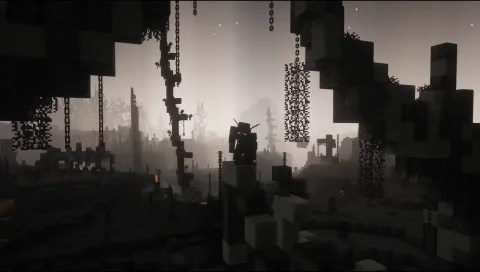
The Obfuscation 是一款围绕官方 Broken Script 模组构建的恐怖奇幻整合包,具有浓厚的中世纪氛围。世界中充满了手工打造与程序生成的奇幻建筑 — 城堡、废墟、地牢和村庄,它们栩栩如生却令人不安。
该整合包旨在让玩家从开始就能沉浸其中。光影、材质包和游戏设置均已预加载,因此您无需花费时间调整选项 — 开箱即用,一切看起来和感觉都恰到好处。
这是一款带有黑暗转折的生存体验:探索充满危险,环境压抑沉重,每一座建筑都在讲述自己的故事。如果您喜欢奇幻与恐怖的结合,The Obfuscation 将让您在揭开其世界秘密的过程中始终紧绷神经。
✦ 特色
-
? The Broken Script 模组 – 作为核心体验的官方集成
-
? 中世纪与奇幻建筑 – 可供探索的城堡、废墟、村庄和地牢
-
? 恐怖氛围 – 声音、光照和环境音效均经过调校以营造紧张感
-
? 预加载的光影与资源包 – 无需设置,启动即可游玩
-
⚔️ 以生存为核心的玩法 – 充满危险的探索,带有黑暗奇幻色彩
-
? 配置调整与设置包含在说明中 – 兼顾沉浸感与性能
如何设置:
视频设置
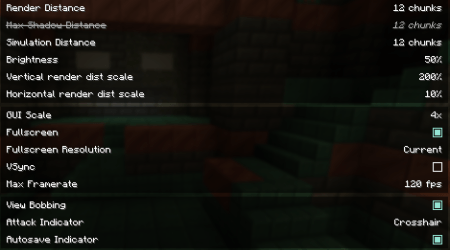 我建议采用以下设置。确保垂直同步(Vsync)已关闭,并将帧率限制设置为显示器的刷新率。如果您不知道刷新率是多少,可以搜索相关教程。
光影
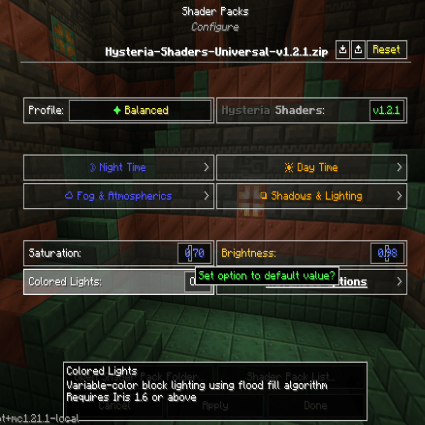 在设置中,点击 Iris 并选择您想要使用的光影。通常如果您的电脑配置不高,建议使用 BSL;如果您拥有如 RTX 3070 或 RX 6800 及以上的高端 PC,则使用 Hysteria 通常没问题。
确定要使用的光影后,请查看下方的教程以了解如何设置所选的光影。
HYSTERIA 光影
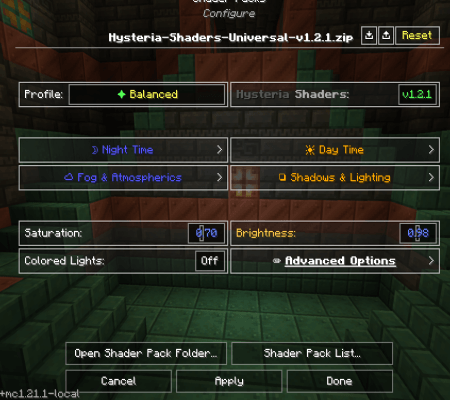 对于 Hysteria 光影,推荐你选择以下设置。点击 Shadows & Lighting(阴影与光照),进入 Light Sources(光源),然后点击 Sunlight Color(日光颜色)。点击 Morning(早晨),降低红色和绿色通道,提高蓝色通道。强度具体如何调整取决于你的个人偏好,只要看起来舒服即可。随后对 Noon(正午) 和 Evening(傍晚) 执行相同的操作。完成后,点击 Back(返回) 并选择 Blocklight Color(方块光颜色),将蓝色通道调低至约 40-45,使光线看起来更自然。如果你觉得太暗,可以随时调高亮度(Brightness),直到符合你的个人喜好。完成所有设置后,继续查看教程。
BSL SHADERS
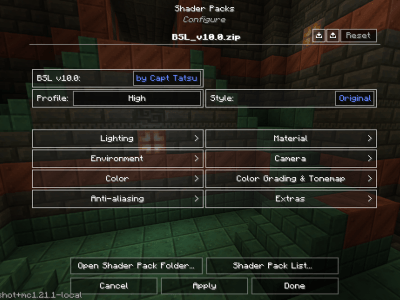 对于 BSL,以下是我推荐的设置。点击Colour(颜色),然后进入Lighting Color(光照颜色),选择Light (Morning)(光线:清晨)。将蓝色调至最高,大约 180-220,绿色和红色调至 80-100。对Day(白天)、Evening(傍晚)和Night(夜晚)执行相同的操作。完成上述步骤后,返回并点击Blocklight Color(方块光源颜色),将绿色和红色调至约 200-220,蓝色降至 90-100,这样火把、灯笼以及来自方块的灯光会看起来更自然、温暖。完成之后,请继续查看教程。
纹理包
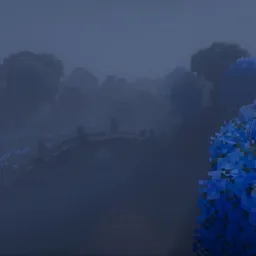
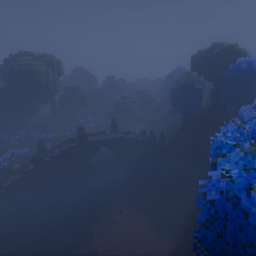
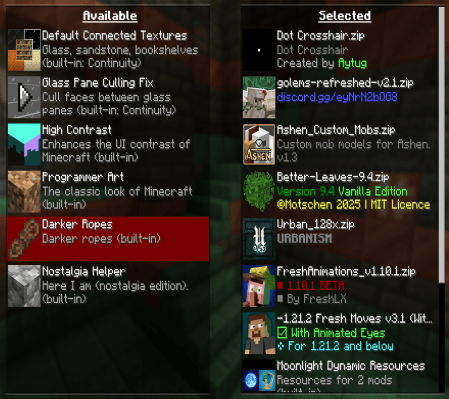 这是最后一步,请一路返回到选项菜单并点击资源包。你只需将图片中显示的资源包添加进去,并严格按照图片中的顺序排列,否则部分资源包将会出现故障。完成上述操作后,游戏画面应当与画廊中展示的图片一致。
READ BELOW FOR SETUP INSTRUCTIONS
The Obfuscation is a horror-fantasy modpack built around the official Broken Script mod, with a strong medieval atmosphere. The world is filled with hand-crafted and generated fantasy structures — castles, ruins, dungeons, and villages that feel alive but unsettling.
The pack is designed to be immersive right from the start. Shaders, textures, and settings come preloaded, so you don’t need to spend time adjusting options — everything looks and feels the way it’s meant to out of the box.
This is a survival experience with a dark twist: exploration is dangerous, the environment feels oppressive, and every structure tells its own story. If you enjoy a mix of fantasy and horror, The Obfuscation will keep you on edge as you uncover what lies within its world.
✦ Features
-
? The Broken Script mod – official integration at the core of the experience
-
? Medieval & fantasy structures – castles, ruins, villages, and dungeons to explore
-
? Horror atmosphere – sound, lighting, and ambience tuned for tension
-
? Preloaded shaders & resource packs – no setup required, just launch and play
-
⚔️ Survival-focused gameplay – dangerous exploration with a dark fantasy twist
-
? Config tweaks & settings included in instructions – balanced for immersion and performance
HOW TO SETUP:
VIDEO SETTINGS
I would recommend these settings. Make sure Vsync is OFF and make sure your fps limit is set to your monitor's refresh rate, if you dont know what it is you can google a tutorial.
SHADERS
In your settings, click on Iris and choose what shader you would like to use, generally if you dont have a very good PC then it's recommended to use BSL, if you have a higher end pc like an RTX 3070 or RX 6800 and above then using Hysteria is generally ok.
Once you have chosen the shader you will use look at the tutorial below on how to setup the shader you chose.
HYSTERIA SHADERS
For Hysteria shaders I recommend you choose these settings. Click on Shadows & Lighting, go to Light Sources and then click on Sunlight Color, Click on Morning and turn Red and Green down, then turn Blue up. It doesnt really matter how intense you make it as long as it fits your preference, then do the same to Noon and Evening. Once you are done, click on Back and choose Blocklight Color, turn Blue down to about 40-45 to make the light look more natural. If it is too dark for you, you can always turn Brightness UP until it meets your personal preference. Once you are done with everything continue with the tutorial.
BSL SHADERS
For BSL, these are the settings I recommend. Click on Colour, then go to Lighting Color, choose Light (Morning). Turn Blue all the way up to about 180-220, and Green and Red to 80-100. Do the same thing for Day, Evening and Night. Once you have done that, go back and click Blocklight Color, turn Green and Red to around 200-220 and Blue goes down to 90-100, this makes the lights from Torches, Lanterns and Light coming from blocks look more natural and warm. Once you have done that continue with the tutorial.
TEXTURE PACKS
This is the final step, Go back all the way to the options menu and click on Resource Packs, all you have to do is add the Texture packs shown in the image and PUT THEM IN THE EXACT ORDER AS THE IMAGE, OR ELSE SOME OF THE TEXTURE PACKS WILL BREAK. Once you have done this the game should end up looking like the pictures shown in the gallery.
 整合包

 整合包
 整合包

 整合包
 整合包

 整合包
评论 0
登录后参与评分
还没有评论,来抢沙发吧