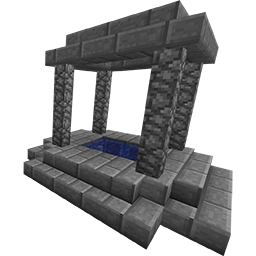
Abyss 是一个专为玩家设计的灵活传送门系统。在 Abyss 中,传送门是一个至少为 2x2 方块、且深度不小于 2 格的水池。传送门会相互链接形成网络,并且它们之间的通行可选地受到距离限制。传送门可以通往其他世界,矿车也可以使用这些传送门。
通过传送门旅行非常简单。只需跳入其中,你就会被立即传送到第一个可用的目的地。动量会在穿越传送门时得以保留,并且在可能的情况下,矿车会被放置在铁轨上。
预告片
还有几个较旧的视频。如果有人愿意制作教程视频,请与我联系。我自己也想做,但由于白天有工作,还要为 Abyss 开发功能,目前相当忙碌。
传送门特性
简易配置
大多数传送门配置都是通过操作传送门主体内的一组物品展示框来完成的,详细说明如下。
网络
Abyss 中的每个传送门都基于由“物品”和“颜色”两部分组成的密钥放置在一个网络上,从而形成了成千上万种可能的网络组合。物品的耐久值也会被考虑在内,因此可以使用独特的物品(如特定地图)作为密钥。网络帧始终是传送门顶部中间的物品展示框。
要将某件物品设置为网络物品,请在手持该物品的状态下右键点击网络物品展示框。这样做不会消耗物品。左键点击网络物品展示框会将传送门重置为默认网络。反复左键点击网络物品展示框会销毁一个传送门。要更改传送门的颜色,左键或右键点击颜色物品展示框即可循环切换可用颜色。
人类头颅物品会创建一个特殊的、针对所有者的玩家专属网络,它也是默认的网络物品,让玩家可以立即获得一个安全的传送门网络。当然,如果你的服务器不希望这样,你可以在配置中将默认物品更改为其他物品。
ID 与目的地
有时,你可能希望将传送门连接到特定的目的地,确保它只前往该目的地,而不是其他地方。为此,传送门可以被分配一个由两种颜色组成的 ID,当包括其中一个颜色槽位为空的情况时,每个网络可以有 288 种可能的 ID。
使用网络密钥左侧的两个物品展示框来设置传送门的 ID,使用右侧的两个物品展示框来设置传送门的目的地。左键和右键点击这些展示框以循环切换可用颜色。
修饰符
每个传送门都有一组专门用于传送门修饰符的物品展示框,位于网络密钥帧下方。修饰符是特殊的物品,可以为传送门添加行为,既包括玩家离开传送门时,也包括玩家到达传送门时。例如,使用发射器作为修饰符会从箱子中取出物品并分发给经过传送门的玩家、储物矿车以及其他带有存储功能的实体。使用压力板作为修饰符会在有东西到达后暂时切换拉杆状态,使得在使用传送门时轻松启动红石装置变得非常简单。
所有可能的修饰符列表及其他信息可在传送门修饰符页面找到。
覆盖物
如果你身处治安不佳的区域,全天候让通往基地核心的未加防护的传送门敞开显然是非常愚蠢的。为此,可以通过在传送门表面建造保护性覆盖物来暂时关闭传送门。任何位于传送门表面上方两个方块内的方块都会阻止该传送门的使用(无论是哪个方向),这使得保护自己免受入侵者侵害或控制通过你的传送门系统的实体流动变得简单。
命令
Abyss 的命令既可以作为普通命令执行,也可以通过使用传送门法杖执行。传送门法杖是独特的物品,具有有限的用途,并且使用与普通命令不同的权限。这使得法杖非常适合玩家使用。传送门法杖的配置存储为自定义名称和物品描述的组合,使得创建出售此类法杖的村民成为可能。在检查法杖的自定义名称时,Abyss 要求字符串中包含颜色代码,以确保玩家没有使用铁砩自行制作该物品。
要创建传送门法杖,请使用命令:/abwand <uses> [command] <arguments>
子命令列表可在命令页面找到。
权限
| 权限 | 默认 | 描述 |
|---|
abyss.use | 所有人 | 允许玩家穿越和操作传送门。 |
abyss.moderate | 管理员 | 允许玩家操作其他玩家创建的传送门。 |
abyss.bypass_protection | 管理员 | 允许玩家通过潜行绕过传送门块保护。这对于在不破坏和重建传送门的情况下修改展示框很有用。 |
abyss.modifers.<material> | 所有人 | 允许玩家使用指定的材质的传送门修饰符。 |
abyss.detail.uuid | 管理员 | 允许玩家在信息命令中看到传送门 UUID。 |
abyss.detail.distance | 管理员 | 允许玩家看到传送门之间的精确距离。 |
abyss.detail.location | 管理员 | 允许玩家看到传送门的精确根位置。 |
abyss.command.base | 管理员 | 授予访问用于执行所有子命令的根/abyss命令的权限。 |
abyss.command.<command> | 管理员 | 允许玩家使用相应的 Abyss 命令。 |
abyss.wand.<command> | 所有人 | 允许玩家使用传送门法杖执行相应的命令。 |
更新
从 v4 版本开始,Abyss 包含了自动更新功能。如果您希望禁用它,请在配置文件中将 auto-update 设置为 false。或者,您可以将 auto-update 设置为 check,使其仅通知您可用的更新。
统计数据
从 v7 版本开始,Abyss 会向 MCStats 提交使用统计数据。

源代码
Abyss 的源代码可在 GitHub 上获取:。
Abyss is a flexible portal system designed for players. In Abyss, a portal is a square pool of water, no smaller than two by two blocks, and no shallower than two blocks deep. Portals are linked together into networks, and travel between them is optionally limited by distance. Portals can go to other worlds, and minecarts can make use of portals.
Traveling through a portal is easy. Just jump in, and you'll be instantly ejected out of the first available destination. Momentum is preserved through portals, and minecarts will be placed on rails when at all possible.
Trailer
There are also a few older videos. If anyone would like to make a tutorial video, please contact me. I'd do it myself, but between the day job and working on features for Abyss, I'm rather busy at the moment.
Portal Features
Easy Configuration
The majority of portal configuration is performed by manipulating a set of item frames within the body of the portal, as detailed below.
Networks
Every portal in Abyss is placed on a network based on a two-part key consisting of an item and a color, making for thousands of possible networks. Damage values of items are taken into account as well, making it possible to use unique items like specific maps as keys. The network frames are always the top, center item frames of a portal.
To set an item as the network item, right click the network item frame with the item in your hand. Doing so will not consume the item. Left clicking the network item frame will reset the portal to the default network. Repeatedly left clicking the network item frame will destroy a portal. To change the portal's color, left or right click on the color item frame to cycle through the available colors.
The Human Head item creates a special, player-specific network for the owner of the portal and is the default network item, giving players a secure network of portals straight away. Of course, if this isn't desirable for your server, you can simply change the default item to something else in the configuration.
IDs and Destinations
At times, you might want to connect a portal to a specific destination, ensuring that it goes to that destination and only that destination. To that end, portals may be assigned an ID consisting of two colors, making for 288 possible IDs per network when you include IDs that leave one of the color slots empty.
Use the two item frames to the left of the network key to set a portal's ID and the two item frames to the right to set a portal's destination. Left and right click the frames to cycle through the available colors.
Modifiers
Every portal has a number of item frames devoted to Portal Modifiers, positioned below the network key frames. Modifiers are special items that add behavior to portals, both when a player is exiting from a portal and when a player is arriving at a portal. For example, using a Dispenser as a modifier will fetch items from a chest and dispense them to players, storage minecarts, and other things with storage passing through a portal. Using a pressure plate for a modifier will toggle a lever momentarily after something arrives, making it easy to start redstone contraptions when a portal is used.
A list of all the possible modifiers and other information is available at the page about Portal Modifiers.
Covers
Leaving an unguarded portal into the heart of your base open at all hours is, of course, quite silly if you're in a bad neighborhood. To that end, portals may be temporarily closed by building a protective cover over the surface of the portal. Any block within two blocks above the surface of a portal will prevent that portal from being used, in either direction, making it simple to protect yourself from invaders, or to control the flow of entities through your portal systems.
Commands
Commands in Abyss can be performed either as a normal command, or through the use of a Portal Wand. Portal Wands are unique items that can have limited uses, and that use separate permissions from the normal commands. This makes the wands ideal for use by players. A Portal Wand's configuration is stored as a combination of a custom name and item lore, making it possible to create villagers that sell such wands. When checking for a wand's custom name, Abyss requires that a color code be present in the string to ensure that a player didn't craft the item themselves using an anvil.
To create a Portal Wand, use the command: /abwand <uses> [command] <arguments>
A list of sub-commands may be found on the Commands page.
Permissions
| Permission | Default | Description |
|---|
abyss.use | Everyone | Allows the player to travel through and manipulate portals. |
abyss.moderate | Ops | Allows the player to manipulate portals created by other players. |
abyss.bypass_protection | Ops | Allows the player to bypass portal block protection by sneaking. Useful for modifying frames without having to destroy and recreate the portal. |
abyss.modifers.<material> | Everyone | Allows the player to use a portal modifier of the material in question. |
abyss.detail.uuid | Ops | Allows the player to see portal UUIDs with the Information command. |
abyss.detail.distance | Ops | Allows the player to see exact distances between portals. |
abyss.detail.location | Ops | Allows the player to see the precise root locations of portals. |
abyss.command.base | Ops | Gives access to the root /abyss command used to perform all sub-commands. |
abyss.command.<command> | Ops | Allows the player to use the Abyss command in question. |
abyss.wand.<command> | Everyone | Allows the player to use a Portal Wand to perform the command in question. |
Updates
As of v4, Abyss includes automatic update functionality. If you wish to disable it, set auto-update to false in your configuration file. Alternatively, you may set auto-update to check to have it merely inform you of available updates.
Statistics
As of v7, Abyss submits usage statistics to MCStats.
Source Code
The source code for Abyss is available on GitHub at .


 插件
 插件

 插件
 插件

 插件

 插件
评论 0
登录后参与评分
还没有评论,来抢沙发吧