
有效的 Minecraft 管理工具,旨在防止作弊,维护员工诚信和社区信任。
AdminToolbox 支持 Folia。
功能与命令
旁观模式
/spectate, /admin, /target
进入管理员模式,这会创建一个独立的临时物品栏,退出时会被删除。玩家将被置于旁观模式,直到他们显示自己或退出管理员模式。
在旁观期间,玩家可以再次使用该命令来退出管理员模式。玩家将被传送回原来的位置,恢复生存模式,并还原其原始物品栏。
目标地点
/target- 在当前地点进入管理员模式/target <player>- 在指定玩家的位置进入管理员模式/target <x> <y> <z> [world]- 在特定坐标进入管理员模式/target <x> <z> [world]- 在特定坐标进入管理员模式(使用该位置最高 Y 层方块的高度)
重生点定位
/spawn, /targetspawn
/spawn- 在当前世界的出生点进入管理员模式/spawn <world>- 在提供的世界的出生点进入管理员模式
导航
/back- 移动到传送历史中的上一个位置/forward- 移动到传送历史中的下一个位置
显形
/reveal, /show
在管理员模式下旁观时,运行此命令会将玩家放置在其当前位置的生存模式中。这使管理员在对峙中对玩家可见,同时保持:
- 临时物品栏
- 伤害免疫
- 不受生物攻击
全亮
/fullbright, /nightvision
/fullbright- 切换当前管理员会话的全亮效果/fullbright <on|off>- 启用或禁用当前管理员会话的全亮效果
广播
/yell <player> <message>
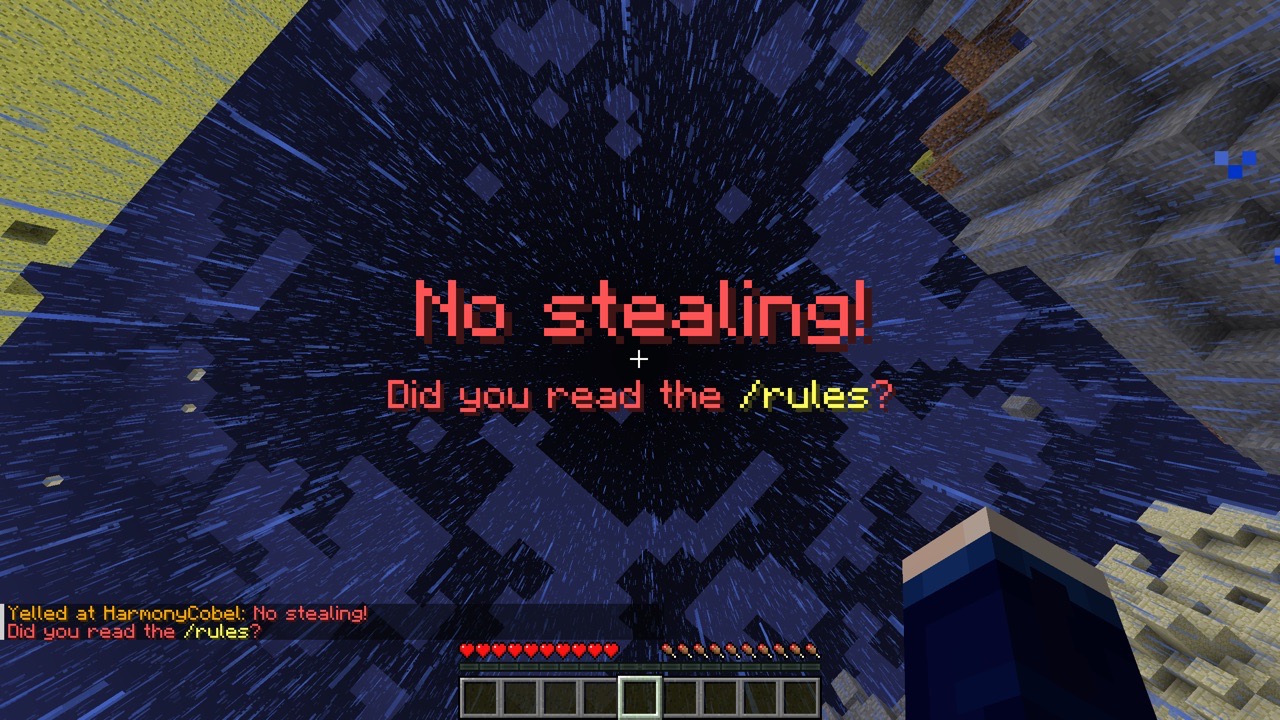
强制在被选中的玩家屏幕上显示一个大的红色标题。
使用竖线字符 (|) 分隔标题和副标题:title | subtitle。
支持旧版 & 颜色代码。例如:No stealing! | Did you read the &e/rules&r?
冻结
/freeze <player>
阻止目标玩家移动,直到被解除冻结。
被冻结的玩家:
- 可以自由环顾四周
- 可以向下坠落
- 可以使用容器
- 不能放置或破坏方块
- 不会受到任何伤害
- 不能伤害其他实体(包括玩家)
- 不会被生物锁定为目标
要解除对玩家的冻结,请使用 /unfreeze <player>
主播模式
需要 LuckPerms。
/streamermode <duration>, /pausealerts <duration>
允许玩家暂时禁用某些权限(即那些给予他们仅限员工查看警报的权限),旨在用于屏幕共享或直播游戏画面时。
占位符
当有 PlaceholderAPI 可用时,会提供一个占位符,用于显示玩家是否处于活跃的主播模式状态。
%rel_streamermode_tag%:当主播模式处于活动状态时,显示红色的⬤标签。%rel_streamermode_prefix%:当主播模式处于活动状态时,显示标签后跟一个空格。%rel_streamermode_suffix%:当主播模式处于活动状态时,显示前跟一个空格的标签。
权限
| 权限 | 描述 |
|---|---|
admintoolbox.target |
使用 /target 在当前地点 |
admintoolbox.target.player |
使用 /target <player> |
admintoolbox.target.location |
使用 /target <x> [y] <z> [world] |
admintoolbox.reveal |
使用 /reveal |
admintoolbox.yell |
使用 /yell |
admintoolbox.freeze |
使用 /freeze 和 /unfreeze |
admintoolbox.spawn |
在当前世界使用 /spawn |
admintoolbox.spawn.all |
使用 /spawn [world] |
admintoolbox.fullbright |
在管理员模式下使用 /fullbright |
admintoolbox.broadcast.receive |
接收关于他人目标操作的警报。 |
admintoolbox.broadcast.exempt |
不向拥有 admintoolbox.broadcast.receive 权限的玩家发送警报 |
admintoolbox.streamermode |
使用主播模式 |
admintoolbox.streamermode.unlimited |
绕过主播模式的最大持续时间。(在 config.yml 中设置) |
admintoolbox.streamermode.placeholder.wear |
佩戴主播模式状态占位符。 |
admintoolbox.streamermode.placeholder.view |
查看其他玩家的主播模式状态占位符。 |
集成
- LuckPerms
- 主播模式所必需。
- 1.4.0 版本新增: 自定义上下文,可根据管理员状态有条件地应用权限。
admintoolbox:state可以是spectating(旁观)、revealed(已显示)或normal(非管理员模式)。
- BlueMap
- 该插件会从地图中隐藏已显示的管理员。
- PlaceholderAPI
- 该插件为玩家的主播模式状态提供了一个占位符。
- 玩家必须拥有相应的权限才能佩戴和查看该占位符。
分析数据
1.4.0 版本新增。
为了更好地理解有多少服务器在使用 AdminToolbox,默认情况下我们通过 bStats 收集匿名分析数据。服务器管理员可以通过在 plugins/bStats/config.yml 中设置 enabled: false 来在其服务器上禁用此功能。
收集的匿名数据可在 公开查看。
Effective Minecraft moderation tools designed to prevent cheating, maintaining staff integrity and community trust.
AdminToolbox supports Folia.
Features & Commands
Spectate
/spectate, /admin, /target
Enter admin mode, which creates a separate temporary inventory that is deleted when exiting. The player is placed in Spectator Mode until they reveal or exit admin mode.
While spectating, the player can use the command again to exit admin mode. The player will be teleported back to their original location, placed back into survival mode, and their original inventory will be restored.
Target Locations
/target- Enter admin mode at current location/target <player>- Enter admin mode at a specified player's location/target <x> <y> <z> [world]- Enter admin mode at specific coordinates/target <x> <z> [world]- Enter admin mode at specific coordinates (uses the highest Y-level block at that location)
Targeting Spawn
/spawn, /targetspawn
/spawn- Enter admin mode at the current world's spawn point/spawn <world>- Enter admin mode at the provided world's spawn point
Navigation
/back- Move to previous location in teleport history/forward- Move to next location in teleport history
Reveal
/reveal, /show
While spectating in admin mode, running this command places the player into survival mode at their current location. This makes the admin visible to players during confrontations while maintaining:
- Temporary inventory
- Immunity to damage
- No mob targeting
Fullbright
/fullbright, /nightvision
/fullbright- Toggle fullbright for the current admin session/fullbright <on|off>- Enable or disable fullbright for the current admin session
Yell
/yell <player> <message>
Forcibly displays a large red title on the targeted player's screen.
Use the pipe character (|) to separate title and subtitle: title | subtitle.
Legacy ampersand color codes are supported. (i.e. No stealing! | Did you read the &e/rules&r?)
Freeze
/freeze <player>
Stops the target player from moving until released.
Frozen players:
- can look around freely
- can fall downward
- can use containers
- cannot place or break blocks
- cannot take any damage
- cannot hurt other entities (including players)
- cannot be targeted by mobs
To release a frozen player, use /unfreeze <player>
Streamer Mode
Requires LuckPerms.
/streamermode <duration>, /pausealerts <duration>
Allows players to temporarily disable certain permissions (i.e. those that give them staff-only alerts), intended for use when screen sharing or live-streaming gameplay.
Placeholder
When PlaceholderAPI is available, a placeholder is made available to display when a player has streamer mode active.
%rel_streamermode_tag%: Displays a⬤tag in red when streamer mode is active.%rel_streamermode_prefix%: Displays the tag followed by a space when streamer mode is active.%rel_streamermode_suffix%: Displays the tag preceded by a space when streamer mode is active.
Permissions
| Permission | Description |
|---|---|
admintoolbox.target |
Use /target at current location |
admintoolbox.target.player |
Use /target <player> |
admintoolbox.target.location |
Use /target <x> [y] <z> [world] |
admintoolbox.reveal |
Use /reveal |
admintoolbox.yell |
Use /yell |
admintoolbox.freeze |
Use /freeze and /unfreeze |
admintoolbox.spawn |
Use /spawn in current world |
admintoolbox.spawn.all |
Use /spawn [world] |
admintoolbox.fullbright |
Use /fullbright while in admin mode |
admintoolbox.broadcast.receive |
Receive alerts about others' targets actions. |
admintoolbox.broadcast.exempt |
Do not send alerts to players with admintoolbox.broadcast.receive |
admintoolbox.streamermode |
Use streamer mode |
admintoolbox.streamermode.unlimited |
Bypass maximum streamer mode duration. (Set in config.yml) |
admintoolbox.streamermode.placeholder.wear |
Wear the streamer mode status placeholder. |
admintoolbox.streamermode.placeholder.view |
View other players' streamer mode status placeholders. |
Integrations
- LuckPerms
- Required for streamer mode.
- New in version 1.4.0: Custom context for conditionally applying permissions based on admin state.
admintoolbox:statecan be any ofspectating,revealed, ornormal(not in admin mode).
- BlueMap
- The plugin will hide admins who are revealed from the map.
- PlaceholderAPI
- The plugin provides a placeholder for players' streamer mode status.
- Players must have the appropriate permissions to wear and view the placeholder.
Analytics
Added in version 1.4.0.
For us to better understand how many servers are using AdminToolbox, by default we collect anonymized analytics via
bStats. Server administrators can disable this functionality on their servers by setting enabled: false in
plugins/bStats/config.yml.
The anonymized collected data is viewable publicly at .

下载 AdminToolbox
需要联机服务器吗?
稳定流畅、一键部署,几分钟即可和朋友联机开服
最低仅需 8 元/月 即可畅快联机
下载 AdminToolbox
需要联机服务器吗?
稳定流畅、一键部署,几分钟即可和朋友联机开服
最低仅需 8 元/月 即可畅快联机
下载 AdminToolbox
需要联机服务器吗?
稳定流畅、一键部署,几分钟即可和朋友联机开服
最低仅需 8 元/月 即可畅快联机
下载 AdminToolbox
需要联机服务器吗?
稳定流畅、一键部署,几分钟即可和朋友联机开服
最低仅需 8 元/月 即可畅快联机
下载 AdminToolbox
需要联机服务器吗?
稳定流畅、一键部署,几分钟即可和朋友联机开服
最低仅需 8 元/月 即可畅快联机
下载 AdminToolbox
需要联机服务器吗?
稳定流畅、一键部署,几分钟即可和朋友联机开服
最低仅需 8 元/月 即可畅快联机
下载 AdminToolbox
需要联机服务器吗?
稳定流畅、一键部署,几分钟即可和朋友联机开服
最低仅需 8 元/月 即可畅快联机
下载 AdminToolbox
需要联机服务器吗?
稳定流畅、一键部署,几分钟即可和朋友联机开服
最低仅需 8 元/月 即可畅快联机
- 修复了与某些修改库存的插件共存时,登录恢复管理员会话可能引发异常的问题
完整更新日志:
关于这个资源的讨论、问题反馈与使用心得
还没有讨论,来发第一帖吧
你是这个资源的作者?登录后可认领此资源。
相似资源
 插件

PacketEvents 是一款专为 Minecraft Java 版打造的协议库,旨在简化数据包的处理与传输。
 插件
ExyliaPlugins 的库。
 插件
通过对话框或铁砧界面帮助你的 Anthme
 插件
重新定义服务器上的生物运输方式。使用高度可定制的口袋道具,安全地捕获、存储和释放任何实体。
 插件
为基于 Spigot/Paper/Folia 的服务器添加对 Vivecraft 的支持
 插件
用于绘制游戏内地图或在浏览器中随探索实时进行地图绘制的实时地图。
评论 0
登录后参与评分
还没有评论,来抢沙发吧