高级资源包
命令:
/Openpacks:一个菜单,以物品或方块的形式展示纹理包。点击其中一个,如果它已在 config.yml 中预先配置好,将应用对应的资源包;要移除它,需再次打开菜单并点击之前选择的那个。
在 config.yml 中的配置示例:
config.yml 中的纹理包默认是空的,以便使用者可以根据自己的喜好进行配置,包括方块、名称和链接。
1:
name: ‘Resource pack 1’(此处为将在菜单中显示的名称)
url: ‘link’(此处为资源包的链接)
icon: ‘GRASS_BLOCK’(此处填写你希望在菜单中用于该资源包的方块或物品的 ID)
如果你已经使用了默认的 6 个,需要添加新的纹理包时,复制并粘贴一个新的条目,只需更改编号及其他内容即可。
7:
name: ‘Resource Pack 7’
url: ‘link’
icon: ‘GOLDEN_APPPLE’
教程:
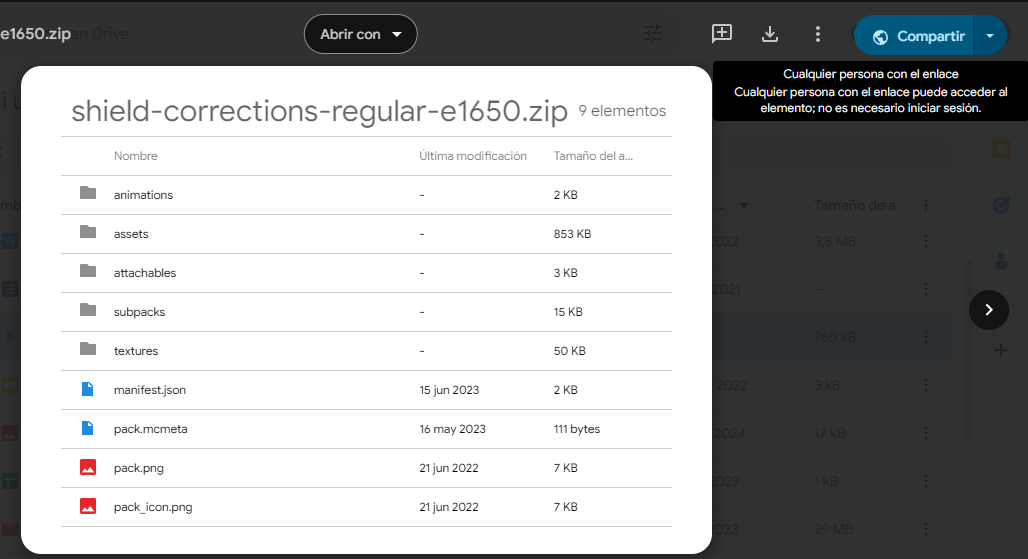
第一步:前往 Google Drive,将你希望使用的纹理包以 .zip 格式上传。
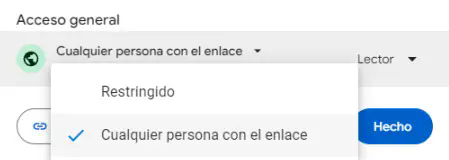
第二步:进入文件 > 共享 > 将隐私设置更改为“拥有此链接的任何人”。
第三步:复制系统提供的链接,例如图片中所示的链接:
第四步:获取上述链接中的 ID,即 ‘1R_DtnoJhdxkPx34YBTcl2Gon0ghetTKO’。获取 ID 的方法是查看 /file/d/ 之后直到 /view 之前的数字和字母组合部分。
第五步:使用以下格式:
将 ID_FILE_ID 替换为你的下载链接 ID,在本例中即为 ‘1R_DtnoJhdxkPx34YBTcl2Gon0ghetTKO’,格式如下:
现在这个链接就是你需要填入 config.yml 的内容。
注意:也可以直接使用那些能直接触发下载的链接,也就是说,将链接放入浏览器后会直接开始下载,无需点击“下载”按钮。如果是这种情况,则完全可以直接绕过冗长的 Google Drive 流程。
Advanced Resource Packs
Commands:
/Openpacks: a menu that shows you the texture packs in items or blocks, when you click on one of them and if it is configured previously in the config.yml, a resourcepack will be applied, and to remove it you have to open the menu again and click on the one you have chosen previously.
Example of how to configure in config.yml:
The texture packs in the config.yml come empty by default so that whoever wants to use it can configure it to their liking, block, name, and link.
1:
name: ‘Resource pack 1’ (here is the name that will appear in the menu)
url: ‘link’ (Here is the link to the resourcepack)
icon: ‘GRASS_BLOCK’ (Here goes the ID of the block or item that you want the resourcepack to have in the menu)
and to add a new texture pack if you have already used the 6 that are by default, copy and paste a new one changing the number and the rest.
7:
name: ‘Resource Pack 7’
url: ‘link’
icon: ‘GOLDEN_APPPLE’
Tutorial:
Step 1: Go to Google Drive and upload the texture pack you want in .zip format.
2° Step: Enter the file > Share > Change the privacy settings to ‘Anyone with this link’.


3° Step: Copy the link that gives you an example of the one in the picture:
4° Step: get the ID of the previous link that would be ‘1R_DtnoJhdxkPx34YBTcl2Gon0ghetTKO’, to get the ID is to look at the ID of numbers and letters that comes out after file/d/ and there follows the ID that is until /view
5° Step: With this format here:
Replace ID_FILE_ID by the ID of your download link, in the case of this example it would be ‘1R_DtnoJhdxkPx34YBTcl2Gon0ghetTKO’ and it would look like this:
Now this link is the one to put in the config.yml.
Note: it is also useful to put links that take you DIRECT to a download, that is to say you put the link in your browser and it downloads without the need of a ‘download’ button if it is like this it is totally useful to avoid using the long process of Google Drive.
评论 0
登录后参与评分
还没有评论,来抢沙发吧