
官方文档
概述
AevorinReports 是一个现代且强大的举报系统,专为需要结构化管理流程的 Minecraft 服务器而设计。它允许玩家轻松提交举报,同时为工作人员提供强大的工具,以便高效地审查、管理和解决举报。该插件经过性能优化,支持多种 GUI 样式,集成了 Discord,并可在单服和网络中无缝扩展。
区域限制
AevorinReports 设计为全球使用;但请注意,位于 以色列 境内的服务器将受到限制,插件无法运行。此限制通过自动 IP/时区验证强制执行。
#FreePalestine
1. 核心功能
- 交互式管理员 GUI – 使用简洁的点击式界面审查、管理和更新举报
- 玩家举报历史 – 玩家可以使用
/reports 查看已提交的举报及其状态
- 多种 GUI 类型 – 支持 书本 GUI 和 容器(箱子)GUI 样式
- 实时工作人员警报 – 在提交举报时即时通知工作人员
- 清晰的状态工作流 – 举报状态从 待处理 → 已解决 / 已拒绝 转换
- 自定义举报理由 – 允许玩家通过聊天输入提供自定义理由
- MiniMessage 支持 – 完全可自定义的消息,支持渐变、悬停事件和格式化
- Discord 集成 – 专用的 Discord 机器人,支持嵌入内容和实时通知
- 数据库支持 – SQLite(本地)和 MySQL(网络范围同步)
- 优化性能 – 异步处理和智能缓存
- 完整本地化支持 – 内置多语言系统,支持自定义语言包
- PlaceholderAPI 支持 – 提供文档记录的举报统计占位符,详见 PlaceholderAPI wiki
- bStats & FastStats 集成 – 匿名使用统计数据和高级遥测数据,以获取开发洞察
2. 命令
2.1 玩家命令
| 命令 |
描述 |
权限 |
/report <player> [reason] |
对某名玩家提交举报 |
aevorinreports.report |
/reports |
查看你提交的举报及其状态 |
aevorinreports.report |
备注:
- 如果
/report 未提供理由,将打开一个 GUI
- 可以通过聊天输入自定义理由
2.2 工作人员命令
| 命令 |
描述 |
权限 |
/reports |
打开管理员举报管理 GUI |
aevorinreports.manage |
/viewreport <id> |
查看详细举报信息 |
aevorinreports.manage |
/setreportstatus <id> to <status> |
更新举报状态 |
aevorinreports.manage |
/ar reload |
重新加载插件配置 |
aevorinreports.reload |
2.3 Discord 机器人命令
| 命令 |
描述 |
/reports |
列出所有活跃的待处理举报 |
/lookup <id> |
查看特定举报的完整详情 |
/resolve <id> |
将举报标记为已解决 |
/reject <id> |
将举报标记为已拒绝 |
/pending <id> |
将举报标记为待处理 |
/help |
查看机器人帮助菜单 |
3. 权限
3.1 基本权限
| 权限 |
描述 |
默认值 |
aevorinreports.report |
允许玩家提交举报 |
true |
aevorinreports.manage |
允许工作人员管理举报并访问管理员 GUI |
op |
aevorinreports.notify |
在提交举报时接收通知 |
op |
aevorinreports.reload |
重新加载配置 |
op |
3.2 通配符权限
| 权限 |
描述 |
aevorinreports.* |
授予所有 AevorinReports 权限 |
4. 举报工作流
- 玩家使用
/report 提交举报
- 工作人员收到即时通知
- 举报被标记为 待处理
- 工作人员通过管理员 GUI 审查举报
- 举报被标记为 已解决 或 已拒绝
所有操作都会被记录,当使用 MySQL 时,跨服务器同步。
5. 配置 (config.yml)
本节记录 config.yml 中每个可用选项,解释其用途和推荐用法。
配置版本系统
# 请勿更改配置版本
config-version: 5
config-version 字段用于让 AevorinReports 在插件更新到需要更改 config.yml 的新版本时,自动管理和迁移您的配置。
工作原理
- 插件加载时,会从现有的
config.yml 中读取 config-version 的值。
- 将该值与当前插件
.jar 内捆绑的版本进行比较。
- 如果两者匹配:无需进行迁移。插件将正常运行。
- 如果捆绑版本更高:插件会自动执行以下操作:
- 将现有文件备份为
config.yml.old。
- 将所有现有设置(服务器名称、数据库凭据、Discord Token 等)迁移到新的配置结构中。
- 写入包含所有新必填字段的全新
config.yml,同时保留您的数据。
[!CAUTION]
切勿手动编辑 config-version 字段。 修改该值会导致插件跳过或重复执行迁移,从而损坏您的配置。如果需要重置配置,只需删除 config.yml 并重启服务器即可。
[!TIP]
在每次迁移运行之前,您的旧配置文件都会安全地备份为 config.yml.old。如果出现问题,您可以从该文件中恢复您的设置。
5.0 语言设置
language: "en_US"
- 设置从
plugins/AevorinReports/lang/ 文件夹加载的活跃语言文件。
- 该值必须与该文件夹内的
.yml 文件名匹配(不含扩展名)。
- 内置语言(首次启动时自动提取):
en_US – 英语(默认)it_IT – 意大利语sk_SK – 斯洛伐克语pl_PL – 波兰语zh_CN – 简体中文
- 自定义语言文件:您可以在
lang/ 文件夹内创建自己的 .yml 文件。
- 自定义文件绝不会被插件更新覆盖。
- 自定义文件中缺失的任何键将自动回退到
en_US 的值,因此插件不会因未翻译的字符串而崩溃。
- 控制台警告将列出任何缺失的键,以帮助您保持翻译的更新。
5.1 服务器配置
server-name: "survival"
- server-name:在多服务器环境中标识服务器。
- 当多个服务器共享同一数据库时,必须唯一。
- 显示在 Discord 嵌入和网络范围内的日志中。
- 克隆服务器:在首次启动克隆服务器实例之前,请从其根目录中删除复制的
aevorin_server_token.dat 文件,以便生成新的、唯一的服务器身份令牌。
5.2 数据库配置
database:
  type: "file" # mysql or file
数据库类型
- file:使用本地 SQLite 存储(推荐用于单服务器环境)。
- mysql:启用网络中的跨服务器同步功能。
MySQL 设置
mysql:
  host: "localhost"
  port: 3306
  database: "aevorin_reports"
  username: "root"
  password: "password"
- 仅在
type 设置为 mysql 时使用。
- 所有服务器必须共享相同的凭据以实现同步。
文件存储
file:
  path: "database/reports.db"
连接池(高级)
pool:
  minimum-idle: 5
  maximum-pool-size: 10
  connection-timeout: 30000
- 优化数据库性能。
- 除非需要调整,否则建议保留默认值。
5.3 举报设置
reports:
  allow-self-reporting: false
GUI 配置
gui:
  type: "book" # book or container
- book:经典的书籍风格界面。
- container:现代的物品栏风格 GUI。
限制与冷却时间
cooldown: 300
max-active-reports: 3
- cooldown:提交举报之间的间隔时间(秒)。
- max-active-reports:每个玩家最大未解决的举报数量。
自定义原因
allow-custom-reasons: true
custom-reason-min-length: 10
custom-reason-max-length: 100
- 允许玩家通过聊天提交自定义原因。
- 长度限制可防止垃圾信息和滥用行为。
举报分类
categories:
  - "Hacking/Cheating"
  - "Harassment/Bullying"
  - "Spam/Advertisement"
5.4 通知设置
notifications:
  new-report: true
  status-change: true
  sound: "BLOCK_NOTE_BLOCK_PLING"
- new-report:当创建举报时通知工作人员。
- status-change:当举报状态更改时通知工作人员。
- sound:工作人员警报播放的声音(空字符串表示禁用)。
聊天前缀
出现在大多数插件消息之前的聊天前缀在语言文件中进行配置,以支持本地化品牌标识。
# Found in lang/en_US.yml
messages:
  prefix: "&8[&bAevorinReports&8]&r "
5.5 更新检查器
update-checker:
  check-interval: 60
  notify-on-join: true
- 自动检查新的插件版本。
- 在玩家加入时通知有权限的玩家。
5.6 调试设置
debug:
  enabled: false
  log-queries: false
- enabled:启用详细的调试日志记录。
- log-queries:记录数据库查询(不建议在生产环境中使用)。
5.7 消息自定义
messages:
  report-created: "&aYour report has been submitted successfully!"
5.8 Discord 集成
discord:
  enabled: false
网络模式(多服务器)
network-mode:
  enabled: false # set to true on ONE server only in a network
  poll-interval: 10 # how often to sync reports from the database (seconds)
- enabled:如果为
true,此服务器将轮询数据库中来自所有服务器的举报。
- poll-interval:数据库检查的频率。建议值:5-10。
核心设置
bot-token: "YOUR_BOT_TOKEN_HERE"
channel-id: "YOUR_CHANNEL_ID_HERE"
log-channel-id: "YOUR_LOG_CHANNEL_ID_HERE"
管理员权限
staff-role-id: ""
机器人外观
bot-settings:
  status: "ONLINE"
  activity:
    type: "WATCHING"
    message: "Reports | %online_players% players online"
Discord 通知
notifications:
  title: "New Report (#%id%)"
  color: "#ff5555"
  footer: "AevorinReports • %date%"
6. Discord 功能
- 提交报告的通知
- 状态更新提醒
- 带有玩家头像的嵌入消息
- 显示服务器和报告元数据
7. GUI 预览
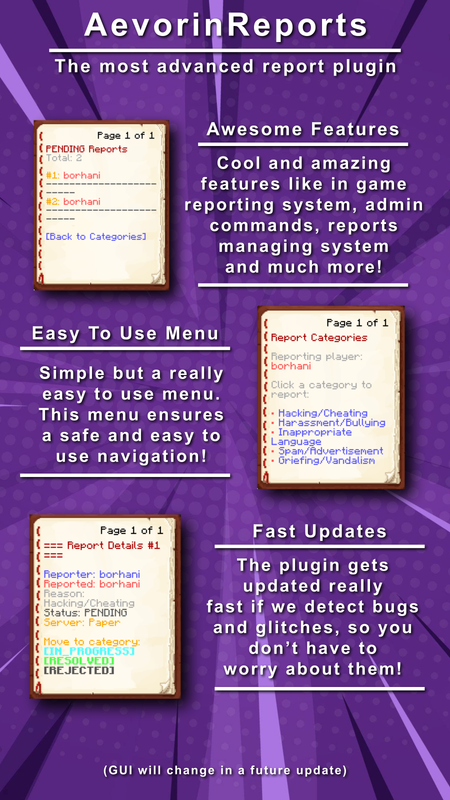
8. 技术特性
- 异步数据库操作
- 线程安全的报告处理
- 高效的缓存系统
- 模块化且可扩展的架构
- 安全的热重载处理
9. 依赖项
可选
- MySQL – 跨网络报告同步
- Discord API (JDA) – Discord 机器人集成
注意:
- 这些可选依赖项已内置在插件中,可以从
config.yml 启用
10. 安装指南
- 从 Modrinth 页面下载 AevorinReports
- 将
.jar 文件放入 /plugins/ 目录
- 重启服务器以生成配置文件
- 配置
config.yml 和数据库设置
- (可选)配置 Discord 集成
- 重载或重启服务器
11. 分析与遥测
FastStats & bStats

FastStats
AevorinReports 还使用 FastStats 进行高级实时插件分析。以下自定义指标被用于指导未来的开发:
| 指标 |
描述 |
pending_reports |
服务器上当前待处理的报告数量 |
total_reports |
服务器上创建的报告总数 |
gui_provider |
服务器使用的 GUI 类型 (book 或 container) |
db_backend |
正在使用的数据库后端 (file 或 mysql) |
configured_categories |
服务器设置的报告类别数量 |
discord_integration |
Discord 机器人是否启用 (true/false) |
所有遥测数据均为匿名收集——从不收集任何玩家数据、用户名、IP 地址或个人身份信息。
12. 许可证
AevorinReports 根据 MIT License 许可。
您可以自由使用、修改、分发和再许可本软件,前提是所有副本中均包含原始版权声明和许可证声明。
致谢
由 Aevorin Studios 开发
Official Documentation
Overview
AevorinReports is a modern, robust reporting system designed for Minecraft servers that require structured moderation workflows. It enables players to submit reports easily while providing staff with powerful tools to review, manage, and resolve reports efficiently. The plugin is optimized for performance, supports multiple GUI styles, integrates with Discord, and scales seamlessly across single servers and networks.
Region Restriction
AevorinReports is designed to be used globally; however, please note that the plugin is restricted and will not function on servers located within Israel. This is enforced via automated IP/timezone verification.
#FreePalestine
1. Core Features
- Interactive Admin GUI – Review, manage, and update reports using a clean, click-based interface
- Player Report History – Players can view their submitted reports and statuses using
/reports
- Multiple GUI Types – Supports both Book GUI and Container (Chest) GUI styles
- Real-Time Staff Alerts – Instantly notify staff members when a report is submitted
- Clear Status Workflow – Reports transition through Pending → Resolved / Rejected
- Custom Report Reasons – Allows players to provide custom reasons via chat input
- MiniMessage Support – Fully customizable messages with gradients, hover events, and formatting
- Discord Integration – Dedicated Discord bot with embeds and real-time notifications
- Database Support – SQLite (local) and MySQL (network-wide synchronization)
- Optimized Performance – Asynchronous processing and intelligent caching
- Full Localization Support – Built-in multi-language system with support for custom language packs
- PlaceholderAPI Support – Provides report statistic placeholders documented on the PlaceholderAPI wiki
- bStats & FastStats Integration – Anonymous usage statistics and advanced telemetry for development insights
2. Commands
2.1 Player Commands
| Command |
Description |
Permission |
/report <player> [reason] |
Submit a report against a player |
aevorinreports.report |
/reports |
View your submitted reports and their status |
aevorinreports.report |
Notes:
- If no reason is provided with
/report, a GUI will open
- Custom reasons can be entered via chat
2.2 Staff Commands
| Command |
Description |
Permission |
/reports |
Open the Admin Report Management GUI |
aevorinreports.manage |
/viewreport <id> |
View detailed report information |
aevorinreports.manage |
/setreportstatus <id> to <status> |
Update report status |
aevorinreports.manage |
/ar reload |
Reload the plugin configuration |
aevorinreports.reload |
2.3 Discord Bot Commands
| Command |
Description |
/reports |
List all active pending reports |
/lookup <id> |
View full details of a specific report |
/resolve <id> |
Mark a report as Resolved |
/reject <id> |
Mark a report as Rejected |
/pending <id> |
Mark a report as Pending |
/help |
View the bot help menu |
3. Permissions
3.1 Basic Permissions
| Permission |
Description |
Default |
aevorinreports.report |
Allows players to submit reports |
true |
aevorinreports.manage |
Allows staff to manage reports and access Admin GUI |
op |
aevorinreports.notify |
Receive notifications when a report is submitted |
op |
aevorinreports.reload |
Reload the configuration |
op |
3.2 Wildcard Permissions
| Permission |
Description |
aevorinreports.* |
Grants all AevorinReports permissions |
4. Report Workflow
- A player submits a report using
/report
- Staff members receive instant notifications
- Report is marked as Pending
- Staff review the report via the Admin GUI
- Report is marked as Resolved or Rejected
All actions are logged and synchronized across servers when using MySQL.
5. Configuration (config.yml)
This section documents every available option in config.yml, explaining its purpose and recommended usage.
Config Version System
# Please Do not change the config version
config-version: 5
The config-version field is used by AevorinReports to automatically manage and migrate your configuration when the plugin is updated to a newer version that requires changes to config.yml.
How It Works
- When the plugin loads, it reads the
config-version value from your existing config.yml.
- It compares that value against the version bundled inside the current plugin
.jar.
- If they match: No migration is needed. The plugin proceeds normally.
- If the bundled version is higher: The plugin automatically:
- Creates a backup of your existing file as
config.yml.old.
- Migrates all your existing settings (server name, database credentials, Discord token, etc.) into the new structure.
- Writes a fresh
config.yml with all new required fields, preserving your data.
[!CAUTION]
Never manually edit the config-version field. Changing it will cause the plugin to skip or repeat migrations, which can corrupt your configuration. If you need to reset the config, simply delete config.yml and restart the server.
[!TIP]
Your old config is always safely backed up as config.yml.old before any migration runs. If something goes wrong, you can restore your settings from that file.
5.0 Language Settings
language: "en_US"
- Sets the active language file loaded from the
plugins/AevorinReports/lang/ folder.
- The value must match a
.yml filename inside that folder (without the extension).
- Built-in languages (automatically extracted on first startup):
en_US – English (default)it_IT – Italiansk_SK – Slovakpl_PL – Polishzh_CN – Simplified Chinese
- Custom language files: You can create your own
.yml file inside the lang/ folder.
- Custom files are never overwritten by plugin updates.
- Any keys missing in a custom file will automatically fall back to
en_US values, so the plugin will never break due to untranslated strings.
- A console warning will list any missing keys to help you keep translations up to date.
5.1 Server Configuration
server-name: "survival"
- server-name: Identifies the server in multi-server setups.
- Must be unique when multiple servers share the same database.
- Displayed in Discord embeds and network-wide logs.
- Cloned servers: Before starting a cloned server instance for the first time, delete the copied aevorin_server_token.dat file from its root directory so that a new, unique server identity token can be generated.
5.2 Database Configuration
database:
  type: "file" # mysql or file
Database Types
- file: Uses local SQLite storage (recommended for single servers).
- mysql: Enables cross-server synchronization for networks.
MySQL Settings
mysql:
  host: "localhost"
  port: 3306
  database: "aevorin_reports"
  username: "root"
  password: "password"
- Used only when
type is set to mysql.
- All servers must share the same credentials for synchronization.
File Storage
file:
  path: "database/reports.db"
- Location of the SQLite database file.
Connection Pool (Advanced)
pool:
  minimum-idle: 5
  maximum-pool-size: 10
  connection-timeout: 30000
- Optimizes database performance.
- Recommended to leave defaults unless tuning is required.
5.3 Report Settings
reports:
  allow-self-reporting: false
- Prevents players from reporting themselves when disabled.
GUI Configuration
gui:
  type: "book" # book or container
- book: Classic book-style interface.
- container: Modern chest-style GUI.
Limits & Cooldowns
cooldown: 300
max-active-reports: 3
- cooldown: Time (seconds) between report submissions.
- max-active-reports: Maximum unresolved reports per player.
Custom Reasons
allow-custom-reasons: true
custom-reason-min-length: 10
custom-reason-max-length: 100
- Allows players to submit custom reasons via chat.
- Length limits prevent spam and abuse.
Report Categories
categories:
  - "Hacking/Cheating"
  - "Harassment/Bullying"
  - "Spam/Advertisement"
- Displayed in the report GUI.
- Categories are fully customizable.
5.4 Notification Settings
notifications:
  new-report: true
  status-change: true
  sound: "BLOCK_NOTE_BLOCK_PLING"
- new-report: Notify staff when a report is created.
- status-change: Notify staff when report status changes.
- sound: Sound played for staff alerts (empty string disables).
Chat Prefix
The chat prefix, which appears before most plugin messages, is configured within the language files to allow for localized branding.
# Found in lang/en_US.yml
messages:
  prefix: "&8[&bAevorinReports&8]&r "
5.5 Update Checker
update-checker:
  check-interval: 60
  notify-on-join: true
- Automatically checks for new plugin versions.
- Notifies authorized players on join.
5.6 Debug Settings
debug:
  enabled: false
  log-queries: false
- enabled: Enables detailed debug logging.
- log-queries: Logs database queries (not recommended for production).
5.7 Message Customization
messages:
  report-created: "&aYour report has been submitted successfully!"
- Fully customizable messages.
- Supports color codes (
&) and placeholders.
- MiniMessage is supported where applicable.
- PlaceholderAPI placeholders can be used in supported GUI text, including container GUI titles, item names, and lore.
- See the official AevorinReports PlaceholderAPI placeholder list.
5.8 Discord Integration
discord:
  enabled: false
Network Mode (Multi-Server)
network-mode:
  enabled: false # set to true on ONE server only in a network
  poll-interval: 10 # how often to sync reports from the database (seconds)
- enabled: If
true, this server will poll the database for reports from all servers.
- poll-interval: The frequency of database checks. Recommended: 5-10.
Core Settings
bot-token: "YOUR_BOT_TOKEN_HERE"
channel-id: "YOUR_CHANNEL_ID_HERE"
log-channel-id: "YOUR_LOG_CHANNEL_ID_HERE"
- Sends reports and status updates directly to Discord.
Staff Permissions
staff-role-id: ""
- Optional role restriction for Discord moderation commands.
Bot Appearance
bot-settings:
  status: "ONLINE"
  activity:
    type: "WATCHING"
    message: "Reports | %online_players% players online"
Discord Notifications
notifications:
  title: "New Report (#%id%)"
  color: "#ff5555"
  footer: "AevorinReports • %date%"
- Fully customizable embed formatting.
6. Discord Features
- Report submission notifications
- Status update alerts
- Embedded messages with player avatars
- Server and report metadata displayed
7. GUI Preview
8. Technical Features
- Async database operations
- Thread-safe report handling
- Efficient caching system
- Modular and extendable architecture
- Safe reload handling
9. Dependencies
Optional
- MySQL – Network-wide report synchronization
- Discord API (JDA) – Discord bot integration
Notes:
- These optional dependencies are built in the plugin itself and can be enabled from config.yml
10. Installation Guide
- Download AevorinReports from the Modrinth page
- Place the
.jar file into the /plugins/ directory
- Restart the server to generate configuration files
- Configure
config.yml and database settings
- (Optional) Configure Discord integration
- Reload or restart the server
11. Analytics & Telemetry
FastStats & bStats
FastStats
AevorinReports also uses FastStats for advanced, real-time plugin analytics. The following custom metrics are tracked to help guide future development:
| Metric |
Description |
pending_reports |
Number of currently pending reports on the server |
total_reports |
Total reports ever created on the server |
gui_provider |
Which GUI type the server uses (book or container) |
db_backend |
Which database backend is in use (file or mysql) |
configured_categories |
How many report categories the server has set up |
discord_integration |
Whether the Discord bot is enabled (true/false) |
All telemetry is anonymous — no player data, usernames, IPs, or personally identifiable information is ever collected.
12. License
AevorinReports is licensed under the MIT License.
You are free to use, modify, distribute, and sublicense this software, provided that the original copyright and license notice are included in all copies.
Credits
Developed by Aevorin Studios


 插件

 插件
 插件
 插件
 插件
 插件
评论 0
登录后参与评分
还没有评论,来抢沙发吧