Aloewera - 终极服务器优化插件 ?
概述
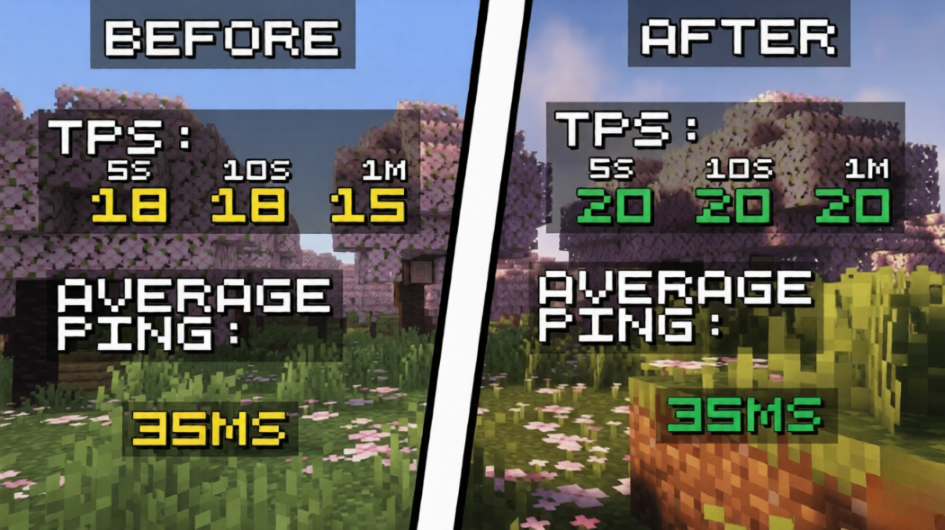
Aloewera 是一款专为 Paper 和 Purpur 服务器设计的高性能优化插件,旨在提高 TPS 稳定性、减少卡顿,并根据服务器状况自动调整。
与依赖固定限制和静态配置的传统优化插件不同,Aloewera 会持续监控服务器性能,并基于实时 TPS 和玩家延迟动态调整其优化系统。这使得服务器即使在活动高峰期也能保持流畅的游戏体验。
无论您运营的是小型社区服务器还是大型公共网络,Aloewera 都能帮助降低不必要的服务器负载,同时保留最佳的玩家体验。
功能特性
⚡ 动态性能优化
Aloewera 会根据以下因素自动调整其优化强度:
- 当前服务器 TPS
- 平均玩家延迟(Ping)
- 整体服务器负载
当性能下降时,优化措施会变得更为激进;当性能稳定时,限制会减少以最大化游戏质量。
命令
-
/aloewera clear - 清除地面上所有物品
-
/aloewera optimize - 运行完整的服务器优化检查,并优化一切可优化的内容以匹配服务器的 TPS 标准。(限制范围包括:生物生成、物品消失、渲染以及整体自适应优化)
-
/aloewera tps - 显示服务器当前 TPS、20 秒平均 TPS 和 1 分钟平均 TPS。同时显示平均延迟和玩家数量。
智能生物管理
减少因实体数量过多导致的服务器卡顿。
- 在重载期间控制生物生成
- 防止不必要的实体堆积
- 维持更健康的服务器性能
自动物品清理
让您的世界远离过多的掉落物。
- 定时物品清除系统
- 减少内存占用
- 帮助防止因实体堆积引起的卡顿峰值
实时自适应系统
与具有固定优化设置的插件不同,Aloewera 会持续评估服务器条件并自动进行调整。
无需频繁手动微调。
轻量级设计
以性能为核心构建。
- 资源占用低
- 对服务器内存影响极小
- 专为现代 Paper 和 Purpur 服务器设计
兼容性
支持平台
支持的 Minecraft 版本
实验性版本
为什么选择 Aloewera?
许多优化插件使用固定数值,这在正常游戏过程中可能过于激进,而在发生卡顿峰值时又可能不够激进。
Aloewera 通过自适应优化解决了这一问题,它能够实时响应实际的服务器状况,从而在将对游戏体验的影响降至最低的同时,帮助维持稳定的 TPS。
优势包括:
- 改善 TPS 稳定性
- 减少卡顿峰值
- 降低与实体相关的服务器负载
- 在玩家高峰时段表现更佳
- 无需复杂设置即可实现自动优化
安装指南
- 下载最新版本。
- 将插件放入服务器的
/plugins 文件夹中。
- 重启您的服务器。
- Aloewera 将自动开始监控和优化服务器性能。
无需复杂的设置。
性能说明
使用 Aloewera 获得的具体性能提升程度将取决于:
- 服务器硬件配置
- 玩家数量
- 已安装的现有插件
- 世界活跃度
- 实体密度
拥有大量生物、掉落物或活跃玩家的服务器通常能看到最显著的提升。
技术支持
发现了错误或有任何建议?
请通过我们的 Discord 服务器报告问题:
*请注意,我们仅为插件的 1.21 - 1.21.11 版本提供支持!
Aloewera - The Ultimate Server Optimization Plugin ?
Overview
Aloewera is a high-performance optimization plugin for Paper and Purpur servers, designed to improve TPS stability, reduce lag, and automatically adapt to changing server conditions.
Unlike traditional optimization plugins that rely on fixed limits and static configurations, Aloewera continuously monitors server performance and dynamically adjusts its optimization systems based on real-time TPS and player latency. This allows servers to maintain smooth gameplay even during periods of high activity.
Whether you're running a small community server or a large public network, Aloewera helps reduce unnecessary server load while preserving the player experience.
Features
⚡ Dynamic Performance Optimization
Aloewera automatically adjusts its optimization strength based on:
- Current server TPS
- Average player ping
- Overall server load
When performance drops, optimization becomes more aggressive. When performance is stable, restrictions are reduced to maximize gameplay quality.
Commands
-
/aloewera clear - Clears all of the items on the ground
-
/aloewera optimize - Runs a full server optimization check and optimizes everything it can to match the server's TPS counts. (Limit: Mob spawning, Item despawning, Rendering and Overall adaptive optimization)
-
/aloewera tps - Shows server current TPS count, 20 second TPS count and 1 minute TPS count. Average ping and Player count.
Intelligent Mob Management
Reduce server lag caused by excessive entity counts.
- Controls mob spawning during heavy load
- Prevents unnecessary entity buildup
- Maintains healthier server performance
Automatic Item Cleanup
Keep your worlds free from excessive dropped items.
- Timed item clearing system
- Reduces memory usage
- Helps prevent lag spikes caused by entity accumulation
Real-Time Adaptive System
Unlike plugins with fixed optimization settings, Aloewera continuously evaluates server conditions and adjusts itself automatically.
No constant manual tweaking required.
Lightweight Design
Built with performance in mind.
- Low resource usage
- Minimal impact on server memory
- Designed specifically for modern Paper and Purpur servers
Compatibility
Supported Platforms
Supported Minecraft Versions
Experimental versions
Why Choose Aloewera?
Many optimization plugins use fixed values that may be too aggressive during normal gameplay or not aggressive enough during lag spikes.
Aloewera solves this by using adaptive optimization that responds to actual server conditions in real time, helping maintain consistent TPS while minimizing the impact on gameplay.
Benefits include:
- Improved TPS stability
- Reduced lag spikes
- Lower entity-related server load
- Better performance during peak player counts
- Automatic optimization without complex setup
Installation
- Download the latest release.
- Place the plugin into your server's
/plugins folder.
- Restart your server.
- Aloewera will automatically begin monitoring and optimizing server performance.
No complicated setup required.
Performance Notes
The exact performance improvements achieved with Aloewera will vary depending on:
- Server hardware
- Player count
- Existing plugins
- World activity
- Entity density
Servers with large numbers of mobs, dropped items, or active players will typically see the most noticeable improvements.
Support
Found a bug or have a suggestion?
Please report issues through our discord server:
*Note that we offer support only on the 1.21 - 1.21.11 versions of our plugin!


 插件

 插件
 插件
 插件
 插件
 插件
评论 0
登录后参与评分
还没有评论,来抢沙发吧