来源:

通过 AmChat 添加一个低技术含量的聊天系统,不再使用“通用”频道与邻居在 65,000 rhz 的频率上交谈。建造一个固定无线电发射器,并在更远的距离上进行传输。AmChat 甚至允许你加密你的传输信号,使得只有处于相同频率和代码的玩家才能阅读彼此的文本。添加铁块、金块或钻石块可以将你的固定无线电变为应答器(支持多用户)。
AmChat 可以作为一个独立系统运行,也可以添加到任何尊重玩家聊天事件中 "iscancelled" 标志的聊天系统中。
开箱即用,本地聊天的范围是 32 格,而无线电聊天的范围是 96 格。如果这还不够远,你可以建造一个固定无线电发射器并添加天线以增加聊天距离。如果你希望无线电显示其信息,只需在侧面放置一块告示牌,它将根据该无线电的数据进行更新。
固定无线电发射器
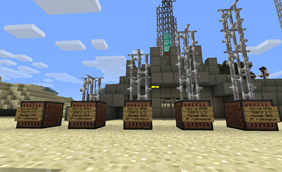
在潜行模式下放置一个唱片机即可创建无线电,你必须处于海平面或以上的高度。
应答器支持更多玩家
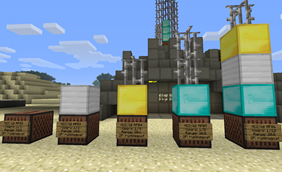
添加铁块、金块或钻石块以增加支持的用户数量
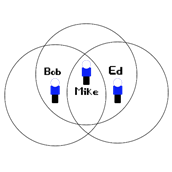
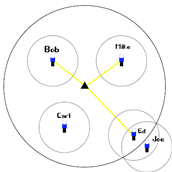
玩家根据距离进行交流,一名玩家可能只能听到对话的一侧,有些玩家甚至可能无法与他们能听到的玩家进行交流。
至少需要添加以下权限以实现基本功能:
amchat.radio.personal.* 所有 /am 命令(除 /am list 外)
amchat.radio.fixed.* 所有 /xm 命令(除 /xm list 外)
版本:0.3.2
特性:
..开启/关闭个人无线电
..调谐到 32-512 rHz 之间的频率
..使用 1-999 之间的代码来加密聊天,0 表示禁用
..开启/关闭麦克风
..过滤被加密且其他情况下不可读的聊天内容。
..设置频率截止点,以便接收来自 <your_frequency>+-<cutoff> 范围内的聊天
..设置加入服务器时的默认频率,默认为 32
..设置默认无线电状态,当玩家首次加入你的服务器时(默认为开启)
..使用游戏内物品(指南针)调谐你的无线电
..创建无线电塔,让你可以在更远的距离上与朋友交谈(按住 Shift 并放置一个唱片机)
..在唱片机上放置一块告示牌以查看无线电的基本统计信息。(无需代码或其他设置,只需在唱片机上放置一块空白告示牌)
..玩家设置会在重启后保存到 yml 文件中。
..服务器控制台可以完全查看所有聊天内容,所有玩家始终可以听到控制台的发言。
..权限节点用于覆盖配置限制(聊天/无线电距离、设置)
..可选地要求使用物理物品才能使用无线电
..通过简单地摧毁唱片机来销毁无线电。
安装:
将 AMChat.jar 放入插件文件夹并启动服务器,如果你想要推荐的默认值,则不需要其他操作。
要放置无线电,你需要按住 Shift(处于潜行模式)并放置一个唱片机。
无线电将由 Minecraft 通信部门分配一个 ID。
AMChat 能与我的其他聊天插件兼容吗?
如果你的聊天插件尊重 PlayerChatEvent 事件中的 event.isCancelled() 标志,那么你的其他聊天插件应该可以与 AMChat 配合工作。
命令
权限节点
config.yml
源代码
开发者信息
待办事项列表
Google Docs 上的手册
反馈?欢迎在下面留下关于我模组的评论。
问题?请使用工单系统。
建议?也请留在这里。
Source:
Add a low-tech chat system with AmChat, instead of using “General” talk to your neighbors on 65.000rhz. Construct a fixed radio transmitter and transmit at even greater distances. AmChat even lets you encrypt your transmissions so that only players on the same frequency and code can read each others text. Add iron, gold or diamond block to change your fixed radio into a transponder (multi user support).
AmChat works as a stand alone system or add it to any chat system that honors the "iscancelled" flag on the player chat event.
Out of the box, local chat will reach 32 blocks, while radio chat reaches 96 blocks, if that’s not far enough you can build a fixed radio transmitter and add antennas to increase your chat distance. If you want your radio to display its information simply place a sign on the side and it will be updated with the data for that radio.
Fixed radio transmitters
Place a JukeBox while in Sneak mode to create a radio, you must be at or above sea level.
Transponders support more players
Add Iron, Gold or Diamond blocks to increase the number of supported users
Players communicate by distance, one player might be able to hear only one side of the conversation, some players might not even be able to communicate with people they can hear.
The following permissions need to be added at minimum for bare functionality:
amchat.radio.personal.* All /am commands (except /am list)
amchat.radio.fixed.* All /xm commands (except /xm list)
Version:0.3.2
Features:
..turn personal radio on/off
..tune to a frequency between 32-512 rHz
..use a code between 1-999, to encrypt your chat, 0 to disables
..turn mic on/off
..filter chat that is encrypted and otherwise unreadable.
..set a frequency cutoff so you receive chat from <your_frequency>+-<cutoff>
..set a frequency default freq. to set when joining server 32 by default
..set the default radio state, when a player joins your server for the first time (on by default)
..tune your radio using the in game item(compass)
..create radio towers that let you talk to your friends at greater distances (hold shift and place a juke box)
..Place a sign on the juke box to see basic stats about the radio. (no codes or anything just place a blank sign on the jukebox)
..player settings save between restarts to yml file.
..server consol has full visibility of all chat and all players can always hear the consol.
..permission nodes to override configuration restrictions (chat/radio distance, settings)
..optionally require a physical item to use the radio
..destroy radios by simply destroying the jukebox.
Installation:
Drop the AMChat.jar in the plugin folder and start your server, if you want the recommended defaults nothing else is needed.
To place a radio you need to hold shift(be in sneak mode) and place a juke box.
Radio's will be assigned an ID by the MineCraft Communications Department.
Will AMChat work with my other chat plugins?
If your chat plugin honors the event.isCancelled() flag for your PlayerChatEvent events, then your other chat plugin should work with AMChat.
Commands
Permission Nodes
config.yml
Source
Developer Info
TODO List
Manual on Google Docs
Feedback? Feel free to leave some comments about my mod below.
Issues? Please use the ticket system.
Suggestions? Please also leave these below.

 插件
 插件
 插件
 插件
 插件
 插件

评论 0
登录后参与评分
还没有评论,来抢沙发吧