通过捐赠支持开发者
编写 BukkitStream 需要花费大量的时间和精力。如果您正在使用 BukkitStream,请支持我们!
新功能!无需 App 即可使用 BukkitStream 的网站!
现已上线!该网站可在电脑和手机上使用!现在任何设备都可以连接(例如:Apple、Blackberry、Android...)

总体介绍
BukkitStream 是一款免费的 Android 应用程序,用于控制您的 Bukkit 服务器。它目前处于测试版阶段。BukkitStream 可在 Google Play、Windows/Mac/Linux 桌面平台以及在线(网页客户端:)获取。
功能特性
主要功能:
- 添加 / 编辑 / 删除多个服务器
- 集成 FTP 服务器
- 支持多用户及离线权限系统
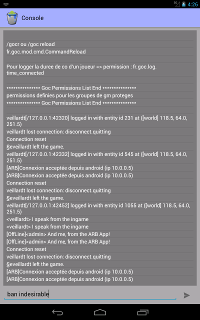
- 显示 / 使用控制台
- 显示 / 使用聊天(适用于管理员和玩家)
- 管理在线玩家(统计、封禁、踢出)
- 管理离线玩家(列出所有、部分数据、封禁)
- 显示在线玩家数量
- 显示被封禁的玩家数量和操作员数量
- 显示 TPS(20/20 表示服务器无卡顿)
- 显示并清理内存占用
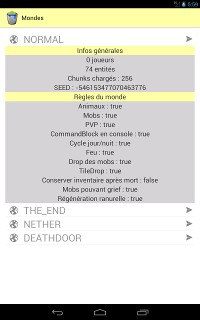
- 显示多种世界数据(PVP、火焰、动物、生物、实体数量、已加载区块等)
- 兼容 Dynmap
- 添加游戏内命令(输入 /bs 查看所有可用命令和变量)
- 管理高级命令别名
- 统计日志记录(玩家、内存、TPS、操作、击杀等)
- 设计简洁,易于组织和操作
安装主指南
在服务器上
- 下载并放置最新版本的插件(请选择 zip 版本)
- 根据需要编辑 config.yml 配置文件
- 重启服务器
在所有设备上(替代方案)
在 Android 手机/平板上。
- 启动 BukkitStream for Android
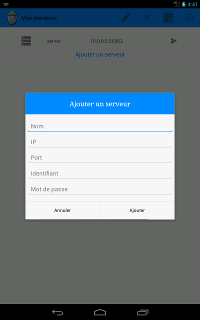
- 点击“添加服务器”
- 输入名称(任意)、IP、端口(config.yml 中设置)、用户名(config.yml 中设置)和密码(config.yml 中设置)。
在您的桌面上。
- 前往下载页面。
- 选择桌面版
- 启动程序。
- 只需将服务器添加到列表中
- 选择服务器并点击“登录”
快速设置服务器
打开 config.yml 并更改登录信息。
username: admin
password: password
port: 25563
- username:从 Android 应用连接到服务器时使用的昵称。出于安全考虑,建议修改此值。
- password:用于连接的密码。(注意:密码不会在网络上传输,仅使用哈希码)
- port:供应用程序通信使用的端口。请勿使用已被占用的端口。(推荐值:25563)
更多信息请参阅此处!
额外功能!您的玩家可以使用离线聊天!
您希望让您的玩家访问离线聊天吗?立即阅读本教程!
如果您是玩家,并希望使用此功能,请获取教程!
关于更新
BukkitStream 包含自动更新器。您可以在 config.yml 中启用或禁用检查更新或下载功能。
- check_update => 从 BukkitDev 检查新版本,但如果未允许下载,则不会自动下载。
- download_update => 如果有可用更新,则自动下载。
如果您进行了更新,请确保同时更新 Android 应用和插件。要确认插件版本与 Android 应用是否兼容,请在手机上检查 vKernel ID。
例如。
vKernel 为 2。现在您可以下载正确的插件版本:
例如:arb_vKernel_2_vPlugin_XXX.jar
演示视频
部分截图








其他项目:
Support Dev with your Donation
To write BukkitStream need a lot of time and work. If you are using BukkitStream, please support us !
New! A website to use bukkitstream without app !
is now available! That website can be use on Computers and on your phone! Every device can now be connected (ex : Appel, Blackberry, Android...)
General Presentation
BukkitStream is a free app for android to control your bukkit server. It is a beta version. BukkitStream is available on Google Play, on Windows/Mac/Linux and online (Website Client : )
Features
Features :
- Add / edit / delete multiple servers
- Integrated FTP Server
- Support of many users and offline permissions system
- Show / use the console
- Show / use chat (for Admin and Players)
- Manage online players (stats, ban, kick)
- Manage offline players (list all, some datas, ban)
- Display the number of players online
- Display the number of banned players and operators
- Display the TPS (20/20 means no server lag)
- Display and clean the ram
- Display many data worlds (pvp, fire, animals, mobs, number of entities, chunks loaded ...)
- Compatible with Dynmap
- Add ingame commands (/bs to show all commands avariables)
- Manage advenced commands alias
- Stats Loging (players, ram, tps, actions, kills...)
- Be simple and easy by its design and organization
Installation Main Guide
On the server
- download and put the last plugin version (take zip version)
- edit config.yml like you want
- restart your server
On All Devices (Alternative)
- go on
- give your IP, Port, Username and Password and submit
On Android phone / tablet.
- start BukkitStream for Android
- click on "Add a server"
- enter a name (what you want), the IP, the port (config.yml), the username (config.yml) and the password (config.yml).
On your Desktop.
- go on the download page.
- select the Desktop édition
- start it.
- just add a server to the list
- select server and click on "Login"
Fast Setting Server
Open config.yml and change the login.
username: admin
password: password
port: 25563
- username : pseudo used to connect to the server from the android app. For security reason, we recommend to change it.
- password : pass used to connect. (Note : no password is shared on the network. We use only the hashcode)
- port : used by app to communicate. But not give an already working port. (recommended value : 25563)
More infos here !
Extra ! Your players can use offline chat !
You want that your players access to offline chat ? Read this tutorial now!
You are a player, and want to use this feacture, get the tutorial !
On Update
Bukkitstream includes an Auto-Updater. You can enable/disable checking or download from config.yml
- check_update => check new version from bukkitdev, but don't download it if download isn't permitted.
- download_update => download update if available.
You need update Android App and Plugin if you do an update. To know if the plugin version and the android app are compatible, check on your phone the vKernel id.
For instance.
The vKernel is 2. Now, you can download the good plugin version :
ex : arb_vKernel_2_vPlugin_XXX.jar
Presentation Video
Some capture
Other Projects :









 插件
 插件
 插件
 插件
 插件

 插件
评论 0
登录后参与评分
还没有评论,来抢沙发吧