AnhyShop
这是一款基于村民交易界面,用于在 Minecraft 服务器上创建商人并进行交易的独特插件。已在 Spigot、Paper、Purpur 服务器核心上测试,版本为 1.20.4。
AnhyShop 运行的主要要求是安装 AnhyLibAPI 库,版本需为 1.5.2 或更高。如果没有 AnhyLibAPI,AnhyShop 将无法运行。它提供系统消息的翻译以及商人的多语言名称支持。
此外,AnhyShop 兼容 AnhyLingo 版本 0.3.3 或更高。安装 AnhyLingo 可以扩展 AnhyShop 的多语言功能。然而,缺少它不会影响 AnhyShop 的基本运行。
插件功能
AnhyShop:Minecraft 中创建管理商店的直观插件
- 简单便捷:无需复杂的配置,所有数据自动存储在内置 SQLite 数据库中(插件文件夹内的
shops.db 文件)。
- 数据安全:关于交易者的信息经过加密。
- 灵活使用:通过控制台命令或具有相应权限的玩家命令开放交易。
管理员命令
(权限 anhyshop.*)
重载命令
- 重载插件
(anhyshop.reload):/shop reload - 从数据库重新加载语言文件、配置和交易者。可从控制台执行。
与交易者交互
(权限 anhyshop.trader.*)
- 查看交易者信息
(anhyshop.trader.view):/shop list - 显示所有交易者的列表。可从控制台执行。
- 创建新交易者
(anhyshop.trader.create):/shop newt <name> - 创建一个新的交易者。可从控制台执行。
- 删除交易者
(anhyshop.trader.delete):/shop delt <key> - 删除一个交易者。可从控制台执行。
- 重命名交易者
(anhyshop.trader.rename):/shop rename <key> <new_name> - 重命名一个交易者。可从控制台执行。
- 打开交易界面
(anhyshop.trader.open):/shop open <key> <player_name> - 为玩家打开交易界面。可从控制台执行。
- 自行交易
(anhyshop.trader.trade):/shop trade <key> - 打开交易界面。
商品操作
(权限 anhyshop.product.*)
- 添加新交易
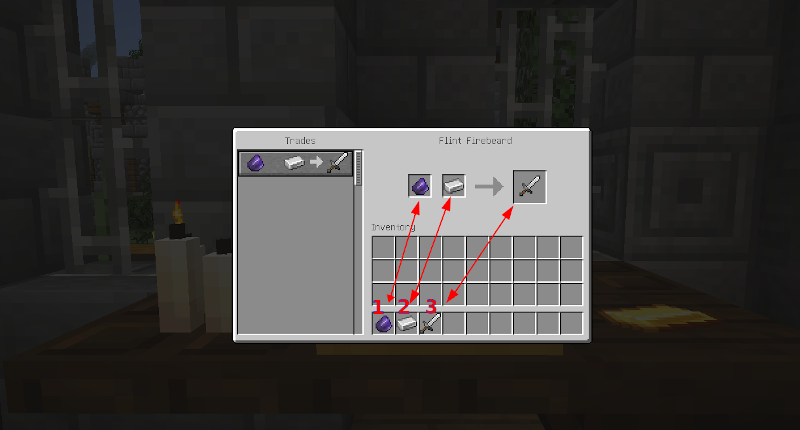
(anhyshop.product.add):/shop add <key> - 要添加交易,请将物品放置在背包的第 1、2、3 槽位。
- 替换现有交易
(anhyshop.product.replace):/shop replace <key> - 替换或添加商品。
- 删除现有交易
(anhyshop.product.remove):/shop remove <key> - 从交易中移除商品。
目录结构
lang:包含插件系统消息翻译和交易者名称翻译的文件。
trader_name_emberlyn: Emberlyn Gemwhisper
trader_name_flint: Flint Firebeard
trader_name_mira: Mira Mysticsight
trader_name_silas: Silas Silverthread
trader_name_cedric: Cedric Stonehand
trader_name_willow: Willow Wildroot
trader_name_raven: Raven Nightshade
trader_name_eldon: Eldon Ironfoot
trader_name_aurora: Aurora Skydancer
trader_name_gideon: Gideon Goldspinner
AnhyShop 插件 1.0.0 版本的扩展功能
AnhyShop 在 1.0.0 版本中引入了“卖家”(Sellers)的新概念,允许玩家通过与游戏内对象互动来与商人进行交易。这通过提供更动态和便捷的交易过程管理,增强了交易体验。
“卖家”的关键特性:
- “卖家”类型:
- 机械物体:按钮、门、拉杆通过其类型和确切的位置坐标进行识别。
- 告示牌:识别基于材质类型和告示牌上显示的文字。告示牌可以放置在不同的位置,但其上的文字将决定唯一的“卖家”。
- 自定义命名的生物:利用生物类型及其唯一名称进行识别。只有拥有自定义名称的生物才能成为“卖家”。
- 流浪商人:所有流浪商人一旦链接,都被视为同一个“卖家”,从而允许对其交易界面进行统一更改。
- 村民:通过职业和等级进行识别。为由特定职业和等级的村民创建的“卖家”会替换所有类似村民的标准交易操作。
管理“卖家”的命令:
注意:以下列出的所有命令仅对拥有 anhyshop.seller 权限的玩家可用。
-
创建“卖家”:
- 命令:
/shop seller add <trader_key>
- 描述:根据玩家注视的对象创建一个“卖家”,并使用唯一的键
<trader_key> 将其链接到选定的交易者。玩家必须位于该对象 5 格范围内。
-
移除“卖家”:
- 命令:
/shop seller remove <seller_id>
- 描述:使用其唯一的数字标识符
<seller_id> 移除一个“卖家”。
-
查看“卖家”信息:
- 命令:
/shop seller view <seller_id>
- 描述:显示有关“卖家”的详细信息,包括其类型、位置、链接的交易者和标识符。
-
列出所有“卖家”:
- 命令:
/shop seller list
- 描述:显示所有现有“卖家”的列表,并支持将
<seller_id> 复制到剪贴板,简化后续操作的标识符管理。
这些更新显著增强了玩家与交易者的互动,为 Minecraft 服务器上的交易过程提供了更多的控制权和定制选项。
语言个性化
AnhyShop 中的多语言功能,集成 AnhyLibAPI 和 AnhyLingo
- 系统消息本地化(AnhyLibAPI):存储在
lang 文件夹中的 shop_XX.yml 文件内。
- 商人名称翻译(AnhyLibAPI):在
traders_XX.yml 中添加翻译。
- 多语言交易物品显示(AnhyLingo):涉及多语言物品的交易将以玩家选择的语言显示这些物品。
AnhyShop 与 AnhyLibAPI 和 AnhyLingo 的集成增强了不同语言下的可用性,丰富了交易体验,使其更具包容性和全球可访问性。
AnhyShop
Is a unique plugin for creating merchants and trading on Minecraft servers, based on the trading inventory of villagers. Tested on Spigot, Paper, Purpur server cores, version 1.20.4.
Essential Dependencies for AnhyShop
The primary requirement for AnhyShop to function is the installation of the AnhyLibAPI library version 1.5.2 or higher. Without AnhyLibAPI, AnhyShop will not operate. It provides translation of system messages and multilingual names for merchants.
Additionally, AnhyShop is compatible with AnhyLingo version 0.3.3 or higher. Installing AnhyLingo expands the multilingual capabilities of AnhyShop. However, its absence does not affect the primary operation of AnhyShop.
Functionality of the Plugin
AnhyShop: Intuitive Plugin for Creating Administrative Stores in Minecraft
- Simplicity and Convenience: No complicated configurations, all data is automatically stored in the embedded SQLite database (file
shops.db in the plugin folder).
- Data Security: Information about traders is encrypted.
- Flexible Use: Open trade via console commands or player commands with appropriate permissions.
Administrator Commands
(with permission anhyshop.*)
Reloading Commands
- Reloading the plugin
(anhyshop.reload): /shop reload - Reloads the language files, configurations, and traders from the database. Available from the console.
Work with Traders
(with permission anhyshop.trader.*)
- Information about traders
(anhyshop.trader.view): /shop list - Displays a list of all traders. Available from the console.
- Create a new trader
(anhyshop.trader.create): /shop newt <name> - Creates a new trader. Available from the console.
- Remove trader
(anhyshop.trader.delete): /shop delt <key> - Deletes a trader. Available from the console.
- Rename trader
(anhyshop.trader.rename): /shop rename <key> <new_name> - Renames a trader. Available from the console.
- Open trade inventory
(anhyshop.trader.open): /shop open <key> <player_name> - Opens trade for a player. Available from the console.
- Trade by yourself
(anhyshop.trader.trade): /shop trade <key> - Opens a trade.
Operations with Goods
(with permission anhyshop.product.*)
- Add a new trade
(anhyshop.product.add): /shop add <key> - To add a trade, place items in slots 1, 2, 3 of your inventory.
- Replace an existing trade
(anhyshop.product.replace): /shop replace <key> - Replace or add products.
- Delete an existing trade
(anhyshop.product.remove): /shop remove <key> - Remove a product from bidding.
Directory Structure
lang: Files with translations of plugin system messages and translations of trader names.
trader_name_emberlyn: Emberlyn Gemwhisper
trader_name_flint: Flint Firebeard
trader_name_mira: Mira Mysticsight
trader_name_silas: Silas Silverthread
trader_name_cedric: Cedric Stonehand
trader_name_willow: Willow Wildroot
trader_name_raven: Raven Nightshade
trader_name_eldon: Eldon Ironfoot
trader_name_aurora: Aurora Skydancer
trader_name_gideon: Gideon Goldspinner
Expanded Functionality of AnhyShop Plugin Version 1.0.0
AnhyShop in version 1.0.0 introduces a new concept of "Sellers," which allow players to interactively trade with merchants through in-game objects. This enhances the trading experience by providing a more dynamic and convenient management of trading processes on the server.
Key Features of "Sellers":
- Types of "Sellers":
- Mechanical Objects: Buttons, doors, levers are identified by their type and the exact coordinates of their location.
- Signs: Identification is based on the material type and the text displayed on the sign. Signs can be placed in different locations, but the text on them will determine a single "Seller."
- Mobs with Custom Names: Utilizes the type of mob and its unique name for identification. Only mobs with custom names can become "Sellers."
- Wandering Traders: All wandering traders, once linked, are recognized as one "Seller," allowing for a uniform change to their trading inventories.
- Villagers: Identified by profession and level. Creating a "Seller" from a villager of a specific profession and level replaces standard trade operations for all similar villagers.
Commands to Manage "Sellers":
Note: All the commands listed below are available only to players with the anhyshop.seller permission.
These updates significantly enhance player interactions with traders, providing greater control and customization options for trading processes on Minecraft servers.
Language Personalization
Multilingual Functionality in AnhyShop with AnhyLibAPI and AnhyLingo Integration
- System Messages Localization (AnhyLibAPI): Stored in
shop_XX.yml files within the lang folder.
- Trader Names Translation (AnhyLibAPI): Add translations in
traders_XX.yml.
- Multilingual Item Display in Trades (AnhyLingo): Trades involving multilingual items display these items in the player's chosen language.
AnhyShop's integration with AnhyLibAPI and AnhyLingo enhances usability across different languages and enriches the trading experience, making it inclusive and globally accessible.


 插件

 插件

 插件
 插件
 插件
 插件
评论 0
登录后参与评分
还没有评论,来抢沙发吧