
愚人节演示
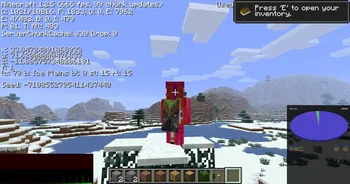
在愚人节加入服务器时显示 Minecraft 的试玩版界面。
支持的版本
该插件理论上适用于 1.7.10 到 1.21 之间的所有版本。不过,我仅在 Paper 1.21.11 以及相同版本的客户端上进行了测试。
工作原理
你可以通过 Game Event 数据包触发多种演示消息。值 0 会显示此屏幕,而值 101 至 104 会在聊天栏中显示游戏操作说明(例如如何移动、截图等)。更多信息请查看 Minecraft wiki。
本插件使用 packetevents 向玩家发送数据包。它已包含在最终的 JAR 文件中。
修改文本
如果你觉得向用户展示这些内容可能会造成误导,那么你绝对不是第一个这么想的人。不过,试玩版界面的文本像游戏中几乎任何其他文本一样,可以通过资源包进行修改。因此,你可以使用资源包更改以下键值,并在玩家加入服务器之前将其发送给玩家:
{
  "demo.help.buy": "立即购买!",
  "demo.help.fullWrapped": "本次试玩将持续 5 个游戏日(约 1 小时 40 分钟现实时间)。请查看进度以获取提示!玩得开心!",
  "demo.help.inventory": "按 %1$s 键打开物品栏",
  "demo.help.jump": "按 %1$s 键跳跃",
  "demo.help.later": "继续游玩!",
  "demo.help.movementMouse": "使用鼠标环顾四周",
  "demo.help.movementShort": "按 %1$s、%2$s、%3$s、%4$s 键移动",
  "demo.help.title": "Minecraft 试玩模式"
}

你是这个资源的作者?登录后可认领此资源。
相似资源
 插件

Beds Always Explode
rabiesland
使床在所有维度中爆炸的模组
诅咒玩法机制
30
 插件

tally
strixun
生存完成进度包 — 10,000+ 个进度,经验值与物品奖励,实时策略开关。
诅咒玩法机制
5
 插件
MythicMobs
Lumine
创建拥有高级技能、属性、装备等的自定义生物和首领!
玩法机制魔法
5
 插件
CrNOBr
IAmREGE
使苦力怕的爆炸不破坏方块(除非你希望如此)
诅咒玩法机制
4
 插件

OpenJavascript
coolcostupit
使用 JavaScript 脚本自定义菜单、命令、插件、系统,基本上可以实现任何功能!支持多线程和 Folia!所有功能均在文档中有完整说明!
管理科技
4
 插件

Agenta
Hanro50
一个用于 Minecraft 旧版本的认证服务器和皮肤修复工具。
诅咒实用
4
评论 0
登录后参与评分
还没有评论,来抢沙发吧