Assembly Line Furnace

版本: 1.4
概述
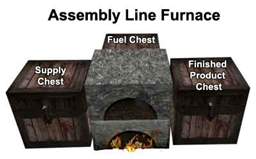
Assembly Line Furnace 是一款易于使用的插件,允许自动加载和卸载熔炉。你可以用它来处理大量材料,而无需一直盯着熔炉看。如果你查看上面的图片,这就是 Assembly Line Furnace 的设计布局。
该插件会自动装入原材料和燃料,然后将成品自动输出到成品箱中。Assembly Line Furnace 支持以下燃料类型:
- 煤炭
- 木炭
- 木材
- 树苗
- 木棍
- 栅栏
- 楼梯(木制)
- 活板门
- 工作台
- 书架
- 箱子
- 唱片机
- 音符盒
- 烈焰棒
- 熔岩桶
当使用熔岩桶作为燃料时,用空的熔岩桶会被从熔炉中排出并进入你的材料供应箱。
使用方法?
按照上述配置搭建一个 Assembly Line Furnace。将你的原材料放入左侧的箱子中。将燃料放入熔炉后面的箱子中,然后左击熔炉。只要你拥有相应的权限,你的 Assembly Line Furnace 就会激活,并且你会在聊天窗口收到一条验证此操作的消息。你可以使用双格箱子同时作为供应箱和成品箱。
Assembly Line Furnace 内置了一项功能,可以保持当前熔炉所在区块的加载状态,以便在没有玩家在线维持区块加载的情况下,熔炉仍能继续运行。要启用此功能,请先执行上述操作,待熔炉激活并开始运行后,输入命令:
- /alf keeploaded. 请谨慎使用此功能。
权限
以下是此插件的具体权限节点及其各自的功能列表。
- assemblylinefurnace.use = 允许用户使用 Assembly Line Furnace。
- assemblylinefurnace.keeploaded = 允许用户在通常没有玩家在线的情况下,依然保持区块加载。
Assembly Line Furnace
Version: 1.4
Overview
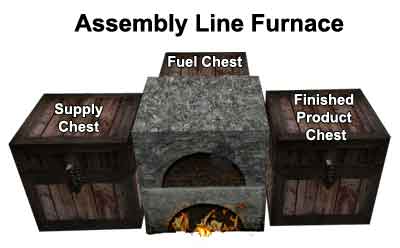
Assembly Line Furnace is an easy to use plugin that allows for automatic loading and unloading of furnaces. You can use this to process large batches of materials without having to hover over your furnace continually watching it. If you look at the picture above this is the designated design layout of the Assembly Line Furnace.
This plugin will automatically load a source material, fuel and then automatically kick out the finished product into the finished product chest. The Assembly Line Furnace can use the following fuel types:
- Coal
- Charcoal
- Wood
- Saplings
- Sticks
- Fence
- Wood Stairs
- Trap Doors
- Workbench
- Bookshelf
- Chest
- Jukebox
- Note Block
- Blaze Rods
- Lava Buckets
When using the fuel source Lava Buckets, the emptied lava bucket will be kicked out of the furnace into your materials supply chest.
How to Use?
Build an Assembly Line Furnace in the configuration shown above. Load your Source Materials into the chest on the left. Load your Fuel supplies into the chest behind your Furnace then Left-Click on your furnace. Providing you have the appropriate permissions your Assembly Line Furnace will activate and you will receive a message in your chat window verifying this action. You can use a double chest for both the Supply Chest and the Finished Materials Chest.
Assembly Line Furnace has a built in ability to keep the chunk that the furnace is currently located in loaded so that your furnace continues to operate if no player is around to keep the chunk loaded. To activate this feature, do the above, after your Furnace is activated and running type the command:
- /alf keeploaded. Use this feature with caution.
Permissions
Here's a list of specific permissions nodes for this plugin and what each does.
- assemblylinefurnace.use = allows a user to use the Assembly Line Furnace.
- assemblylinefurnace.keeploaded = allows user to keep the chunk loaded even when a player isn't around to do so normally.
评论 0
登录后参与评分
还没有评论,来抢沙发吧