ATM


请注意:本插件需要一个经济类插件(ECONOMY PLUGIN)才能显示银行余额等功能。本插件本身不会提供经济系统。
源代码 | 插件主页
功能特性
- 点击即可查看你的银行账户余额!
- 也可以查看你手持物品中的余额。
- 添加全局 ATM 告示牌——任何人点击该告示牌即可查看其银行余额。
- 支持多银行!
- 支持:iConomy (4, 5 & 6), BOSEconomy, Essentials Economy。
- 使用银行进行取款/存款操作!
- 对取款/存款操作收费!(可选/可配置)
- 向其他玩家转账。
- 将资金转入其他玩家的银行账户。
- 每次启动时自动检查新版本!(可选)
截图
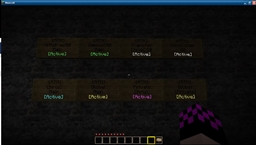
请参阅“图片”选项卡。
使用方法
在创建用于查看银行余额的告示牌时,必须遵循以下格式以便 ATM 识别:
[ATM]
Personal/Global
<bank_name>
<blank>
第一行:这必须是 “[ATM]”(不含引号)。不允许使用颜色代码或其他字符。
第二行:个人告示牌仅对放置者本人有效。当你放置一个个人 ATM 告示牌时,“Personal” 行会自动更改为你的名字,以表明它属于你。如果你拥有放置全局告示牌的权限,这将允许所有用户查看指定银行的余额。
第三行:这是你要查询余额的银行名称(区分大小写)。如果该银行不存在,告示牌仍会被放置,但不会被激活。
第四行:你可以在这行输入文本,但它会被更新为带有 [Active] 标记,以显示 ATM 告示牌已激活。
例如:
此告示牌将为放置它的玩家生成一个个人告示牌,用于访问其在 BigBank 账户中的余额。
此告示牌将为所有人生成一个全局告示牌,用于访问他们在 SmallerBank 账户中的余额。
在创建用于查看你手持物品中余额的告示牌时,请使用以下格式:
[ATM]
Private
<blank>
<blank>
这将更新第三行以包含你的名字,并更新第四行以包含 “[Active]”。
此告示牌将允许你(且仅允许你)查看你手持物品中的余额。
要创建一个全局私有告示牌(即允许任何人查看其手持物品余额的个人告示牌),请使用以下格式:
[ATM]
Global
[Private]
<blank>
注意:第三行必须用方括号括起来。如果你输入 “Private”(不含引号),它将尝试查找名为 Private 的银行。
要创建用于取款的告示牌,请使用以下格式:
[ATM]
Withdraw:<number>
<bank_name>
<blank>
将 <number> 替换为你希望从账户中提取的金额。
存款请遵循相同的格式,但将 Withdraw 替换为 Deposit。
注意:确保第二行中没有空格。
要创建转账告示牌,请使用以下格式:
[ATM]
Transfer
<playername>:<amount>
<blank>
将 <amount> 替换为你希望转账的金额。<playername> 是接收转账的玩家名称。
如果你想设置一个让别人向你转账的告示牌,只需在 <playername> 处填写你的名字即可。
要创建将资金转入玩家银行账户的告示牌,请使用以下格式:
[ATM]
BankTransfer
<playername>:<bank>
<amount>
如果设置正确,告示牌会更新,使得第二行变为 <playername>:<bank>,第三行变为 <amount>,第四行变为白色的 [Active] 标记。
使用告示牌时,只需右键点击即可。
配置
配置文件 properties.yml 将以默认值生成:
enableCharges: false
chargePercentage: true
depositCharge: 2.5
withdrawCharge: 5
checkVersion: true
- enableCharges - 设置为 false 时,玩家进行取款/存款操作将不被收费。设置为 true 时,将对玩家收费。
- chargePercentage - 设置为 true 时,将对用户的交易金额收取一定百分比的费用。设置为 false 时,将收取固定金额。例如,如果此项设置为 true,且 depositCharge 设置为 2.5,则用户将被收取交易金额的 2.5%。否则,将直接收取 2.5 单位的货币。
- depositCharge - 定义存款操作的费用金额。
- withdrawCharge - 定义取款操作的费用金额。
- checkVersion - 当为 true 时,ATM 将自动检查新版本并通知你有可用更新。当为 false 时,关闭此功能。
权限
如果您已安装 TheYeti 的 Permissions 插件,则可使用以下权限节点。否则,该插件将读取 ops.txt 文件,并允许任何人在签名上使用 Personal(个人)和 Private(私密)类型,以及允许 ops.txt 中的任何人使用 Global(全局)类型。
- 'atm.place.Personal' - 此权限允许用户/组放置 Personal 签名。
- 'atm.place.Global' - 此权限允许用户/组放置 Global 签名。
- 'atm.place.Private' - 此权限允许用户/组放置 Private 签名。
- 'atm.place.Withdraw' - 此权限允许用户/组放置 Withdraw 签名。
- 'atm.place.Deposit' - 此权限允许用户/组放置 Deposit 签名。
- 'atm.place.Transfer' - 此权限允许用户/组放置 Transfer 签名。
- 'atm.place.BankTransfer' - 此权限允许用户/组放置 Bank Transfer 签名。
ATM
Please note: this plugin requires an ECONOMY PLUGIN in order to display bank balances etc. This plugin will NOT provide you with an economy system
SOURCE | PLUGIN PORTAL
Features
- Check the balance of your bank at a click!
- Check your in-hand balance, too.
- Add global ATM signs - whoever clicks the sign gets their bank balance.
- Multi-bank support!
- Supports: iConomy (4, 5 & 6), BOSEconomy, Essentials Economy.
- Withdraw/deposit money using banks!
- Charge users to withdraw/deposit! (optional/configurable)
- Transfer money to other players.
- Transfer money into other player's bank accounts.
- Checks for new versions every time it starts up! (optional)
Screenshot
See Images tab.
How To Use
When creating a sign to check a bank, you must follow this format for ATM to recognize the sign:
[ATM]
Personal/Global
<bank_name>
<blank>
Line 1: This must ALWAYS be "[ATM]" (without quotes). No colours or other characters allowed.
Line 2: Personal signs will only work for you. When you place a Personal ATM sign, the Personal line will change to your name, to show that it belongs to you. If you have the permissions to place a Global sign, this will allow all users to view their balances for a defined bank.
Line 3: This is the name of the bank you want to get the balance readouts from (case sensitive). If the bank does not exist, the sign will still be placed, but it will not be activated.
Line 4: You can put text on this line, but it will get updated with an [Active] flag to show that the ATM sign is active.
For example:
This sign will produce a personal sign for the player who placed it, to access the balance of their account with BigBank.
This sign will produce a Global sign for anyone to use, to access their balance of their account with SmallerBank.
When creating a sign to view your in-hand balance, use this format:
[ATM]
Private
<blank>
<blank>
This will update the third line to include your name, and the fourth line to include "[Active]".
This sign will let you (and only you) see your in-hand balance.
To create a GLOBAL PRIVATE sign (i.e. a Private sign that lets anyone check their in-hand balance), use this format:
[ATM]
Global
[Private]
<blank>
Note: the third line MUST have square brackets around it. If you input "Private" (without quotes) it will check for a bank called Private.
To create a sign for withdrawals, use this format:
[ATM]
Withdraw:<number>
<bank_name>
<blank>
Replace <number> with how much you want to withdraw from the account.
Follow the same format for deposits, but replace Withdraw with Deposit.
Note: Make sure there are no spaces in the second line.
To create a transfer sign, use this format:
[ATM]
Transfer
<playername>:<amount>
<blank>
Replace <amount> with how much you want to transfer. <playername> is the name of the player to transfer to.
If you want to set up a sign for people to transfer to you, simply put your name where it says <playername>
To create a sign to transfer money into a player's bank account, use this format:
[ATM]
BankTransfer
<playername>:<bank>
<amount>
If done correctly, the sign will update so that the second line is now <playername>:<bank>, the third line is <amount>, and the fourth line is a white [Active] tag.
To use a sign, simply right click it.
Configuration
The configuration file properties.yml will be generated with the default values:
enableCharges: false
chargePercentage: true
depositCharge: 2.5
withdrawCharge: 5
checkVersion: true
- enableCharges - when set to false, players will not be charged for withdrawals/deposits. When set to true, players will be charged.
- chargePercentage - when set to true, this will charge users a percentage of their transaction. When set to false, this will charge users a defined amount. For example, if this is set to true, and depositCharge is set to 2.5, users will be charged 2.5% of their transaction. Otherwise, it would charge them 2.5 of the currency.
- depositCharge - defines how much is charged for a deposit.
- withdrawCharge - defines how much is charged for a withdrawal.
- checkVersion - When true, ATM will automatically check for new versions and inform you of an update. When false, this is turned off.
Permissions
If you have Permissions by TheYeti installed, you can use these permission nodes. Otherwise, the plugin will read from ops.txt, and allow Personal and Private signs for anyone, and Global signs for anyone in ops.txt
- 'atm.place.Personal' - this permission allows the user/group to place Personal signs.
- 'atm.place.Global' - this permission allows the user/group to place Global signs.
- 'atm.place.Private' - this permission allows the user/group to place Private signs.
- 'atm.place.Withdraw' - this permission allows the user/group to place Withdraw signs.
- 'atm.place.Deposit' - this permission allows the user/group to place Deposit signs.
- 'atm.place.Transfer' - this permission allows the user/group to place Transfer signs.
- 'atm.place.BankTransfer' - this permission allows the user/group to place Bank Transfer signs.

 插件

 插件
 插件
 插件
 插件

 插件

评论 0
登录后参与评分
还没有评论,来抢沙发吧