? AuricNetwork – 零代理网络系统
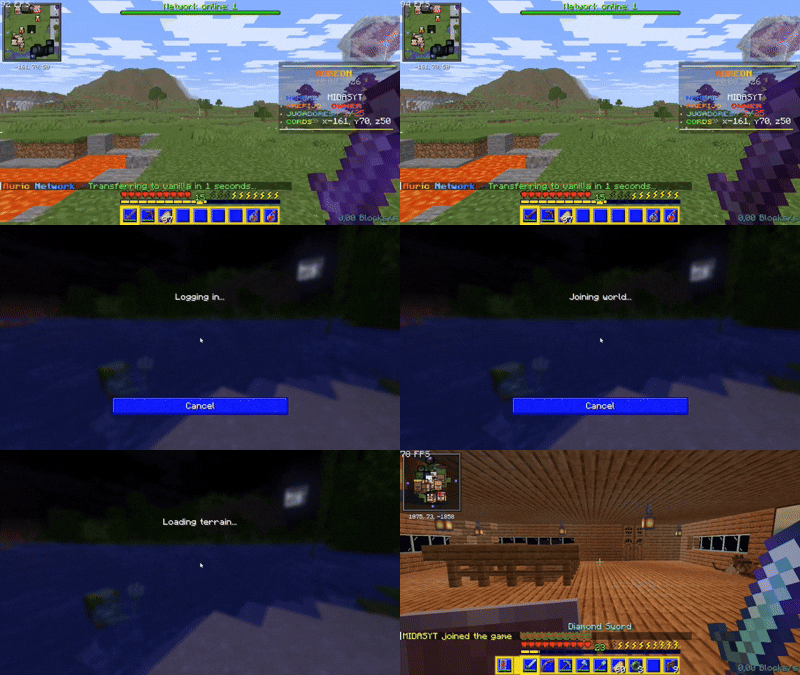
免费的网络?无需代理?无需多个世界占用服务器内存?是的,借助 AuricNetwork 这一切皆有可能。
AuricNetwork 让你能够构建一个 无需任何代理(BungeeCord、Velocity)的 Minecraft 服务器网络。它使用 Paper 原生的 Player#transfer 功能(1.21+)。
? 依赖项
? 安装
- 将
AuricNetwork.jar 放入你网络中 每台服务器 的 plugins 文件夹中。
- 在每台目标服务器上,于
server.properties 中设置 accepts-transfers=true。
- 启动或重启所有服务器。
- 根据
plugins/AuricNetwork/ 中生成的文件配置你的网络和服务器连接。
- 确保参与网络的每台服务器上的 AuricNetwork 配置保持一致。
? 更新
- 对于小版本更新(例如,
1.1.0 → 1.1.1),只需在所有服务器上替换现有的 .jar 文件为新版本并重启即可。
- 对于大版本更新(例如,
1.1.0 → 1.2.0),请先备份每台服务器上当前的配置和重要的网络数据,替换 .jar 文件,删除旧的 plugins/AuricNetwork/ 文件夹,然后重启服务器以生成新文件。
- 更新完成后,恢复或重新应用之前的配置,并在将网络重新上线前查看新的配置选项。
核心功能
- 直接服务器传输 – 无单点故障,延迟更低。
- 完整的战利品与状态传输 – 物品栏、末影箱、经验值、生命值、药水效果、游戏模式以及 Vault 经济余额均可跟随玩家跨服务器转移,通过签名 Cookie 携带,无需数据库支持——若传输失败,还会自动在本地进行备份。
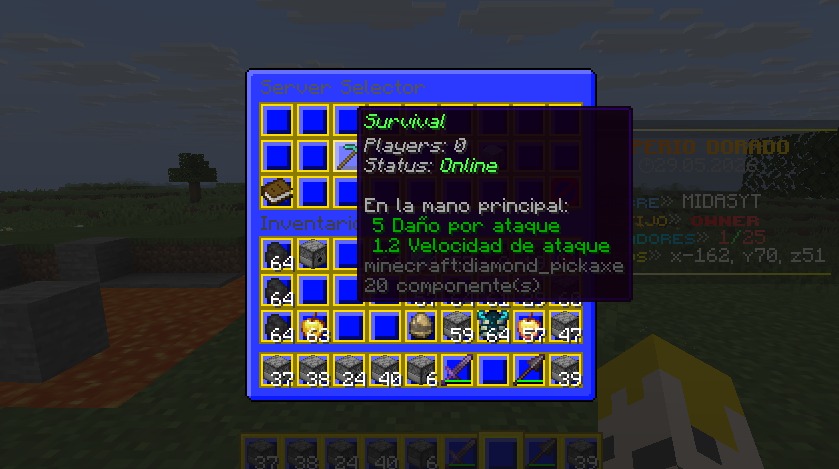
- 图形化服务器选择器 – 完全可配置的箱子 GUI,支持占位符
%online_<server>% 和 %status_<server>%。
- 基于排位的欢迎系统 – 加入时显示标题、副标题、聊天消息、动作栏、音效、烟花以及一道不造成伤害的闪电,均绑定到数字排位权限。
- 可配置的热键栏 – 玩家加入时给予自定义物品,支持点击动作(传输、执行命令、打开菜单、播放音效、发送消息……),并防止玩家丢弃、移动、拾取或交换这些物品。
- 命名公告 – 通过 ID 按需广播特定公告,支持按 ID 设置权限和 Tab 补全。
- 维护模式 – 将任意服务器移出轮换;传输尝试会被拒绝并显示消息,而不是静默失败。
- 队伍系统 – 邀请、接受、踢出和解散队伍;当队长传输到其他服务器时,整个队伍会自动跟随。
- 救援服务器(备用) – 在优雅关闭时,所有玩家会自动传输到配置的救援服务器,支持可选的备用列表。控制台会显示有多少玩家被转移。
- 多大厅平衡 –
/lobby 会从列表中选择一个服务器,可以是随机选择,也可以始终选择玩家最少的服务器。
- 加入与重生出生点 – 为加入和重生事件设置传送位置。
- 实时服务器状态 – 从
api.mcsrvstat.us 获取实时的在线玩家数量以及在线/离线/已满状态。
- 网络占位符 – 无论是否安装 PlaceholderAPI 均可工作,暴露在线人数、服务器状态、队列位置和队伍信息作为
%auricnetwork_*% / %an_*%。
命令
/auricnetwork reload – 重载配置。(auricnetwork.command.reload)/auricnetwork status – 列出每台服务器的实时状态。(auricnetwork.command.status)/auricnetwork announce <id> – 广播命名公告。(auricnetwork.command.announce or auricnetwork.command.announce.<id>)/auricnetwork menu – 打开服务器选择器 GUI。(auricnetwork.command.menu)/auricnetwork setjoinspawn – 在你所在位置设置加入出生点。(auricnetwork.command.setjoinspawn)/auricnetwork setrespawnspawn – 设置重生出生点。(auricnetwork.command.setrespawnspawn)/server <name> [player] – 传输到另一台服务器,或将其他玩家传输过去。(auricnetwork.command.server / auricnetwork.command.server-others)/spawn [join|respawn] – 传送至出生点。(auricnetwork.command.spawn)/lobby 或 /hub – 前往大厅(支持随机或最少玩家平衡)。(auricnetwork.command.lobby)/party <invite|accept|deny|leave|kick|list|disband> – 管理你的队伍。(auricnetwork.command.party)
上述每个子命令也可以直接在 /auricnetwork 下使用(例如 /auricnetwork server survival)。
权限
auricnetwork.admin – 所有管理权限的父节点:重载、公告、状态、设置出生点、对其他玩家操作。auricnetwork.command.server / auricnetwork.command.server-others – 传输自己,或传输其他玩家。auricnetwork.command.menu – 打开服务器选择器 GUI。auricnetwork.command.spawn – auricnetwork.command.spawn.join 和 auricnetwork.command.spawn.respawn 的父节点。auricnetwork.command.lobby – 使用 /lobby//hub。auricnetwork.command.party – invite、accept、deny、leave、kick、list 和 disband 的父节点,每项均有各自的独立权限。auricnetwork.command.announce – 广播任意公告,或使用 auricnetwork.command.announce.<id> 针对单个公告。auricnetwork.welcome.<number> – 解锁配置中具有该确切数字键的欢迎排位。auricnetwork.queue.<number> – 队列优先级;任何数字均可,数值越高优先级越高。
每个命令权限都被尽可能细粒度地拆分,因此你可以移除对某一特定功能的访问权限而不影响其他功能。
? AuricNetwork 现已原生处理物品栏、统计数据和经济系统,无需为此使用数据库。但对于超出此范围的内容,如玩家排位,连接到每台服务器的数据库仍然适用。
? 由于未使用代理,插件必须安装在所有服务器上;它们不会在服务器之间同步。
? 我的社交媒体(西班牙语内容 / Contenido en Español)
? Auric 测试计划
抢先体验即将发布的 Auric 插件,并在发布前帮助测试新功能。
如果您对测试插件感兴趣,请加入。
- 无需经验,您可以选择性地测试您想测试的内容,且无需任何回报。
?
? AuricNetwork – Zero-Proxy Network System
A free network? No proxy? No multiple worlds overloading the server's RAM? Yes, it's possible with AuricNetwork.
AuricNetwork lets you build a Minecraft server network without any proxy (BungeeCord, Velocity). It uses Paper's native Player#transfer (1.21+).
? Dependencies
- PlaceholderAPI (Optional)
? Installation
- Place
AuricNetwork.jar into the plugins folder of every server in your network.
- On every target server, set
accepts-transfers=true in server.properties.
- Start or restart all servers.
- Configure your network and server connections from the files generated in
plugins/AuricNetwork/.
- Make sure AuricNetwork is configured consistently across all servers that participate in the network.
? Updating
- For minor updates (for example,
1.1.0 → 1.1.1), replace the existing .jar file with the new version on every server and restart them.
- For major updates (for example,
1.1.0 → 1.2.0), back up your current configuration and important network data on every server, replace the .jar files, delete the old plugins/AuricNetwork/ folders, and restart the servers so the new files can be generated.
- After the update, restore or reapply your previous configuration and review the new configuration options before bringing the network back online.
Core Features
- Direct server transfers – No single point of failure, lower latency.
- Full loot & stats transfer – Inventory, ender chest, XP, health, potion effects, gamemode and even Vault economy balance can follow the player across servers, carried in signed cookies with no database needed — and automatically backed up locally if a transfer ever fails.
- Graphical server selector – Fully configurable chest GUI with placeholders
%online_<server>% and %status_<server>%.
- Rank-based welcome system – Title, subtitle, chat message, action bar, sound, fireworks and a damage-free lightning strike on join, all tied to numeric rank permissions.
- Configurable hotbar – Give players custom items on join with click actions (transfer, command, open menu, sound, message...) and protection against dropping, moving, picking up or swapping them.
- Named announcements – Broadcast a specific announcement on demand by its id, with per-id permissions and tab-completion.
- Maintenance mode – Take any server out of rotation; transfer attempts are rejected with a message instead of failing silently.
- Party system – Invite, accept, kick and disband; when the leader transfers servers, the whole party follows automatically.
- Rescue server (fallback) – On graceful shutdown, all players are auto-transferred to a configured rescue server, with an optional fallback list. Console shows how many were moved.
- Multi-lobby balancing –
/lobby picks a server from a list, either at random or always the one with the fewest players.
- Join & respawn spawns – Set teleport locations for join and respawn events.
- Live server status – Pulls real-time online players and online/offline/full status from
api.mcsrvstat.us.
- Network placeholders – Works with or without PlaceholderAPI, exposing online counts, server status, queue position and party info as
%auricnetwork_*% / %an_*%.
Commands
/auricnetwork reload – Reload config. (auricnetwork.command.reload)/auricnetwork status – List every server's live status. (auricnetwork.command.status)/auricnetwork announce <id> – Broadcast a named announcement. (auricnetwork.command.announce or auricnetwork.command.announce.<id>)/auricnetwork menu – Open server selector GUI. (auricnetwork.command.menu)/auricnetwork setjoinspawn – Set join spawn at your location. (auricnetwork.command.setjoinspawn)/auricnetwork setrespawnspawn – Set respawn spawn. (auricnetwork.command.setrespawnspawn)/server <name> [player] – Transfer to another server, or send another player. (auricnetwork.command.server / auricnetwork.command.server-others)/spawn [join|respawn] – Teleport to spawn. (auricnetwork.command.spawn)/lobby or /hub – Go to lobby (supports random or least-players balancing). (auricnetwork.command.lobby)/party <invite|accept|deny|leave|kick|list|disband> – Manage your party. (auricnetwork.command.party)
Every subcommand above also works directly under /auricnetwork (e.g. /auricnetwork server survival).
Permissions
auricnetwork.admin – Parent node for every administrative permission: reload, announce, status, set spawns, server-others.auricnetwork.command.server / auricnetwork.command.server-others – Transfer yourself, or transfer other players.auricnetwork.command.menu – Open the server selector GUI.auricnetwork.command.spawn – Parent node for auricnetwork.command.spawn.join and auricnetwork.command.spawn.respawn.auricnetwork.command.lobby – Use /lobby//hub.auricnetwork.command.party – Parent node for invite, accept, deny, leave, kick, list and disband, each with its own individual permission.auricnetwork.command.announce – Broadcast any announcement, or auricnetwork.command.announce.<id> for a single one.auricnetwork.welcome.<number> – Unlocks the welcome rank with that exact numeric key in the config.auricnetwork.queue.<number> – Queue priority; any number works, the highest one wins.
Every command permission is split as granularly as possible, so you can remove access to one specific feature without affecting the rest.
? AuricNetwork now handles inventory, stats and economy natively, no database needed for those. For anything outside that scope, like player ranks, a database connected to each server still works well.
? Since a proxy is not being used, the plugins must be installed on all servers; they will not be transferred between them.
? My Socials (Spanish Content / Contenido en Español)
? Auric Tester Program
Get early access to upcoming Auric plugins and help test new features before their release.
Join if you're interested in testing plugins.
- No experience required, you can test only what you want and there's nothing to give in return.
?


 插件

 插件
 插件
 插件
 插件
 插件
评论 0
登录后参与评分
还没有评论,来抢沙发吧