Aurora Enchantments
重大更新!!


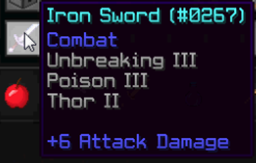
此插件实现了完全可自定义的自定义附魔
本插件支持 Spigot
现在插件支持 1.8+ 版本!!

将插件添加到你的服务器:
- 下载插件
- 下载 LAE API
- 非必需 - 下载 TitleSender 插件
- 将这些文件放入你的 plugins 文件夹中
- 启动服务器,如果服务器已在运行则重新加载。
配置
你可以设置附魔是否在生物上启用,以及是否在玩家身上启用。(默认两者均为 true)
你可以设置使用自定义附魔所需的权限。(默认为 ae.use.enchants)
使用此插件添加自定义附魔非常简单。
你可以添加两种自定义附魔:
- 效果附魔(如中毒、凋灵、力量等……)
- 闪电附魔(召唤闪电)
- 火球附魔(发射火球)(来自 AuroraEnchantments v1.1.0+)
- 狂怒附魔(提升单次攻击伤害)(来自 AuroraEnchantments v2.0+)
你可以按需自定义你的附魔:
- 可以设置附魔生效的百分比(适用于效果附魔、闪电附魔和狂怒附魔)
- 可以设置附魔的效果类型(仅限效果附魔)
- 可以设置附魔的效果等级(仅限效果附魔)
- 可以设置附魔的效果持续时间(仅限效果附魔)
- 可以设置附魔的爆炸威力(仅限火球附魔)
- 可以在附魔生效时设置标题和副标题(所有类型的附魔 - 需安装 TitleSender 插件)
打开 AuroraEnchantments 文件夹中的 config.yml 文件,修改它或添加新的配置项。
当 config.yml 文件被创建时,它已经包含了一些自定义附魔,你可以借此了解如何添加其他附魔。
(您可以删除默认的自定义附魔)
世界
您可以通过 worlds.yml 文件甚至在游戏中设置哪些世界中不应用自定义附魔,即使百分比为 100%。
这就是为什么闪电附魔即使在安全区或已声明的区域中也会引发闪电并造成伤害。这不是插件本身的 bug,而是实现安全区的插件和实现区域的插件之间的冲突导致的 bug。
通过告示牌附魔 & Vault 依赖
在配置文件中,您可以启用 "enable-enchant-sign" 选项。(将 false 设置为 true)。但是,要创建
可购买的附魔,您的服务器上必须安装用于经济管理的
Vault 插件。
命令与权限
| 命令 |
描述 |
权限 |
| /ae list |
显示所有可用的自定义附魔列表。 |
ae.list |
| /ae enchant <name> |
将手中物品附魔指定的附魔名称。 |
ae.enchant |
| /ae world add <name> |
将世界 <name> 添加到禁用的世界列表中。 |
ae.world.add |
| /ae world rem <name> |
从禁用的世界列表中移除世界 <name>。 |
ae.world.rem |
| /ae reload |
重新加载配置文件和世界文件。 |
ae.reload |
| 使用附魔 |
如果玩家拥有该权限,则可以使用自定义附魔。否则无法使用。 |
ae.use.enchants (可在配置文件中更改此权限) |
| 放置告示牌 |
拥有此权限的玩家可以在告示牌上右键点击手中的物品进行附魔。 |
ae.sign.place |
| 使用告示牌 |
拥有此权限的玩家可以通过预先创建的告示牌对其手中的物品进行附魔。 |
ae.sign.use |
Aurora Enchantments
BIG UPDATE!!
This plugin implements custom Enchantments FULLY CUSTOMIZABLE
IMPORTANT: this plugin requires my LAE API 1.0.1+ to work
This Plugin supports Spigot
Now Plugin supports 1.8+!!
Adding the Plugin to your server:
- Download the Plugin
- Download the LAE API
- NOT REQUIRED - Download the TitleSender plugin
- Put those files in your plugins folder
- Start the server or reload it if it was already started.
Configuration
You can set if the enchantments are enabled on mobs and if they're enabled on players. (default true both)
You can set the permission to use the custom enchantments. (default ae.use.enchants)
Adding custom enchantments is very easy with this Plugin.
You can add two types of custom enchantment:
- Effect Enchantment (like Poison, Wither, Strength etc...)
- Lightning Enchantment (strikes a lightning)
- Fireball Enchantment (throws a fireball) (from AuroraEnchantments v1.1.0+)
- Rage Enchantments (increases your damage for one hit) (from AuroraEnchantments v2.0+)
You can customize your enchantments as you want:
- You can set the percentage of the enchant to apply (Effect and Lightning and Rage Enchantment)
- You can set the type of effect of the enchant (Effect Enchantment only)
- You can set the level of the effect of the enchant) (Effect Enchantment only)
- You can set the duration of the effect of the enchant (Effect Enchantment only)
- You can set the explosion power of the enchant (Fireball Enchantment only)
- You can set titles and subtitles when enchant applies (Every type of Enchantment - Works only with TitleSender plugin installed)
Just open the config.yml file in AuroraEnchantments folder and modify it or add new ones.
When the config.yml file is created it has already few custom enchantments so you see how to add other ones.
(You can delete the default custom enchantments)
Worlds
You can set, from the file worlds.yml or even in-game, the worlds where the custom enchantments doesn't apply even if the percentage is 100.
This is why, Lightning Enchantment, strikes a lightning and does damage even if it is Safe-Zone or Region claimed. This isn't a bug of the Plugin but a bug of the Plugin that implements the Safe-Zone and the other that implements Regions.
Enchanting by Signs & Vault Dependancy
On the config, you can enable the "enable-enchant-sign" option. (Setting false to true). However to create
buyable enchantments you must have in your server the
Vault plugin for economy management.
Commands & Permissions
| COMMAND |
DESCRIPTION |
PERMISSION |
| /ae list |
Shows a list of all available custom enchantments. |
ae.list |
| /ae enchant <name> |
Enchants the item in your hand with the specified enchant name. |
ae.enchant |
| /ae world add <name> |
Adds to the disabled worlds the world <name> |
ae.world.add |
| /ae world rem <name> |
Removes from the disabled worlds the world <name> |
ae.world.rem |
| /ae reload |
Reloads the config file and the worlds file. |
ae.reload |
| Using enchantments |
If the player has the permission he can use custom enchantments. If not he can't. |
ae.use.enchants (can change this perm from config) |
| Sign place |
The player with this permission can place sign for enchanting the item in your hand with right clicking it. |
ae.sign.place |
| Sign use |
The player with this permission can enchant the item in his hand through a precedently created sign. |
ae.sign.use |

 插件

 插件
 插件
 插件
 插件

 插件
评论 0
登录后参与评分
还没有评论,来抢沙发吧