authmebia
AuthMe Reloaded 的附加组件,将 AuthMe Reloaded 基于对话框的登录和注册提示替换为可自定义的对话框。
GitHub
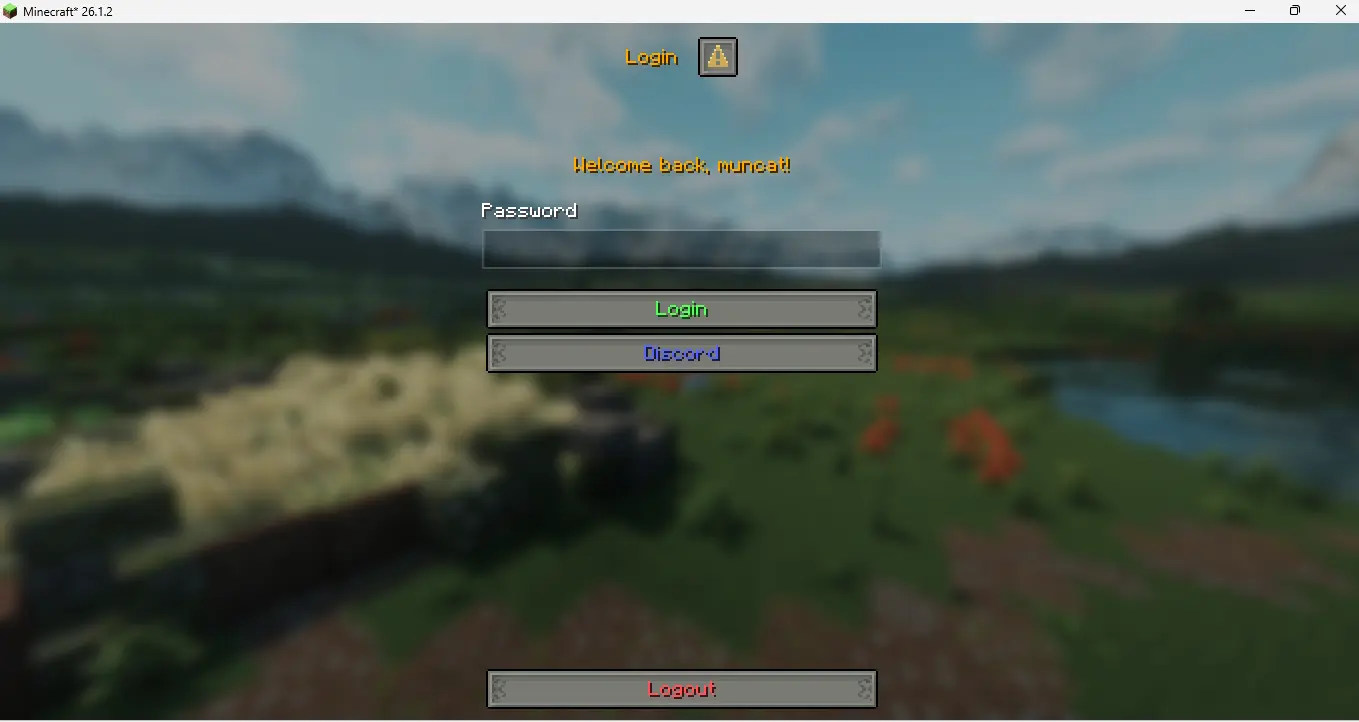
登录
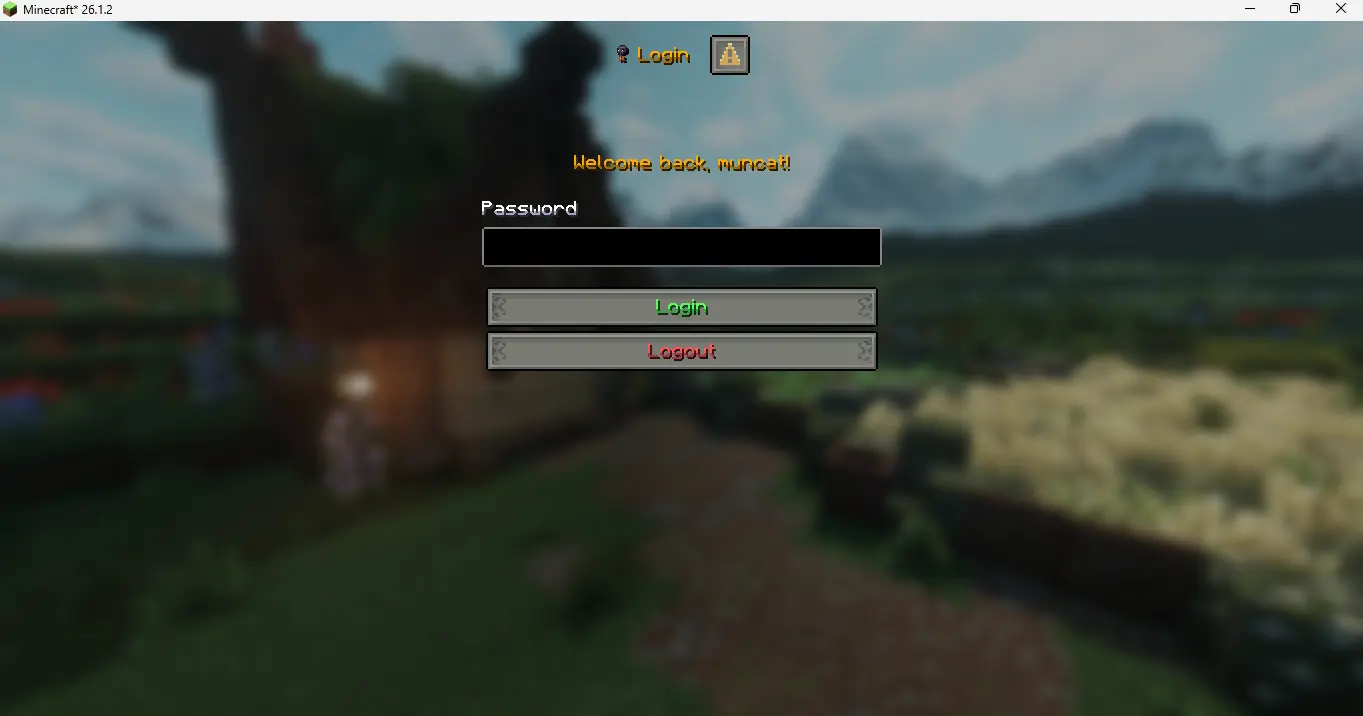
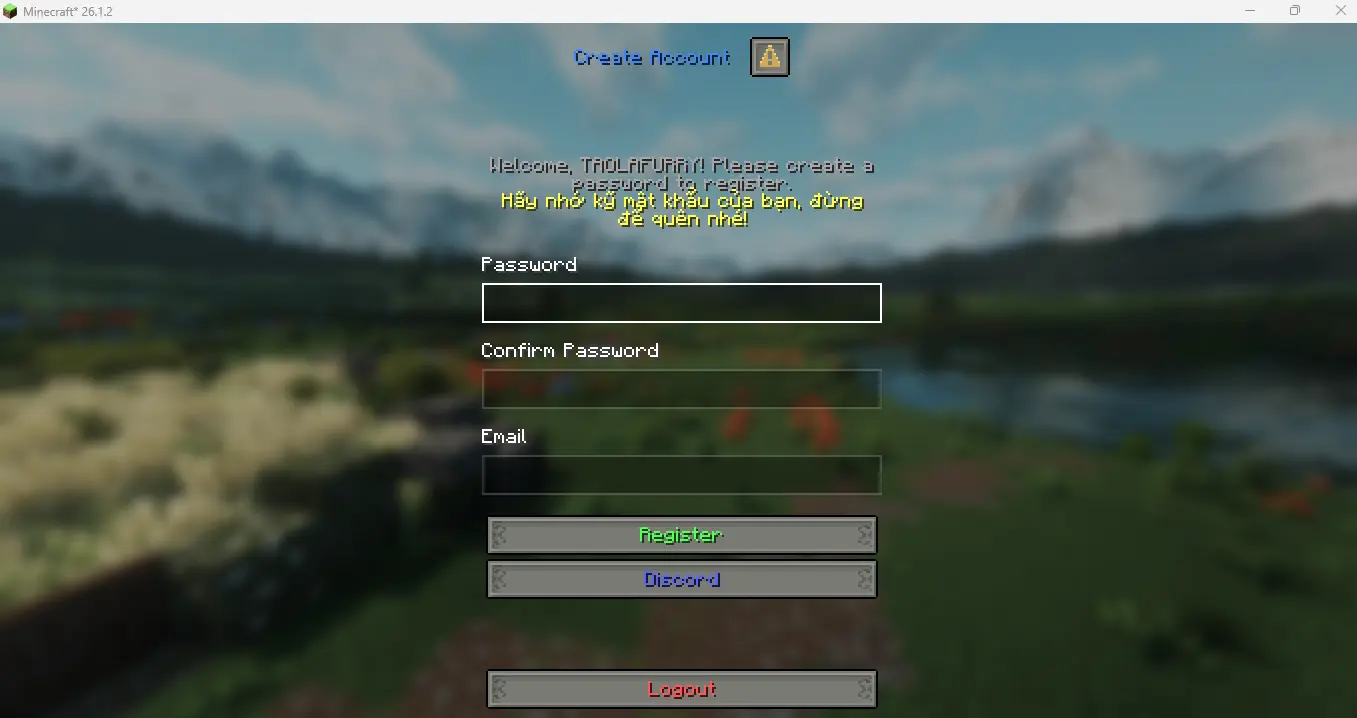
注册
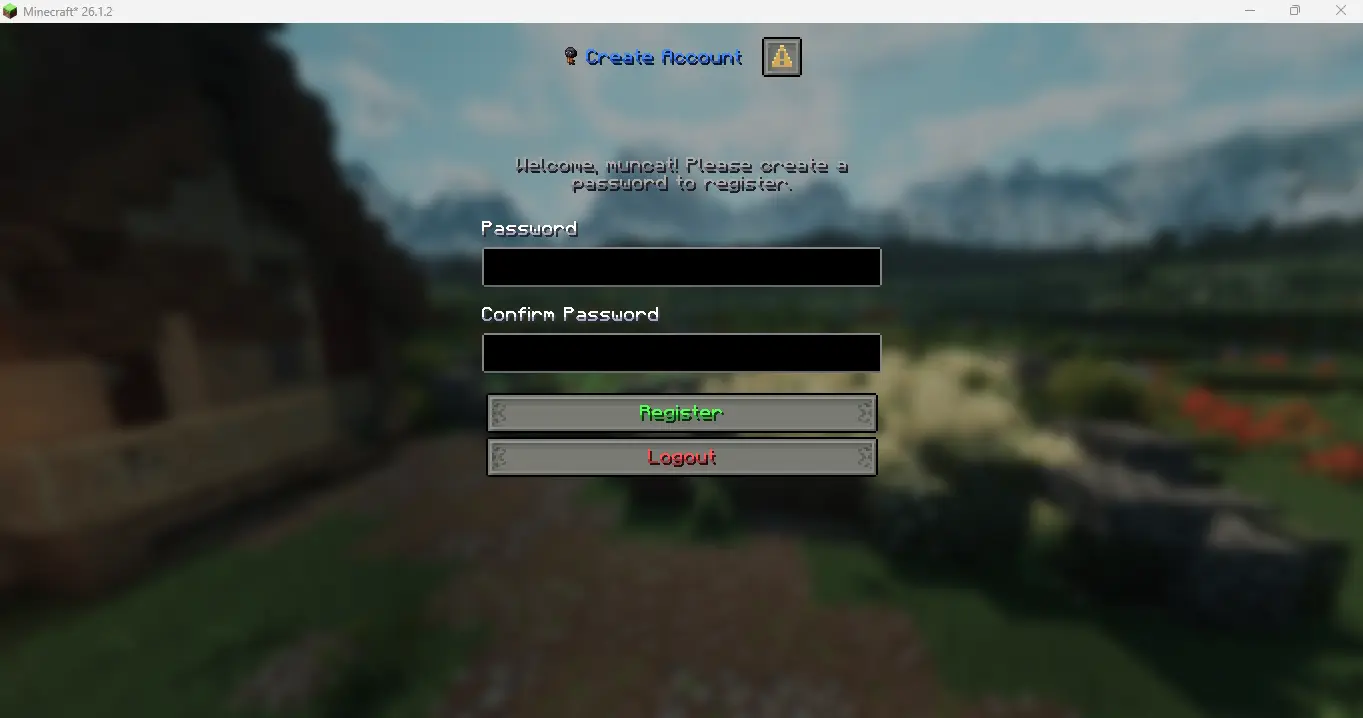
规则
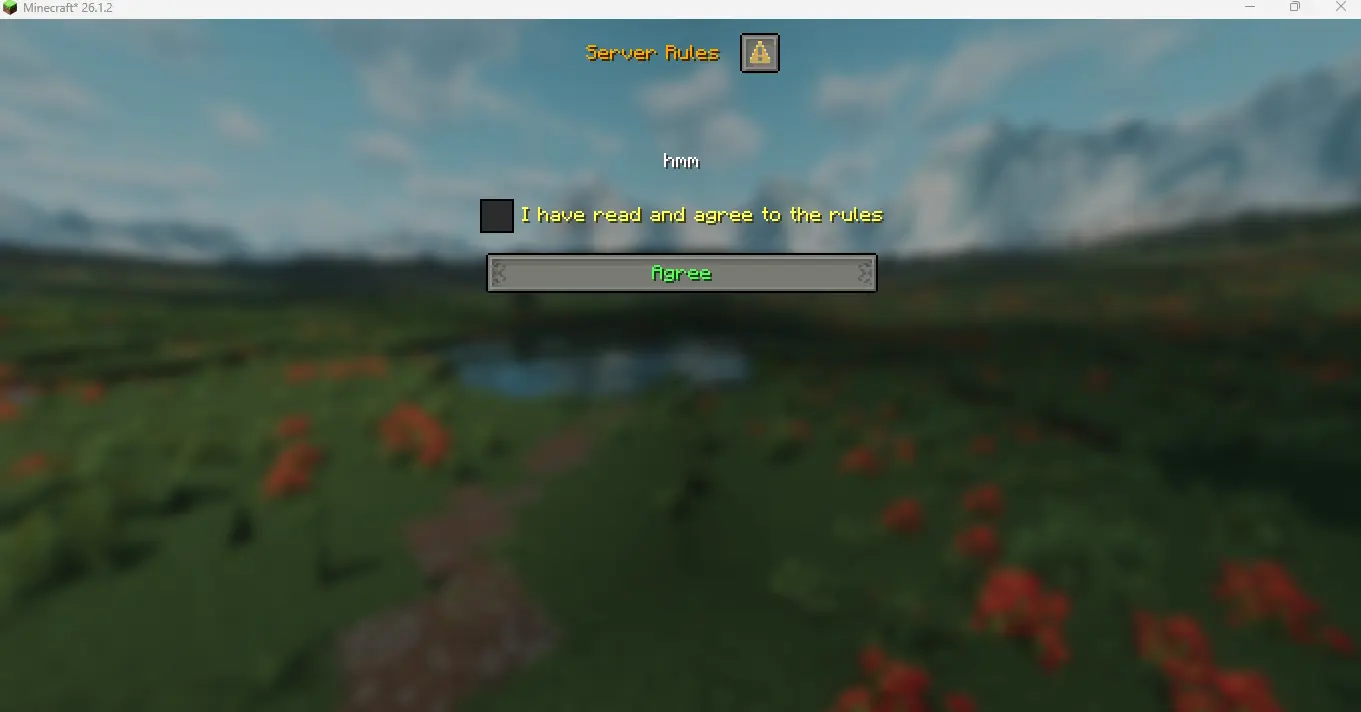
自定义按钮链接
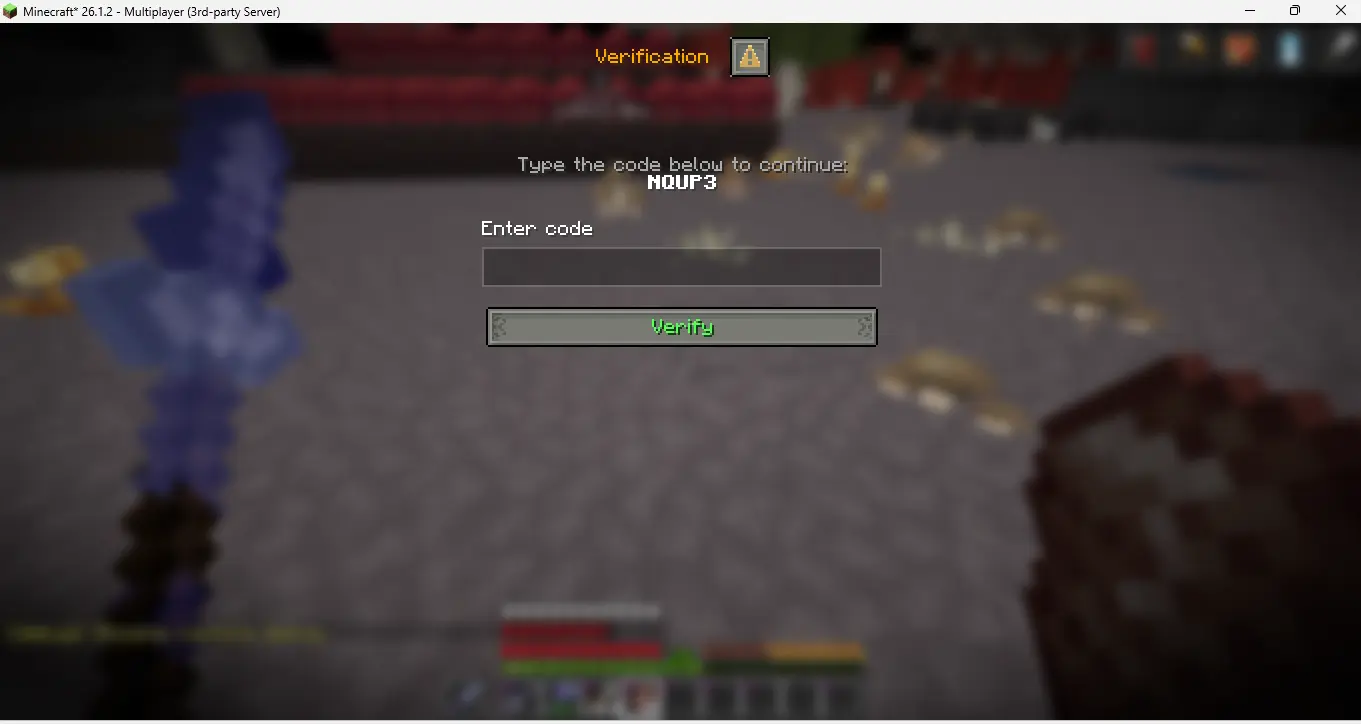
验证码
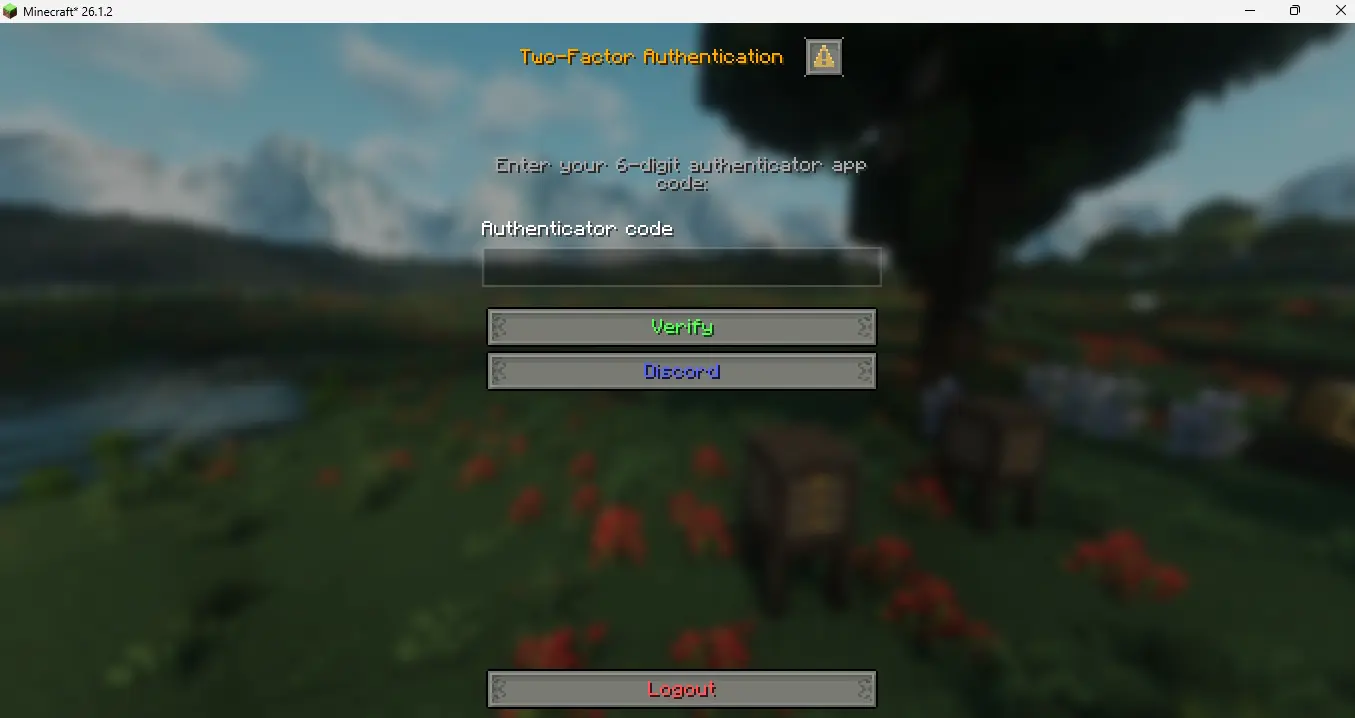
双重验证 (2FA)
添加邮箱
邮箱验证
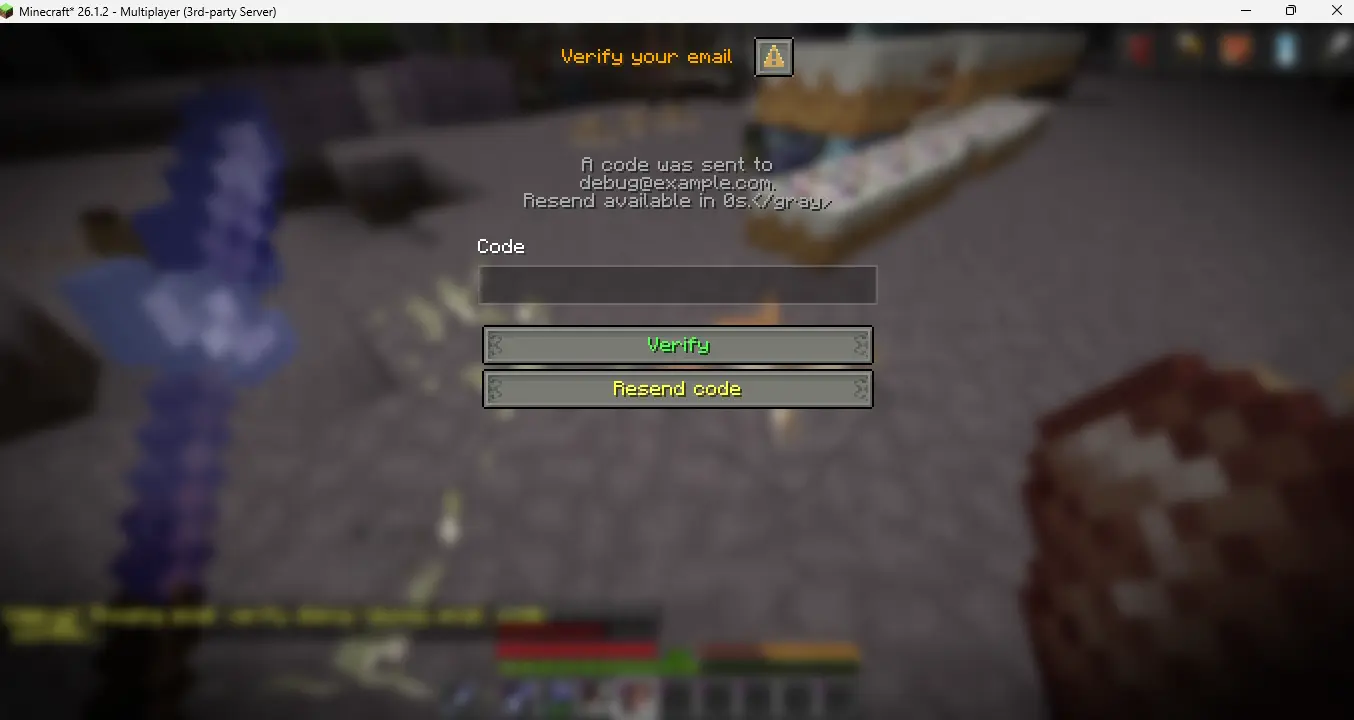
找回密码
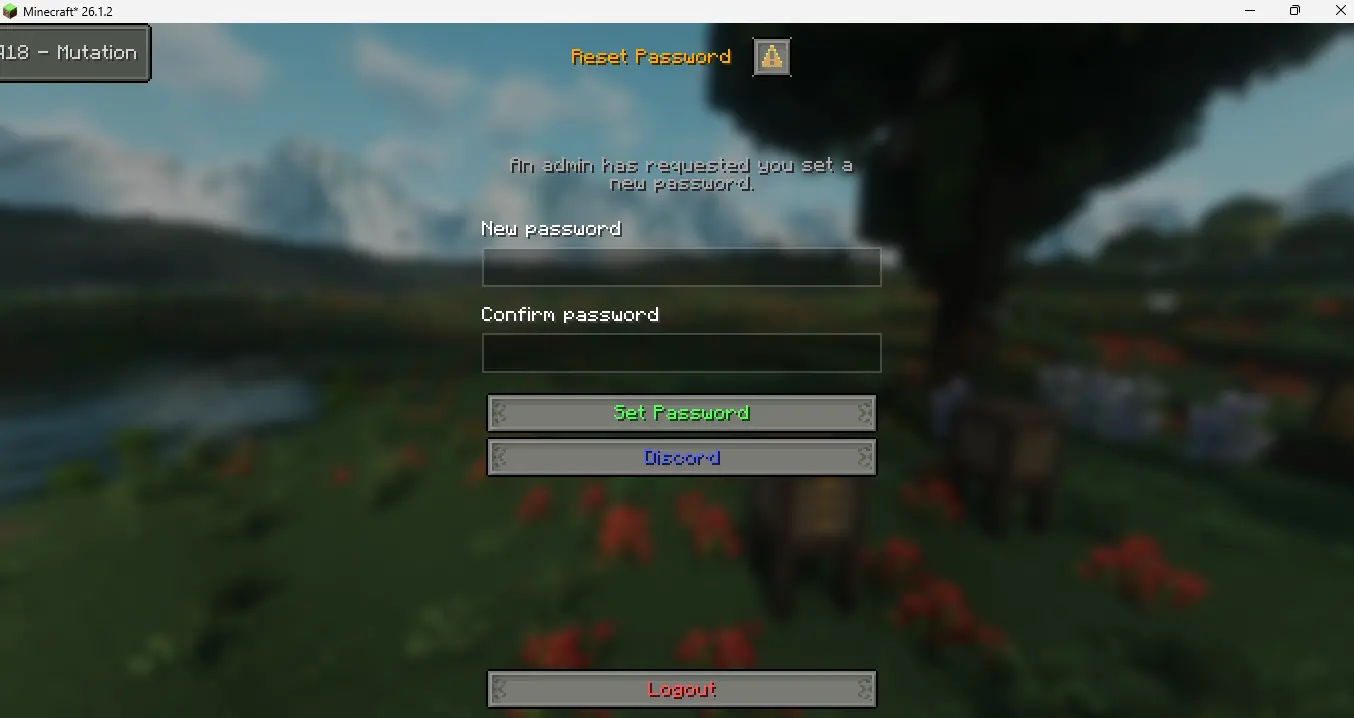
忘记密码但邮箱未找到对话框
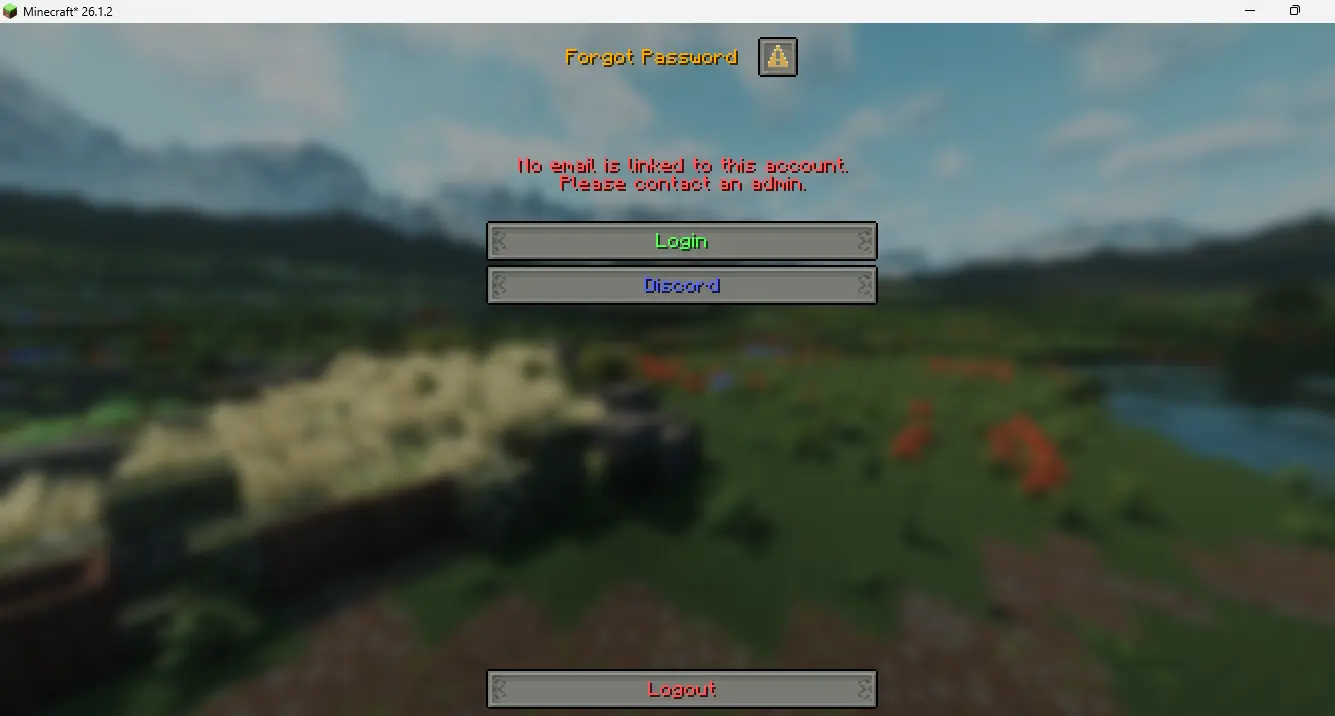
设置对话框

配置对话框

| 需求 |
版本 |
原因 |
| Minecraft 客户端 |
1.21.6+ |
客户端能够渲染对话框 |
| Paper |
✔ |
|
| Folia |
✔ |
|
| Java |
21-25 |
|
| AuthMe Reloaded |
6.0.1+ |
才能加载 authmebia 的全部功能 |
| ViaVersion |
可选 |
检测旧版客户端,回退到命令式登录/注册 |
可选,仅特定功能需要:
- Floodgate/geyser —
auto.bedrock_autologin 功能和基岩版对话框 (dialog.bedrock) 所需
- ItemsAdder / NexoMC / Oraxen — 仅在启用了相应的
integrations.* 条目时需要
- PlaceholderAPI — 仅当需要在 config.yml/lang 文本中使用
%placeholder% 扩展时;否则 {player} 替换和 MiniMessage 格式仍能正常工作
功能
对话框模式
- 预生成对话框模式:登录或注册窗口会阻止连接阶段,玩家出生时即已认证
- 后生成对话框模式:窗口在玩家加入世界后出现
- 三种身份验证输入模式:密码文本框、数字 PIN 码网格或逐位滑块
- 旧版客户端小键盘/滑块回退:对于协议版本无法渲染对话框(1.21.6 之前)的客户端,当
auth_mode.mode 为 pin 或 slider 时,将使用库存 GUI 小键盘/滑块进行回退,因为否则无法通过 AuthMe 的纯聊天命令输入代码。仅在后生成模式下生效;使用与正常 PIN 码/滑块对话框完全相同的错误代码/尝试限制/双重验证逻辑
- 按钮布局切换 (
dialog.button_layout):在注册和登录对话框中,将主要操作按钮垂直排列(堆叠)或水平排列(并排)
身份验证
- 高级账户绕过:如果玩家的 UUID 与 AuthMe 中存储的高级账户匹配,系统会自动检测并跳过 authmebia 的所有对话框。
- 高级账户自动登录(
auto.premium_autologin,默认关闭)+ 高级账户密码设置(premium.enabled,默认开启):此功能比上述的高级账户绕过更进一步。Bia 不会执行自己的高级账户认证,也不会独立通过 Mojang 验证账户。相反,它使用 AuthMe Reload 6.0.0 版本提供的高级账户认证 API。Bia 通过检测 UUID v4 来确定何时使用该 API,然后自动处理账户设置流程:如果玩家尚未注册,它会调用 forceRegister 并生成随机密码,随后调用 forceLogin。之后,Bia 使用 AuthMe Reload 的 API 设置账户密码并将其标记为高级账户。在此过程中不会显示任何登录或注册对话框。完成后,会显示一次强制性的密码设置对话框,要求玩家设置自己的 AuthMe 密码——仅针对首次注册(!registered);返回的玩家在后续登录时不再看到此提示。将 premium.enabled: false 可完全禁用此提示并保留内部占位符。完成后,所有后续的高级账户认证均由 AuthMe Reload 自行处理,Bia 不再显示任何进一步的登录对话框。可通过 /bia settings(自动登录 → 高级账户密码设置)和 /bia config(premium 部分)进行管理。
- 基岩版自动登录(
auto.bedrock_autologin,默认关闭):与上述自动登录类似,但适用于通过 Geyser/Floodgate 连接的基岩版玩家。auto.bedrock_mode 控制信任程度:link(默认,安全)仅在 Floodgate 报告该玩家账户已链接到已验证的 Java 高级账户时生效;geyser(需手动启用,不安全,除非启用了 Geyser 自身的在线认证类型。但如果你在 Geyser 中将 auth-type 配置为 offline,则是不安全的)信任任何基岩版/Geyser 连接,不进行任何账户链接检查。
- 基岩版对话框支持:基岩版玩家看到的注册/登录/找回密码/规则/验证码/自定义屏幕对话框与 Java 版玩家相同,复用所有相同的逻辑。
dialog.bedrock 允许你为基岩版客户端单独覆盖按钮宽度、输入框宽度和认证输入模式(密码/PIN/滑块),因为某些基岩版设备的可用对话框区域较小。
- 会话自动登录(
auto.session_autologin,默认开启):对于返回玩家,如果 AuthMe 自身的会话功能(AuthMe 配置文件 config.yml 中的 settings.sessions.enabled/timeout)已通过 IP 匹配和超时机制进行认证,则跳过对话框。这复现了 AuthMe 自身的会话比较逻辑,而不是询问 AuthMe 是否已经做出决定,因为 AuthMe 直到加入游戏的较晚阶段才会评估其会话功能,而此时插件的对话框决策早已做出。除非同时启用了 AuthMe 自身的会话功能,否则此功能无效。如果 检测到 Bia 的会话失败,那是特性 :D 。不用担心安全问题,Bia 只会跳过自己的对话框,AuthMe 始终在其之后运行。
- 每 IP 注册限制 —— 尊重 AuthMe 的
settings.restrictions.maxRegPerIp。AuthMe 自身的 /register 命令会检查此限制,但 forceRegister/registerPlayer(由对话框使用)会跳过此检查。AuthMeBia 通过读取 settings.restrictions.maxRegIp(AuthMe 中默认为 1)并在创建账户前查询 DataSource.getAllAuthsByIp(ip) 来镜像此检查;回环 IP 以及拥有 authme.allowmultipleaccounts 权限的玩家被豁免,这与 AsyncRegister.isPlayerIpAllowedToRegister 中的处理方式完全一致。如果超出限制,玩家将被断开连接,并显示与 AuthMe 相同的错误消息(error.max_registration)。这适用于预加入(阻塞式)和加入后(游戏内)对话框模式下的密码/PIN/滑块注册,以及最终调用 registerAndLogin 的邮箱验证注册。
- 为在 AuthMe 中设置了身份验证器应用的玩家提供 TOTP / 2FA 对话框
- 验证码对话框与 AuthMe 的验证码设置同步。但如果机器人使用旧协议,Bia 无法显示验证码 :D。(趣味特性)
- 注册时的邮箱验证对话框(复用 AuthMe 的 SMTP 配置)
- 无需验证的邮箱(
dialog.register.email_add_nonverify):在注册时请求邮箱,并将其存储在 AuthMe 账户中作为已验证状态,不发送代码或不显示验证对话框。即使 email.enabled 为 false 也可正常工作
- “忘记密码?”:登录对话框上的一个按钮允许玩家在无管理员协助的情况下重置自己的密码。它会查找 AuthMe 上已有的邮箱(在邮箱验证注册期间或通过
email_add_nonverify 设置),通过 AuthMe 的 SMTP 配置向其发送重置代码,一旦代码验证成功——显示用于管理员强制恢复的相同重置对话框。档案中没有邮箱的账户会被告知联系管理员
- 管理员强制密码恢复:使用
/bia recover <player> 标记一个账户;玩家在下一次登录时会看到重置对话框,如果他们已经在线则会立即显示。重置对话框现在遵循 auth_mode.mode(密码/PIN/滑块),与注册和登录对话框保持一致,而不再是始终显示文本字段
- 在新玩家创建账户之前显示的服务器规则同意复选框
- 登录尝试次数限制,密码错误过多后踢出玩家
- 登录超时,可选择踢出玩家或重新显示对话框
- IP 封禁,在多次跨会话的登录失败后逐步增加封禁时长。仅限 Bia 的对话框
通知
- 自定义通知(
notifications.toasts):在 first_register、first_login、first_message 或 first_advancement 时,于屏幕角落显示小型成就弹窗,支持配置标题、描述、物品图标、音效以及进度框类型(task/goal/challenge)。
/bia notifier <toast> <player> show [seconds]:允许管理员在不修改已持久化的“已显示”状态的情况下,向在线玩家预览任何已配置的通知,确保测试不会干扰其后续的实际触发。- 自定义标题(
custom_titles + <titles:name>):定义带有独立延迟的命名标题/副标题/动作栏条目,然后通过 titles_scripts 在登录、注册、恢复或自定义界面时播放。使用 /bia titles <title> <player> show [seconds] 可在在线玩家身上预览单个条目;[seconds] 可选地覆盖其延迟时间。
第三方物品插件集成
- 可选且具备自检功能的 ItemsAdder、NexoMC 和 Oraxen 集成(
integrations.*,默认全部关闭)。每个集成仅在对应插件实际安装且其 API 可加载时才会激活;如果未满足条件,集成将静默禁用自身,而不会影响登录或注册流程。
管理工具
- 绕过列表:通过
/bia add 添加的玩家将跳过 bia 的所有对话框,转而使用 AuthMe 自身的命令。
- 自定义界面:在 config.yml 中定义任意数量的对话框窗口,并通过
/bia screen <id> [player] 推送给任意在线玩家;或者使用 trigger: postjoin/trigger: prejoin 使其在加入时自动显示,而非仅通过命令触发。具有相同触发器的界面按配置顺序依次运行:prejoin 界面会阻塞直到服务器端按钮点击完成(若客户端无响应则设有 30 秒安全超时),postjoin 界面则一个接一个排队显示而不是相互替换;open_url/copy 操作和 ESC 键不会推进队列。界面可以包含一个可选的同意复选框(checkbox_label/checkbox_action),一旦勾选并关闭,该界面将对玩家永久隐藏;可使用 /bia screen reset <player> [id] 进行重置。
- 调试命令:无需经历完整的登录流程即可在游戏中预览单个对话框。
/bia look <ip|player>:显示地址的 IPinfo 数据或玩家名称的 UUID/类型信息;免费的 IPinfo JSON 端点无需配置即可使用。/bia settings:编辑分类子对话框中的常见选项,保存后可重新加载。/bia config:在对话框中编辑 config.yml,对于大文件会自动回退到分区选择器。- 启动检查:如果 AuthMe 自身内置的对话框(
settings.registration.dialog.preJoin/postJoin.enable)也已启用,将在控制台发出警告,以防止两个对话框同时出现。
其他功能
- 自定义内联图标(
custom_icons + <icons:name>):在 config.yml 中一次性定义命名图标(Atlas 精灵、玩家头颅或完整物品图标),然后在任意对话框的标题、内容或按钮标签内的任意位置插入 <icons:name> 以以内联方式显示。物品类型的图标还可以通过界面的 icon: 字段显示在自定义界面的内容上方。
- 对话框内的链接按钮(打开网址、复制到剪贴板)
- 按钮点击音效:几乎所有对话框按钮(提交、登出、同意、验证、重新发送、忘记密码、自定义界面按钮等)在点击时都可以播放各自的 Minecraft 音效。
- Discord Webhook:首次登录后向玩家发送欢迎消息(类似某些服务器 Discord 中的 Canva 图片风格)。
- ViaVersion 支持:协议版本较旧的玩家会自动回退到 AuthMe 的正常流程。
命令
| 命令 |
权限 |
描述 |
/bia reload |
OP |
重新加载配置和语言文件 |
/bia info |
- |
显示插件版本和状态 |
/bia add <player> |
authmebia.bypass |
将玩家添加到绕过对话框列表 |
/bia rm <player> |
authmebia.bypass |
从绕过对话框列表中移除玩家 |
/bia recover <player> |
bia.admin.recover |
强制下次登录时重置密码 |
/bia screen <id> [player] |
OP |
向玩家展示自定义界面 |
/bia screen reset <player> [id] |
OP |
重置玩家对自定义界面的“永久关闭”复选框(省略 id 以重置所有界面) |
/bia debug <feature> <true|false|show> |
OP |
在游戏中测试功能 |
/bia notifier <toast> <player> show [seconds] |
OP |
向在线玩家预览已配置的通知,不影响其“每人一次”的状态 |
/bia titles <title> <player> show [seconds] |
authmebia.titles |
向在线玩家预览 custom_titles 条目;[seconds] 可选地覆盖其延迟 |
/bia look <ip|player> |
authmebia.look |
显示 IP 或玩家信息 |
/bia settings |
authmebia.settings |
在对话框中编辑常用设置 |
/bia config |
authmebia.config |
在对话框中编辑 config.yml |
拥有 authmebia.update 权限的玩家在启动检查后或加入服务器时,若发现新版本,会收到游戏内消息。
调试功能:captcha、email、register、login、recover、rule。
使用 show 命令配合 captcha 或 email 可直接预览这些对话框,无需经过登录流程。
使用的 AuthMe API
AuthMeBia 通过反射而非编译时 API 依赖接入 AuthMe Reloaded。因此它可以运行在任何旧版 AuthMe 上。
| 类 |
用法 |
fr.xephi.authme.api.v3.AuthMeApi |
核心操作:isRegistered, forceLogin, forceRegister, forceLogout, checkPassword, changePassword, isAuthenticated, registerPlayer, getLastIp, getLastLoginTime |
fr.xephi.authme.data.auth.PlayerAuth |
读取玩家数据:isPremium, getPremiumUuid, getEmail, getTotpKey, setEmail |
fr.xephi.authme.data.auth.PlayerCache |
isAuthenticated(name) — 用于内存中的身份验证检查 |
fr.xephi.authme.datasource.DataSource |
获取 PlayerAuth 记录 (getAuth),检查 auto.session_autologin 状态 (hasSession),持久化邮件更改 (updateEmail),并强制执行 settings.restrictions.maxRegPerIp (getAllAuthsByIp) |
fr.xephi.authme.mail.EmailService |
检查 SMTP 可用性,发送验证码 |
fr.xephi.authme.security.totp.TotpAuthenticator |
验证 TOTP 代码以进行双重身份验证对话框 (checkCode(PlayerAuth, String)) |
fr.xephi.authme.events.LoginEvent |
检测成功登录以完成异步任务 |
fr.xephi.authme.events.RegisterEvent |
检测成功注册 |
fr.xephi.authme.events.FailedLoginEvent |
检测登录失败 |
AuthMeBia 还可选地桥接 Floodgate 的 API,其方式与 AuthMe Reloaded API 中使用的相同,仅在启用 auto.bedrock_autologin 或 Bedrock 对话框覆盖时生效:
| 类 |
用法 |
org.geysermc.floodgate.api.FloodgateApi |
检测 Floodgate/Bedrock 连接 |
org.geysermc.floodgate.api.player.FloodgatePlayer |
查找 Bedrock 玩家的关联账户 |
org.geysermc.floodgate.util.LinkedPlayer |
读取已验证的关联 Java UUID(如果有) |
致谢:
为预加入连接处理和会话验证提供了行为灵感。
AuthMeBia 中的实现是原创的,不包含任何 AuthMeReloaded 源代码。 :P
配置
config.yml
# AuthMeBia 配置。
# 文本字段支持 MiniMessage 颜色/装饰标签,例如 <red>, <#ff0000>, <bold>。
# 在支持的占位符处使用 {player} 作为玩家名称。
# 在字符串内部使用 \n 插入换行。

# 消息语言代码(断开/踢出、错误、聊天)。
# 内置选项:en(英语)、vi(越南语)、zh(简体中文)、de(德语)、ru(俄语)、fr(法语)。
# 要添加自定义语言,请复制 plugins/AuthMeBia/lang/en.yml 到 lang/<code>.yml 并进行编辑。
# 使用 /bia reload 重载。
lang: en

# 通过 bStats 进行的匿名使用统计(需要重启)。
bstats: true

# 检查 authmebia 的新版本 ;V
update_checker: true

# /bia look 的 IPinfo 设置。默认的免费端点无需配置即可工作。
look:
  ipinfo_url: "https://ipinfo.io/{ip}/json"
  ipinfo_token: ""

# 对已验证身份的自动认证跳过。
# 两个标志默认均为 false。如果两者都为 false,则行为等同于完全不存在此部分。
auto:
  premium_autologin: false
  bedrock_autologin: false
  # link(默认,安全)或 geyser(不安全,除非启用了 Geyser 自身的在线
  # auth-type -- 请参阅 config.yml 中的完整注释)
  bedrock_mode: link
  # 跳过由 AuthMe 自身会话功能已认证的玩家的对话框。除非 AuthMe 的 settings.sessions.enabled
  # 也为 true,否则无效。默认值:true。
  session_autologin: true

dialog:
  enabled: true
  menu: true
  min_protocol_version: 771
  # 已弃用 / 无效。保留以防止现有配置报错。
  protocol_detect_wait_ms: 500
  button_width: 200
  # vertical(垂直堆叠)或 horizontal(水平并排)
  button_layout: vertical
  input_width: 200

  register:
    title: "<icons:trial_key> <#4287f5>创建账户</#4287f5>"
    content: "<gray>欢迎,{player}!请创建密码以注册。</gray>"
    password_label: "密码"
    confirm_password_label: "确认密码"
    # 在注册期间请求电子邮件并将其存储为已验证。
    # 即使 email.enabled 为 false 也能工作。
    email_add_nonverify: false
    submit_sound: ""
    # 加入后的标题序列以及允许播放它的触发事件。
    titles_scripts: ""
    titles_trigger: []

  login:
    title: "<icons:trial_key> <gold>登录</gold>"
    content: "<gold>欢迎回来,{player}!</gold>"
    password_label: "密码"
    submit_sound: ""
    # 加入后的标题序列以及允许播放它的触发事件。
    titles_scripts: ""
    titles_trigger: []

    forgot_password:
      # 通过档案中已有的电子邮件进行自助密码重置。
      # 需要 email.enabled 或 dialog.register.email_add_nonverify 以便在账户上存储电子邮件。
      enabled: false
      button: "<yellow>忘记密码?</yellow>"
      button_sound: ""
      email_title: "<gold>忘记密码</gold>"
      email_content: "<gray>输入与此账户关联的电子邮件地址。</gray>"
      email_label: "电子邮件"
      submit_button: "<green>发送验证码</green>"
      submit_sound: ""
      invalid_email_error: "电子邮件不正确"
      no_email_message: "<red>此账户未关联任何电子邮件。请联系管理员。</red>"

logout_button: "<red>注销</red>"
  logout_sound: ""
  submit_register_button: "<green>注册</green>"
  submit_login_button: "<green>登录</green>"
  allow_close: true
  # 仅在 allow_close 为 false 时使用;在玩家未点击而关闭游戏内对话框后,重新检查并再次显示该对话框的延迟(以刻为单位)。
  reopen_delay_ticks: 10

  # 仅应用于基岩版(Geyser/Floodgate)玩家的可选覆盖设置。
  # 若希望基岩版与 Java 版保持一致,请保持 enabled: false。
  bedrock:
    enabled: false
    button_width: 300
    input_width: 300
    # "" = 继承 auth_mode.mode 的设置。选项:""、password、pin、slider
    auth_mode_override: ""

auth_mode:
  # password | pin | slider
  mode: password

  pin:
    length: 4
    title: "<gold>输入您的 PIN 码</gold>"
    confirm_button: "<green>确认</green>"
    delete_button: "<red>⌫ 删除</red>"
    button_width: 100
    button_sound: ""

  slider:
    length: 4
    title: "<gold>输入您的代码</gold>"
    confirm_button: "<green>确认</green>"
    button_width: 100
    button_sound: ""

rule:
  enabled: false
  title: "<gold>服务器规则</gold>"
  content: ""
  checkbox_label: "<yellow>我已阅读并同意规则</yellow>"
  agree_button: "<green>同意</green>"
  agree_sound: ""

discord:
  enabled: false
  # 必须是 https:// 开头的 URL。
  webhook_url: ""
  # 当 welcome_image.enabled 为 false 时,也作为文本发送。
  message: "**{player}** 已注册。"

welcome_image:
  enabled: false

links:
  enabled: false
  position: grouped
  button_width: 200
  buttons:
    - enabled: true
      label: "<#5865F2>Discord</#5865F2>"
      action: open_url
      value: "https://discord.gg/abc"
      width: 200
    - enabled: true
      label: "<gray>{player}, 复制 IP</gray>"
      action: copy
      value: "play.example.com"
      width: 200

captcha:
  enabled: false
  length: 5
  title: "<gold>验证</gold>"
  content: "<gray>输入下方的代码以继续:</gray>\n<white><bold>{code}</bold></white>"
  input_label: "输入代码"
  submit_button: "<green>验证</green>"
  submit_sound: ""
  trust_duration_seconds: 18000

login_attempts:
  enabled: true
  max_tries: 5

otp_attempts:
  enabled: true
  max_tries: 5

login_timeout:
  enabled: true
  seconds: 60
  kick_message: "<red>身份验证超时。请重新连接。</red>"

recover:
  title: "<gold>重置密码</gold>"
  content: "<gray>管理员要求您设置新密码。</gray>"
  new_password_label: "新密码"
  confirm_password_label: "确认密码"
  submit_button: "<green>设置密码</green>"
  submit_sound: ""
  # 加入后的标题序列及允许播放该序列的事件。
  titles_scripts: ""
  titles_trigger: []
  success_message: "<green>密码更新成功。</green>"
  mismatch_message: "<red>密码不匹配。请重试。</red>"

# 当玩家首次通过 auto.premium_autologin 或 auto.bedrock_autologin 加入时显示的“设置密码”对话框。
# 如果这两项均为 false,则此配置无效。
premium:
  # 首次自动登录时显示“设置密码”对话框的主开关。
  # 当设置为 false 时,自动登录的玩家将不会被提示设置自定义密码,
  # 而是保留系统内部生成的占位符密码。
  # 默认值:true。注意:这不会影响 AuthMe 的 settings.restrictions.maxRegPerIp 检查,
  # 该检查会在任何对话框注册之前单独强制执行。
  enabled: true
  title: "<gold>设置您的密码</gold>"
  content: "<gray>您已自动登录。请为您的账户设置一个密码(如果您从未经验证的客户端加入时将使用此密码)。</gray>"
  new_password_label: "新密码"
  confirm_password_label: "确认密码"
  submit_button: "<green>设置密码</green>"
  submit_sound: ""
  success_message: "<green>密码设置成功。</green>"
  mismatch_message: "<red>密码不匹配。请重试。</red>"

email:
  # 有关在不进行验证的情况下于注册期间捕获电子邮件的信息,
  # 请参阅上方的 dialog.register.email_add_nonverify。
  enabled: false
  code_length: 6
  resend_cooldown: 60
  field_label: "电子邮件"
  verify_title: "<gold>验证您的电子邮件</gold>"
  verify_content: "<gray>已向 {email} 发送验证码。\n{cooldown}秒后可重新发送。</gray>"
  code_label: "验证码"
  verify_button: "<green>验证</green>"
  verify_sound: ""
  resend_button: "<yellow>重新发送验证码</yellow>"
  resend_sound: ""
  resend_button_cooldown: "<gray>重新发送 ({cooldown}s)</gray>"
  invalid_email_message: "<red>请输入有效的电子邮件地址。</red>"
  send_failed_message: "<red>无法发送邮件。请联系管理员。</red>"
  wrong_code_error: "验证码错误"

totp_2fa:
  # 如果玩家在 AuthMe 中启用了 TOTP,则在登录后显示 2FA 对话框。
  # 需要 AuthMe 5.6 或更高版本。
  enabled: false
  title: "<gold>双因素认证</gold>"
  content: "<gray>输入您的 6 位身份验证器应用代码:</gray>"
  input_label: "身份验证器代码"
  submit_button: "<green>验证</green>"
  submit_sound: ""
  wrong_code_error: "无效的代码"

# 命名标题/动作栏条目,引用方式为 <titles:name>。每个条目
# 支持 title、subtitle、actionbar 和 delay(秒,0.1-60)。
# 在游戏中预览某个条目可使用命令:/bia titles <title> <player> show [seconds]
custom_titles:
  hello:
    title: "<gold>你好,{player}!</gold>"
    subtitle: "<gray>欢迎来到服务器。</gray>"
    actionbar: ""
    delay: 3
  welcome:
    title: "<gradient:gold:yellow>欢迎!</gradient>"
    subtitle: "<white>玩得开心,公平游戏。</white>"
    actionbar: "<yellow>游玩前请先阅读 /rules。</yellow>"
    delay: 3

# 自定义对话框屏幕。使用方式:/bia screen <id> [player]
# 重置玩家的“永久关闭”复选框状态:/bia screen reset <player> [id]
# 按钮动作:close(关闭)、open_url(打开链接)、copy(复制)、command(执行命令)、console(控制台)
custom_screens:
  - id: example
    enabled: false
    title: "<icons:trial_key> <gold>服务器公告</gold>"
    content: "<gray>欢迎来到服务器,<yellow>{player}</yellow>!\n祝您游戏愉快。</gray>"
    allow_close: true
    button_width: 200
    # command(默认)、postjoin(加入后触发)或 prejoin(加入前触发)-- 详见 doc/README.md
    trigger: postjoin
    sound_on_show: ""
    # 此屏幕的可选标题序列(仅限加入后触发)。
    titles_scripts: ""
    titles_trigger: []
    # 可选的同意复选框 -- checkbox_action 的具体用法请参见 doc/README.md
    checkbox_label: "<gray>不再显示此消息</gray>"
    checkbox_action: close
    buttons:
      - label: "<green>确定</green>"
        action: close
        sound: "minecraft:ui.button.click"
      - label: "<#5865F2>Discord</#5865F2>"
        action: open_url
        value: "https://discord.gg/abc"
        width: 200

ip_ban:
  enabled: false
  threshold: 10
  ban_durations_seconds: [600, 1800, 3600, 86400]

# 可在任意位置通过 <icons:name> 使用的命名图标(用于标题、内容、
# 按钮标签、自定义屏幕文本等)-- 完整的 sprite/player_head/item 字段参考请参见 doc/README.md。
custom_icons:
  trial_key:
    type: sprite
    atlas: items
    sprite: item/trial_key
  settings_general:
    type: sprite
    atlas: items
    sprite: item/comparator
  settings_auto:
    type: sprite
    atlas: items
    sprite: item/clock
  settings_security:
    type: sprite
    atlas: items
    sprite: item/iron_door
  settings_appearance:
    type: sprite
    atlas: items
    sprite: item/painting
  settings_auth:
    type: sprite
    atlas: items
    sprite: item/name_tag
  config_section:
    type: sprite
    atlas: items
    sprite: item/writable_book
  ui_save:
    type: sprite
    atlas: items
    sprite: item/lime_dye
  ui_back:
    type: sprite
    atlas: items
    sprite: item/arrow
  ui_exit:
    type: sprite
    atlas: items
    sprite: item/barrier

config_version: 5
notifications.toasts 和 integrations
# 每个检查项针对每位玩家仅显示一次的自定义通知。
notifications:
  toasts:
    - name: welcome_toast
      check: first_register
      title: "<gold>欢迎!</gold>"
      content: "<gray>感谢您加入服务器。</gray>"
      icon: "minecraft:player_head"
      sound: "minecraft:entity.player.levelup 0.6 1.0"
      delay: 5
      frame: task

# 与第三方物品/资源包插件的可选集成。
# 每个集成项都会自行检测目标插件是否已安装;如果未安装,则不执行任何操作,且绝不会影响登录/注册流程。
integrations:
  itemsadder:
    enabled: false
  nexomc:
    enabled: false
  oraxen:
    enabled: false
authmebia
An addon for AuthMe Reloaded that replaces dialog-based login and register prompts of authme reloaded with dialog customizable.
GitHub
Login
Register
Rules
Custom buttons link
Captcha
2FA
Add Email
Email verify
Recovery password
Forgot Password but email not found dialog
Settings dialog
Config dialog
| Requirement |
Version |
Reason |
| Minecraft client |
1.21.6+ |
Client Can render dialogs |
| Paper |
✔ |
|
| Folia |
✔ |
|
| Java |
21-25 |
|
| AuthMe Reloaded |
6.0.1+ |
Can load full features of authmebia |
| ViaVersion |
Optional |
Detect old-client , fallback to command login /register |
Optional, only needed for specific features:
- Floodgate/geyser — required for
auto.bedrock_autologin and the Bedrock dialog (dialog.bedrock)
- ItemsAdder / NexoMC / Oraxen — only needed if the corresponding
integrations.* entry is enabled
- PlaceholderAPI — only needed if you want
%placeholder% expansions inside config.yml/lang text; without it, {player} substitution and MiniMessage formatting still work normally
Features
Dialog modes
- Pre-spawn dialog mode: the login or register window blocks the connection phase, so the player spawns already authenticated
- Post-spawn dialog mode: the window appears after the player joins the world
- Three auth input modes: password text field, numeric PIN grid, or per-digit slider
- Old-client numpad/slider fallback: clients whose protocol version can't render dialogs at all (pre-1.21.6) get an inventory-GUI numpad/slider instead when
auth_mode.mode is pin or slider, since there's otherwise no way to type a code through AuthMe's plain chat commands. Works post-spawn only; uses the exact same wrong-code/attempt-limit/2FA logic as the normal PIN/slider dialog
- Button layout switch (
dialog.button_layout): arrange the main action buttons vertically (stacked) or horizontally (side by side) in both the register and login dialogs
Authentication
- Premium bypass: players whose UUID matches a premium account stored in AuthMe are detected automatically and skip all dialogs of authmebia.
- Premium auto-login (
auto.premium_autologin, off by default) + Premium password-set (premium.enabled, on by default): Goes a step further than the premium bypass above. Bia does not perform its own premium authentication or independently verify accounts with Mojang. Instead, it uses the premium authentication API provided by AuthMe Reload since version 6.0.0. Bia detects UUID v4 to determine when this API should be used, then handles the account setup process automatically: it calls forceRegister with a randomly generated password if the player is not registered yet, followed by forceLogin. Bia then uses AuthMe Reload's API to set the account's password and mark it as a premium account. No login or registration dialog is displayed during this process. Afterward, a one-time mandatory password-set dialog is displayed, requiring the player to set their own AuthMe password — only on first registration (!registered); returning players no longer see it on every login. Set premium.enabled: false to disable the prompt entirely and keep the internal placeholder. Once completed, all subsequent premium authentication is handled by AuthMe Reload itself, without Bia displaying any further login dialogs. Manageable via /bia settings (Auto-login → Premium password-set) and /bia config (premium section).
- Bedrock auto-login (
auto.bedrock_autologin, off by default): the same automatic login, but for Bedrock players connecting through Geyser/Floodgate. auto.bedrock_mode controls how much this trusts: link (default, safe) only applies if Floodgate reports the player's account as linked to a verified Java premium account; geyser (opt-in, unsafe unless Geyser's own online auth-type is enabled.But it unsafe when u config in geyser auth-type: offline ) trusts any Bedrock/Geyser connection with no linked-account check at all
- Bedrock dialog support: Bedrock players see the same register/login/recover/rule/captcha/custom_screen dialogs as Java players, reusing all the same logic.
dialog.bedrock lets you optionally override button width, input width, and the auth input mode (password/PIN/slider) just for Bedrock clients, since some Bedrock devices have a smaller usable dialog area
- Session auto-login (
auto.session_autologin, on by default): skips the dialog for a returning player that AuthMe's own session feature (settings.sessions.enabled/timeout in AuthMe's own config.yml) would already authenticate by matching IP and timeout. This reproduces AuthMe's own session comparison rather than asking AuthMe whether it already decided, since AuthMe does not evaluate its session feature until later in the join than this plugin's dialog decision is made. Has no effect at all unless AuthMe's own session feature is also enabled . If session of bia detected fail , it is feature :D . U don't worry security , bia only skip own dialog. Authme alway behind it
- Registration per-IP limit — respects AuthMe
settings.restrictions.maxRegPerIp. AuthMe's own /register checks the limit, but forceRegister/registerPlayer (used by the dialog) skip it. AuthMeBia mirrors the check by reading settings.restrictions.maxRegPerIp (default 1 in AuthMe) and querying DataSource.getAllAuthsByIp(ip) before creating an account; loopback IPs and players with authme.allowmultipleaccounts are exempt, exactly as in AsyncRegister.isPlayerIpAllowedToRegister. If the limit is exceeded, the player is disconnected with the same message AuthMe would show (error.max_registration). This applies to password/PIN/slider registration in both pre-join (blocking) and post-join (in-game) dialog modes, and to email-verified registration that eventually calls registerAndLogin.
- TOTP / 2FA dialog for players who have an authenticator app set up in AuthMe
- Captcha dialog synced with AuthMe's captcha setting.But so bad if bot use old procotol bia cannot show captcha :D . ( Fun feature)
- Email verification dialog on registration (reuses AuthMe's SMTP config)
- Email without verification (
dialog.register.email_add_nonverify): asks for an email during registration and stores it on the AuthMe account as already verified, without sending a code or showing the verification dialog. Works even when email.enabled is false
- "Forgot Password?": a button on the login dialog lets players reset their own password without an admin. It looks up the email already on authme (set during email-verified registration or with
email_add_nonverify), sends a reset code to it through AuthMe's SMTP config, and | once the code is verified — shows the same reset dialog used for admin-forced recovery. Accounts with no email on file are told to contact an admin instead
- Admin-forced password recovery: use
/bia recover <player> to flag an account; the player is shown a reset dialog on their next login or immediately if they are already online. The reset dialog now follows auth_mode.mode (password/PIN/slider), matching the register and login dialogs instead of always showing a text field
- Server rules agreement checkbox shown to new players before their account is created
- Login attempt limit with kick after too many wrong passwords
- Login timeout with optional kick or re-show of the dialog
- IP ban with escalating ban durations after repeated failed logins across sessions.Only dialogs of bia
Notifications
- Custom notifications (
notifications.toasts): show the small achievement popup in the corner of the screen on first_register, first_login, first_message, or first_advancement, with a configurable title, description, item icon, sound, and advancement frame (task/goal/challenge).
/bia notifier <toast> <player> show [seconds] lets an admin preview any configured toast on an online player without touching its persisted "already shown" state, so testing never affects whether it fires for real later- Custom titles (
custom_titles + <titles:name>): define named title/subtitle/actionbar entries with their own delay, then play them from titles_scripts on login, register, recover, or custom screens. Use /bia titles <title> <player> show [seconds] to preview one entry on an online player; [seconds] optionally overrides its delay
Third-party item plugin integrations
- Optional, self-checking integrations with ItemsAdder, NexoMC, and Oraxen (
integrations.*, all off by default). Each one only activates if the corresponding plugin is actually installed and its API is loadable; if it isn't, the integration quietly disables itself without affecting login/registration in any way
Admin tools
- Bypass list: players added with
/bia add skip all dialogs of bia and fall back to AuthMe's own commands
- Custom screens: define any number of dialog windows in config.yml and push them to any online player with
/bia screen <id> [player], or auto-show them on join with trigger: postjoin/trigger: prejoin instead of only on command. Screens with the same trigger run sequentially in config order: prejoin screens block until each server-side button click (with a 30-second safety timeout if the client never responds), and postjoin screens queue one after another instead of replacing each other; open_url/copy and ESC do not advance the queue. Screens can include an optional agreement checkbox (checkbox_label/checkbox_action) that permanently suppresses the screen for a player once ticked and dismissed; reset it with /bia screen reset <player> [id]
- Debug commands: preview individual dialogs in-game without going through the full login flow
/bia look <ip|player> shows IPinfo data for an address or UUID/type information for a player name; the free IPinfo JSON endpoint works without configuration/bia settings edits common options in category sub-dialogs and can reload after saving/bia config edits config.yml in a dialog, falling back to a section picker for large files- Startup check that warns in the console if AuthMe's own built-in dialog (
settings.registration.dialog.preJoin/postJoin.enable) is also enabled, to prevent two dialogs from appearing at once
Extras
- Custom inline icons (
custom_icons + <icons:name>): define named icons (atlas sprites, player heads, or full item icons) once in config.yml, then drop <icons:name> anywhere inside any dialog title, content, or button label to show it inline. Item-type icons can also be shown above a custom screen's content via that screen's icon: field
- Link buttons inside dialogs (open URL, copy to clipboard)
- Per-button click sounds: nearly every dialog button (submit, logout, agree, verify, resend, forgot password, custom screen buttons, etc.) can play its own Minecraft sound on click
- Welcome sent to the player after first login(like image canva in someone server discord) use wedhook of discord.
- ViaVersion support: players on older protocol versions fall back to AuthMe's normal flow automatically
Commands
| Command |
Permission |
Description |
/bia reload |
OP |
Reload config and lang |
/bia info |
- |
Show plugin version and status |
/bia add <player> |
authmebia.bypass |
Add player to bypass dialog list |
/bia rm <player> |
authmebia.bypass |
Remove player from bypass dialog list |
/bia recover <player> |
bia.admin.recover |
Force password reset on next login |
/bia screen <id> [player] |
OP |
Show a custom screen to a player |
/bia screen reset <player> [id] |
OP |
Reset a player's "closed forever" checkbox for a custom screen (omit id to reset all screens) |
/bia debug <feature> <true|false|show> |
OP |
Test features in-game |
/bia notifier <toast> <player> show [seconds] |
OP |
Preview a configured toast on an online player without affecting its once-per-player state |
/bia titles <title> <player> show [seconds] |
authmebia.titles |
Preview a custom_titles entry on an online player; [seconds] optionally overrides its delay |
/bia look <ip|player> |
authmebia.look |
Show IP or player information |
/bia settings |
authmebia.settings |
Edit common settings in a dialog |
/bia config |
authmebia.config |
Edit config.yml in a dialog |
Players with authmebia.update receive an in-game message when a newer release is found after the startup check or when they join.
Debug features: captcha, email, register, login, recover, rule.
Use show with captcha or email to preview those dialogs directly without going through the login flow.
AuthMe API used
AuthMeBia hooks into AuthMe Reloaded through reflection rather than a compile-time API dependency.So it can run on any old-authme version.
| Class |
Usage |
fr.xephi.authme.api.v3.AuthMeApi |
Core operations: isRegistered, forceLogin, forceRegister, forceLogout, checkPassword, changePassword, isAuthenticated, registerPlayer, getLastIp, getLastLoginTime |
fr.xephi.authme.data.auth.PlayerAuth |
Read player data: isPremium, getPremiumUuid, getEmail, getTotpKey, setEmail |
fr.xephi.authme.data.auth.PlayerCache |
isAuthenticated(name) — used for in-memory authentication checks |
fr.xephi.authme.datasource.DataSource |
Fetch PlayerAuth records (getAuth), check auto.session_autologin state (hasSession), persist email changes (updateEmail), and enforce settings.restrictions.maxRegPerIp (getAllAuthsByIp) |
fr.xephi.authme.mail.EmailService |
Check SMTP availability, send verification codes |
fr.xephi.authme.security.totp.TotpAuthenticator |
Verify TOTP codes for 2FA dialog (checkCode(PlayerAuth, String)) |
fr.xephi.authme.events.LoginEvent |
Detect successful login to complete async futures |
fr.xephi.authme.events.RegisterEvent |
Detect successful registration |
fr.xephi.authme.events.FailedLoginEvent |
Detect failed login |
AuthMeBia also optionally bridges to Floodgate's API the same way used in the AuthMe Reloaded API, only when auto.bedrock_autologin or a Bedrock dialog override is in use:
| Class |
Usage |
org.geysermc.floodgate.api.FloodgateApi |
Detect Floodgate/Bedrock connections |
org.geysermc.floodgate.api.player.FloodgatePlayer |
Look up a Bedrock player's linked account |
org.geysermc.floodgate.util.LinkedPlayer |
Read the verified linked Java UUID, if any |
Credit:
Behavioral inspiration for pre-join connection handling and session validation.
The implementation in AuthMeBia is original and contains no AuthMeReloaded source code. :P
Configuration
config.yml
# AuthMeBia configuration.
# Text fields support MiniMessage color/decoration tags, e.g. <red>, <#ff0000>, <bold>.
# Use {player} as a placeholder for the player's name where supported.
# Use \n inside a string to insert a line break.

# Language code for messages (disconnect/kick, errors, chat).
# Built-in options: en (English), vi (Vietnamese), zh (Chinese Simplified), de (German), ru (Russian), fr (French).
# To add your own, copy plugins/AuthMeBia/lang/en.yml to lang/<code>.yml and edit it.
# Reload with /bia reload.
lang: en

# Anonymous usage statistics via bStats (restart required).
bstats: true

# Check new version of authmebia ;V
update_checker: true

# IPinfo settings for /bia look. The default free endpoint works without configuration.
look:
  ipinfo_url: "https://ipinfo.io/{ip}/json"
  ipinfo_token: ""

# Automatic authentication skip for already-verified identities.
# Both flags default to false. With both false, behavior is identical to not
# having this section at all.
auto:
  premium_autologin: false
  bedrock_autologin: false
  # link (default, safe) or geyser (unsafe unless Geyser's own online
  # auth-type is enabled -- see the full comment in config.yml)
  bedrock_mode: link
  # Skips the dialog for a player already authenticated by AuthMe's own
  # session feature. No effect unless AuthMe's settings.sessions.enabled
  # is also true. Default: true.
  session_autologin: true

dialog:
  enabled: true
  menu: true
  min_protocol_version: 771
  # Deprecated / no effect. Kept so existing configs do not error.
  protocol_detect_wait_ms: 500
  button_width: 200
  # vertical (stacked) or horizontal (side by side)
  button_layout: vertical
  input_width: 200

  register:
    title: "<icons:trial_key> <#4287f5>Create Account</#4287f5>"
    content: "<gray>Welcome, {player}! Please create a password to register.</gray>"
    password_label: "Password"
    confirm_password_label: "Confirm Password"
    # Ask for an email during registration and store it as already verified.
    # Works even when email.enabled is false.
    email_add_nonverify: false
    submit_sound: ""
    # Post-join title sequence and the events allowed to play it.
    titles_scripts: ""
    titles_trigger: []

  login:
    title: "<icons:trial_key> <gold>Login</gold>"
    content: "<gold>Welcome back, {player}!</gold>"
    password_label: "Password"
    submit_sound: ""
    # Post-join title sequence and the events allowed to play it.
    titles_scripts: ""
    titles_trigger: []

    forgot_password:
      # Self-service password reset via the email already on file.
      # Requires email.enabled or dialog.register.email_add_nonverify so an
      # email is stored on the account.
      enabled: false
      button: "<yellow>Forgot Password?</yellow>"
      button_sound: ""
      email_title: "<gold>Forgot Password</gold>"
      email_content: "<gray>Enter the email address registered to this account.</gray>"
      email_label: "Email"
      submit_button: "<green>Send Code</green>"
      submit_sound: ""
      invalid_email_error: "Incorrect email"
      no_email_message: "<red>No email is linked to this account. Please contact an admin.</red>"

  logout_button: "<red>Logout</red>"
  logout_sound: ""
  submit_register_button: "<green>Register</green>"
  submit_login_button: "<green>Login</green>"
  allow_close: true
  # Only used when allow_close is false; delay in ticks before re-checking
  # and re-showing an in-game dialog the player closed without a click.
  reopen_delay_ticks: 10

  # Optional overrides applied only to Bedrock (Geyser/Floodgate) players.
  # Leave enabled: false to keep Bedrock identical to Java.
  bedrock:
    enabled: false
    button_width: 300
    input_width: 300
    # "" = inherit auth_mode.mode. Options: "", password, pin, slider
    auth_mode_override: ""

auth_mode:
  # password | pin | slider
  mode: password

  pin:
    length: 4
    title: "<gold>Enter your PIN</gold>"
    confirm_button: "<green>Confirm</green>"
    delete_button: "<red>⌫ Delete</red>"
    button_width: 100
    button_sound: ""

  slider:
    length: 4
    title: "<gold>Enter your code</gold>"
    confirm_button: "<green>Confirm</green>"
    button_width: 100
    button_sound: ""

rule:
  enabled: false
  title: "<gold>Server Rules</gold>"
  content: ""
  checkbox_label: "<yellow>I have read and agree to the rules</yellow>"
  agree_button: "<green>Agree</green>"
  agree_sound: ""

discord:
  enabled: false
  # Must be an https:// URL.
  webhook_url: ""
  # Also sent as text when welcome_image.enabled is false.
  message: "**{player}** has registered."

welcome_image:
  enabled: false

links:
  enabled: false
  position: grouped
  button_width: 200
  buttons:
    - enabled: true
      label: "<#5865F2>Discord</#5865F2>"
      action: open_url
      value: "https://discord.gg/abc"
      width: 200
    - enabled: true
      label: "<gray>{player}, copy IP</gray>"
      action: copy
      value: "play.example.com"
      width: 200

captcha:
  enabled: false
  length: 5
  title: "<gold>Verification</gold>"
  content: "<gray>Type the code below to continue:</gray>\n<white><bold>{code}</bold></white>"
  input_label: "Enter code"
  submit_button: "<green>Verify</green>"
  submit_sound: ""
  trust_duration_seconds: 18000

login_attempts:
  enabled: true
  max_tries: 5

otp_attempts:
  enabled: true
  max_tries: 5

login_timeout:
  enabled: true
  seconds: 60
  kick_message: "<red>Authentication timed out. Please reconnect.</red>"

recover:
  title: "<gold>Reset Password</gold>"
  content: "<gray>An admin has requested you set a new password.</gray>"
  new_password_label: "New password"
  confirm_password_label: "Confirm password"
  submit_button: "<green>Set Password</green>"
  submit_sound: ""
  # Post-join title sequence and the events allowed to play it.
  titles_scripts: ""
  titles_trigger: []
  success_message: "<green>Password updated successfully.</green>"
  mismatch_message: "<red>Passwords do not match. Try again.</red>"

# Password-set dialog shown once, the first time a player joins via
# auto.premium_autologin or auto.bedrock_autologin. Has no effect if both
# of those are false.
premium:
  # Master switch for the password-set dialog on first auto-login.
  # When false, auto-logged-in players will not be prompted to set a custom
  # password, keeping the internally generated placeholder password.
  # Default: true. Note: this does not affect AuthMe's
  # settings.restrictions.maxRegPerIp check, which is enforced separately
  # before any dialog registration.
  enabled: true
  title: "<gold>Set Your Password</gold>"
  content: "<gray>You were signed in automatically. Please set a password for your account (used if you ever join from a non-verified client).</gray>"
  new_password_label: "New password"
  confirm_password_label: "Confirm password"
  submit_button: "<green>Set Password</green>"
  submit_sound: ""
  success_message: "<green>Password set successfully.</green>"
  mismatch_message: "<red>Passwords do not match. Try again.</red>"

email:
  # For email capture during registration without verification, see
  # dialog.register.email_add_nonverify above.
  enabled: false
  code_length: 6
  resend_cooldown: 60
  field_label: "Email"
  verify_title: "<gold>Verify your email</gold>"
  verify_content: "<gray>A code was sent to {email}.\nResend available in {cooldown}s.</gray>"
  code_label: "Code"
  verify_button: "<green>Verify</green>"
  verify_sound: ""
  resend_button: "<yellow>Resend code</yellow>"
  resend_sound: ""
  resend_button_cooldown: "<gray>Resend ({cooldown}s)</gray>"
  invalid_email_message: "<red>Please enter a valid email address.</red>"
  send_failed_message: "<red>Could not send the email. Please contact an admin.</red>"
  wrong_code_error: "Incorrect code"

totp_2fa:
  # Shows a 2FA dialog after login if the player has TOTP enabled in AuthMe.
  # Requires AuthMe 5.6+.
  enabled: false
  title: "<gold>Two-Factor Authentication</gold>"
  content: "<gray>Enter your 6-digit authenticator app code:</gray>"
  input_label: "Authenticator code"
  submit_button: "<green>Verify</green>"
  submit_sound: ""
  wrong_code_error: "Invalid code"

# Named title/actionbar entries referenced as <titles:name>. Each entry
# supports title, subtitle, actionbar, and delay (seconds, 0.1-60).
# Preview one in-game with: /bia titles <title> <player> show [seconds]
custom_titles:
  hello:
    title: "<gold>Hello, {player}!</gold>"
    subtitle: "<gray>Welcome to the server.</gray>"
    actionbar: ""
    delay: 3
  welcome:
    title: "<gradient:gold:yellow>Welcome!</gradient>"
    subtitle: "<white>Have fun and play fair.</white>"
    actionbar: "<yellow>Read /rules before playing.</yellow>"
    delay: 3

# Custom dialog screens. Show with: /bia screen <id> [player]
# Reset a player's "closed forever" checkbox: /bia screen reset <player> [id]
# Button actions: close, open_url, copy, command, console
custom_screens:
  - id: example
    enabled: false
    title: "<icons:trial_key> <gold>Server Notice</gold>"
    content: "<gray>Welcome to the server, <yellow>{player}</yellow>!\nHave fun playing.</gray>"
    allow_close: true
    button_width: 200
    # command (default), postjoin, or prejoin -- see doc/README.md
    trigger: postjoin
    sound_on_show: ""
    # Optional title sequence for this screen (post-join only).
    titles_scripts: ""
    titles_trigger: []
    # Optional agreement checkbox -- see doc/README.md for checkbox_action
    checkbox_label: "<gray>Don't show this again</gray>"
    checkbox_action: close
    buttons:
      - label: "<green>OK</green>"
        action: close
        sound: "minecraft:ui.button.click"
      - label: "<#5865F2>Discord</#5865F2>"
        action: open_url
        value: "https://discord.gg/abc"
        width: 200

ip_ban:
  enabled: false
  threshold: 10
  ban_durations_seconds: [600, 1800, 3600, 86400]

# Named icons usable inline anywhere via <icons:name> (titles, content,
# button labels, custom screen text, etc.) -- see doc/README.md for the
# full sprite/player_head/item field reference.
custom_icons:
  trial_key:
    type: sprite
    atlas: items
    sprite: item/trial_key
  settings_general:
    type: sprite
    atlas: items
    sprite: item/comparator
  settings_auto:
    type: sprite
    atlas: items
    sprite: item/clock
  settings_security:
    type: sprite
    atlas: items
    sprite: item/iron_door
  settings_appearance:
    type: sprite
    atlas: items
    sprite: item/painting
  settings_auth:
    type: sprite
    atlas: items
    sprite: item/name_tag
  config_section:
    type: sprite
    atlas: items
    sprite: item/writable_book
  ui_save:
    type: sprite
    atlas: items
    sprite: item/lime_dye
  ui_back:
    type: sprite
    atlas: items
    sprite: item/arrow
  ui_exit:
    type: sprite
    atlas: items
    sprite: item/barrier

config_version: 5
notifications.toasts and integrations
# Custom notifications shown once per player per check.
notifications:
  toasts:
    - name: welcome_toast
      check: first_register
      title: "<gold>Welcome!</gold>"
      content: "<gray>Thanks for joining the server.</gray>"
      icon: "minecraft:player_head"
      sound: "minecraft:entity.player.levelup 0.6 1.0"
      delay: 5
      frame: task

# Optional integrations with third-party item/resource-pack plugins.
# Each self-checks whether the target plugin is installed; if not, it does
# nothing and never affects login/registration.
integrations:
  itemsadder:
    enabled: false
  nexomc:
    enabled: false
  oraxen:
    enabled: false

 插件
 插件
 插件
 插件

 插件
 插件

评论 0
登录后参与评分
还没有评论,来抢沙发吧