
Automatic-Crafting-Table
现在,您可以在漏斗系统中自动合成物品。
本插件支持:
- Minecraft 1.14.1 至 1.19.4 的所有版本
- 在漏斗系统中集成工作台以自动合成物品
- 自定义物品
- PlaceholderAPI
- 配置文件
使用方法
只需按住 Shift 并左键点击工作台,即可弹出新的菜单:
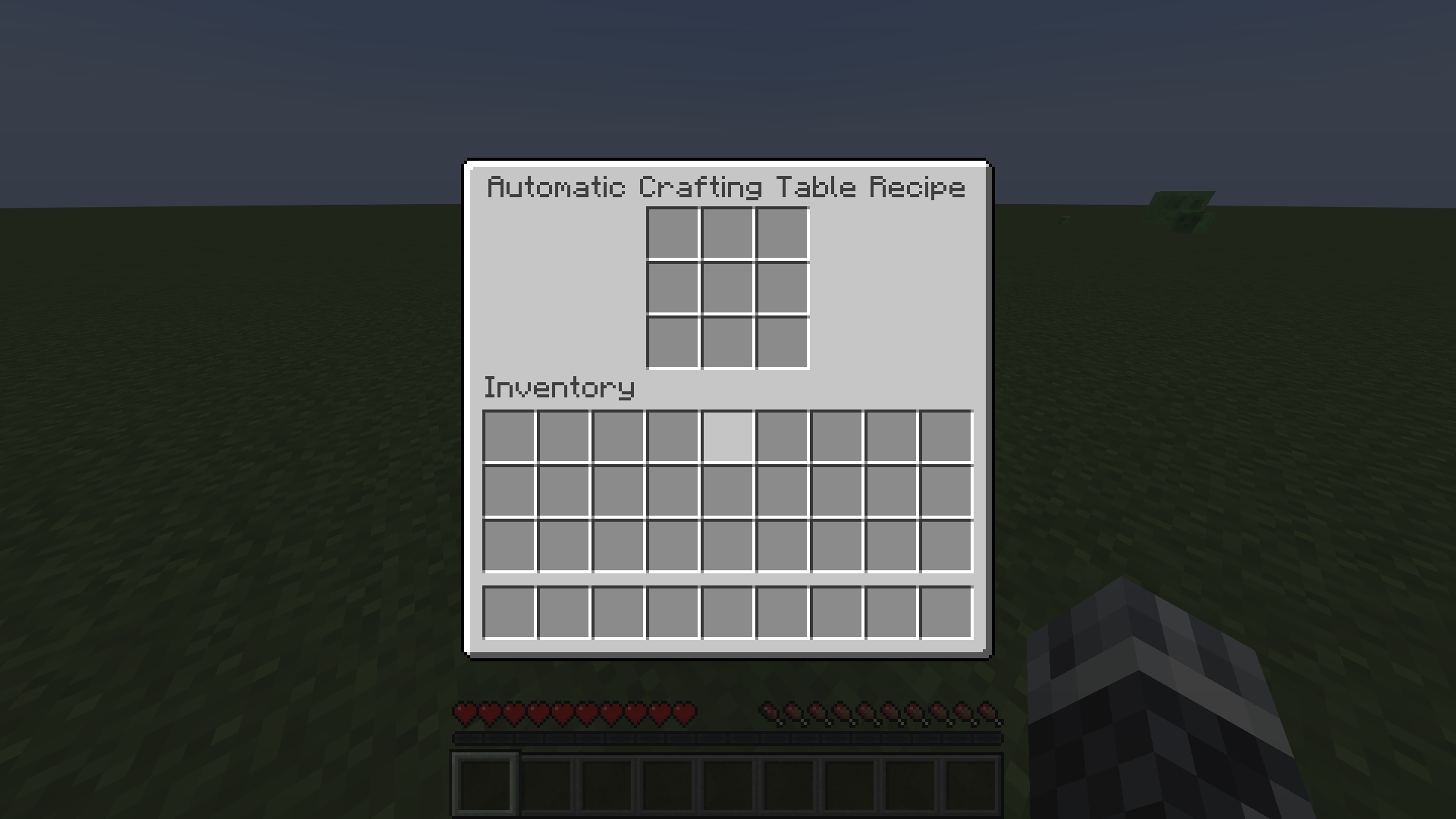
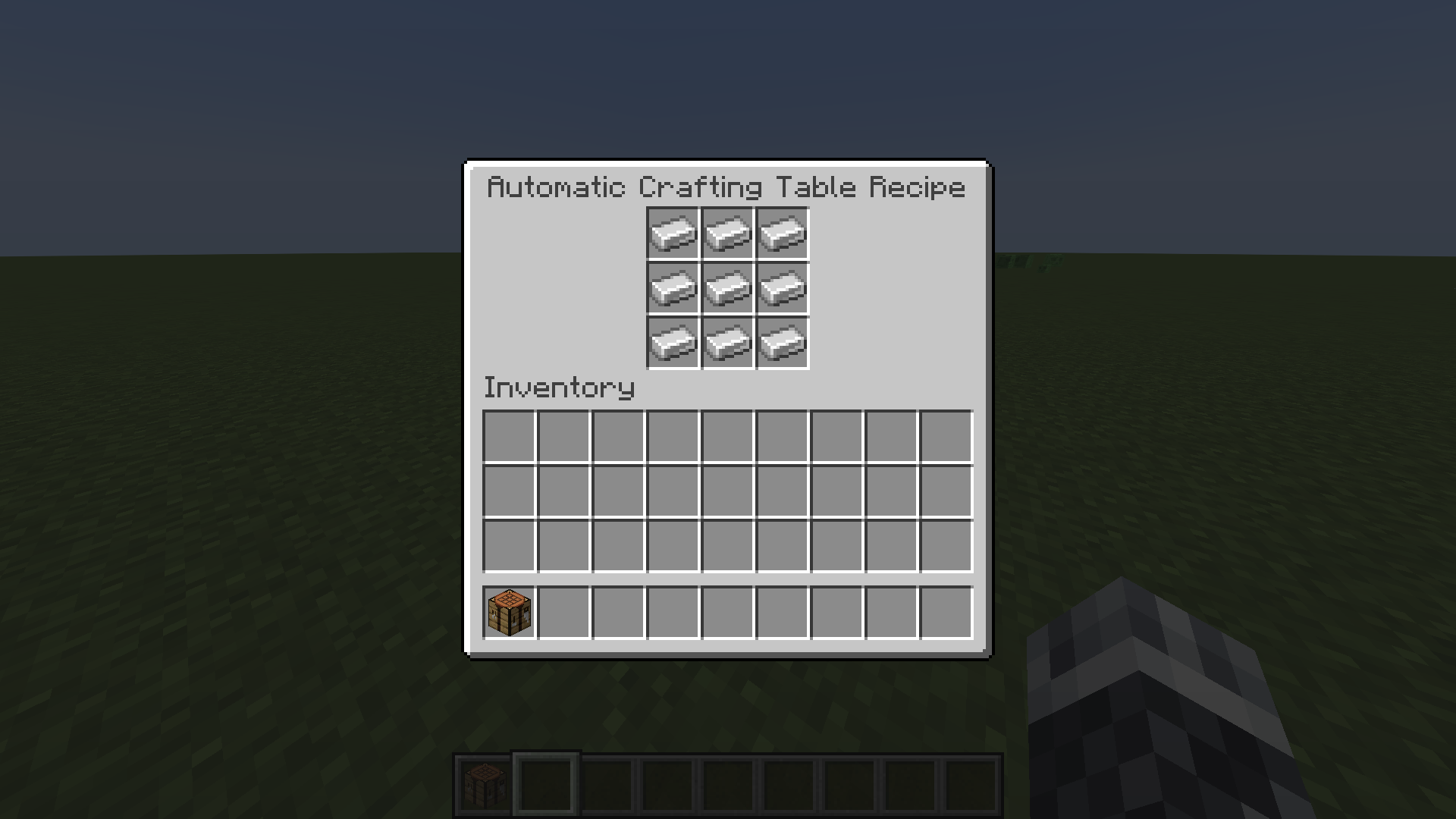
现在,在此菜单中放入您想要合成的任何配方的物品(包括自定义配方)。例如,我使用一个铁块:
下一步,将您刚刚修改的工作台与漏斗系统连接(第一个漏斗必须放置在工作台上,第二个漏斗必须放置在除工作台所在方向以外的任何其他方向)。例如:
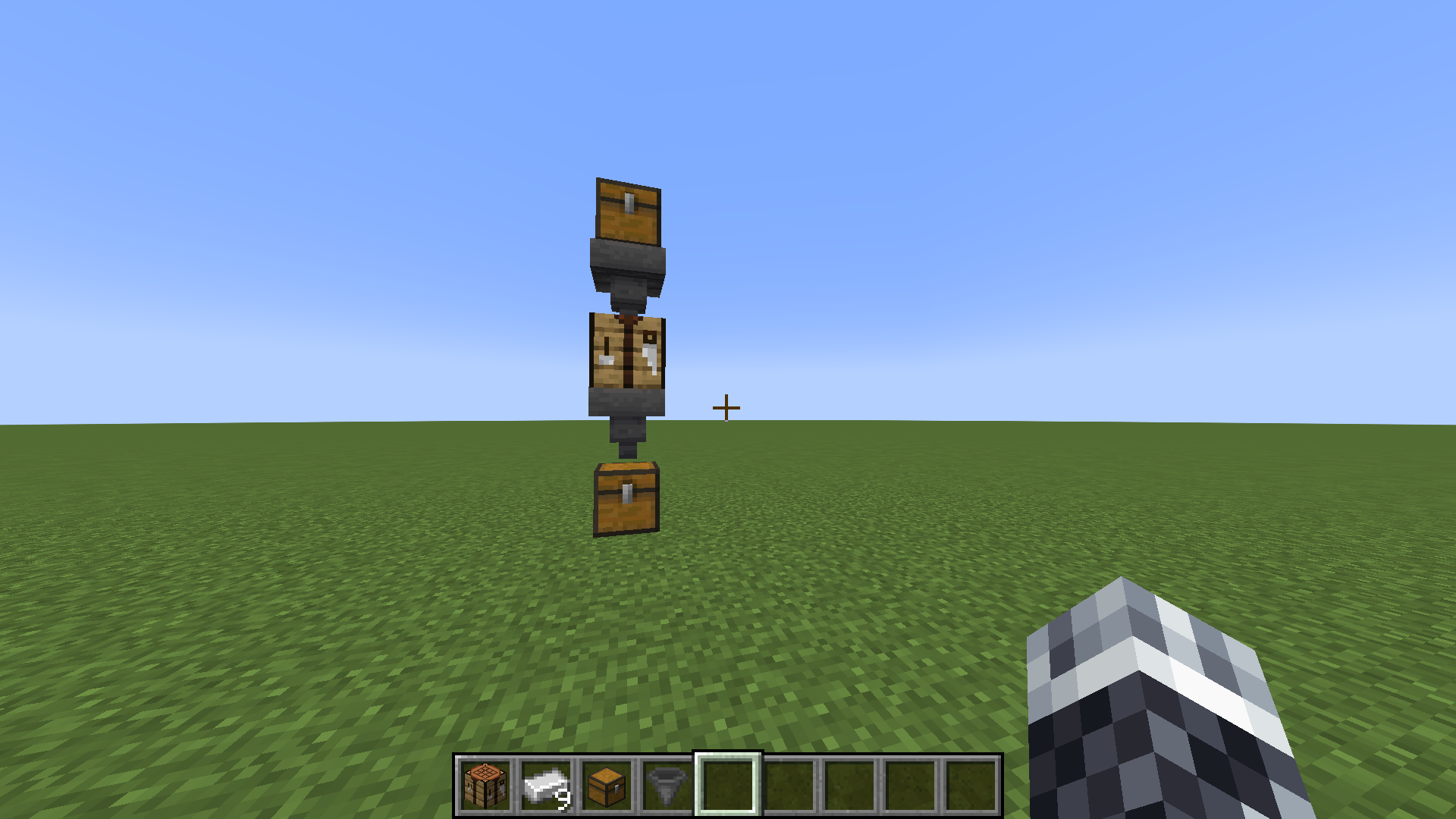
最后,只需将合成配方所需的物品放入通向工作台的漏斗中,Voilà! 您想要的物品就会掉落到另一个漏斗中!
您还可以让多个漏斗朝向同一个工作台。它们将与原料协同工作以合成您想要的物品。例如,一个漏斗里有 2 根木棍,另一个漏斗里有 3 个钻石用于合成钻石镐,这样也能正常工作!
配置文件
enabled: true
crafting-table-ui-display: 'Automatic Crafting Table Recipe'
crafting-table-timer: 4
crafting-table-visual-feedback-enabled: true
crafting-table-sound-feedback-enabled: true
separate-from-other-crafting-tables: false
automatic-crafting-table-item-display: "&aAutomatic-Crafting-Table"
automatic-crafting-table-item-lore:
  - "&eUse this Crafting Table in a "
  - "&ehopper system to automatically "
  - "&ecraft items"
“enabled”字段可以设置为 true 或 false,以启用或禁用该插件。
“crafting-table-ui-display”字段是您按住 Shift 并左键点击工作台时打开的菜单名称。支持颜色代码。
“crafting-table-timer”字段是一个数字,表示您的工作台合成物品所需的时间。该数字单位为 Minecraft tick(刻)。例如:20 Minecraft tick = 1 秒。
“crafting-table-visual-feedback-enabled”字段启用/禁用成功自动合成物品时生成的粒子效果。
“crafting-table-sound-feedback-enabled”字段启用/禁用成功自动合成物品时播放的声音。
当“separate-from-other-crafting-tables”字段设置为 true 时,它会使 Automatic-Crafting-Table 成为与普通工作台不同的物品。执行 /getACT (player) (权限: act) 来获取一个或给予其他玩家。
“automatic-crafting-table-item-display”字段是 Automatic-Crafting-Table-Item 的显示名称。
“automatic-crafting-table-item-lore”字段是 Automatic-Crafting-Table-Item 的描述文本。
您还可以让多个漏斗朝向同一个工作台。它们将与原料协同工作以合成您想要的物品。例如,一个漏斗里有 2 根木棍,另一个漏斗里有 3 个钻石用于合成钻石镐,这样也能正常工作!
PlaceholderAPI
“automaticcraftingtableTables”返回已注册的工作台数量(整数)。
“automaticcraftingtableUsedRecipes”返回一个字符串,列出所有通过该插件自动合成的物品。
Automatic-Crafting-Table
You can now automatically craft items within a hopper system.
This plugin supports:
- All minecraft versions from 1.14.1 to 1.19.4
- Integration of a workbench in a hopper system to automatically craft items
- Custom items
- PlaceholderAPI
- A configuration file
How to use it
Simply shift and left-click on a crafting table and a new menu pops up:
Now put items in this menu for any crafting recipe you want (custom recipes included). For instance, I use a block of iron:
In the next step, connect your crafting table you just modified with a hopper system (the first hopper must go on the crafting table, the second hopper must go in any other direction except the where the crafting table is located). For example:
Finally, just put the items you need to craft the recipe in the hopper that goes into the crafting table and Voilà! The item you want just dropped into the other hopper!
You can also make more than one hopper face into the crafting table. They will work together with the ingredients to craft the item you want. For example, one hopper has 2 sticks and the other has 3 diamonds for a diamond pickaxe and it would work!
The configuration file
enabled: true
crafting-table-ui-display: 'Automatic Crafting Table Recipe'
crafting-table-timer: 4
crafting-table-visual-feedback-enabled: true
crafting-table-sound-feedback-enabled: true
separate-from-other-crafting-tables: false
automatic-crafting-table-item-display: "&aAutomatic-Crafting-Table"
automatic-crafting-table-item-lore:
  - "&eUse this Crafting Table in a "
  - "&ehopper system to automatically "
  - "&ecraft items"
The field "enabled" can be set either to true or false to enable or disable the plugin.
The field "crafting-table-ui-display" is the menu name of the menu that opens when you shift and left-click on a crafting table. Color codes supported.
The field "crafting-table-timer" is a number of the time how long your crafting table needs to craft items. The number is in minecraft ticks. For instance: 20 minecraft ticks = 1 second.
The field "crafting-table-visual-feedback-enabled" enables/disables the particles that spawn when an item has been successfully automatically crafted.
The field "crafting-table-sound-feedback-enabled" enables/disables the sound that plays when an item has been successfully automatically crafted.
The field "separate-from-other-crafting-tables" makes, when it is set to true, the Automatic-Crafting-Table a different item as the normal crafting table. Do /getACT (player) (permission: act) to get one or give to other players.
The field "automatic-crafting-table-item-display" is the display of the Automatic-Crafting-Table-Item.
The field "automatic-crafting-table-item-lore" is the lore of the Automatic-Crafting-Table-Item.
You can also make more than one hopper face into the crafting table. They will work together with the ingredients to craft the item you want. For example, one hopper has 2 sticks and the other has 3 diamonds for a diamond pickaxe and it would work!
PlaceholderAPI
"automaticcraftingtableTables" returns an int of how many crafting tables are registered.
"automaticcraftingtableUsedRecipes" returns a String of all items that has been crafted automatically with the plugin.

下载 Automatic-Crafting-Table
需要联机服务器吗?
稳定流畅、一键部署,几分钟即可和朋友联机开服
最低仅需 8 元/月 即可畅快联机
下载 Automatic-Crafting-Table
需要联机服务器吗?
稳定流畅、一键部署,几分钟即可和朋友联机开服
最低仅需 8 元/月 即可畅快联机
下载 Automatic-Crafting-Table
需要联机服务器吗?
稳定流畅、一键部署,几分钟即可和朋友联机开服
最低仅需 8 元/月 即可畅快联机
下载 Automatic-Crafting-Table
需要联机服务器吗?
稳定流畅、一键部署,几分钟即可和朋友联机开服
最低仅需 8 元/月 即可畅快联机
下载 Automatic-Crafting-Table
需要联机服务器吗?
稳定流畅、一键部署,几分钟即可和朋友联机开服
最低仅需 8 元/月 即可畅快联机
下载 Automatic-Crafting-Table
需要联机服务器吗?
稳定流畅、一键部署,几分钟即可和朋友联机开服
最低仅需 8 元/月 即可畅快联机
下载 Automatic-Crafting-Table
需要联机服务器吗?
稳定流畅、一键部署,几分钟即可和朋友联机开服
最低仅需 8 元/月 即可畅快联机
下载 Automatic-Crafting-Table
需要联机服务器吗?
稳定流畅、一键部署,几分钟即可和朋友联机开服
最低仅需 8 元/月 即可畅快联机
下载 Automatic-Crafting-Table
需要联机服务器吗?
稳定流畅、一键部署,几分钟即可和朋友联机开服
最低仅需 8 元/月 即可畅快联机
下载 Automatic-Crafting-Table
需要联机服务器吗?
稳定流畅、一键部署,几分钟即可和朋友联机开服
最低仅需 8 元/月 即可畅快联机
- 增强 getACT 命令
关于这个资源的讨论、问题反馈与使用心得
还没有讨论,来发第一帖吧
你是这个资源的作者?登录后可认领此资源。
相似资源
 插件

PacketEvents 是一款专为 Minecraft Java 版打造的协议库,旨在简化数据包的处理与传输。
 插件
ExyliaPlugins 的库。
 插件
通过对话框或铁砧界面帮助你的 Anthme
 插件
重新定义服务器上的生物运输方式。使用高度可定制的口袋道具,安全地捕获、存储和释放任何实体。
 插件
为基于 Spigot/Paper/Folia 的服务器添加对 Vivecraft 的支持
 插件
用于绘制游戏内地图或在浏览器中随探索实时进行地图绘制的实时地图。
评论 0
登录后参与评分
还没有评论,来抢沙发吧