
别再为空的 Minecraft 服务器付费了
AutoStopper 会让基于 Docker 的后端在闲置时休眠,并在有玩家通过 Velocity 连接时立即唤醒它们。 玩家可以正常使用你的网络。你不再运行无人游玩的服务器。
在 Velocity 上安装它,列出你想要管理的容器,让安静的服务器进入休眠。
你会喜欢它的理由
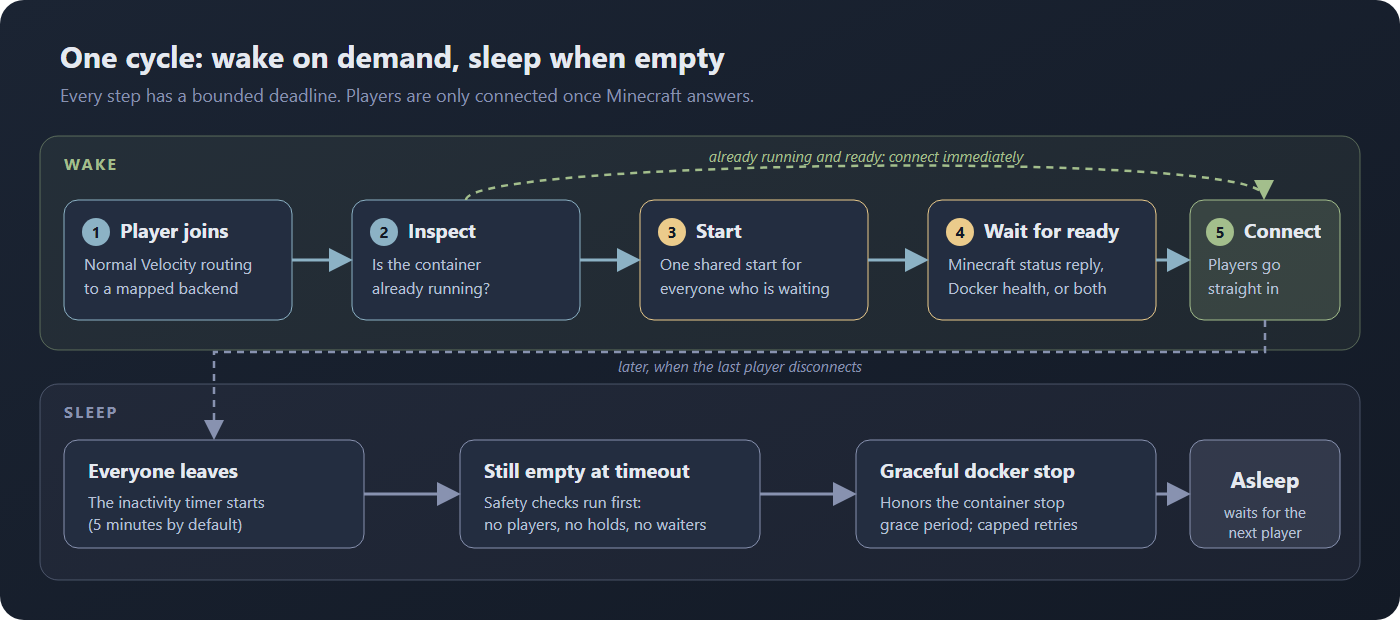
- 它会为你唤醒服务器。 玩家通过正常的 Velocity 路由选择一台休眠服务器。一旦容器准备就绪,AutoStopper 就会启动它并让玩家接入。无需客户端模组,也无需替换
/server命令。 - 它不仅等待 Docker,还等待 Minecraft。 正在运行的容器并不等于可用的服务器。AutoStopper 会等待真实的 Minecraft 状态回复、Docker 健康检查,或两者之一,并对每次探测和命令设置有限的超时期限。
- 它能处理回流的涌入。 如果十名玩家同时到达,他们共享一次启动过程,并在服务器响应时一起连接。
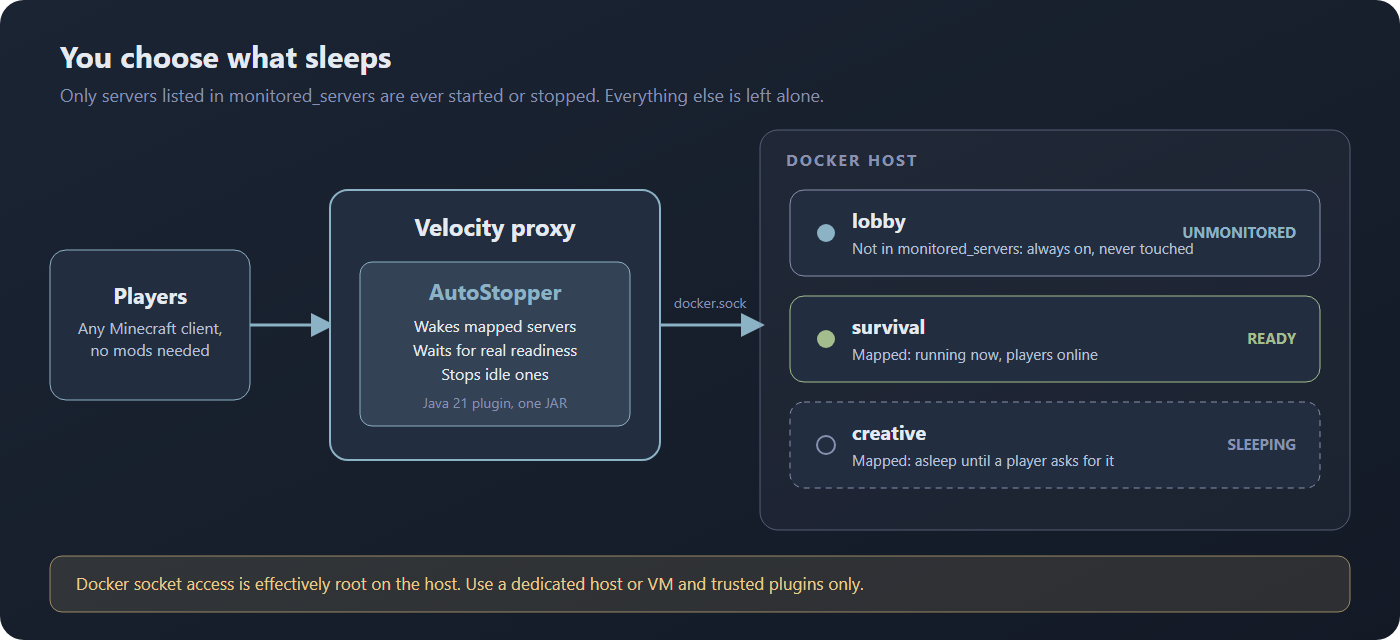
- 它只操作你映射的内容。
monitored_servers中未列出的中心服、大厅服或其他任何内容都不会被启动、停止或拦截。 - 失败提示清晰。 失败的停止操作会以限制退避时间重试,且绝不会假装服务器已停止。无效的重载会使之前的配置继续运行。玩家会看到简短友好的消息;原始的 Docker 输出保留在你的日志中。
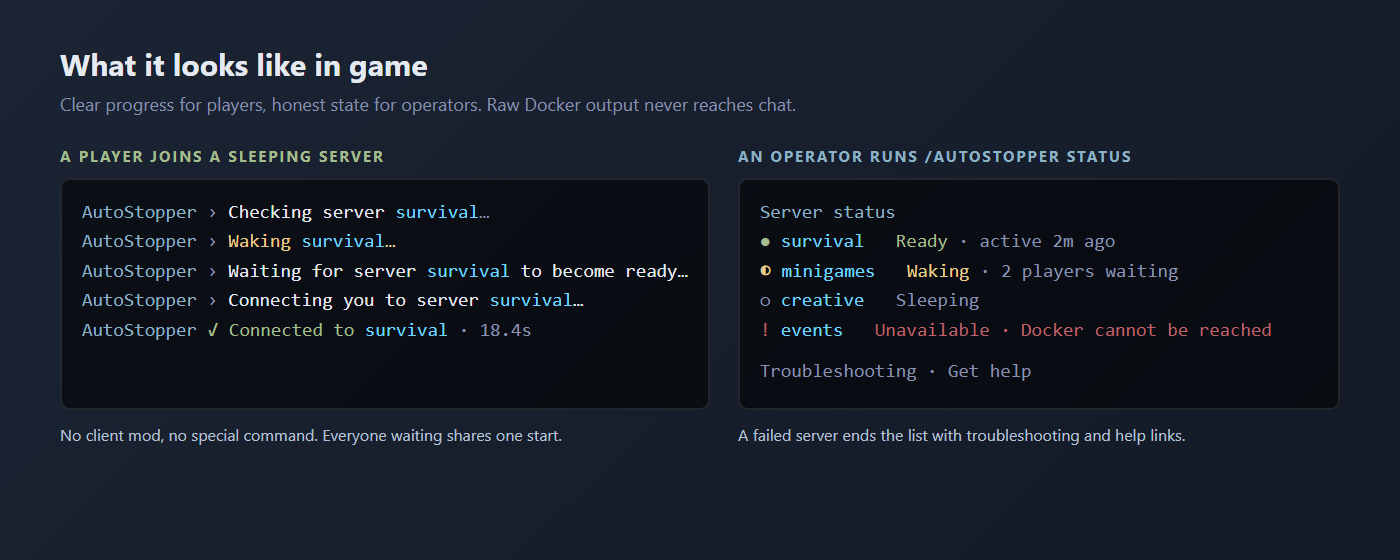
玩家看到的效果
快速开始
你需要一台装有 Docker Engine 和 Docker Compose v2 的 Linux 主机。以下设置将在 Java 25 上部署 Velocity 4.2,并包含一个由 AutoStopper 管理休眠和唤醒的 Minecraft 服务器。无需手动下载任何东西:代理会在启动时从 Modrinth 安装 AutoStopper。
1. 将此保存为 docker-compose.yml 放入空目录中:
services:
  # 让 Velocity 检查、启动和停止容器,除此之外不做其他事情。
  # 它是唯一接触 Docker socket 的服务。
  autostopper-docker:
    image: wollomatic/socket-proxy:1.13.1@sha256:3935b709275e4ec35d6ed5a5c4a1f0d01ed31eec5e7234efc3357ecd47689002
    restart: unless-stopped
    user: "0:0"
    read_only: true
    cap_drop:
      - ALL
    command:
      - -listenip=0.0.0.0
      - -allowfrom=velocity
      - -allowGET=^(/v[0-9.]+)?/(_ping|containers/[a-zA-Z0-9_.-]+/json)$
      - -allowPOST=^(/v[0-9.]+)?/containers/[a-zA-Z0-9_.-]+/(start|stop)$
    volumes:
      - /var/run/docker.sock:/var/run/docker.sock:ro
    networks:
      - autostopper-internal

  velocity:
    image: itzg/mc-proxy:2026.8.0-java25
    environment:
      TYPE: "VELOCITY"
      VELOCITY_VERSION: "4.2.0"
      VELOCITY_BUILD_ID: "30"
      # 在启动时安装最新版本的 AutoStopper。写入
      # autostopper:<version> 可固定特定版本。MINECRAFT_VERSION 仅用于选择
      # 下载(1.7.2 到 26.2 之间的任何版本均适用)。
      MODRINTH_PROJECTS: "autostopper"
      MINECRAFT_VERSION: "1.21.4"
    ports:
      - "25565:25577"
    volumes:
      - ./velocity_server:/server
    networks:
      - minecraft
      - autostopper-internal
    depends_on:
      - autostopper-docker
    restart: unless-stopped

  # AutoStopper 管理的服务器。以相同方式添加更多服务器。
  survival:
    image: itzg/minecraft-server:java21
    container_name: survival-server
    environment:
      EULA: "TRUE"
      TYPE: "PURPUR"
      VERSION: "1.21.4"
      ONLINE_MODE: "FALSE"
    volumes:
      - ./survival_data:/data
    networks:
      - minecraft
    restart: "no"          # AutoStopper 负责启动和停止它;Docker 不应重启它
    stop_grace_period: 60s # 停止时保存世界的时间

networks:
  minecraft:
  autostopper-internal:
    internal: true
2. 使用 docker compose up -d 启动它。 首次启动将下载所有内容并生成配置。
3. 告知 Velocity 有关服务器的信息。 在 velocity_server/velocity.toml 中,替换示例服务器和引用它们的示例强制主机:
[servers]
survival = "survival:25565"
try = ["survival"]

[forced-hosts]
在同一文件的现有 [advanced] 部分中,设置 read-timeout = 180000,以便休眠服务器有时间在被 Velocity 放弃之前唤醒(默认为 30 秒)。
4. 告知 AutoStopper 要管理哪个容器。 在
velocity_server/plugins/autostopper/config.yml 中,将 monitored_servers: [] 替换为:
monitored_servers:
  - server_name: survival            # velocity.toml 中的名称
    container_name: survival-server  # docker-compose.yml 中的 container_name
5. 重启并检查。 运行 docker compose restart velocity。代理日志应显示
endpoint auto: tcp://autostopper-docker:2375 (socket-proxy sidecar) 和
AutoStopper startup preflight healthy: 1 mapping(s) checked.
就是这样。在没有玩家的 5 分钟后,服务器将进入休眠,下一个加入的玩家会将其唤醒。/autostopper status 会显示每台服务器的状态。始终在线的中心服不会出现在 monitored_servers 中。其他 Velocity 线路的现成文件位于 examples,配置参考 涵盖了调优细节。
Docker 安全警告。 访问
/var/run/docker.sock在 Docker 主机上等同于拥有 root 权限。示例配置将 Velocity 与 socket 隔离开来:一个小型的 socket 代理持有该 socket,并仅允许 Velocity 检查、启动和停止容器。除非你将代理锁定到你的后端服务器,否则 Velocity 仍能停止或启动任何容器,并读取容器的环境变量。建议优先使用专用主机或虚拟机,仅安装可信插件,并在操作前阅读 安全指南。
合理默认值
| 设置项 | 默认值 |
|---|---|
| 不活跃超时时间 | 5 分钟 |
| 就绪检查 | Minecraft 状态回复,总截止时间为 120 秒 |
| 自动停止尝试次数 | 3 次,退避间隔限制在 60 到 300 秒之间 |
| 插件关闭截止时间 | 10 秒 |
| 托管服务器 | 添加映射之前为无 |
每个值均可配置,并作为单个原子快照进行验证。请参阅 配置参考。
命令
| 命令 | 权限 |
|---|---|
/autostopper, /as |
所有人 |
/autostopper help |
所有人,过滤显示你可用的命令 |
/autostopper status [server] |
autostopper.command.status |
/autostopper start, stop, restart <server> |
autostopper.command.start, .stop, .restart |
/autostopper hold, release <server> |
autostopper.command.hold, .release |
/autostopper reload |
autostopper.command.reload |
autostopper.admin 权限授予上述所有命令。AutoStopper 永远不会替换 Velocity 自带的 /server 命令。
测试支持
一个 Java 21 JAR 包已在五个完整的运行时版本线上经过测试。请将代理镜像与同一行的 Velocity 构建版本搭配使用。
| 版本线 | 代理镜像 | Java | Velocity |
|---|---|---|---|
| Legacy (最低要求) | itzg/mc-proxy:2026.8.0-java21 |
21 | 3.5.1 build 615 |
| Stable 4.0 (生产环境) | itzg/mc-proxy:2026.8.0-java25 |
25 | 4.0.0 build 6 |
| Stable 4.1 (生产环境) | itzg/mc-proxy:2026.8.0-java25 |
25 | 4.1.0 build 22 |
| Stable 4.2 (推荐) | itzg/mc-proxy:2026.8.0-java25 |
25 | 4.2.0 build 30 |
| Preview (快照) | itzg/mc-proxy:2026.8.0-java25 |
25 | 4.2.1-SNAPSHOT build 41 |
Velocity 4 需要 Java 25。预览版线路追踪 PaperMC 的快照版本,并非生产基线。完整的发布候选版已针对真实的 Purpur 1.21.4 后端进行了测试,包括实际协议客户端、同时加入、空闲停止、重启、永不就绪的服务器以及失败停止重试。列出 Minecraft 1.7.2 到 26.2 版本是因为 AutoStopper 仅使用 Velocity 事件和通用的状态请求,但只有上述后端被直接测试过。
帮助与文档
- 故障排除 涵盖了你在聊天或日志中可能看到的各种失败情况
- 配置参考
- 安全指南
- 从 2.3.x 迁移到 3.0.0(移除了 Docker CLI 后端)
- 从 2.2.0 迁移到 2.3.0(即插即用;可选迁移至 socket 代理)
- 从 1.1.2 迁移到 2.0.0
- 完整安装指南
- 更新日志
- 报告问题
准备好让空服休眠了吗? 选择一个示例,审查 Docker 安全边界,并安装与 GitHub Releases 上发布的经过验证的相同 JAR 包。
Stop paying for empty Minecraft servers
AutoStopper puts idle Docker-based backends to sleep and wakes them the moment a player connects through Velocity. Players keep using your network normally. You stop running servers nobody is playing on.
Install it on Velocity, list the containers you want managed, and let quiet servers sleep.
Why you will like it
- It wakes servers for you. A player picks a sleeping server through normal Velocity routing.
AutoStopper starts the container and connects them as soon as it is ready. No client mod, no
replacement
/servercommand. - It waits for Minecraft, not just Docker. A running container is not a ready server. AutoStopper waits for a real Minecraft status reply, Docker health, or either one, with a bounded deadline on every probe and command.
- It handles the rush back in. If ten players arrive at once they share one start and are connected together when the server answers.
- It only touches what you map. Hubs, lobbies and anything not listed in
monitored_serversare never started, stopped or intercepted. - It fails clearly. Failed stops retry with capped backoff and never pretend the server stopped. An invalid reload keeps the previous configuration running. Players see short, friendly messages; raw Docker output stays in your logs.
What your players see
Quick start
You need a Linux host with Docker Engine and Docker Compose v2. This sets up Velocity 4.2 on Java 25 with one Minecraft server that AutoStopper puts to sleep and wakes. There is nothing to download by hand: the proxy installs AutoStopper from Modrinth.
1. Save this as docker-compose.yml in an empty directory:
services:
  # Lets Velocity inspect, start and stop containers, and nothing else.
  # It is the only service that touches the Docker socket.
  autostopper-docker:
    image: wollomatic/socket-proxy:1.13.1@sha256:3935b709275e4ec35d6ed5a5c4a1f0d01ed31eec5e7234efc3357ecd47689002
    restart: unless-stopped
    user: "0:0"
    read_only: true
    cap_drop:
      - ALL
    command:
      - -listenip=0.0.0.0
      - -allowfrom=velocity
      - -allowGET=^(/v[0-9.]+)?/(_ping|containers/[a-zA-Z0-9_.-]+/json)$
      - -allowPOST=^(/v[0-9.]+)?/containers/[a-zA-Z0-9_.-]+/(start|stop)$
    volumes:
      - /var/run/docker.sock:/var/run/docker.sock:ro
    networks:
      - autostopper-internal

  velocity:
    image: itzg/mc-proxy:2026.8.0-java25
    environment:
      TYPE: "VELOCITY"
      VELOCITY_VERSION: "4.2.0"
      VELOCITY_BUILD_ID: "30"
      # Installs the latest AutoStopper release at startup. Write
      # autostopper:<version> to pin one. MINECRAFT_VERSION only selects the
      # download (any version from 1.7.2 to 26.2 works).
      MODRINTH_PROJECTS: "autostopper"
      MINECRAFT_VERSION: "1.21.4"
    ports:
      - "25565:25577"
    volumes:
      - ./velocity_server:/server
    networks:
      - minecraft
      - autostopper-internal
    depends_on:
      - autostopper-docker
    restart: unless-stopped

  # A server AutoStopper manages. Add more the same way.
  survival:
    image: itzg/minecraft-server:java21
    container_name: survival-server
    environment:
      EULA: "TRUE"
      TYPE: "PURPUR"
      VERSION: "1.21.4"
      ONLINE_MODE: "FALSE"
    volumes:
      - ./survival_data:/data
    networks:
      - minecraft
    restart: "no"          # AutoStopper starts and stops it; Docker must not restart it
    stop_grace_period: 60s # time to save the world when it is stopped

networks:
  minecraft:
  autostopper-internal:
    internal: true
2. Start it with docker compose up -d. The first start downloads everything and generates
the configuration.
3. Tell Velocity about the server. In velocity_server/velocity.toml, replace the sample
servers and the sample forced hosts, which refer to them:
[servers]
survival = "survival:25565"
try = ["survival"]

[forced-hosts]
In the existing [advanced] section of the same file, set read-timeout = 180000 so a sleeping
server has time to wake before Velocity gives up on the player (the default is 30 seconds).
4. Tell AutoStopper which container to manage. In
velocity_server/plugins/autostopper/config.yml, replace monitored_servers: [] with:
monitored_servers:
  - server_name: survival            # the name in velocity.toml
    container_name: survival-server  # the container_name in docker-compose.yml
5. Restart and check. Run docker compose restart velocity. The proxy log should show
endpoint auto: tcp://autostopper-docker:2375 (socket-proxy sidecar) and
AutoStopper startup preflight healthy: 1 mapping(s) checked.
That's it. After 5 minutes without players the server sleeps, and the next player who joins wakes
it. /autostopper status shows every server's state. Always-on hubs stay out of
monitored_servers. Ready-made files for the other Velocity lines are in the
examples, and the
configuration reference covers tuning.
Docker security warning. Access to
/var/run/docker.sockis effectively root on the Docker host. The examples keep it out of Velocity: a small socket proxy holds the socket and lets Velocity only inspect, start and stop containers. Velocity can still stop or start any container and read container environment variables unless you pin the proxy to your backends. Prefer a dedicated host or VM, install only trusted plugins, and read the security guidance first.
Sensible defaults
| Setting | Default |
|---|---|
| Inactivity timeout | 5 minutes |
| Readiness | Minecraft status reply, 120 second overall deadline |
| Automatic stop attempts | 3, with 60 to 300 second capped backoff |
| Plugin shutdown deadline | 10 seconds |
| Managed servers | none until you add mappings |
Every value is configurable and validated as one atomic snapshot. See the configuration reference.
Commands
| Command | Permission |
|---|---|
/autostopper, /as |
Everyone |
/autostopper help |
Everyone, filtered to what you can use |
/autostopper status [server] |
autostopper.command.status |
/autostopper start, stop, restart <server> |
autostopper.command.start, .stop, .restart |
/autostopper hold, release <server> |
autostopper.command.hold, .release |
/autostopper reload |
autostopper.command.reload |
autostopper.admin grants all of them. AutoStopper never replaces Velocity's /server command.
Tested support
One Java 21 JAR is tested on five complete runtime lines. Keep the proxy image and Velocity build from one row together.
| Line | Proxy image | Java | Velocity |
|---|---|---|---|
| Legacy (minimum) | itzg/mc-proxy:2026.8.0-java21 |
21 | 3.5.1 build 615 |
| Stable 4.0 (production) | itzg/mc-proxy:2026.8.0-java25 |
25 | 4.0.0 build 6 |
| Stable 4.1 (production) | itzg/mc-proxy:2026.8.0-java25 |
25 | 4.1.0 build 22 |
| Stable 4.2 (recommended) | itzg/mc-proxy:2026.8.0-java25 |
25 | 4.2.0 build 30 |
| Preview (snapshot) | itzg/mc-proxy:2026.8.0-java25 |
25 | 4.2.1-SNAPSHOT build 41 |
Velocity 4 needs Java 25. The preview line tracks a PaperMC snapshot and is not a production baseline. The full release candidate runs against a real Purpur 1.21.4 backend with actual protocol clients, simultaneous joins, idle stop, restart, never-ready servers and failed-stop retry. Minecraft versions 1.7.2 through 26.2 are listed because AutoStopper uses only Velocity events and a generic status request, but only that backend is exercised directly.
Help and docs
- Troubleshooting covers every failure outcome you can see in chat or logs
- Configuration reference
- Security guidance
- Migrating from 2.3.x to 3.0.0 (removes the Docker CLI backend)
- Migrating from 2.2.0 to 2.3.0 (drop-in; optional move to the socket proxy)
- Migrating from 1.1.2 to 2.0.0
- Full installation guide
- Changelog
- Report an issue
Ready to let empty servers sleep? Pick an example, review the Docker security boundary, and install the same validated JAR that is published on GitHub Releases.

下载 AutoStopper
需要联机服务器吗?
稳定流畅、一键部署,几分钟即可和朋友联机开服
最低仅需 8 元/月 即可畅快联机
下载 AutoStopper
需要联机服务器吗?
稳定流畅、一键部署,几分钟即可和朋友联机开服
最低仅需 8 元/月 即可畅快联机
下载 AutoStopper
需要联机服务器吗?
稳定流畅、一键部署,几分钟即可和朋友联机开服
最低仅需 8 元/月 即可畅快联机
下载 AutoStopper
需要联机服务器吗?
稳定流畅、一键部署,几分钟即可和朋友联机开服
最低仅需 8 元/月 即可畅快联机
下载 AutoStopper
需要联机服务器吗?
稳定流畅、一键部署,几分钟即可和朋友联机开服
最低仅需 8 元/月 即可畅快联机
下载 AutoStopper
需要联机服务器吗?
稳定流畅、一键部署,几分钟即可和朋友联机开服
最低仅需 8 元/月 即可畅快联机
下载 AutoStopper
需要联机服务器吗?
稳定流畅、一键部署,几分钟即可和朋友联机开服
最低仅需 8 元/月 即可畅快联机
下载 AutoStopper
需要联机服务器吗?
稳定流畅、一键部署,几分钟即可和朋友联机开服
最低仅需 8 元/月 即可畅快联机
下载 AutoStopper
需要联机服务器吗?
稳定流畅、一键部署,几分钟即可和朋友联机开服
最低仅需 8 元/月 即可畅快联机
下载 AutoStopper
需要联机服务器吗?
稳定流畅、一键部署,几分钟即可和朋友联机开服
最低仅需 8 元/月 即可畅快联机
已更改
- 当配置为
endpoint: auto时,若使用ssh://、npipe://或 TLS 协议的DOCKER_HOST,选定了 Docker 上下文,或在 Windows 主机上未设置DOCKER_HOST,系统将不再回退到 Docker CLI。在此类情况下,AutoStopper 将不会联系任何守护进程。所有 Docker 操作均会报告DAEMON_UNAVAILABLE,且代理日志中会注明原因及解决方法。docker.backend: api不再优先忽略此类DOCKER_HOST而选择边车容器或本地套接字(#146)。 - 唤醒服务器时仅发送一次 Docker inspect 请求,而非两次:启动请求不再先重新检查容器状态(#146)。
已移除
- 公共方法
AutoStopperPlugin.getServer()、getLogger()和getServerManager()。AutoStopper 从未使用过这些方法,且它们并非受支持的集成点(#162)。 - Docker CLI 后端,该功能自 2.3.0 版本起已被弃用。
docker.backend: cli现在被视为配置错误;auto和api虽被接受但无效;生成的config.yml文件中也不再包含该键值。Docker 诊断信息中的CLI_MISSING已移除。从 2.3.x 迁移至 3.0.0 指南 涵盖了如何迁移出 CLI 后端及自定义入口点模式的内容(#146)。 - 遥测结果
NO_MAPPING、其对应的故障排除条目以及玩家收到的“无容器映射”消息。没有任何代码路径会产生这些内容:在启动过程中因重载而移除映射时,其结束状态仍如之前一样标记为MAPPING_CHANGED(#162)。 - 遥测来源
STATUS_POLL。状态检查和预检操作永远不会启动生命周期操作,因此没有任何生命周期日志行携带该标识(#162)。
变更
- 插件的 Velocity 描述符现在仅来自
velocity-plugin.json,版本由构建过程确定,因此每个 JDK 生成的 JAR 文件内容一致。Velocity 的插件列表现在会显示 AutoStopper 的描述信息,而之前的 JAR 文件中缺少该描述 (#162)。
移除
- AutoStopper 不再在内存中维护生命周期计数器和持续时间统计信息。此前没有任何功能展示这些数据,但每次生命周期操作和阶段更新时都会修改这些计数器。结构化的生命周期日志行以及
/autostopper status <server>命令中的近期操作记录保持不变;配置文档现在仅描述实际保留的遥测数据 (#162)。
已更改
- README 和 Modrinth 页面现在以自包含的快速入门指南开头:提供完整的
docker-compose.yml(包括 socket 代理、带有 Modrinth 安装功能的 Velocity 以及一个托管服务器)、精确的velocity.toml和config.yml修改说明,以及确认运行成功的日志行。每个示例的 README 现在都拥有独立的逐步运行说明,而不再指向主 README(#157)。
已修复
/autostopper status命令以及启动和重载预检在监控服务器数量约为 35 或更多的网络中,不再因“无法收集服务器状态”或出现SaturationException而失败。容器检查现在改为每个工作线程最多同时运行一项,而非全部同时执行,从而避免大型网络填满工作队列;此外,在状态检查或预检期间到达的玩家唤醒请求也不再因饱和而被拒绝(#163)。
新增
- AutoStopper 直接通过 Unix 套接字或普通 TCP 与 Docker Engine API 通信,因此代理不再需要 Docker CLI。新的
docker.backend(auto、api、cli)和docker.endpoint(auto、unix://…、tcp://…)设置在加载和重载时进行验证。backend: auto优先使用 API,通过DOCKER_HOST、然后是通过autostopper-docker套接字代理旁路容器、最后是/var/run/docker.sock来查找守护进程。对于ssh://或 TLSDOCKER_HOST、选定的 Docker 上下文或 Windows 环境,则回退到 CLI。所选的后端和端点会被记录日志,并显示在/autostopper status的末尾。挂载了 Docker 套接字的现有部署将继续正常运行,无需更改 (#143)。
变更
- 示例中,Velocity 通过内部网络上的
autostopper-docker套接字代理(wollomatic/socket-proxy,已通过摘要固定版本)获得 Docker 访问权限。该代理仅允许从velocity服务执行容器检查、启动和停止操作。Velocity 运行标准的itzg/mc-proxy镜像,没有自定义入口点,没有套接字挂载,也没有主机特定的值。README、安全性、故障排除和配置文档描述了此设置,新的 2.2.0 至 2.3.0 迁移指南 涵盖了将现有部署迁移的过程。自定义的docker-entrypoint.sh模式和 Docker CLI 后端(docker.backend: cli)已被弃用,并计划在未来版本 3.0.0 中移除。直接挂载套接字的方法仍受支持 (#144)。 - 示例和 README 现在在启动时通过代理镜像的
MODRINTH_PROJECTS环境变量从 Modrinth 安装 AutoStopper,该变量已固定到特定发布版本,并根据镜像要求设置了MINECRAFT_VERSION。无需下载 JAR 文件;升级只需更改固定版本即可。代理会在每次启动时联系 Modrinth。手动安装 JAR 文件作为替代方案仍有文档说明;请仅使用其中一种方法 (#142)。
移除
- 示例中的
docker-entrypoint.sh。使用它的现有部署将继续正常运行 (#144)。
关于这个资源的讨论、问题反馈与使用心得
还没有讨论,来发第一帖吧
你是这个资源的作者?登录后可认领此资源。
相似资源
 插件

PacketEvents 是一款专为 Minecraft Java 版打造的协议库,旨在简化数据包的处理与传输。
 插件
ExyliaPlugins 的库。
 插件
通过对话框或铁砧界面帮助你的 Anthme
 插件
重新定义服务器上的生物运输方式。使用高度可定制的口袋道具,安全地捕获、存储和释放任何实体。
 插件
为基于 Spigot/Paper/Folia 的服务器添加对 Vivecraft 的支持
 插件
一个在游戏内运行的 Minecraft 地图编辑器! 支持选区、蓝图、复制粘贴、笔刷和脚本。 可在创造模式中使用,也可在生存模式中临时使用。
评论 0
登录后参与评分
还没有评论,来抢沙发吧