Az_Protection
保护你的土地。把烦恼抛在脑后。
Az_Protection 1.0.0 是一款 Minecraft 领地保护插件。它允许玩家使用特殊的旗帜来保护他们的领地。在地面放置一面旗帜即可创建一个受保护的区域。
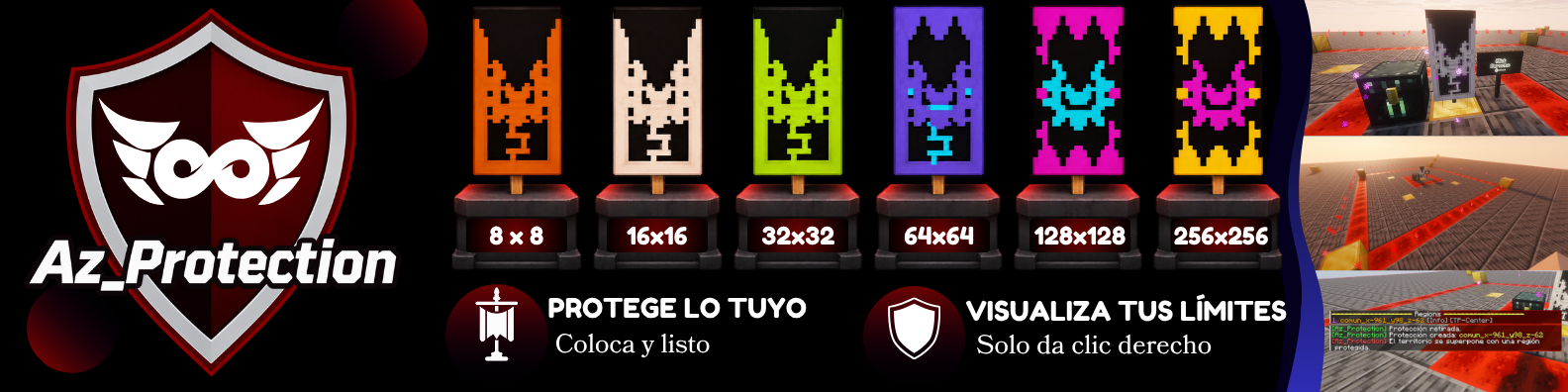
Az_Protection 旨在简化领地保护流程,使其易于上手。它提供了六个保护等级、直观的领地管理功能以及可视化边界,帮助玩家理解和管理他们的受保护区域。
特性
- 基于旗帜的保护: 通过放置特殊的保护旗帜来保护你的土地。
- 六种保护等级: 提供六种不同的保护级别,以满足你的建筑需求。
- 自动领地管理: 通过旗帜系统创建和移除受保护的区域。
- 可视化边界: 显示受保护土地的周长,以便轻松识别其范围。
- 领地识别: 与保护旗帜交互以识别和检查受保护的区域。
- WorldGuard 集成: 使用 WorldGuard 进行领地保护和管理工作。
保护等级与命令
Az_Protection 提供了六种具有不同覆盖范围的防护旗帜。
管理员可以使用以下命令:
| 保护等级 |
面积 |
命令 |
| Starter |
8 × 8 |
/azprotection give <player> gratis |
| Common |
16 × 16 |
/azprotection give <player> nivel_1 |
| Special |
32 × 32 |
/azprotection give <player> nivel_2 |
| Rare |
64 × 64 |
/azprotection give <player> nivel_3 |
| Epic |
128 × 128 |
/azprotection give <player> nivel_4 |
| Legendary |
256 × 256 |
/azprotection give <player> premium |
商店集成: Az_Protection 设计为与现有的服务器经济和商店插件协同工作,这些插件支持命令执行。管理员可以使用上述命令,通过他们偏好的商店系统分发保护旗帜。
注意:Az_Protection 不包含内置的经济或商店系统。命令执行和目标玩家配置必须在外部商店插件中设置。
工作原理
- 通过服务器配置的分配方式获取保护旗帜。
- 在可用区域的地面上放置该旗帜。
- Az_Protection 会根据旗帜的等级自动创建一个受保护的区域。
- 右键点击已放置的旗帜以可视化保护边界。
- 移除你的旗帜即可移除关联的区域。
保护区域延伸至 Minecraft 世界的整个高度。
依赖项
插件
- WorldGuard — 管理受保护的区域。
- WorldEdit — WorldGuard 正常运行所必需。
请确保这两个插件均已安装,并且与你的服务器版本兼容。
可选集成: Az_Protection 可与支持命令执行的经济和商店插件一起使用。其核心保护功能不需要额外的经济插件。
文档与支持
需要安装说明、命令、权限或故障排除帮助吗?
由 AZ Servers 制作。
面向 Minecraft 主播和社区的专业工具。
© 2026 AZ Servers. All rights reserved.
Az_Protection
Protect your land. Leave your worries behind.
Az_Protection 1.0.0 is a Minecraft land protection plugin. It allows players to protect their land using special banners. Place a banner on the ground to create a protected region.
Designed to make land protection simple and accessible, Az_Protection provides six protection tiers, intuitive region management, and visual boundaries to help players understand and manage their protected areas.
Features
- Banner-Based Protection: Protect your land by placing special protection banners.
- Six Protection Tiers: Choose from six different protection levels to suit your building needs.
- Automatic Region Management: Create and remove protected regions through the banner system.
- Visual Boundaries: Display the perimeter of your protected land to easily identify its limits.
- Region Identification: Interact with protection banners to identify and inspect protected areas.
- WorldGuard Integration: Uses WorldGuard for region protection and management.
Protection Tiers & Commands
Az_Protection provides six protection banners with different coverage areas.
Administrators can using the following commands:
| Protection Tier |
Area |
Command |
| Starter |
8 × 8 |
/azprotection give <player> gratis |
| Common |
16 × 16 |
/azprotection give <player> nivel_1 |
| Special |
32 × 32 |
/azprotection give <player> nivel_2 |
| Rare |
64 × 64 |
/azprotection give <player> nivel_3 |
| Epic |
128 × 128 |
/azprotection give <player> nivel_4 |
| Legendary |
256 × 256 |
/azprotection give <player> premium |
Shop Integration: Az_Protection is designed to work alongside existing server economy and shop plugins that support command execution. Administrators can use the commands above to distribute protection banners through their preferred shop systems.
Note: Az_Protection does not include a built-in economy or shop system. Command execution and player targeting must be configured in the external shop plugin.
How It Works
- Obtain a protection banner through your server's configured distribution method.
- Place the banner on the ground in an available area.
- Az_Protection automatically creates a protected region based on the banner's tier.
- Right-click the placed banner to visualize the protection boundaries.
- Remove your banner to remove the associated region.
Protection regions extend across the full height of the Minecraft world.
Dependencies
Plugins
- WorldGuard — Manages protected regions.
- WorldEdit — Required for WorldGuard to function properly.
Make sure both plugins are installed and compatible with your server version.
Optional Integration: Az_Protection can be used alongside economy and shop plugins that support command execution. No additional economy plugin is required for its core protection features.
Documentation & Support
Looking for installation instructions, commands, permissions, or troubleshooting assistance?
By AZ Servers.
Practical tools for Minecraft streamers and communities.
© 2026 AZ Servers. All rights reserved.


 插件

 插件
 插件
 插件
 插件
 插件
评论 0
登录后参与评分
还没有评论,来抢沙发吧