
背包
 BackpacksRemastered 为 Minecraft 添加了——好吧,就是背包,其亮点在于无需使用任何客户端模组。完全原版的背包体验!该插件是同类中的先驱,因为它将背包添加为一个
ItemStack,即使未安装该插件,背包内的物品栏数据也会保留!背包还允许你检查物品的 NBT 数据,这有助于深入了解游戏的底层运作机制。
功能
- 大版本兼容 - 采用可适配的 NMS 解决方案,目前通过单个插件 jar 包支持从 MC1.12 开始的多个版本。即使某个版本没有明确说明受支持,也可以尝试一下,它可能仍然有效。
- NBT 数据存储 - 背包数据存储在该物品的 NBT 数据中(与 Minecraft 存储附魔数据的方式相同)。这意味着你无需担心数据库、配置文件或类似的东西。你可以备份整个世界,所有背包的内容都会随之备份。
- 功能完整的背包物品 - 来自此插件的背包就像模组中的背包一样。它们可以被交易、破坏、复制等。
- 多种背包类型 - 本插件引入了许多不同类型的背包,远远超出了简单的储物功能。请在本页的制作部分查看它们。
- 高度可定制 - 背包的几乎所有方面都是可定制的,包括合成配方!所以如果你不喜欢默认配方,可以将其更改为你喜欢的内容。
- 多语言支持 - Backpacks 在其构建链中使用一种名为 i18nExtractor 的专有自动翻译系统。这意味着你可以将 Backpacks 自动翻译成 Google Translate 支持的任何语言。请参阅 GitHub 关于用你的语言构建 Backpacks 的内容。
命令
- /bp - 显示帮助信息。
- /bp help - 同样显示帮助信息。
- /bp config:reload - 重新加载配置文件。
- /bp info - 显示有关插件的信息。
- /bp item:info - 列出你手中物品相关的 NBT 数据键。
- /bp item:info:get - 获取特定 NBT 数据键的类型/数据。
- /bp item:give - 给予玩家一个背包。
- /bp split - 分解你手中持有的背包。
- /bp materials - 列出配置中可用于自定义配方的所有物品类型。
- /bp materials:search - 搜索所有这些材料以查找指定的一种。
- /bp vfurnace - 列出所有虚拟熔炉及其当前库存位置,无论是箱子、玩家物品栏、地面等。注意:虚拟熔炉是与熔炉背包绑定的底层熔炉操作。
权限
在 plugin.yml 中查看完整的权限列表(以及它们的默认状态)。
配置
你可以在此处查看配置文件:这里。
制作
背包配方、名称、描述等 可以通过配置文件进行定制。以下是默认设置:
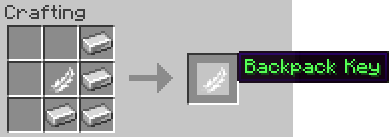
Key - 用于打开背包。
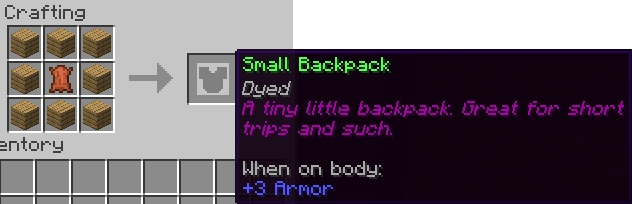
Small - 最小的背包。大小相当于普通箱子。
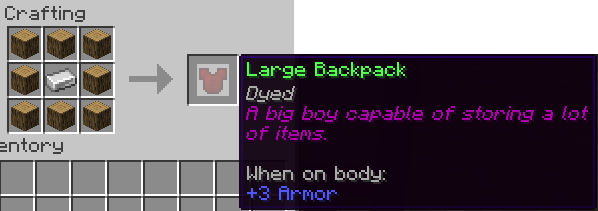
Large - 一个相当大的背包。大小相当于双层箱子。
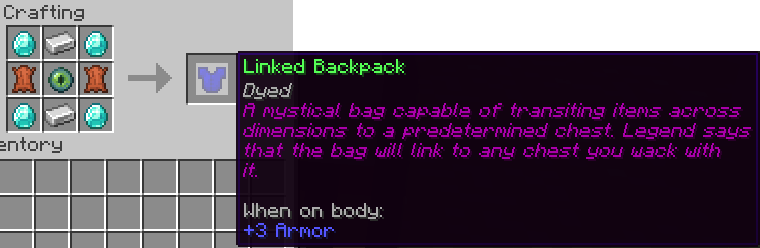
Linked - 一种能够与多种不同类型容器接口的背包:箱子、双层箱子、熔炉等。它在任何距离下都能工作,甚至跨维度。这是终极背包。要链接它,请在手中持有它并左击所需的容器。
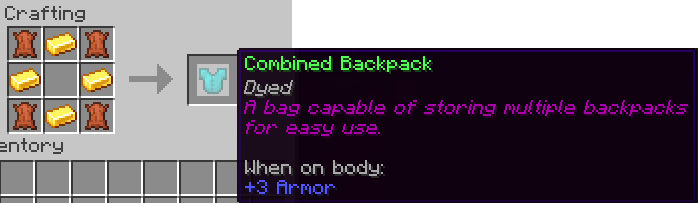
Combined - 一种可以存储多个背包以便快速使用的背包。
要添加,请将组合背包与待插入的背包一起放置在合成网格中。
要移除,请参阅:/bp split。
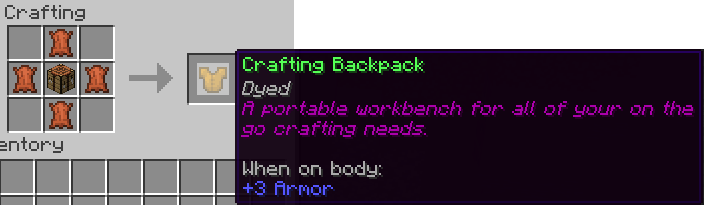
Craft - 背包中的合成台。
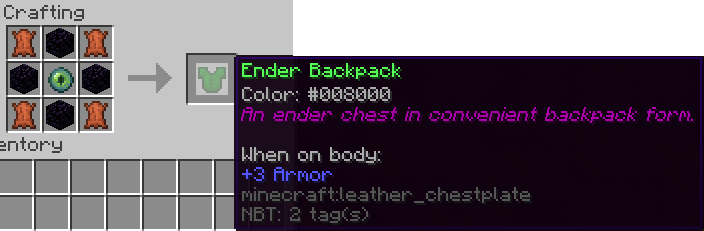
Ender - 背包中的末影箱。
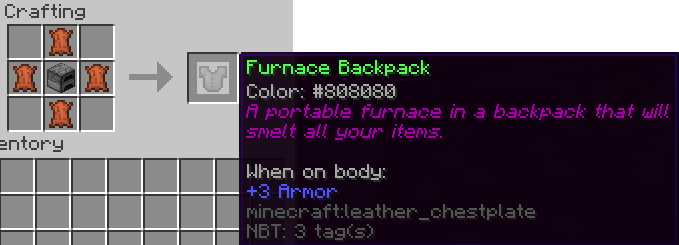
Furnace - 首款便携式熔炉。
用法
背包作为胸甲物品存在,但可以在合成网格中与任何可装备在该槽位的物品组合。要打开背包,请在手中持有背包并按右键。
可以使用 /bp split 命令将背包从组合物品中分离出来。
捐赠
您可以通过页面顶部的按钮或 此处进行捐赠。任何捐赠都表示感谢。:D
安装
安装过程非常简单,只需拖放即可。如果您习惯于安装插件,那么您无需阅读接下来的部分。
- 找到位于服务器主文件夹中的 "plugins" 文件夹。
- 将下载的 .jar 文件放入 plugins 文件夹中。
- 运行一次服务器以完成安装!
- 注意:Backpacks 会创建一些文件。除非您知道自己在做什么,否则请勿删除或修改这些文件。否则可能会破坏他人的背包。
展示
注意:本教程基于一个较旧版本的 Backpacks。它甚至完全不相关。
已知问题
请参阅 此处 的开放问题列表,以获取已知问题的清单。
2022-10-19:我将项目名称从 Backpacks 更改为 BackpacksRemastered,因为 Bukkit 存在一个 bug,导致我无法更新项目设置,原因是存在同名的遗留项目冲突(以前您可以这样做)。无论如何,这样更好。
Backpacks
BackpacksRemastered adds -- well -- backpacks, to Minecraft, the catch being without the use of any client-side modifications. Completely vanilla backpacks! This plugin was the first of its kind due to the fact that it adds backpacks as an ItemStack that will persist its inventory even without the plugin installed! Backpacks also allows you to inspect the NBT data of items which is handy for getting an under-the-hood look at how the game works.
Features
- Large version compatibility - Adaptable NMS solution currently supporting back to MC1.12 via a single plugin jar. Even if a version isn't explicitly stated as being supported, give it a try. It may still work.
- NBT Data Storage - Backpack data is stored in that item's NBT data (the same way Minecraft stores data about enchantments). This means you don't have to worry about databases, configs, or anything like that. You can even backup the world and all of the backpack's contents will be backed up with it.
- Fully functioning backpack item - Backpacks from this plugin are just like backpacks from a mod. They can be traded, destroyed, cloned, etc.
- Different backpack types - This plugin introduces many different backpack types that extend far beyond just simply storage. Check them out under the crafting section of this page.
- Highly customizable - Almost every aspect of the backpacks is customizable, including the crafting recipe! So if you don't like the default recipes, change them to something you do.
- Multilingual support - Backpacks uses a proprietary automatic translation system known as i18nExtractor in its build chain. This means that you can automatically translate Backpacks into ANY language supported by Google Translate. See the GitHub about building Backpacks in your language.
Commands
- /bp - Shows help information.
- /bp help - Also shows help info.
- /bp config:reload - Reloads the configuration.
- /bp info - Displays info about the plugin.
- /bp item:info - Lists NBT data keys about the item you are holding.
- /bp item:info:get - Gets the type/data of a particular NBT data key.
- /bp item:give - Gives a player a backpack.
- /bp split - Splits the backpack held in your hand.
- /bp materials - Lists all item types available to custom recipes in the configuration.
- /bp materials:search - Searches all of these materials for a specified one.
- /bp vfurnace - Lists all virtual furnaces and that vfurnace's current inventory location, whether it be a chest, player's inventory, the ground, etc. Note: A virtual furnace is the underlying furnace operation tied to a furnace backpack.
Permissions
See a full list of permissions (as well as their default status) in the plugin.yml
Configuration
You can view the configuration file here.
Crafting
Backpack recipes, names, lore, etc. may be customized via the configuration. Below are the defaults:
Key - Used to open the backpacks.
Small - Smallest of the backpacks. Size of normal chest.
Large - A pretty dang large backpack. Size of double chest.
Linked - A backpack capable of interfacing with many different types of containers: chest, double chests, furnaces, etc. It works at any distance, even across dimensions. It is the ultimate backpack. To link it, hold it in your hand and left-click the desired container.
Combined - A backpack which can store multiple backpacks for quick use.
To add, place the combined backpack along with the to-be-inserted bag in a crafting grid.
To remove, see: /bp split.
Craft - A crafting table in a backpack.
Ender - An enderchest in a backpack.
Furnace - A first of its kind portable furnace.
Usage
Backpacks exist as chestplate items, however, they may be combined in a crafting grid w/ any item that can be equipped in this slot. To open, right-click with a backpack key in your hand.
Backpacks may be removed from their combined item using the /bp split command.
Donate
You can donate by using the button at the top of the page or here. Any donation is appreciated. :D
Installation
The installation is literally just drag and drop, so if you are used to installing plugins, you shouldn't have to read this next part.
- Locate your "plugins" folder which is located in your servers home folder.
- Drop the downloaded .jar file into the plugins folder.
- Run the server once to complete the installation!
- NOTE: Backpacks will create some files. Do NOT delete or modify these files unless you know what you are doing. You could mess up someones backpack.
Showcases
NOTE: This tutorial is of a much older version of backpacks. ITS NOT EVEN REMOTELY THE SAME.
Known Bugs
See the open issues here for a list of known bugs.
10-19-2022: I changed the project name from Backpacks -> BackpacksRemastered because bukkit had a bug where I couldn't update the project settings for the longest due to conflicting legacy projects by the same name (you used to be able to do that). Anyhow, its better this way.

下载 BackpacksRemastered
需要联机服务器吗?
稳定流畅、一键部署,几分钟即可和朋友联机开服
最低仅需 8 元/月 即可畅快联机
下载 BackpacksRemastered
需要联机服务器吗?
稳定流畅、一键部署,几分钟即可和朋友联机开服
最低仅需 8 元/月 即可畅快联机
下载 BackpacksRemastered
需要联机服务器吗?
稳定流畅、一键部署,几分钟即可和朋友联机开服
最低仅需 8 元/月 即可畅快联机
下载 BackpacksRemastered
需要联机服务器吗?
稳定流畅、一键部署,几分钟即可和朋友联机开服
最低仅需 8 元/月 即可畅快联机
下载 BackpacksRemastered
需要联机服务器吗?
稳定流畅、一键部署,几分钟即可和朋友联机开服
最低仅需 8 元/月 即可畅快联机
下载 BackpacksRemastered
需要联机服务器吗?
稳定流畅、一键部署,几分钟即可和朋友联机开服
最低仅需 8 元/月 即可畅快联机
下载 BackpacksRemastered
需要联机服务器吗?
稳定流畅、一键部署,几分钟即可和朋友联机开服
最低仅需 8 元/月 即可畅快联机
下载 BackpacksRemastered
需要联机服务器吗?
稳定流畅、一键部署,几分钟即可和朋友联机开服
最低仅需 8 元/月 即可畅快联机
下载 BackpacksRemastered
需要联机服务器吗?
稳定流畅、一键部署,几分钟即可和朋友联机开服
最低仅需 8 元/月 即可畅快联机
下载 BackpacksRemastered
需要联机服务器吗?
稳定流畅、一键部署,几分钟即可和朋友联机开服
最低仅需 8 元/月 即可畅快联机
* 修复 #40 的 bug
* 优化
* 简化配置
关于这个资源的讨论、问题反馈与使用心得
还没有讨论,来发第一帖吧
你是这个资源的作者?登录后可认领此资源。
相似资源
 插件
重新定义服务器上的生物运输方式。使用高度可定制的口袋道具,安全地捕获、存储和释放任何实体。
 插件
用于绘制游戏内地图或在浏览器中随探索实时进行地图绘制的实时地图。
 插件

使床在所有维度中爆炸的模组
 插件
为 Armor Poser 模组添加兼容性
 插件

SkyBlock、OneBlock、Boxed、SkyGrid、AcidIsland、CaveBlock、Poseidon、StrangerRealms——以及更多!这些只是由 BentoBox 支持的基于岛屿的游戏模式之一。来自原版 ASkyBlock 的作者。
 插件
一个高度兼容、功能完善且稳定的 TPA 模组
评论 0
登录后参与评分
还没有评论,来抢沙发吧