
Wiki | 源码 | 支持 | 权限/命令 | 更新日志
可制作的背包,玩家可手持、穿戴并升级。
支持任意数量的背包类型,每种都有独特的外观、容量、合成配方和规则。物品内容保存在数据库中,因此即使发生崩溃、物品丢失或服务器切换也能保留。
需要 Minecraft 26.1+ 和 Java 25。 兼容 CraftBukkit、Spigot、Paper 和 Folia。无需其他插件。
从 1.x 版本更新? 你的背包、backpacks.yml 和语言文件都会保留,但权限名称已更改。请先阅读 更新至 2.0。
玩家功能
- 基于物品:右键点击背包即可打开,无需使用命令。
- 每个背包最多 900 个格子,每次显示一页共 45 个格子。
- 整理与存入按钮:每个背包下方都有:整理合并并对所有页面的物品进行排序;存入将当前背包已有的各类物品全部移入。
- 升级:用金锭将基础款升级为高级款,用钻石将高级款升级为巨型款。内部物品全部保留。
- 可穿戴:将背包放入胸甲槽位,潜行并按交换手键(F)即可打开。
- 自动拾取:当背包已满时,走过的掉落物会自动进入背包。(Paper 和 Folia)
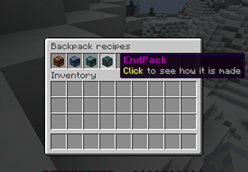
- 配方菜单:输入 /backpack 可查看你可制作的所有背包及其方法。配方也存在于配方书中。
- 更大的末影箱:可选地用一个多达 900 格容量的末影箱替换原版末影箱,也可通过 EndPack 访问。
- 自定义语言:每位玩家都能在自己的游戏语言下查看消息。
服务器管理员功能
- 每个背包的独立配置:包括名称、标题、描述、容量、合成配方、升级配方、白名单/黑名单(支持如 #minecraft:shulker_boxes 的物品标签)、开合音效、死亡后保留、发光效果等。
- 自定义外观:可使用来自 MinecraftHeads.com 的玩家头颅纹理,或使用资源包中的物品模型和自定义模型数据。菜单按钮也可同样重新样式化。
- 数据库存储:默认 SQLite,也支持 MySQL、PostgreSQL 或 MongoDB。多个服务器可共享同一个数据库;在一个服务器上打开的背包,在关闭前无法在其他服务器上打开。
- 安全保存:每分钟保存一次已打开的背包。如果数据库不可用,内容会暂存于磁盘,待恢复后再保存。
- 管理工具:/backpack view 可查看任何玩家(包括离线状态)的背包;/backpack restore 可恢复丢失的背包;/backpack purge 可清理旧背包。
- 权限控制:可为每个背包设置使用和合成的权限,并可限制玩家拥有的背包数量上限。
- 格式化支持:支持 & 颜色代码和 &#rrggbb;在 Paper 和 Folia 上还支持 MiniMessage 标签和渐变效果。
- PlaceholderAPI 占位符和 WorldGuard 标志(backpack-use, backpack-auto-pickup)。两者均为可选。
- 14 种语言:英语、德语、西班牙语、法语、意大利语、荷兰语、波兰语、葡萄牙语(巴西)、俄语、土耳其语、日语、韩语、中文(简体和繁体)。
各服务器平台功能支持情况
- CraftBukkit 和 Spigot:除自动拾取和 MiniMessage 标签外的所有功能。
- Paper 和 Folia:全部功能。
以上四种平台均已测试通过。分支版本的行为应与其基于的平台保持一致。
默认背包
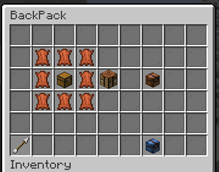
- 基础款(27 格):由皮革环绕的箱子。
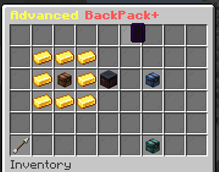
- 高级款(45 格):由金锭环绕的基础款背包。
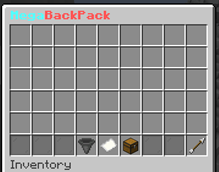
- 巨型款(108 格,3 页):由钻石环绕的高级款背包。
- EndPack:由皮革环绕的末影箱。用于打开你的末影箱。
可在 backpacks.yml 中修改这些默认背包或添加自定义背包。
图片
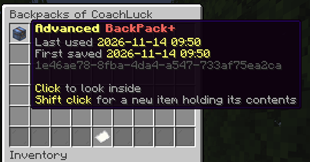
指令
- /backpack - 打开可制作的背包及其配方的菜单 (backpacks.use)
- /backpack open - 打开你手持或装备的背包 (backpacks.use)
- /backpack give <BackPack> <Player> [Amount] - 给予玩家背包 (backpacks.give)
- /backpack view <Player> [Number] - 浏览或打开玩家的已保存背包 (backpacks.admin)
- /backpack restore <Player> <Number> - 为已保存的背包生成新的物品 (backpacks.admin)
- /backpack purge <Days> [confirm] - 统计并在确认后删除在此时长内未使用的背包 (backpacks.admin)
- /backpack reload - 重载插件的文件 (backpacks.reload)
- /backpack help - 显示帮助页面 (backpacks.help)
别名:/backpacks、/bp、/bpp 以及来自 1.x 版本的 /backpacksplus。
权限
- backpacks.use.<BackPack> - 打开该背包
- backpacks.craft.<BackPack> - 制作该背包,或升级至该背包
- backpacks.use.* 和 backpacks.craft.* - 所有背包
- backpacks.limit.<number> - 当 BackPackLimiter 启用时,玩家最多可以拥有的背包数量;backpacks.limit.* 表示任意数量
- backpacks.* - 所有权限
默认情况下,管理员拥有所有这些权限。
自定义纹理
在 MinecraftHeads.com 上找到一个头部,复制其“Minecraft URL”并将其放置在 backpacks.yml 中背包配置项下方:
Texture: "http://textures.minecraft.net/texture/<YOURCUSTOMTEXTUREID>"
使用资源包时,请改用 Model: "namespace:path" 或 CustomData: <number>。
示例背包
Miner:
  Name: "&6Miner's BackPack"
  Title: "Miner's BackPack"
  Size: 90
  Texture: "http://textures.minecraft.net/texture/<YOURCUSTOMTEXTUREID>"
  Lore:
    - " &7Open this with &e<key:key.use>"
    - " &7Slots used: &e%used%&7/&e%size%"
  Whitelist: [ "#minecraft:coal_ores", "#minecraft:iron_ores", "COBBLESTONE", "RAW_IRON", "COAL" ]
  AutoPickup: true
  KeepOnDeath: true
  Upgrade:
    From: "Basic"
    Shape:
      - "III"
      - "IBI"
      - "III"
    Materials:
      I: "IRON_INGOT"
      B: "BACKPACK"
所有选项均在 backpacks.yml 的顶部列出,并可在 维基 中找到。
存储
在 config.yml 中将 Storage.Type 设置为 sqlite(默认)、mysql、postgresql 或 mongodb。
- PostgreSQL 和 MongoDB 驱动程序会在服务器首次启动时从 Maven Central 下载。
- 来自 1.x 版本的背包将其内容保存在物品本身中。它们在被第一次打开时会移动到数据库中。
- 从一个存储类型切换到另一个不会移动现有内容。
PlaceholderAPI 和 WorldGuard
- %backpacksplus_carried% - 玩家携带的背包数量
- %backpacksplus_limit% - 允许拥有的最大数量
- %backpacksplus_open% - 当前打开的背包名称
- %backpacksplus_open_size% - 其槽位数量
WorldGuard:/rg flag <region> backpack-use deny 禁止在该区域打开背包,而 backpack-auto-pickup deny 禁止在该区域自动拾取。
旧版 Minecraft 版本
2.0 适用于 Minecraft 26.1 及更高版本。对于 1.14 到 1.16,版本 1.2.4 仍位于 Files 标签页中;它不再接收更新。
支持
问题、想法和错误报告:在 GitLab 上提交 Issue。请不要在评论中报告错误;我无法在那里提供帮助。
Wiki | Source | Support | Permissions/Commands | Changelog
Craftable backpacks that players hold, wear and upgrade.
Any number of backpack types, each with its own look, size, recipe and rules. Contents are saved in a database, so they survive crashes, lost items and server switches.
Requires Minecraft 26.1+ and Java 25. Runs on CraftBukkit, Spigot, Paper and Folia. No other plugins needed.
Updating from 1.x? Your backpacks, backpacks.yml and language files carry over, but permissions were renamed. Read Updating to 2.0 first.
For players
- Item based: right click a backpack to open it. No command needed.
- Up to 900 slots per backpack, shown a page of 45 slots at a time.
- Sort and deposit buttons under every backpack: sort merges and orders everything across all pages, deposit moves over every kind of item the backpack already holds.
- Upgrades: craft a Basic with gold into an Advanced, and an Advanced with diamonds into a Mega. Everything inside stays.
- Wearable: put a backpack in your chest slot and open it by sneaking and pressing the swap hands key (F).
- Auto pickup: when your inventory is full, items you walk over go into your backpack. (Paper and Folia)
- Recipe menu: /backpack shows every backpack you may craft and how. The recipes are in the recipe book too.
- Bigger ender chest: optionally replace the ender chest with one of up to 900 slots, also reachable from an EndPack.
- Your own language: every player sees messages in their game language.
For server owners
- Everything per backpack: name, title, lore, size, recipe, upgrade recipe, whitelist/blacklist (with item tags such as #minecraft:shulker_boxes), open and close sounds, keep on death, glow.
- Custom looks: player head textures from MinecraftHeads.com, or item models and custom model data from your resource pack. The menu buttons can be restyled the same way.
- Database storage: SQLite out of the box, or MySQL, PostgreSQL or MongoDB. Several servers can share one database; a backpack open on one server can't be opened on another until it is closed.
- Safe saving: open backpacks are saved every minute. If the database is down, contents are kept on disk and saved once it is back.
- Admin tools: /backpack view to look into any player's backpacks (also offline), /backpack restore to bring back a lost one, /backpack purge to clear out old ones.
- Permissions to use and to craft each backpack, and an optional limit on how many backpacks a player may have.
- Formatting: & colour codes and &#rrggbb everywhere; MiniMessage tags and gradients on Paper and Folia.
- PlaceholderAPI placeholders and WorldGuard flags (backpack-use, backpack-auto-pickup). Both optional.
- 14 languages: English, German, Spanish, French, Italian, Dutch, Polish, Portuguese (Brazil), Russian, Turkish, Japanese, Korean, Chinese (Simplified and Traditional).
Which server can do what
- CraftBukkit and Spigot: everything except auto pickup and MiniMessage tags.
- Paper and Folia: everything.
All four are tested. Forks should behave like the server they are made from.
Default backpacks
- Basic (27 slots): a chest surrounded by leather.
- Advanced (45 slots): a Basic surrounded by gold ingots.
- Mega (108 slots, 3 pages): an Advanced surrounded by diamonds.
- EndPack: an ender chest surrounded by leather. Opens your ender chest.
Change them or add your own in backpacks.yml.
Images
Commands
- /backpack - open the menu of craftable backpacks and their recipes (backpacks.use)
- /backpack open - open the backpack you hold or wear (backpacks.use)
- /backpack give <BackPack> <Player> [Amount] - give backpacks to a player (backpacks.give)
- /backpack view <Player> [Number] - browse or open a player's saved backpacks (backpacks.admin)
- /backpack restore <Player> <Number> - make a new item for a saved backpack (backpacks.admin)
- /backpack purge <Days> [confirm] - count, and with confirm delete, backpacks unused for that long (backpacks.admin)
- /backpack reload - reload the plugin's files (backpacks.reload)
- /backpack help - show the help page (backpacks.help)
Aliases: /backpacks, /bp, and /bpp and /backpacksplus from 1.x.
Permissions
- backpacks.use.<BackPack> - open that backpack
- backpacks.craft.<BackPack> - craft that backpack, or upgrade into it
- backpacks.use.* and backpacks.craft.* - every backpack
- backpacks.limit.<number> - how many backpacks a player may have while BackPackLimiter is on; backpacks.limit.* for any number
- backpacks.* - everything
Operators have all of them by default.
Custom textures
Find a head on MinecraftHeads.com, copy its "Minecraft URL" and put it under the backpack in backpacks.yml:
Texture: "http://textures.minecraft.net/texture/<YOURCUSTOMTEXTUREID>"
With a resource pack, use Model: "namespace:path" or CustomData: <number> instead.
Example backpack
Miner:
  Name: "&6Miner's BackPack"
  Title: "Miner's BackPack"
  Size: 90
  Texture: "http://textures.minecraft.net/texture/<YOURCUSTOMTEXTUREID>"
  Lore:
    - " &7Open this with &e<key:key.use>"
    - " &7Slots used: &e%used%&7/&e%size%"
  Whitelist: [ "#minecraft:coal_ores", "#minecraft:iron_ores", "COBBLESTONE", "RAW_IRON", "COAL" ]
  AutoPickup: true
  KeepOnDeath: true
  Upgrade:
    From: "Basic"
    Shape:
      - "III"
      - "IBI"
      - "III"
    Materials:
      I: "IRON_INGOT"
      B: "BACKPACK"
Every option is listed at the top of backpacks.yml and in the wiki.
Storage
Set Storage.Type in config.yml to sqlite (default), mysql, postgresql or mongodb.
- The PostgreSQL and MongoDB drivers are downloaded by the server from Maven Central on first start.
- Backpacks from 1.x kept their contents on the item. They are moved into the database the first time they are opened.
- Switching from one kind of storage to another does not move existing contents.
PlaceholderAPI and WorldGuard
- %backpacksplus_carried% - backpacks the player carries
- %backpacksplus_limit% - how many they may have
- %backpacksplus_open% - name of the backpack they have open
- %backpacksplus_open_size% - its number of slots
WorldGuard: /rg flag <region> backpack-use deny stops backpacks from being opened in a region, and backpack-auto-pickup deny stops auto pickup there.
Older Minecraft versions
2.0 is for Minecraft 26.1 and newer. For 1.14 to 1.16, version 1.2.4 is still in the Files tab; it gets no more updates.
Support
Questions, ideas and bugs: open an issue on GitLab. Please don't report bugs in reviews; I can't help you there.

 插件

 插件
 插件
 插件
 插件

 插件
评论 0
登录后参与评分
还没有评论,来抢沙发吧