

English

BanMace is a powerful administrative tool for Minecraft servers, disguised as a mystical weapon. It provides server staff with a range of intuitive player management functions, from teleportation to punishment, all accessible through a single, versatile item. The plugin features two convenient ways to switch between modes: a quick right-click cycle and an immersive radial menu.
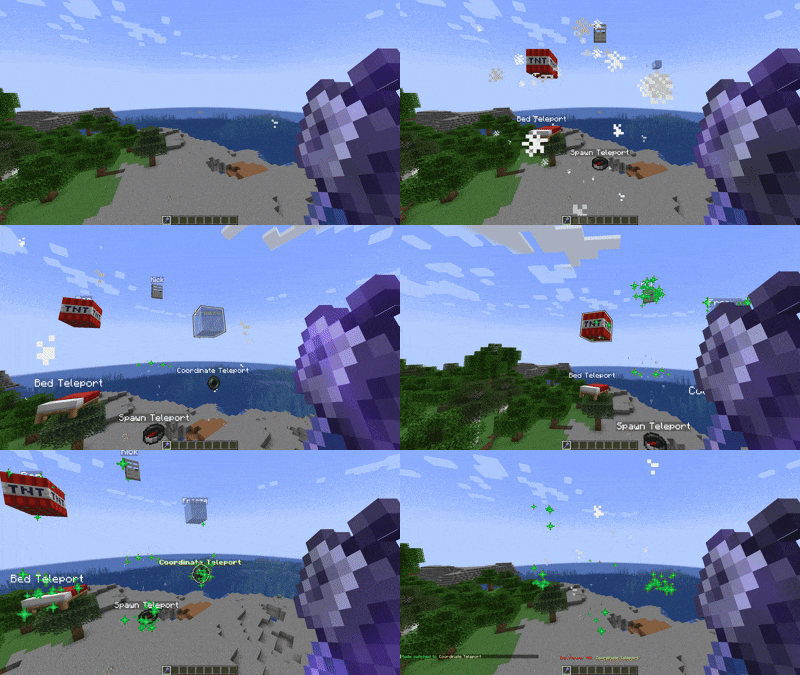

BanMace offers several modes, each with a unique function:
- SPAWN: Teleports the target player to the world's spawn point.
- BED: Teleports the target to their personal bed. If no bed is set, they are sent to the world spawn.
- COORDINATE TELEPORT: Teleports the target to specific coordinates stored within the mace. Use
/bm-tpcoordinatesto set them. - FREEZE: Immobilizes a player, encasing them in ice for a short duration.
- KICK: Instantly kicks the player from the server.
- BAN: Temporarily bans the player from the server.
- BALLOON: Launches the player into the air with colorful balloon effects for a fun and playful moderation approach.

Mode Switching
You can switch between modes in two ways:
- Right-Click: Quickly cycle through the available modes.
- Radial Menu (Press F): Hold the BanMace and press your "Swap-Hand" key (default: F) to open an immersive radial menu for easy mode selection.
Customization and Settings
A comprehensive in-game GUI allows you to customize almost every aspect of the plugin.
/bm-settings: Opens the main settings menu.- Customize the BanMace's item type.
- Configure particles, sounds, and message display styles (chat, actionbar, or title).
- Manage Discord integration, language settings, and more.

| Command | Description | Permission |
|---|---|---|
/bm-give |
Gives the user a Ban Mace. | banmace.give |
/bm-settings |
Opens the settings GUI. | banmace.settings |
/bm-tpcoordinates <x> <y> <z> |
Sets the target coordinates for the mace. | banmace.tpcoordinates |
/bm-setlanguage <lang> |
Changes the plugin's language. | banmace.setlanguage |
/bm-changeview <mode> |
Changes the message display mode. | banmace.changeview |
Installation
- Download the latest version of the BanMace plugin.
- Place the
.jarfile into thepluginsfolder of your Spigot/Paper server. - Restart or reload the server.
Notes
- The plugin is designed for Paper and its forks for best performance and compatibility.
- Ensure the main world is available for teleportation functions to work correctly.
- Default configuration and language files (
message_en.yml,message_ru.yml) are generated on the first run.
Contact
If you have any questions, suggestions, or issues, please open an issue on the GitHub Issues page.
Russian | Русский

BanMace — это мощный административный инструмент для серверов Minecraft, замаскированный под мистическое оружие. Он предоставляет персоналу сервера ряд интуитивно понятных функций для управления игроками, от телепортации до наказаний, доступных через один универсальный предмет. Плагин предлагает два удобных способа переключения режимов: быстрое переключение по правому клику и иммерсивное радиальное меню.

BanMace предлагает несколько режимов, каждый с уникальной функцией:
- СПАВН: Телепортирует игрока на точку спавна мира.
- КРОВАТЬ: Телепортирует игрока к его личной кровати. Если кровать не установлена, игрок отправляется на спавн мира.
- ТЕЛЕПОРТ ПО КООРДИНАТАМ: Телепортирует игрока на определённые координаты, сохранённые в булаве. Используйте
/bm-tpcoordinatesдля их установки. - ЗАМОРОЗКА: Обездвиживает игрока, заключая его в ледяную глыбу на короткое время.
- КИК: Моментально кикает игрока с сервера.
- БАН: Временно банит игрока на сервере.
- ШАРЫ: Запускает игрока в воздух с красочными эффектами шаров для веселого и игривого подхода к модерации.
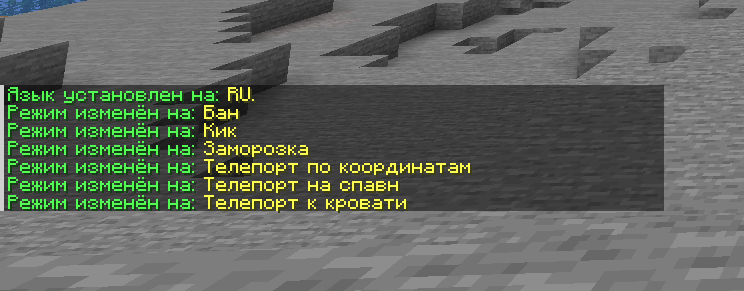
Переключение Режимов
Вы можете переключаться между режимами двумя способами:
- Правый клик: Быстрое циклическое переключение между доступными режимами.
- Радиальное меню (нажмите F): Удерживая BanMace, нажмите клавишу смены предмета в руках (по умолчанию F), чтобы открыть удобное радиальное меню для выбора режима.
Кастомизация и Настройки
综合的游戏内界面允许你几乎自定义插件的每个方面。
/bm-settings:打开主设置菜单。- 自定义战锤的物品类型。
- 自定义粒子效果、音效以及消息显示样式(聊天栏、动作栏或标题)。
- 管理 Discord 集成、语言设置等更多功能。

| 命令 | 描述 | 权限 |
|---|---|---|
/bm-give |
向玩家发放 BanMace(战锤)。 | banmace.give |
/bm-settings |
打开设置 GUI。 | banmace.settings |
/bm-tpcoordinates <x> <y> <z> |
在战锤中设置目标坐标。 | banmace.tpcoordinates |
/bm-setlanguage <语言> |
更改插件的语言。 | banmace.setlanguage |
/bm-changeview <模式> |
更改消息显示模式。 | banmace.changeview |
安装
- 下载最新版本的 BanMace 插件。
- 将
.jar文件放入你的 Spigot/Paper 服务器的plugins文件夹中。 - 重启服务器。
注意事项
- 该插件专为 Paper 及其分支开发,以实现最佳性能和兼容性。
- 请确保服务器上的主世界可用,以便正确运行传送功能。
- 配置文件和默认语言文件(
message_en.yml,message_ru.yml)将在首次运行时自动生成。
联系方式
如果您有任何问题、建议或发现了错误,请在 GitHub Issues 页面创建议题。

你是这个资源的作者?登录后可认领此资源。
相似资源
 插件

PacketEvents 是一款专为 Minecraft Java 版打造的协议库,旨在简化数据包的处理与传输。
 插件
ExyliaPlugins 的库。
 插件
通过对话框或铁砧界面帮助你的 Anthme
 插件
自定义你的Minecraft头像!
 插件
重新定义服务器上的生物运输方式。使用高度可定制的口袋道具,安全地捕获、存储和释放任何实体。
 插件
为基于 Spigot/Paper/Folia 的服务器添加对 Vivecraft 的支持
评论 0
登录后参与评分
还没有评论,来抢沙发吧