
BeeChat
适用于 Paper 及其衍生版本的聊天与 Tab 列表格式化工具插件。
功能
- 配置和聊天中支持 MiniMessage
- 在配置中使用来自 MiniPlaceholders 和 PlaceholderAPI 的占位符
- 基于权限的消息格式化
- 支持自定义格式和权限的聊天频道
- 用于监控聊天频道的间谍模式
- Tab 列表自定义
消息格式化
拥有相应权限的玩家可以在聊天中使用 MiniMessage 进行格式化。
权限
- beechat.format.all - 所有格式化标签
- beechat.format.color -
color、gradient、rainbow、pride和shadow标签 - beechat.format.reset -
reset标签 - beechat.format.decorations -
bold、italic、underlined、strikethrough和obfuscated装饰效果 - beechat.format.insertion -
insert标签 - beechat.format.click -
click标签 - beechat.format.hover -
hover标签 - beechat.format.head -
head标签 - beechat.format.sprite -
sprite标签
示例
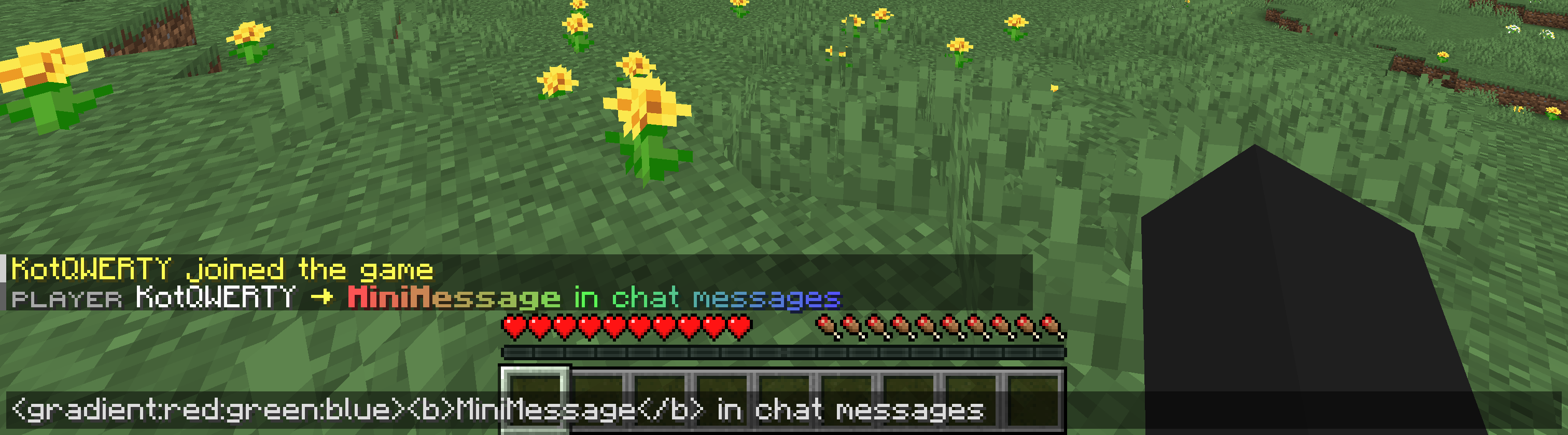 此处使用了 MiniPlaceholders LuckPerms Expansion 插件来显示来自 LuckPerms 的前缀
聊天频道
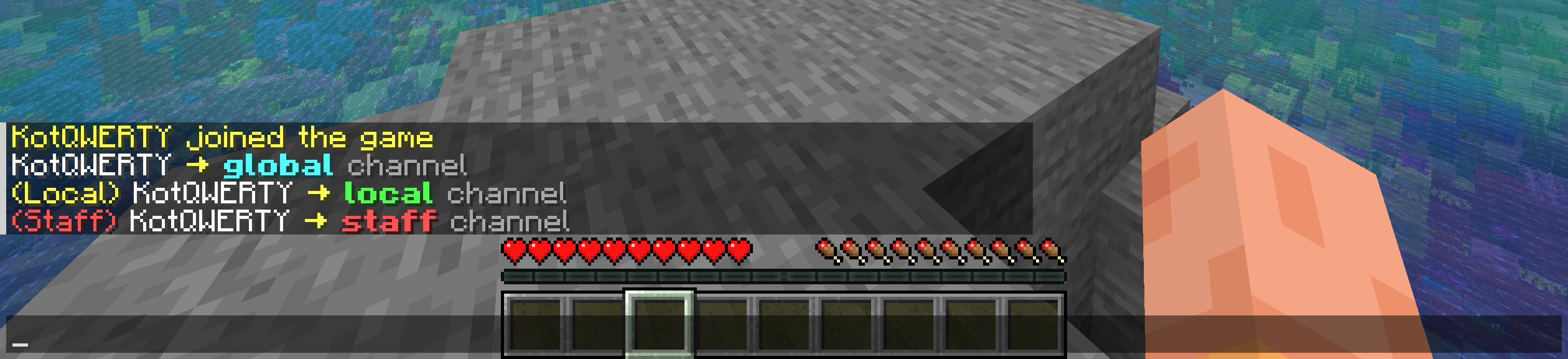
BeeChat 支持多个聊天频道,每个频道都有独立的格式、距离限制和权限要求。频道通过消息中的前缀进行识别。
示例
间谍模式
间谍模式允许拥有权限的玩家监控所有聊天频道。
这对于需要监督对话以进行管理的管理员非常有用。
启用后,任何频道发送的所有消息都会根据间谍模式的配置显示给间谍玩家。
可以使用 /beechat spy 命令启用或禁用此功能。权限:beechat.spy
Tab 列表自定义
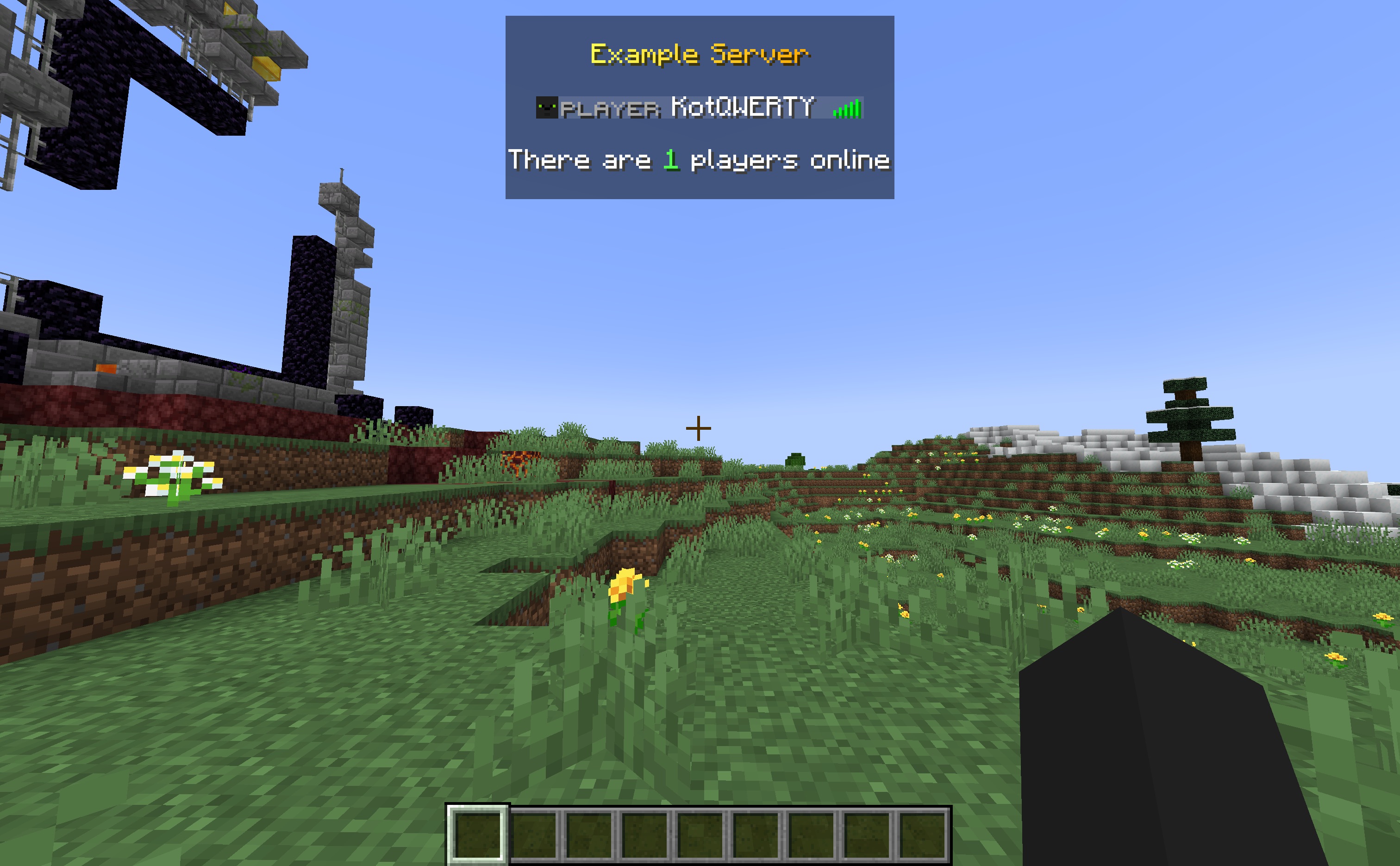
可以在配置文件中自定义 Tab 列表的头部、尾部以及玩家名称的格式。
示例
配置文件
默认配置文件位于此处:。
配置文件 (config.yml) 仅支持 MiniMessage 格式。不支持旧版(&符号)格式化。
您可以在配置中使用来自 MiniPlaceholders 和 PlaceholderAPI 的占位符。
重载
可以使用命令 /beechat reload 重载配置文件。
该命令所需的权限:beechat.reload
配置示例
chat:
  message-format: '<luckperms_prefix><reset> <name> <yellow>→ <gray><message>'
  channels:
    - identifier: '!'
      format: '<message_format>'

    - identifier: '#'
      permission: chat.channel.staff
      format: '<red>(Staff)</red> <message_format>'

    - identifier: ''
      distance: 40
      format: '<yellow>(Local)</yellow> <message_format>'
  spy:
    format: '<aqua>Spy</aqua> <channel_message>'
    disable-on-leave: true

tab-list:
  enable: true
  update-period: 200
  header: '<br><gradient:yellow:gold>Example Server<br>'
  footer: '<br>There are <green><server_online></green> players online<br>'
  player-name: '<luckperms_prefix> <reset><name> <luckperms_suffix>'

messages:
  reload: '<green>The <gradient:yellow:gold>BeeChat</gradient> configuration has been reloaded'
  not-player: '<red>This command can only be executed by a player'
  spy-mode-enabled: '<aqua>Spy</aqua> mode <green>enabled</green>. Enter the command again to <red>disable</red>'
  spy-mode-disabled: '<aqua>Spy</aqua> mode <red>disabled</red>'
BeeChat
Chat and tab formatting plugin for Paper and its forks.
Features
- MiniMessage in config and chat
- Using placeholders from MiniPlaceholders and PlaceholderAPI in config
- Message formatting with permissions
- Chat channels with customizable formats and permissions
- Spy mode for monitoring chat channels
- Tab customization
Message formatting
Players with permission can use formatting with MiniMessage in chat.
Permissions
- beechat.format.all - all formatting tags
- beechat.format.color -
color,gradient,rainbow,prideandshadowtags - beechat.format.reset -
resettag - beechat.format.decorations -
bold,italic,underlined,strikethroughandobfuscateddecorations - beechat.format.insertion -
inserttag - beechat.format.click -
clicktag - beechat.format.hover -
hovertag - beechat.format.head -
headtag - beechat.format.sprite -
spritetag
Example
The MiniPlaceholders LuckPerms Expansion plugin is used here to display the prefix from LuckPerms
Chat channels
BeeChat supports multiple chat channels, each with its own format, distance and permission. Channels are identified by prefixes in the message.
Example
Spy mode
Spy mode allows players with permission to monitor all chat channels.
This is useful for administrators who need to oversee conversations for moderation purposes.
When enabled, all messages sent in any channel will be displayed to the spy, formatted according to the spy mode configuration.
Can be enabled or disabled using the /beechat spy command. Permission: beechat.spy
Tab customization
Tab header, footer and player name format can be customized in config.
Example
Configuration
The default config can be found here: .
The configuration file (config.yml) only supports MiniMessage format. Legacy (ampersand) formatting is not supported.
You can use placeholders from MiniPlaceholders and PlaceholderAPI in the configuration.
Reloading
The configuration can be reloaded using the command /beechat reload.
Permission for the command: beechat.reload
Example configuration
chat:
  message-format: '<luckperms_prefix><reset> <name> <yellow>→ <gray><message>'
  channels:
    - identifier: '!'
      format: '<message_format>'

    - identifier: '#'
      permission: chat.channel.staff
      format: '<red>(Staff)</red> <message_format>'

    - identifier: ''
      distance: 40
      format: '<yellow>(Local)</yellow> <message_format>'
  spy:
    format: '<aqua>Spy</aqua> <channel_message>'
    disable-on-leave: true

tab-list:
  enable: true
  update-period: 200
  header: '<br><gradient:yellow:gold>Example Server<br>'
  footer: '<br>There are <green><server_online></green> players online<br>'
  player-name: '<luckperms_prefix> <reset><name> <luckperms_suffix>'

messages:
  reload: '<green>The <gradient:yellow:gold>BeeChat</gradient> configuration has been reloaded'
  not-player: '<red>This command can only be executed by a player'
  spy-mode-enabled: '<aqua>Spy</aqua> mode <green>enabled</green>. Enter the command again to <red>disable</red>'
  spy-mode-disabled: '<aqua>Spy</aqua> mode <red>disabled</red>'
下载 BeeChat
需要联机服务器吗?
稳定流畅、一键部署,几分钟即可和朋友联机开服
最低仅需 8 元/月 即可畅快联机
下载 BeeChat
需要联机服务器吗?
稳定流畅、一键部署,几分钟即可和朋友联机开服
最低仅需 8 元/月 即可畅快联机
下载 BeeChat
需要联机服务器吗?
稳定流畅、一键部署,几分钟即可和朋友联机开服
最低仅需 8 元/月 即可畅快联机
下载 BeeChat
需要联机服务器吗?
稳定流畅、一键部署,几分钟即可和朋友联机开服
最低仅需 8 元/月 即可畅快联机
下载 BeeChat
需要联机服务器吗?
稳定流畅、一键部署,几分钟即可和朋友联机开服
最低仅需 8 元/月 即可畅快联机
下载 BeeChat
需要联机服务器吗?
稳定流畅、一键部署,几分钟即可和朋友联机开服
最低仅需 8 元/月 即可畅快联机
下载 BeeChat
下载 BeeChat
需要联机服务器吗?
稳定流畅、一键部署,几分钟即可和朋友联机开服
最低仅需 8 元/月 即可畅快联机
下载 BeeChat
需要联机服务器吗?
稳定流畅、一键部署,几分钟即可和朋友联机开服
最低仅需 8 元/月 即可畅快联机
下载 BeeChat
需要联机服务器吗?
稳定流畅、一键部署,几分钟即可和朋友联机开服
最低仅需 8 元/月 即可畅快联机
修复
修复了当玩家在接收消息时处于其他维度会抛出异常的 bug。
关于这个资源的讨论、问题反馈与使用心得
还没有讨论,来发第一帖吧
你是这个资源的作者?登录后可认领此资源。
相似资源
 插件
自定义你的Minecraft头像!
 插件
一个高度兼容、功能完善且稳定的 TPA 模组
 插件
专为 Velocity 打造的自制聊天插件,功能丰富——支持跨服群组/全局/私聊消息,并集成 LibertyBans 的禁言功能。
 插件

允许基岩版(Geyser)玩家使用自定义铁砧和锻造台配方。
 插件
适用于旧版版本的近距离语音聊天
 插件
一个功能丰富、完全动画化的箱子插件,适用于 Paper 1.21.x,支持 IA、Vault、PlaceholderAPI 和 Citizens
评论 0
登录后参与评分
还没有评论,来抢沙发吧